Best SVG Compressor Online — Shrink SVG Files by 50-90%
SVG files are the gold standard for scalable web graphics, but they can get surprisingly large. A detailed icon exported from Illustrator might weigh 200 KB or more — and when you're loading dozens of SVGs on a single web page, that adds up fast. The solution? An SVG compressor online that strips away unnecessary metadata,合并s redundant paths, and optimizes coordinates without changing a single visible pixel. In this guide, we compare the top SVG optimizers, explain how they work, and show you the fastest way to reduce SVG file size for free.
Why SVG Files Get So Large
Before you compress, it helps to understand what makes SVGs bloated. Every time you export from a design tool like Adobe Illustrator, Figma, or Sketch, the file gets stuffed with extra data:
- Editor metadata: Layers, guides, unused definitions, and tool-specific comments.
- Decimal precision: Excessive decimal places (e.g., 12.345678) that don't affect rendering.
- Redundant paths: Overlapping shapes and duplicate nodes that can be merged.
- Unnecessary attributes: Default styles, unused gradients, and hidden elements.
- Untransformed elements: Elements with transforms that could be simplified to direct coordinates.
All of this data is invisible to users but adds kilobytes — sometimes megabytes — to your file size. A good SVG compressor online removes this bloat automatically while keeping your graphic pixel-perfect.
Convert Your Images to SVG Today
Download Super Vectorizer Pro — free trial to preview results. Mac & Windows.
Compatible with macOS 10.10+ (M1/M2/M3) & Windows 7/8/10/11
How an SVG Compressor Works
SVG optimization is not the same as image compression (like JPEG). It's a lossless process that cleans up the XML code inside the SVG file. Here's what a quality SVG compressor online does under the hood:
- Minification: Removes whitespace, comments, and unnecessary quotes from the XML.
- Path optimization: Simplifies bezier curves and reduces the number of decimal places in coordinates.
- Attribute cleanup: Strips default values and collapses repeated style declarations into CSS classes.
- Def removal: Deletes unused gradients, patterns, filters, and symbols from the
<defs>section. - Shape conversion: Converts basic shapes (circles, rectangles) to paths when it saves space.
The result is an SVG that looks identical to the original but loads much faster. For a typical icon, file size drops from 50 KB to 5-10 KB — a 5x to 10x reduction.
Top 3 SVG Compressor Online Tools Compared
Here's how the leading SVG compressor online tools stack up:
1. SVGVector SVG Mini (Our Pick)
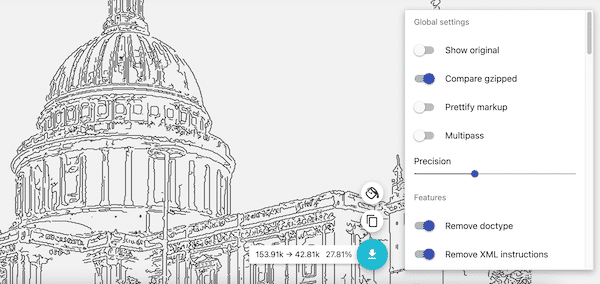
SVG Mini is our own free SVG optimizer, built for designers and developers who need fast, reliable results. It runs entirely in your browser — no file upload to a server, no sign-up, no watermarks. Just paste your SVG code or drag and drop a file, and it instantly shows the optimized version with a before/after file size comparison. It handles all standard SVG elements and preserves animations and interactivity.
2. SVGO (Command Line)
SVGO is the industry-standard Node.js tool for SVG optimization. It's powerful and configurable, but requires installing Node.js and running commands in Terminal. Great for developers building automated pipelines, but overkill for casual users.
3. CompressSVG.com
A web-based wrapper around SVGO. Upload your SVG and download the compressed version. Simple and effective, but your file is uploaded to a third-party server — not ideal for sensitive graphics.
Step-by-Step: Reduce SVG File Size with SVG Mini
- Open SVG Mini. Visit SVG Mini Online in any modern browser.
- Upload or paste. Drag and drop your SVG file, or copy-paste the SVG code directly into the editor.
- Review the result. The tool shows the original file size and the optimized size side by side. Most files shrink by 50-90%.
- Download. Click "Download" to save the compressed SVG, or copy the optimized code to your clipboard for pasting into HTML.
That's it — your SVG is now optimized and ready for production.
When NOT to Compress an SVG
While SVG compression is usually safe, there are a few cases where you should be cautious:
- Animated SVGs: Some optimizers strip SMIL animations. Always test animated files after compression.
- Scripted/interactive SVGs: JavaScript event handlers and CSS animations may be affected by aggressive cleanup.
- Extremely complex illustrations: If an SVG has thousands of paths, optimization can take a long time. Consider simplifying the source artwork first.
FAQ
Is SVG compression lossless?
Yes. A proper SVG compressor online only removes redundant data — it never changes the visual appearance of the graphic. What you see before and after should be pixel-identical.
Can I compress SVGs in bulk?
Some tools support batch processing, but most free SVG compressor online tools handle one file at a time. For bulk compression, use SVGO with a script or a dedicated build tool.
Will compressed SVGs work in Cricut?
Yes. Cricut Design Space accepts standard SVG files, and optimized SVGs typically import faster than bloated originals. Just make sure the optimizer doesn't remove necessary clip paths or masks.
Compress Your SVGs Instantly
Try our free SVG Mini compressor — no upload, no sign-up, instant results. Also grab Super Vectorizer Pro for converting PNG to SVG.
Compatible with macOS 10.10+ (M1/M2/M3) & Windows 7/8/10/11
An SVG compressor online is an essential tool for anyone working with vector graphics on the web. Whether you're building a fast-loading website, exporting icons for an app, or preparing files for Cricut, shrinking your SVGs will save bandwidth, improve loading times, and keep your projects lean. Try SVG Mini today — it's free, secure, and works in seconds. And if you need to create SVGs from PNGs first, Super Vectorizer Pro has you covered.