
Free SVG Minifier Online
Reduce SVG code size by 50-80% without losing quality
Minify SVG Now - 100% Free📑 Table of Contents
What is SVG Minification?
SVG minification is the process of removing unnecessary characters from SVG code without changing its functionality. Think of it like decluttering your code – you remove all the extra spaces, comments, and metadata that make the file larger but don't affect how the image looks.
What Gets Removed During Minification?
| Element | Example | Impact on Size |
|---|---|---|
| Whitespace | Spaces, tabs, newlines | 10-20% reduction |
| Comments | 5-10% reduction | |
| Metadata | Editor-specific data, XMP | 10-30% reduction |
| Empty Attributes | fill="", stroke="" | 2-5% reduction |
| Default Values | overflow="visible" | 5-10% reduction |
Total potential reduction: 50-80% in file size!
SVG Minifier vs SVG Compressor: What's the Difference?
Many people use these terms interchangeably, but they're actually different processes:
| Aspect | SVG Minifier | SVG Compressor |
|---|---|---|
| Process | Removes unnecessary characters | Uses compression algorithms |
| Reversible? | No (permanently removes data) | Yes (decompression possible) |
| Typical Reduction | 50-80% | Additional 10-30% |
| When to Use | Production websites, apps | Before minification for max reduction |
Best Practice: Use both! First compress your SVG, then minify it for maximum file size reduction.
How to Use SVG Minifier Online
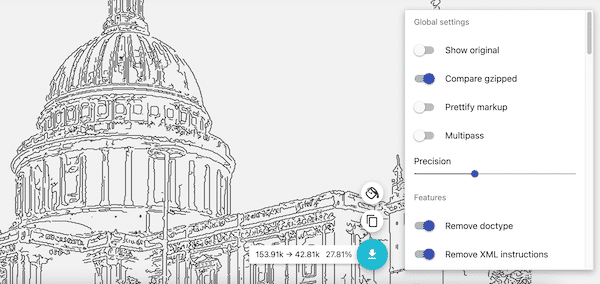
Step-by-Step Guide
Step 1. Open the SVG Minifier tool in your browser. It's 100% free with no signup required.
Step 2. Click the menu button at the top left and select "Open SVG".
Step 3. Choose your SVG file. The tool automatically minifies the code:
- Removes whitespace and comments
- Deletes unnecessary metadata
- Optimizes path data
- Removes empty attributes
Step 4. (Optional) Adjust settings in the right panel for more control.
Step 5. Click "Drop" button to download your minified SVG file.
Benefits of Minifying SVG Files
1. Faster Page Load Speed
Smaller file sizes mean faster downloads. A 100KB SVG minified to 30KB loads 3x faster, improving user experience especially on mobile devices.
2. Better Core Web Vitals Scores
Google's Core Web Vitals measure page experience. Minifying SVGs helps improve:
- LCP (Largest Contentful Paint): Smaller files load faster
- FID (First Input Delay): Less JavaScript blocking
- CLS (Cumulative Layout Shift): Faster rendering
3. Reduced Bandwidth Costs
For high-traffic websites, minifying SVGs can save gigabytes of bandwidth daily, reducing hosting costs.
4. Better SEO Rankings
Page speed is a ranking factor. Faster pages rank higher in search results, bringing more organic traffic.
5. Improved Mobile Performance
Mobile networks are slower. Minified SVGs ensure your site loads quickly on all devices.
SVG Minification Best Practices
✅ Do:
- Minify before deployment: Always minify SVGs before uploading to production
- Keep original files: Save unminified versions for future editing
- Test after minification: Verify the minified SVG renders correctly
- Combine with compression: Use Gzip/Brotli for additional savings
- Use automation: Integrate minification into your build process
❌ Don't:
- Don't minify dynamically: Minify once during build, not on every page load
- Don't edit minified code: Always edit the original, then re-minify
- Don't over-optimize: Some SVGs are already minimal
Free SVG Minifier Tools Comparison
| Tool | Free | No Signup | Batch | Avg Reduction |
|---|---|---|---|---|
| SVG Compressor Online (ours) |
✅ Yes | ✅ Yes | ✅ Yes | 60-80% |
| SVGOMG | ✅ Yes | ✅ Yes | ❌ No | 50-70% |
| SVG Minifier (CodeBeautify) | ✅ Limited | ✅ Yes | ❌ No | 40-60% |
Common Questions About SVG Minification
Is SVG minification safe?
Yes! Minification is completely safe. It only removes data that doesn't affect how the SVG looks or functions. Your image will look exactly the same.
Can I un-minify an SVG?
No, minification is one-way. You can't restore the original formatting. Always keep your original SVG files for future editing.
How much can I reduce SVG file size?
Most SVGs can be reduced by 50-80% through minification. Files exported from Adobe Illustrator or Inkscape often contain the most unnecessary data.
Should I minify SVGs before or after compression?
Minify first, then compress with Gzip or Brotli. This gives maximum file size reduction (up to 90% total).
Ready to Minify Your SVG Files?
Reduce file size by 60-80% in seconds. No signup required.
Minify SVG Now - 100% FreeUsed by 290,000+ users worldwide