What Is Vector Drawing Software?
Vector drawing software creates artwork from mathematical paths rather than pixels, so every line, curve and shape stays sharp at any size and remains individually editable. Architects, designers and engineers rely on vector graphics as the foundation of their work because logos, icons, diagrams and illustrations can be re-colored, re-shaped and re-used without quality loss.
If you want to draw from scratch, free apps like Inkscape, Vectr and LibreOffice Draw run on both Mac and Windows and cover flowcharts, technical diagrams and original illustrations. If instead you already have a photo, sketch or existing logo, a vector converter is faster — and that is where Super Vectorizer Pro comes in.
Two Ways to Get Vector Art on Mac & Windows
- Draw it yourself — use a vector editor to place paths, shapes and text. Best when you are creating something new.
- Convert what you have — feed a raster image (photo, scan, sketch or logo) into Super Vectorizer Pro and let it auto-trace the artwork into editable SVG, AI, DXF or PDF.
- Combine both — convert a reference image to vector, then refine and add to it in your favorite drawing app.
Turn a Photo or Sketch into Vector Drawing (3 Steps)
Super Vectorizer Pro is built for converting 70+ image formats — PNG, JPG, GIF, BMP, TIFF, PDF, PSD, TIF and ICO — into PDF, AI, DXF and SVG vector files on Mac and Windows.
Step 1. Import your image
Open Super Vectorizer Pro and drag your photo or sketch onto the workspace, click Import, or use File › Import (Command + I). System compatibility covers Windows 7, 8, 10, 11 and macOS 10.10+, including native Apple Silicon M1, M2 and M3 chips.
Step 2. Auto-trace and adjust
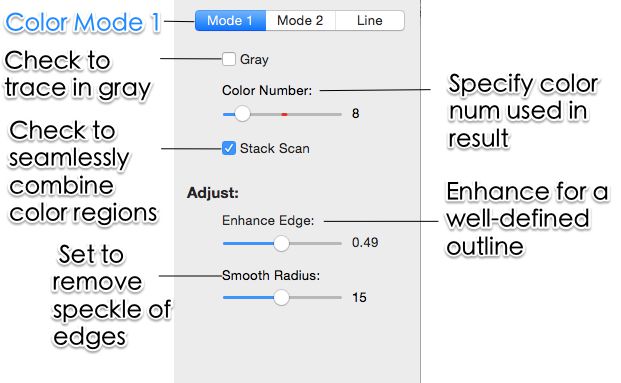
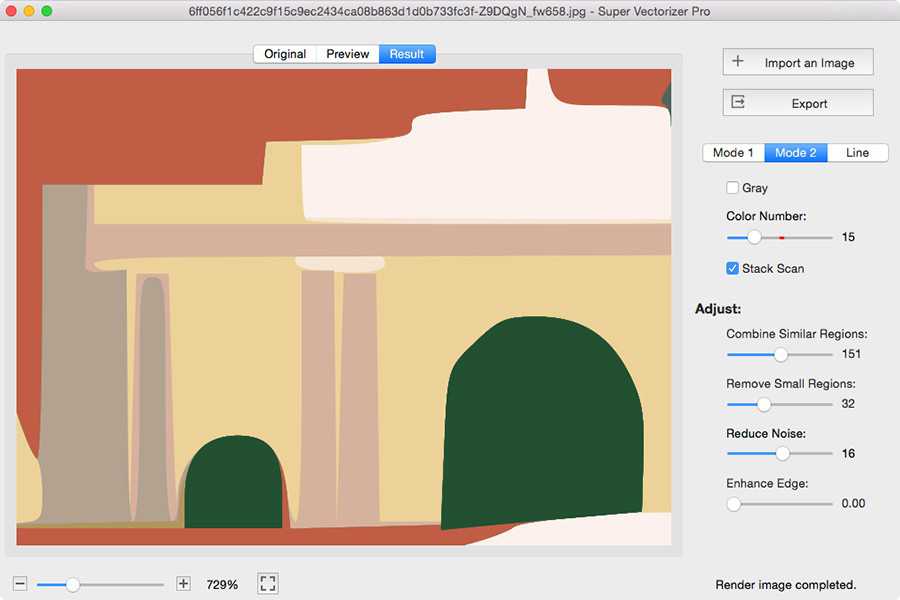
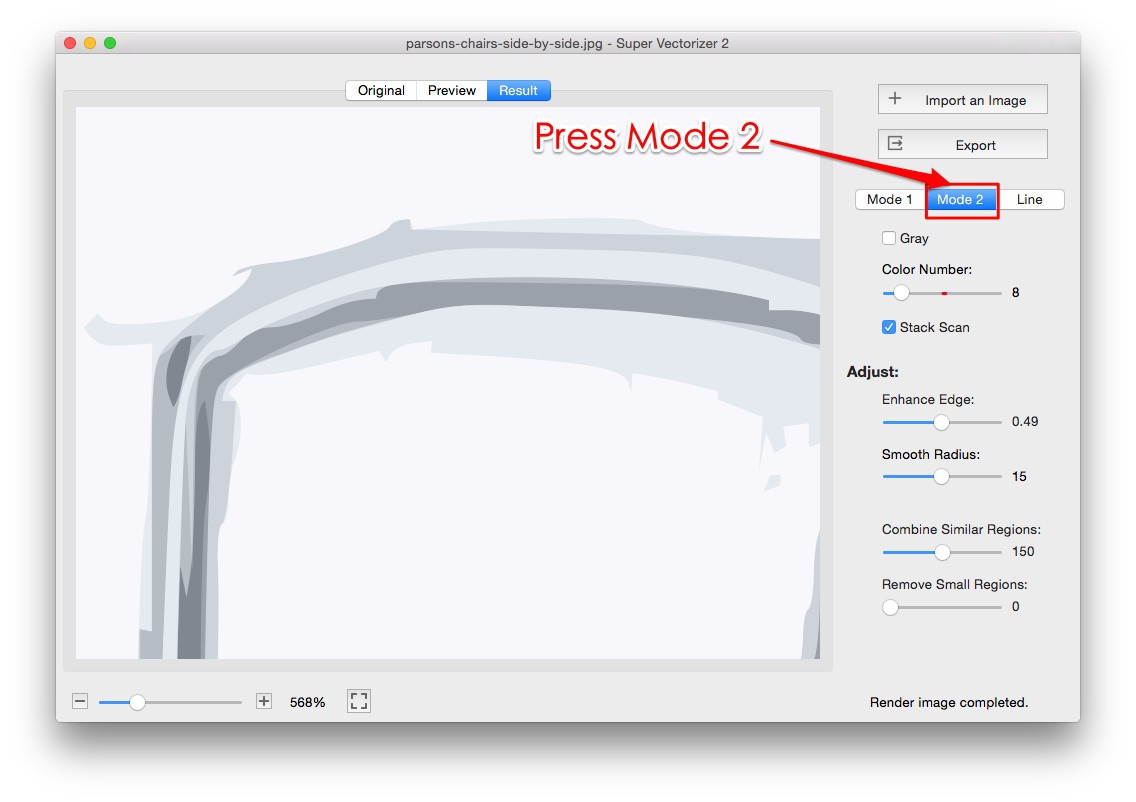
Switch between Color Mode and Line Mode and raise the Smooth Lines control so stair-step edges round off into clean curves. The live preview updates as you fine-tune color count and detail, so you can see the vector drawing take shape before exporting.
Step 3. Export as SVG, AI, DXF or PDF
Click Export and choose your format. The finished file opens in Adobe Illustrator, Inkscape, a CAD application or a cutting-machine workflow without further conversion.

Download Super Vectorizer Pro
One-time purchase $29.99 · Free trial to preview results (export requires a licence) · Mac + Windows
Frequently Asked Questions
What is the best vector drawing software for Mac?
For drawing vector shapes from scratch, Inkscape, Vectr and LibreOffice Draw are popular free Mac options. If your goal is to turn a photo, logo or hand-drawn sketch into editable vector art, Super Vectorizer Pro is the fastest choice — it auto-traces the image into clean SVG, AI, DXF or PDF on your Mac.
Is there free vector drawing software for Mac and Windows?
Yes. Inkscape, Vectr and LibreOffice Draw are free and run on both Mac and Windows. Super Vectorizer Pro also offers a free trial that lets you preview the vectorized result before buying — exporting the final file requires a one-time licence.
Can I turn a photo into a vector drawing on Mac?
Yes. Open Super Vectorizer Pro, import the photo, and the auto-trace engine converts it into vector line art or color fills. You can then export it as SVG, AI, DXF or PDF to open in Illustrator, a CAD tool or a cutting machine.
What is the difference between vector drawing software and a vector converter?
Drawing software lets you create shapes, paths and illustrations by hand. A vector converter (like Super Vectorizer Pro) takes an existing raster image — a photo, scan or sketch — and traces its edges into vector paths automatically. Many workflows use both: draw the base, then convert reference art.
How do I convert a hand-drawn sketch to vector on Mac?
Scan or photograph your sketch, import it into Super Vectorizer Pro in Line Mode, and raise the Smooth Lines control so the jagged scan edges round off into clean curves. Then export the result as SVG or DXF for further editing.
Which file formats can vector drawings be exported as?
Super Vectorizer Pro exports to SVG, AI (Adobe Illustrator), DXF (CAD) and PDF. SVG and PDF are ideal for web and print, AI for advanced editing, and DXF for laser cutters, CNC routers and other CAD-driven machines.
Does Super Vectorizer run offline on Mac?
Yes. Super Vectorizer Pro is a desktop application that processes everything locally on your Mac or Windows machine. Your images never leave your device, which makes it a private alternative to cloud-based vectorizers.
Can I edit the vector after converting it on Mac?
Yes. The exported SVG, AI or DXF stays fully editable in Adobe Illustrator, Inkscape, CorelDRAW or any vector editor. You can recolor, reshape and combine the traced paths with artwork you draw from scratch.
Is vector drawing software better than raster for logos and icons?
For logos, icons and illustrations, vector is better because it scales to any size without losing sharpness and every element stays individually editable. Raster formats like PNG are great for photos but blur when enlarged. Converting your artwork to vector gives you the best of both.
How much does Super Vectorizer Pro cost?
Super Vectorizer Pro is a one-time purchase of $29.99 for both Mac and Windows. A free trial is available so you can preview vectorization results before deciding to buy.