Every VTracer Parameter, in Your Browser
Most online tracers hide the engine behind one "magic" button. This page exposes the real VTracer controls so you can match the output to your artwork. Drag a slider and the SVG re-traces instantly — all on your device, nothing sent to a server.
What each control does
- Filter speckles — drops isolated noise pixels before tracing (great for scans).
- Color precision — bit depth of each color channel; higher keeps subtle gradients.
- Layer difference — how much contrast is needed to start a new color layer.
- Corner / length / splice thresholds — shape the curves: tighter values keep more corners, looser values smooth them out.
- Path precision — decimal places in coordinates; lower shrinks the file with negligible visual loss.
- Max colors — cap the palette for screen-printing or vinyl workflows.
Pixel and Polygon modes
Switch to Pixel to keep blocky, 1:1 pixel art intact (perfect for retro sprites), or Polygon for straight-edged vectorization of technical drawings. These are modes the big one-click sites do not expose.
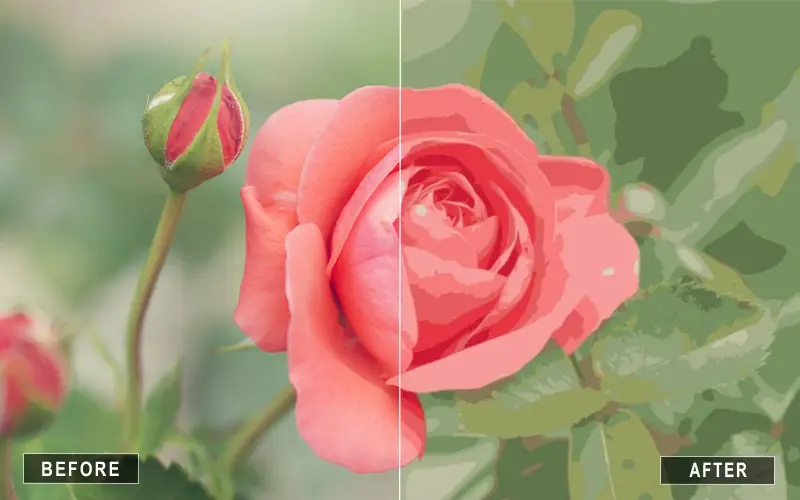
How to trace an image with VTracer Online
Getting a clean vector takes four steps — and you can watch the SVG redraw after every change:
- Start with the sample. The page loads a built-in house drawing so you see a real trace immediately. Tap Upload Another to bring your own image.
- Pick a preset. Color for logos and illustrations, B&W for line art, Flat for posters, Photo for photographs, Pixel for retro sprites, Polygon for technical drawings.
- Fine-tune. Drag any slider — filter speckles, color precision, layer difference, corner/length/splice thresholds, path precision, or max colors — and the SVG re-traces live in your browser.
- Download. Save the SVG, or send it to Super Vectorizer Pro for batch and high-resolution export.
VTracer Online vs one-click converters
Most "image to SVG" sites hide the engine behind a single button and return a generic result. VTracer Online is different:
- Full control — every tracing parameter is exposed, so the output matches your artwork instead of a one-size-fits-all guess.
- Privacy by design — the image is decoded and traced entirely in your browser via WebAssembly; it never touches a server.
- Specialized modes — cutout stencils, locked spot colors, pixel art, and polygon tracing that simpler tools cannot do.
- Real vector paths — not a flattened bitmap, but editable SVG you can open in any editor.
Best VTracer settings for your artwork
Start from a preset, then nudge one or two sliders:
- Logos & flat illustrations — Color or Flat preset, Color precision 6–8, Max colors 8–16. Need only brand inks? Use the Spot Color converter.
- Line drawings & sketches — B&W preset with adaptive binarization; raise Remove speckles to drop paper texture. See Line Art to SVG.
- Photos — Photo preset; lower Color precision and raise Layer difference for cleaner separations.
- Pixel art & sprites — Pixel mode keeps every block intact.
- Stencils & cutouts — the Stencil Maker uses cutout mode for seamless, tileable bridges.
Frequently Asked Questions
What is VTracer and how does this online tool use it?
VTracer is an open, professional raster-to-SVG tracing engine. This page loads it as WebAssembly and runs it entirely in your browser, so your images never leave your device.
Can I control the tracing parameters?
Yes. Unlike simplified one-click converters, this page exposes filter speckles, color precision, layer difference, corner/length/splice thresholds, path precision, max colors, and Pixel/Polygon modes.
Which image formats can I trace?
PNG, JPG, GIF, WebP, BMP, AVIF, ICO and SVG. The browser decodes the image and VTracer rebuilds it as real SVG paths.
Is there a file size limit?
Files up to 5 MB and a longest edge of 1500 px are processed (larger images are scaled down first to keep tracing instant).
Does this upload my image to a server?
No. All conversion happens locally in your browser via JavaScript and WebAssembly.
