Raster vs Vector
Photos are made of pixels — they blur when enlarged. Vectors are made of paths — they stay perfectly sharp at any size. Converting a photo to vector line art gives you the best of both worlds.
Turn any photo into clean, scalable vector line art. This guide shows you how — using Super Vectorizer Pro for Mac & Windows, plus free online options.
Prefer a quick browser tool? Try the free online image to SVG converter first, then export on desktop.
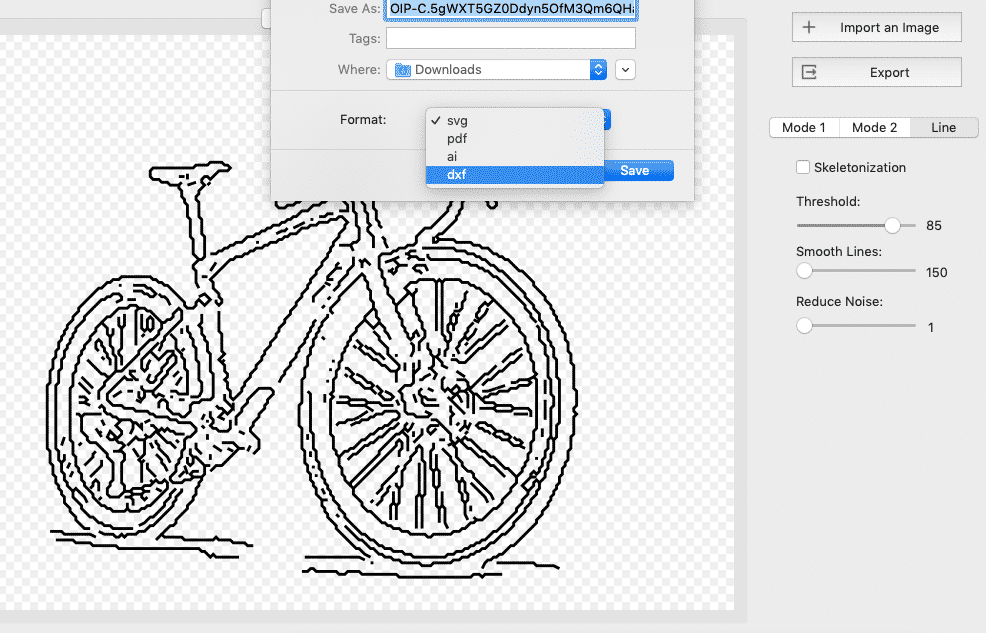
Photo to vector line art converts raster images (JPG, PNG, TIFF) into scalable vector graphics composed of clean lines and curves.
Photos are made of pixels — they blur when enlarged. Vectors are made of paths — they stay perfectly sharp at any size. Converting a photo to vector line art gives you the best of both worlds.
Advanced tracing detects edges and outlines in your photo and converts them to clean vector paths. Works best with clear subjects and good contrast between foreground and background.
Super Vectorizer Pro supports multiple trace styles including clean outlines, pencil sketch effects, and ink drawings. Adjust threshold, color count, and path detail for perfect results.
Your photos never leave your computer. The whole conversion runs locally on macOS or Windows — no upload to a server, no account required.
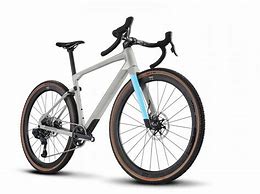
Super Vectorizer Pro makes it easy. Here's how in 4 steps.
Drag and drop any JPG, PNG, TIFF, BMP, or WEBP file into Super Vectorizer Pro.
Select "Line Art" or "Outline" mode and adjust threshold, smoothing, and path detail to match your photo.
See the vector preview instantly. Adjust colors, simplify paths, and fine-tune the trace.
Save as SVG for infinite scalability, or export to PDF, AI, and DXF from the same traced image.
Ready to turn your photos into clean vector line art? Download Super Vectorizer Pro and preview the full trace in the free trial.
Compatible with macOS 10.14+ (M1/M2/M3/M4) & Windows 10/11
Not every photo converts equally well — here's what works best.
Photos with clear faces and good lighting convert well, tracing facial contours and hair outlines into stylized portrait line art.
Buildings with strong straight lines and geometric shapes convert beautifully — roof edges and windows become precise vector paths.
Silhouettes, trees, and landscapes with clear outlines work well. Use "Pencil Sketch" mode for organic, hand-drawn style vector art.
Photos of logos, handwritten notes, or calligraphy convert to clean vector paths — perfect for digitizing old artwork.
Everything you need to know about photo to vector conversion
Open your photo in Super Vectorizer Pro, select Line Art or Outline tracing mode, adjust the threshold and detail settings, preview the result, and export as SVG. You can also try a free online image to SVG converter for quick conversions.
Yes. Use our free online image to SVG converter — upload any photo and download SVG directly in your browser. For higher quality, more line art styles, and offline processing, Super Vectorizer Pro is $39.99 one-time.
Photos with clear edges and good contrast convert best: portraits with good lighting, architecture, silhouettes, logos, vehicles, and hand-drawn sketches. Busy photos with gradients, shadows, or complex textures produce more abstract vector results.
The software uses edge detection algorithms to find contrast boundaries in your photo. It then traces those edges as mathematical Bezier curves (vector paths). The result is a scalable SVG file with clean lines instead of pixels.
Photo to SVG preserves the colors and fills from the original image as vector shapes. Photo to line art extracts only the outlines and contours, producing a clean line drawing in a single color. Both output as SVG files.
Yes. Super Vectorizer Pro for Mac converts photos to vector line art on macOS (M1–M4 Apple Silicon, Intel). Both Mac and Windows versions have identical features and output quality, supporting macOS 10.14 through macOS 15.
For professional results, Super Vectorizer Pro is the best photo to vector line art converter for Mac and Windows. It offers multiple trace styles (outline, sketch, ink), full control over path detail, exports to SVG/PDF/AI/DXF, and costs $39.99 one-time with no subscription.
Yes. Vector line art exported as SVG or DXF from Super Vectorizer Pro is perfect for laser cutting, vinyl cutting (Cricut/Silhouette), screen printing, and large format printing. Vector files scale to any size without quality loss.
Yes. Super Vectorizer Pro runs identically on Windows 10/11 and macOS (M1–M4). Both versions export the same SVG, PDF, AI, and DXF vector line art with the same tracing quality and controls.
Super Vectorizer Pro exports to SVG, PDF, AI, and DXF. SVG is best for web and cutting machines, PDF for print and sharing, AI for Illustrator, and DXF for CAD and laser or CNC workflows.
Super Vectorizer Pro handles any photo — portraits, logos, architecture, landscapes — and converts them to clean, scalable vector line art in SVG, PDF, AI and DXF format.
One-time purchase $29.99 · Works offline · macOS & Windows