
What Is Image Tracing (Raster to Vector Conversion)?
Before comparing tools, it helps to understand the technology behind image vectorization — the process that powers both Vectorizer.AI and Super Vectorizer Pro.
Image Tracing Explained
Image tracing (also called raster to vector conversion, vectorization, or bitmap to vector) converts pixel-based images (PNG, JPG, BMP) into vector graphics (SVG, PDF). Instead of millions of colored squares, vector files store shapes as mathematical paths — infinitely scalable with zero quality loss.
Why Convert to Vector?
Vector files are essential for logo design, screen printing, laser cutting, embroidery, and any project that needs crisp graphics at any size. A PNG logo looks blurry when enlarged; an SVG logo stays perfectly sharp on a business card or a billboard.
Two Best Tools Compared
This comparison focuses on the two most powerful image-tracing solutions available: Vectorizer.AI (cloud AI, subscription) and Super Vectorizer Pro (Mac/Windows app, one-time purchase). Both produce professional-quality SVG output.
Super Vectorizer Pro vs Vectorizer.AI — Full Comparison
Everything you need to choose the right image-tracing tool for your workflow.
| Feature | Vectorizer.AI | Super Vectorizer Pro |
|---|---|---|
| 💰 Pricing & License | ||
| Cost | $9.9 / month subscription | $29.99 one-time purchase |
| Free trial | ⚠ Free preview, must subscribe to download | ✔ Free trial (preview only) |
| Lifetime ownership | ✗ Must create account & subscribe | ✔ Buy once, own forever |
| 5-year total cost | ~$594 | $29.99 |
| 🖥️ Platform & Accessibility | ||
| Where it runs | Cloud (requires internet) | Desktop app — Mac & Windows (works offline) |
| Privacy | ✗ Your images uploaded to servers | ✔ Your images stay on your computer |
| No internet required | ✗ Internet required | ✔ Fully offline capable |
| Mac & Windows | Browser only | Mac & Windows |
| ⚙️ Output & Quality | ||
| Output formats | SVG, PNG, PDF, EPS | SVG, PDF, AI, DXF |
| AI-enhanced tracing | ✔ Deep learning model | ✔ Advanced vectorization algorithms with adjustable settings |
| Adjustable trace settings | ⚠ Limited control | ✔ Full manual controls |
| Path optimization | ✔ Auto-optimized | ✔ Node reduction & cleanup |
| 🚀 Workflow & Speed | ||
| Setup required | ✔ Open in browser, no install | ✔ Download & install |
| Processing speed | Depends on internet speed | Fast local processing |
| Export to design tools | Copy SVG code or download file | Direct export to Illustrator, CorelDRAW, Figma |
| Batch processing | ✗ No built-in batch in web UI | ⚠ No (one at a time) |
| 🎯 Best For | ||
| Ideal user | Occasional users, browser-only workflow | Designers, frequent image tracing, value privacy |
| Logo conversion | ✔ Good quality | ✔ Excellent quality |
| Print / embroidery files | ⚠ Limited format support | ✔ DXF, AI support |
How to Trace Images with Super Vectorizer Pro
Super Vectorizer Pro makes image tracing simple — three steps from raster to clean vector.
Open Your Image
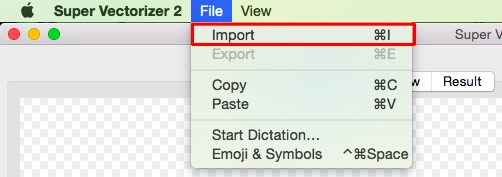
Open a PNG, JPG, BMP, or TIFF file in Super Vectorizer Pro. Supports images up to 25 megapixels.
Adjust Settings
Choose output format (SVG, PDF, AI, DXF), set trace quality, threshold, and path optimization level.
Export Vector
Export your clean SVG vector file. Ready for Figma, Illustrator, web, or print production instantly.
Vectorizer AI Free Download: Why There Isn't One
A lot of searchers type "Vectorizer AI free download" hoping for a desktop app. Here is the reality of how Vectorizer.AI is licensed and delivered.
Vectorizer.AI is a browser-based cloud service — there is no standalone desktop program to download for free. You upload an image, the AI traces it, and you can preview the result in your browser at no cost. But to download or export the finished vector you must subscribe to their $9.9/month plan; the interface effectively says "please subscribe to download results." In other words, the free part is only a preview, not a usable file.
If you want a real downloadable app you actually own, that is exactly the gap Super Vectorizer Pro fills: you download the Mac or Windows application once for $29.99, and it runs entirely on your computer — no subscription, no account, and you can preview results with the free trial before buying.

Best Free Vectorizer AI Alternatives
If you want vectorizer AI power without a recurring bill, these are the strongest options in 2026.
Super Vectorizer Pro
A one-time $29.99 desktop app (Mac & Windows) with a free trial to preview results. Offline, private image tracing that exports SVG, PDF, AI, and DXF. Processes one image at a time (no batch mode).
Inkscape
Free, open-source desktop software with a built-in Trace Bitmap (auto-trace) feature. Excellent for simple logos and line art, though tracing is less automated than true AI.
Adobe Express
A free online image-trace / vector tool with a free tier. Great for quick social-media graphics, but export control is limited compared with desktop software.
SVGvector.com Online Converter
Free, browser-based raster-to-vector conversion. No install and no account needed for basic use — handy for a fast one-off trace.
Vector Magic
A long-standing paid alternative (desktop + online) known for clean auto-tracing. There is no free tier beyond a small trial, so it is best for users who trace often.
Vectorizer AI vs Super Vectorizer Pro: Pricing Compared
The clearest way to choose is to compare cost, free options, and ownership side by side.
| Tool | Free option | Price | Platform | Offline | Batch |
|---|---|---|---|---|---|
| Vectorizer.AI | Free preview only | $9.9 / month (~$594 / 5 yrs) | Browser / Cloud | ✗ No | ✗ No (web UI) |
| Super Vectorizer Pro | Free trial (preview) | $29.99 one-time purchase | Mac & Windows | ✔ Yes | ⚠ No (one at a time) |
| Inkscape | Fully free | $0 | Mac / Win / Linux | ✔ Yes | ⚠ Limited (CLI) |
| Adobe Express | Free tier | $0–sub | Browser | ✗ No | ✗ No |
Bottom line: For frequent image tracing, the one-time desktop app is the better value. Vectorizer.AI suits occasional, browser-only users who don't mind subscribing. Either way, you now have the full pricing picture to decide.
Ready to Trace Images Like a Pro?
Skip the $9.9/month subscription. Super Vectorizer Pro gives you professional image tracing — more export formats, local processing, and a one-time price of $29.99.