Clean, Precise Cuts
Vector paths give sharp cuts every time. No jagged edges from pixel-based sources, even on intricate monograms and lace patterns.
Turn PNG, JPG & any image into clean, cut-ready SVG for Cricut Design Space - Explore, Maker and Joy. Compare tools and pick the workflow that gives you the sharpest vector paths — offline on your Mac or Windows machine.
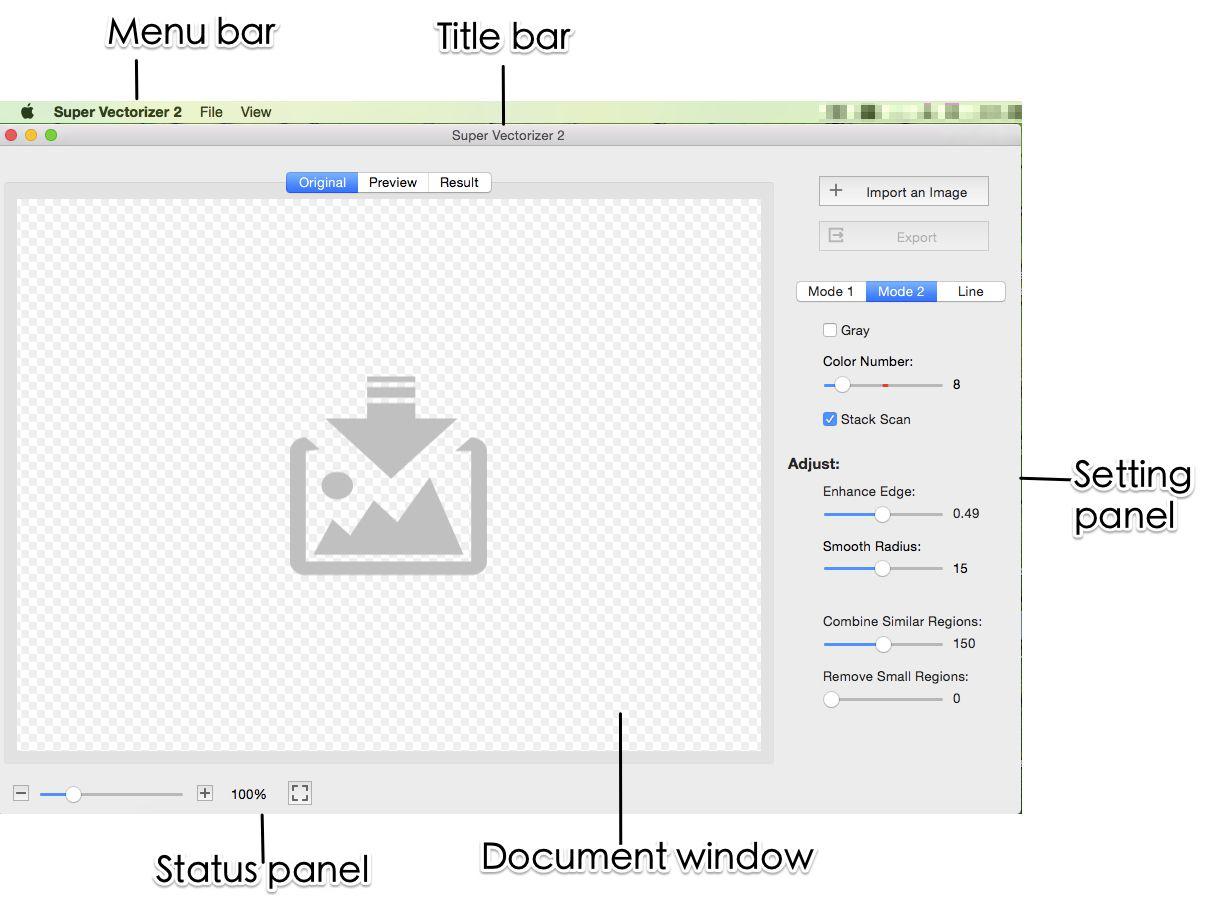
Cricut cutting machines read vector paths for cutting and drawing. A dedicated image vectorizer turns your raster art into SVG that cuts cleanly.
Vector paths give sharp cuts every time. No jagged edges from pixel-based sources, even on intricate monograms and lace patterns.
Scale a design from 2 inches to 24 inches with zero quality loss. SVG stays crisp at any dimension in Design Space.
SVG is Cricut Design Space preferred format. Exported files import as editable layers ready to cut or draw.
Your images never leave your computer. A desktop image vectorizer keeps family photos and client art private - no cloud upload.

Match the tool to what you actually cut - vinyl, paper, iron-on, or layered photo art
The offline image vectorizer built for Cricut crafters. Turns any PNG, JPG, BMP image into clean, cuttable SVG files. No subscription, one-time purchase.
| Tool | Platform | Output Quality | Offline | Price |
|---|---|---|---|---|
| Super Vectorizer Pro | Mac + Windows | Clean, layered SVG | Yes | $29.99 one-time |
| Online converters | Web only | Varies, often watermarked | No | Free / Freemium |
| Adobe Illustrator | Mac + Windows | Excellent | Yes | $32/mo subscription |
| Inkscape (Trace Bitmap) | Mac + Windows | Good for simple art | Yes | Free |

Six steps from raster image to cut-ready SVG file

Get the free trial from svgvector.com. Available for Mac and Windows.
Drag and drop your PNG, JPG, or any image into the image vectorizer. Supports logos, clipart, drawings, and photos.
Line Mode: Outlines for vinyl and HTV. Color Mode: Separates colors into layers for multicolor art.
2-4 colors for simple cuts, more for detailed designs. Preview the trace in real time and adjust.
Click Export and choose SVG. The file is ready to upload to Cricut Design Space.
Click Upload, browse to your SVG, and it appears as editable vector art ready to cut.
Ready to turn your images into cut-ready SVG? Try Super Vectorizer Pro free trial to preview the trace.
Compatible with macOS 10.10+ (M1/M2/M3) & Windows 7/8/10/11
Match the file format to the material and the cut type
Convert any logo, monogram, or illustration to SVG. Cut custom vinyl decals for laptops, water bottles, and car windows. Clean vector paths ensure perfect weeding.
Convert designs to SVG for iron-on projects. Mirror the design in Cricut Design Space before cutting, then press onto t-shirts and bags.
Create intricate paper cut designs from any image. Wedding invitations, birthday cards, and scrapbook elements become easy with clean vector cuts.
Turn photos and artwork into reusable stencils for painting or Cricut engraving on metal, leather, and acrylic with the Engraving Tip.

Everything you need to know about the best image vectorizer for Cricut
The best image vectorizer for Cricut turns raster PNG, JPG, and BMP files into clean, closed SVG paths that import as editable layers in Cricut Design Space. Super Vectorizer Pro is built for this: it produces cut-ready SVG on Mac and Windows, runs offline for privacy, and costs a one-time $29.99 with no subscription.
Yes. A good image vectorizer exports standard SVG files that Cricut Design Space reads as vector paths. Super Vectorizer Pro creates SVG compatible with every Cricut machine - Maker, Maker 3, Explore, Explore 3, Joy - so your converted art cuts cleanly instead of looking pixelated.
Open the image vectorizer, drag in your PNG, choose Line Mode for simple shapes or Color Mode for multi-color art, set the color count (2-4 for vinyl, more for photos), preview the trace, then export SVG. Upload that SVG to Cricut Design Space. The free trial previews the result; export unlocks after the one-time purchase.
Line Mode traces outlines only - ideal for logos, text, and single-layer vinyl or HTV cuts. Color Mode separates each color into its own layer, which is best for multicolor illustrations, clipart, and photos. In Cricut Design Space each layer becomes its own mat, so Color Mode gives you the most control.
No. Super Vectorizer Pro runs locally on your Mac or Windows computer, so your images never leave the device. There is no cloud upload and no account required to trace and preview - a real privacy advantage over browser-only converters.
SVG is resolution-independent, so it scales to any size with no quality loss. Cricut reads the vector paths directly, keeping cuts sharp. PNG is pixel-based and can cut with jagged or rough edges when enlarged, especially on detailed designs.
All of them. SVG exported by Super Vectorizer Pro imports into Cricut Maker, Maker 3, Explore, Explore 3, Explore Air 2, and Joy. SVG is Cricut Design Space preferred format and appears as editable vector art ready to cut or draw.
Import the photo into the image vectorizer, pick Color Mode with 16-32 colors for detailed photos (or 2-4 for bold silhouettes), preview the trace, then export SVG. High-contrast photos with a clean background produce the best cut files. For Print Then Cut, keep the photo as a single layered image.
That usually means the file was exported as a single merged path or a flattened image. In Super Vectorizer Pro, use Color Mode so each color becomes its own layer, and avoid embedding the source photo inside the SVG. Separate layers let you assign different mats and materials.
Along with SVG, it exports PDF, EPS, AI, and DXF, and supports 70+ input image formats including PNG, JPG, BMP, GIF, TIFF, PSD, and HEIC. SVG and DXF are the most common choices for Cricut and other cutting machines.
For Cricut crafters, yes in three ways: it runs offline (your images stay private), it produces clean closed paths suited to blade cutting, and it has no upload size limits or watermarks. Free online tools are fine for quick one-offs but often cap resolution and add restrictions on export.
Yes. Super Vectorizer Pro offers a free trial that previews the full vectorization trace on your Mac or Windows machine. You can check path quality, color separation, and layer structure before deciding. Export and batch features unlock after the one-time $29.99 purchase.
Super Vectorizer Pro converts PNG, JPG, BMP to clean SVG files that work perfectly with Cricut Design Space
One-time purchase $29.99 - Works offline - macOS & Windows