The most accurate answer to vectorizer AI free download in 2026 is a mix of two truths. Vectorizer.AI itself has no desktop app to download — it runs entirely in your browser — so the genuinely free, installable AI vectorizers are open-source tools like Inkscape and VTracer, plus desktop apps like Super Vectorizer Pro that offer a free trial to preview results. If you want a real installer you keep on your Mac or Windows machine, the six options below are the ones worth downloading; if you only want a quick browser conversion, our PNG to SVG Converter Online does it with no download at all.
Want a vectorizer AI free download that runs offline? Super Vectorizer Pro installs locally — free trial to preview results, no account, no monthly fee.
Compatible with macOS 10.10+ (M1/M2/M3) & Windows 7/8/10/11
Our Verdict
If "download" is the hard requirement, skip the browser-only AI tools and pick a program that installs on your computer. Open-source projects and free desktop trials are the only categories that can guarantee a genuinely free vectorizer AI workflow, because nothing is metered per file and no server is billing you in the background.
Installable & Local Win on Control
- No per-file fee, no quota
- No account, email, or sign-in
- Runs offline on your machine
- Keeps working after a reinstall
"Vectorizer AI Download" — Read the Fine Print
- Vectorizer.AI is browser-only
- No .exe or .dmg to install
- Full export often gated
- Subscription kicks in after the limit
What "Vectorizer AI Free Download" Actually Means in 2026
A vectorizer AI free download search mixes three very different promises. A genuinely downloadable free vectorizer is a program you install on your own computer — a desktop app (Mac or Windows) or an open-source package — that converts a raster bitmap into a scalable SVG using an AI or automatic tracing engine, without charging you per file. The conversion happens as native code on your machine, so the image never has to leave your device.
By contrast, many tools that say "free download" are actually browser tabs with a download button that leads to a sign-up wall. Vectorizer.AI is the clearest example: it is a polished AI tracer, but it has no installable client, so the phrase "vectorizer AI free download" does not apply to it the way people expect. For this guide we use the strict definition — download the app, open it, drop in your image, get an SVG, close the window — with no email, no subscription, and no per-file charge. A paid desktop app with a free trial sits at the edge of that definition: it is not free forever, but it installs for free and lets you preview raster-to-vector results before any purchase.
The 6 Best Vectorizer AI Free Download Options in 2026
Each card below lists the tool, the realistic cost, and how it handles your file. Tags indicate whether the option is genuinely free, has caveats, or is a paid desktop app with a free trial. The mix covers open-source, command-line, and desktop routes so the comparison reflects the real choice you face when you actually want to install something.
1. Inkscape (Desktop)
Full open-source vector editor with a built-in bitmap tracer (Trace Bitmap). Runs offline on Mac, Windows, and Linux. No login, no quota, unlimited use. The classic free vectorizer AI download for logos, line art, and full editing.
2. VTracer (CLI / Open Source)
Command-line raster-to-SVG tracer from the image-tracing community. 100% local, no account. Best for developers comfortable with a terminal who want a scriptable, offline vectorizer AI download.
3. Super Vectorizer Pro (Mac/Win)
One-time-purchase desktop app. Processes one image at a time locally, no account, no upload. Free trial to preview results before you buy. The polished, one-click install for privacy-first users.
4. SVGcode (Browser PWA)
Progressive web app that installs into your browser via WebAssembly. After the first load it runs offline. No sign-up; the original file never leaves your device. Not a traditional .exe, but still an installable offline tool.
5. Vectorizer.AI (Web)
High-quality AI tracer with a limited free preview — but no desktop client to download. Full-resolution export requires sign-up and a paid plan, so it does not meet the strict vectorizer AI free download bar.
6. Adobe Illustrator (Desktop)
The industry-standard editor with Image Trace. A 7-day free trial is downloadable, after which it becomes a subscription. Powerful, but the ongoing cost is the highest of the group.
Vectorizer AI Free Download: Side-by-Side Comparison
This table compares the same six tools on the factors that matter when a real install is the deal-breaker. The batch-support column applies to converting many files in one run; Super Vectorizer Pro is intentionally a one-at-a-time desktop workflow, so it is marked accordingly.
| Tool | Price | Platform | Login? | Offline? | Batch | Best For |
|---|---|---|---|---|---|---|
| Inkscape | Free (open source) | Mac / Win / Linux | None | Yes (desktop) | Yes (scripted) | Logos, line art, full editing |
| VTracer | Free (open source) | Mac / Win / Linux (CLI) | None | Yes (local) | Yes (scripted) | Developers & batch jobs |
| Super Vectorizer Pro | One-time purchase | Mac / Win (desktop) | None | Yes (desktop) | No (one at a time) | Privacy-first local vectorization |
| SVGcode | Free | Any modern browser (PWA) | None | Yes (after first load) | No | Quick offline vectorization |
| Vectorizer.AI | Free preview / paid plans | Web (no installer) | Required for export | No | No | Photo-grade AI color tracing |
| Adobe Illustrator | Free trial / subscription | Mac / Win (desktop) | Adobe ID required | Yes (desktop) | Yes | Professional design suites |
Is There a Vectorizer.AI Desktop App to Download?
Short answer: no. Vectorizer.AI is a browser-based web service with no downloadable desktop client, so there is nothing to install from vectorizer.ai. People land on "vectorizer AI free download" expecting an .exe or .dmg, but the product is delivered as a hosted web app that needs an internet connection every time you use it. That is fine for a quick one-off, but it is not a vectorizer AI free download in the installable sense.
If your goal is a real offline installer, the closest matches are the open-source desktop apps (Inkscape, VTracer) and a one-time desktop app such as Super Vectorizer Pro that offers a free trial to preview results. None of them ask for a credit card to download, and all of them keep working without a server in the loop. For sensitive client artwork, that local-only behavior is usually the safer choice anyway.
How to Stay Safe When Downloading a Vectorizer
A free vectorizer AI download is only useful if it is safe to install. Stick to official sources: open-source builds from their project sites or code repositories, and desktop trials directly from the vendor. Avoid third-party download portals that bundle toolbars or extra software, and check that the installer is signed before you run it. A local app that does not upload your image to a remote server is also safer for sensitive artwork than a web tool whose privacy policy stores your file for a few hours.
For the two open-source picks, Inkscape publishes signed builds for Mac and Windows, and VTracer ships as a small native binary you compile or fetch from its repository. Both are free, both are local, and neither requires you to create an account. If a "free download" page asks for your email before you can even click the installer, that is a marketing capture, not a free tool.
Open-Source Downloads: Inkscape and VTracer
If you prefer a community-maintained tool, Inkscape and VTracer are the two open-source projects that consistently appear in any free vectorizer roundup. Inkscape is a full desktop vector editor with a Trace Bitmap panel that handles color, grayscale, and line art. VTracer is a lighter command-line tool written in Rust that focuses on raster-to-SVG and can be scripted to convert an entire folder without opening a window. Both are free, both are local, and neither requires you to create an account.
The tradeoff is effort. Inkscape has a steeper learning curve than a one-click web tool, and VTracer requires comfort with a terminal. For designers who already know Inkscape it is the obvious pick for a free vectorizer AI download; for developers, VTracer is a good complement to a build pipeline. Together they remain the reference implementation the commercial tools are measured against.
How to Download and Vectorize Your First Image (Step-by-Step)
The exact steps depend on the tool, but the workflow is similar across every option that genuinely installs for free. Follow this five-step path to turn a raster image into a scalable SVG on your own computer.
- Pick a downloadable tool. Choose an open-source desktop app such as Inkscape, a command-line tracer such as VTracer, or a paid desktop app with a free trial such as Super Vectorizer Pro. Avoid web-only tools if your goal is a real offline installer.
- Download and install. Go to the official site or repository, download the installer for Mac or Windows, and run it. Open-source apps and the free trial install without asking for a credit card.
- Import your image. Open the app and drag in your raster file. Because a local app does not upload to a remote server, the image never leaves your machine.
- Choose a mode and preview. Color mode works best for photos and brand art; grayscale for monotone work; line or poster mode for logos and line art. Preview the SVG and check node density and color accuracy.
- Export the SVG. Save the vector file to your computer. For open-source tools the export is fully free; for a one-time desktop app the free trial lets you preview the result, and exporting requires the paid version.
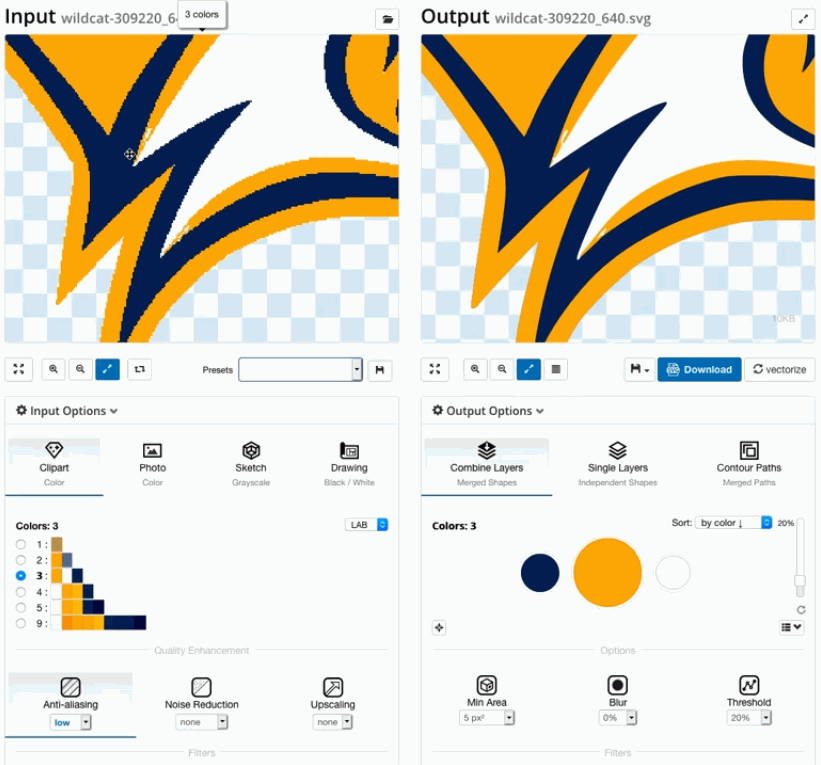
Desktop Install vs Browser Tab: Which Free Route Is Right?
Browser PWAs like SVGcode are great for a quick vectorize with no install, but they still depend on a browser cache and a working WebAssembly build, and they cannot easily process a folder of images. A native desktop app like Super Vectorizer Pro removes every browser dependency: you install it once, drag a bitmap onto the window, pick a tracing mode (color, grayscale, line), and export the SVG to a folder of your choice. The free trial lets you preview raster-to-vector results before you buy.
For users who need a free vectorizer without the terminal and without a browser, a paid desktop app with a free trial is the most reliable option. It costs more than an open-source tool but it eliminates account friction, server uploads, and usage caps. If you trace client work or sensitive art, that tradeoff is usually worth it, and the one-time price still beats a year of cloud AI subscriptions.
Related SVG Workflows
Once you have a clean SVG from your free vectorizer AI download, the next step is usually editing, compressing, or preparing it for a specific downstream task. These guides cover the most common follow-ups.
- Best Free Image Vectorizer Tools 2026 — a broader roundup of free vectorizers across every platform.
- PNG to Vector AI Free: 7 Truly Free Tools — the browser-based, no-install version of the same task.
- Image to Vector AI Free Without Login: 6 Truly No-Signup Tools — the privacy-first version of the same task.
- Best Free Image Vectorizer Reddit Community Guide — what the Reddit community actually recommends.
- SVG Compressor Online — shrink the SVG output before shipping it.
- Super Vectorizer Pro for Mac & Windows — the local desktop app with a free trial to preview results.
Frequently Asked Questions
Is there a Vectorizer.AI desktop app I can download for free?
No. Vectorizer.AI is a browser-based web tool with no installable desktop client, so there is nothing to download and install from vectorizer.ai. The genuinely free, installable AI vectorizers in 2026 are open-source desktop apps such as Inkscape and VTracer, plus desktop apps like Super Vectorizer Pro that offer a free trial to preview results. If you specifically want a real installer you keep on your Mac or Windows machine, pick one of those instead.
What is the best free AI vectorizer to download in 2026?
For a zero-cost download, Inkscape (open source, desktop) and VTracer (open source, command line) are the strongest picks because they are unlimited and local. If you want a polished one-click desktop app, Super Vectorizer Pro offers a free trial that lets you preview raster-to-vector results on your own image before buying. All three run offline, so nothing is metered per file.
Is downloading Super Vectorizer Pro actually free?
A free trial is available to preview results, and the install is free, but the app itself is a one-time purchase rather than free forever. The current price is a single one-time fee of $29.99 with no subscription. The trial is preview-only: you can see the traced SVG on your screen, but exporting the file requires the paid version. Downloading the trial does not require any payment details.
Are free vectorizer downloads safe to install?
Yes, if you download from official sources. Get open-source builds from their project sites or repositories, and desktop trials directly from the vendor. Avoid third-party download portals that bundle toolbars or extra software, and check that the installer is signed. A local app that does not upload your image to a remote server is also safer for sensitive artwork than a web tool.
Can I vectorize images offline after downloading?
Yes. Desktop apps such as Super Vectorizer Pro and Inkscape run entirely on your machine and work with no internet connection. Browser-based PWAs like SVGcode also vectorize offline after the first load. Cloud-only tools such as Vectorizer.AI need a connection every time, so they do not count as offline downloads.
The Shortcut to a Free Vectorizer AI Download
Install Super Vectorizer Pro once and preview raster-to-vector results with no subscription. One-time purchase, free trial to preview results, processes one image at a time locally on Mac or Windows.
Compatible with macOS 10.10+ (M1/M2/M3) & Windows 7/8/10/11
Related Articles


Try These Free Online Tools
No download required — convert, compress & optimize SVGs right in your browser
PNG to SVG Converter
Convert PNG, JPG, BMP images to scalable vector graphics instantly
PNG to SVG ConverterSVG Compressor (Mini)
Reduce SVG file size by up to 80% without losing quality
SVG Compressor OnlineSVG Optimizer
Clean up SVG code, remove redundant data and optimize for web
SVG Optimizer OnlineJPG to SVG Converter
Turn JPEG photos into crisp vector artwork in seconds
JPG to SVG ConverterEPS to SVG Converter
Convert EPS vector files to web-friendly SVG format
EPS to SVG ConverterAll Free Tools
Browse our complete collection of free online conversion tools
Browse All Free Tools