
PNG to SVG for Etsy
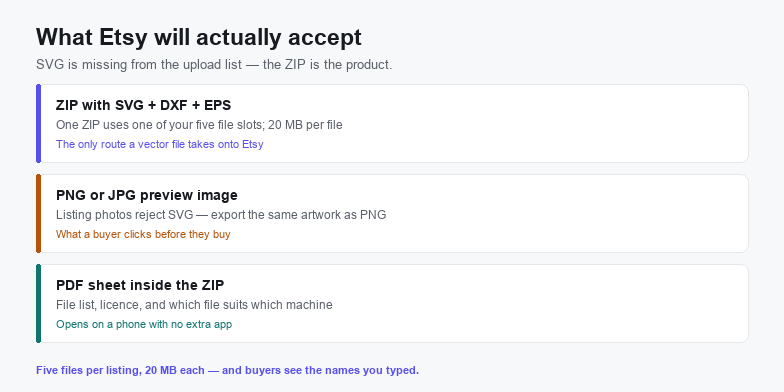
Etsy does not accept an SVG at all. A digital listing takes only BMP, DOC, GIF, JPEG, JPG, MOBI, MOV, MP3, MPEG, PDF, PNG, PSP, RTF, STL, TXT, ZIP, EPUB or iBook files, and listing photos take only JPG, PNG or GIF — so the SVG has to travel inside a ZIP, and the picture that sells it has to be a PNG exported from the same artwork.
That makes this a packaging problem rather than a tracing problem. You can produce a perfect vector in two minutes and still lose the sale to a buyer who cannot open it, or to a listing photo that promises a colour the file does not contain. The conversion is the easy half; the other half is a ZIP with a 20 MB ceiling, five file slots, and file names the buyer sees exactly as you typed them.
Etsy takes the ZIP, not the SVG
Two separate upload paths have two separate whitelists, and SVG is on neither. Once you know which file goes where, the rest of the listing is bookkeeping.
| File | Digital listing | Listing photo | What to do |
|---|---|---|---|
| SVG | Rejected | Rejected | Only travels inside a .zip |
| ZIP | Accepted | n/a | One ZIP = one of your five slots, 20 MB max |
| PNG / JPG | Accepted | Accepted | The preview inside the ZIP and the listing image |
| Accepted | n/a | One-page sheet: what is inside, how to use it, licence | |
| DXF / EPS | Rejected | Rejected | Also inside the ZIP, never loose |
Five files, 20 MB each, is the whole budget. Ship SVG, DXF, EPS, PNG and PDF as five loose files and you have used every slot with no room for the next size or colourway. Ship them as one ZIP and you have one slot used and four left — which is why almost every cut-file listing on Etsy is a ZIP with a PDF inside it.
What goes inside the ZIP
A cut-file buyer is usually standing in front of one specific machine. Ship the formats that cover the machines you claim to support, and nothing you cannot test.
- SVG — the master. Single colour, text converted to paths, no embedded
base64image, no external font or image references. - DXF — the line-only export that CAD, laser and older cutting software still ask for. Same contours as the SVG, with no styling attached.
- EPS — for Illustrator and Affinity users who want to re-colour or re-scale without touching the node structure.
- PNG, 300 DPI, transparent — so a buyer can print a mockup or upload to a print-on-demand service without converting anything.
- PDF, one page — the file list, which format suits which machine, and the licence in plain words. This is the only file that reliably opens on the phone where the download email lands.
Name the ZIP for the buyer, not for yourself. File names are capped at 70 characters using letters, numbers, periods, underscores and hyphens, buyers see exactly what you upload, and Etsy has no rename after the fact. Monogram-Frame-SVG-DXF-EPS.zip is a product; final_v3.zip is a support ticket.
The preview PNG is what you are actually selling
Since an SVG cannot be a listing image, the photo buyers click on is a PNG or JPG you export yourself. Etsy's listing guidance asks for at least 2000 px on the shortest side, and the image has to match the file: same colours, same proportions, same contours. A preview that shows five gradient shades while the ZIP holds four flat colours is the fastest route to a one-star review that no revision can remove.
Build the mockup from the real file rather than from a stock scene. Drop the exported PNG onto the shirt, mug or sign, then add one flat, unframed image of the artwork on a plain background so the buyer can see exactly what is in the download. If you sell several colourways, show all of them in the photo set — Etsy does not allow variations on digital items, so the images and the description carry that information instead.
Four ways a good trace turns into a refund
- The SVG still wraps a bitmap. If the file contains
base64, it is a PNG in a costume. Cricut and Silhouette will import it as a picture with no cut lines, and the buyer will say the file is broken. Search the output for the string before you ship it. - Text is still text. A live
<text>element depends on a font the buyer may not have, so words drop out or reflow. Convert to outlines once, at the size you sell, and keep the editable version for yourself. - The node count is uneconomical. A photo traced at maximum fidelity can pass 20 MB on its own, and even when it fits it stalls older cutting software. Simplify curves until the shape still reads at 3 inches wide; that is the size most vinyl work actually uses.
- Colours that are not in the file. Nine shades in the preview and three in the ZIP is a mismatch, and the buyer only discovers it after paying. Either posterise to the colours you promise or photograph the real output.
Convert the PNG without uploading it
Your source artwork does not need to touch a server to become a vector, which matters when the design is a client's logo or a paid commission you cannot afford to leak.
- Open the PNG to SVG converter. It runs in the tab on WebAssembly; the file is read through the browser's own file API and is never posted anywhere.
- Start on a clean, high-contrast PNG. A 2000 px-wide transparent PNG traced once beats a 400 px screenshot traced five times. Flat colour art traces cleanly; photographs need posterising first — the image to SVG route handles those.
- Set the colour count to the number of vinyl colours you will actually ship. Extra colours become extra contours, and every contour is a cut the buyer has to weed.
- Simplify one step at a time and check the small size. Zoom to 3 inches wide before accepting an increase; curves that look smooth at full screen are faceted where it matters.
- Clean up in the SVG editor. Outline the text, delete duplicate stacked paths, and confirm the
viewBoxplus units are present so the file lands at the right physical size. - Export the preview PNG from the same document. Same artwork, same colours, no re-tracing — then compress both files before they go into the ZIP.
Fitting the 20 MB ceiling
Flat vector art is tiny; the weight in a cut-file bundle is almost always the 300 DPI preview PNG. Keep the SVG lean by simplifying paths and removing hidden layers, export the preview at the size a listing photo needs rather than at print resolution, and check the ZIP's total size before uploading rather than after Etsy rejects it. A four-file bundle with a 2000 px preview usually lands between 1 and 4 MB, which leaves room for several size variants in the same listing.
If you sell apparel or print-on-demand products as well as cut files, the artwork requirements diverge: a print-ready SVG for a shirt needs fills and a large canvas, while a cut file needs thin closed contours. Keep them as two exports from one master, not one file stretched to do both.
When Etsy is the wrong shop for the file
Skip the conversion when the listing sells a finished physical product rather than the geometry — a printed print or a cut-and-weeded decal does not need an SVG behind it, only a good photo. Skip it when the design is a one-off commission for a single buyer, and skip it when the artwork is a photograph or a gradient illustration: a trace flattens tone into patches, and the buyer who paid for a portrait will see the difference immediately.
Convert when the file is the product, when the buyer owns a cutting machine, and when you want one master that resizes for every size you list. Our Cricut page covers the fills-versus-paths question, the Silhouette Cameo page covers the edition limits buyers will hit, and the logo vectorizer guide handles the source artwork if the PNG you are selling from is itself a scan.
Frequently asked questions
Can you sell SVG files on Etsy?
Yes, but not as a loose upload. SVG is not one of Etsy's accepted digital file types, so sellers put the SVG inside a ZIP along with DXF, EPS, a PNG preview and a PDF guide. Each listing takes up to five files at 20 MB each, and the ZIP counts as one of them.
Why does Etsy say my SVG file type is not supported?
Because the upload is checked against a fixed list that includes ZIP, PDF, PNG and JPG but not SVG, DXF or EPS. Compress the vector files into a single ZIP and upload that instead; the extension inside the archive is not inspected.
What size should the Etsy preview image be?
At least 2000 px on the shortest side, exported as PNG or JPG from the same artwork you are selling. Listing photos accept only those two formats plus GIF, which is why the preview has to exist as a raster file even when the product itself is a vector.
Related SVG Workflows
Packaging is the last step. These pages cover the ones before it.
- SVG for T-shirts — the print-ready export, where fills and a large canvas matter more than contour count.
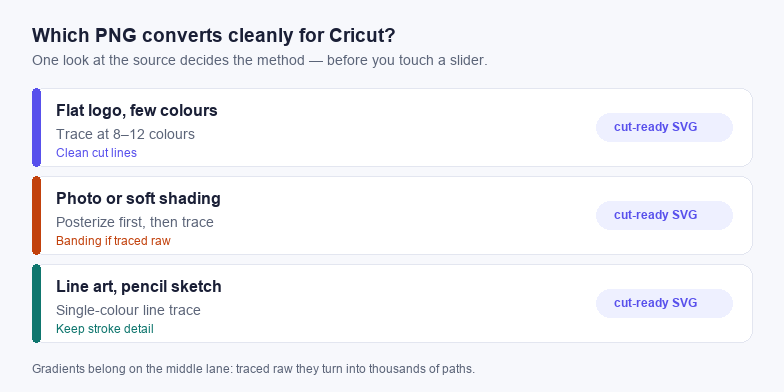
- PNG to SVG for Cricut — why Design Space needs filled, closed shapes from the same trace.
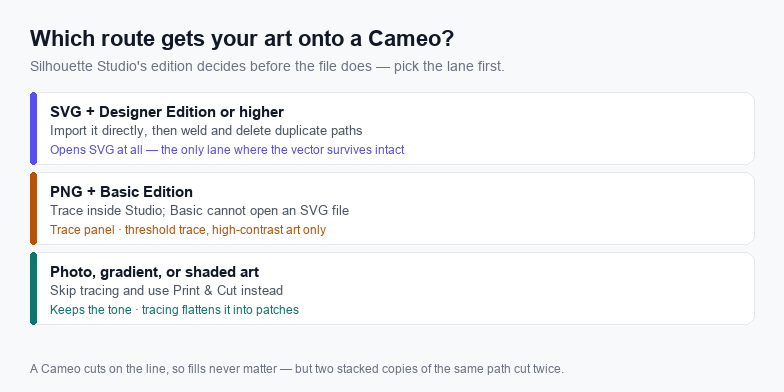
- SVG for Silhouette Cameo — which Studio editions open an SVG at all, and why buyers on the free one need a second format.
- PNG to SVG converter — the trace step this page assumes, with no upload.
- SVG editor — outline text, weld duplicates, and set units before export.
- Clipart to SVG — the right starting point when the source is flat clipart rather than a logo.
- Vectorize a logo for free — when the PNG you are selling from began life as a scan or a screenshot.
Trace it in the browser
Free, no upload, no account. Batch conversion and offline tracing with the desktop app.
Related Articles
Try These Free Online Tools
No download required — convert, compress & optimize SVGs right in your browser
PNG to SVG Converter
The trace step on this page, with a colour limit you control.
Open PNG to SVG