
Image vectorizer for Mac;
Products FAQs About Pricing

Getting Started with Super Vectorizer

  1. Welcome
  2. Introduction
  3. Install & Uninstall
  4. Registration
  5. Function Summary
  6. Quick Start
  7. Work Area Overview
  8. FAQs
  9. Tips

Register Super Vectorizer

Once you get a registration code for Super Vectorizer, you may copy and paste the code to the registering window to register after installation:
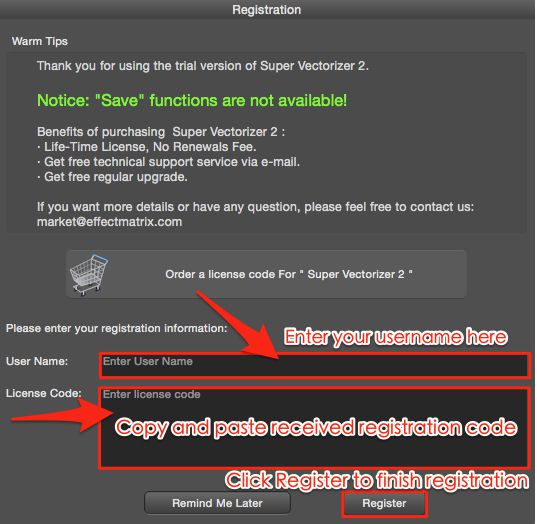
register super vectorizer Mac

Enter your name or create a new name to register the program.


Please note: You only need to register your copy of Super Vectorizer once! If you have already registered this version, the App will never request you to register for an update.

Next >

Tips and Tutorials

  • How to Convert Bitmap Image to Vector Mac?
  • How to Vectorize Line Art to Jpeg Mac
  • How Stack Scan works on Vectorizer?
  • How to Smooth Jagged Edges on Mac?
  • Convert EPS to SVG Vector Mac
  • Vector Image Editor Software Mac
  • Convert JPG to PDF Vector on Mac


  • Tips of Quickly Vectorize Image on Mac
  • How to Convert PNG Image to SVG on Mac
  • How to vectorize SVG image for Mac?
  • Trace Image in Mac
  • PSD to svg Vector Image Mac
  • PDF to SVG Vector Mac

More Online Editors

  • Convert SVG to PNG Online
  • Free SVG Editor Online
  • Compress SVG Online
  • Online Vector Line Drawing
  • Online Photo Editor
  • Convert Rar to Zip Online


Creative Photography Tools for Mac

Free Download. 10 days Free Trial with Full Features.


Mac Photo Editor Photo Background Eraser mac Photo Eraser Mac

PixelStyle Photo Editor Mac

Alternative to PhotoShop on Mac ( Filters, Text, Vector, Paint, exposure, hue...)

Super PhotoCut Pro Mac

Removing Image Background from Transparent Objects ( veil, glass, water, fire... )

Photo Eraser Pro Mac

Removes Unwanted (Watermark, Date, People...) from Photo and Scales an Image
Free Download. Full Features Free Download. Full Features Free Download. Full Features

©2002-, Effectmatrix All Rights Reserved.