
PNG to SVG for Logo
A PNG logo has to become an SVG the moment it is reused at more than one size. A bitmap logo is drawn for a single pixel grid, so every resize re-samples the edge the brand is recognised by. A traced SVG stores the outline as coordinates instead, which is why one file can serve a 16 px favicon and a three-metre shopfront sign without a second master.
The catch is that a logo is the worst possible subject for a careless trace. It is small, geometric and built from a handful of curves, so a wobble that would be invisible in a photograph reads as a broken circle on a van. There is no middle ground: a logo trace either looks like the original or looks like a tracing.
When a logo actually needs to be an SVG
Plenty of logo use is raster-only and always will be. The list below separates the jobs that cannot be done from a PNG from the ones where a PNG is the correct file.
| Job | What the output has to be | PNG enough? | Why |
|---|---|---|---|
| Vinyl cutting | Closed contour per colour | No | The blade follows a path; a raster has no path to follow |
| Embroidery | Digitised stitch path | No | Needles need direction and density, derived from contours |
| Screen print | One film per spot ink | No | Each ink is burned from a separated contour |
| Favicon and app icon | Legible at 16–32 px | Partly | A favicon is raster, but it should be rendered from the SVG master |
| Website header | Retina-crisp at any width | No | A 2× PNG blurs on a 3× screen; an SVG never does |
| Social post at a fixed size | One exact pixel size | Yes | Nothing is being resized, so nothing is lost |
The practical rule: if the logo will be resized, cut, stitched or recoloured by someone other than you, give them the SVG. If it is going out once at one size, the PNG is already the right file.
Four things a trace copies from a bad PNG
A tracer does not know what a logo is. It finds boundaries between colours and turns each boundary into a curve, and it will do that to every artefact it finds as faithfully as it does to your artwork.
- JPEG ringing. A logo saved as JPG grows a pale halo along every high-contrast edge. The tracer sees that halo as a colour, so the output gains a grey outline ring that has to be deleted by hand. If the only file you have is a JPG, convert it and then threshold the background to pure white before tracing.
- A white plate instead of transparency. A logo flattened onto white becomes a white rectangle inside the SVG. On a dark website or a black tote that plate prints or displays as a box around the mark.
- Drop shadows and glows. These are gradients, and a tracer turns a gradient into a stack of nested bands — often eight to twelve of them. The shadow also silently enters your colour count, so a two-colour logo traces as a ten-colour file.
- Anti-aliased edges on a small source. A 600 px logo has perhaps two pixels of blur on every contour. Tracing at that size converts the blur into a wavy line, and the wobble is proportional to the artwork, so it stays visible at every scale.
Judge the source before you trace it. Open the PNG at 400% and look at one straight edge. If the transition from ink to background takes more than two pixels, the file is too soft for a clean trace — get a larger original or plan on a redraw.
How many colours a logo SVG should have
Most logos are one, two or three flat inks. Set the trace colour count to that number rather than letting the converter decide, because a high limit invites the algorithm to preserve anti-aliasing as extra shades: a two-colour mark traced at sixteen colours comes back with sixteen, most of them near-duplicates of the two you wanted.
Exact brand colour is a separate step. Quantisation snaps each cluster to the nearest of 256 palette entries, so #0B5FFF can come back as #0A5EFC — close enough to look right, wrong enough to fail a brand check. After tracing, set the fill on each path explicitly to the brand hex, and count the paths while you are there: one fill per ink is the target. If two shapes share an ink, merge them into a single compound path so the next person recolours the logo once instead of eleven times.
Gradients are the exception. A mesh or linear gradient logo does not separate into inks at all, so do not trace the bands — rebuild the gradient as a real <linearGradient> or <radialGradient> definition and keep the outline as a single path.
Convert the PNG without uploading client artwork
A logo is usually someone's trademark, often under an NDA, and frequently the only copy of a brand asset that a small client still has. None of that has to leave your machine: the browser converters here read the file through the local file API and never post it to a server.
- Measure the source. A logo wants roughly 2,000–3,000 px on its long edge before tracing. Anything under 1,000 px will reproduce its softness, and no setting fixes that.
- Remove the background first. The background remover turns a flattened white box into real transparency, which stops the white plate from entering the trace.
- Trace at your ink count. Open the PNG to SVG converter and set the colour limit to the number of brand inks. For a flat vector-style mark, VTracer gives finer control over curve fitting — the VTracer page explains the two settings that matter.
- Preview at 16 px before you accept it. Shrink the result until the mark is thumbnail-sized. This is where stray specks and closed counters show up, and it is the size most of your visitors will actually see.
- Clean up in the SVG editor. Delete the halo ring, merge same-colour shapes, set the brand hex, and tighten the
viewBoxto the artwork so the logo aligns predictably in a layout. - Compress the SVG before delivery. A one-colour mark should land well under 10 KB; if it does not, the node count is the problem, not the compressor.
What makes a traced logo look homemade
- Too many nodes. A simple wordmark needs a few hundred at most. Thousands mean the tracer followed noise; raise the simplify tolerance until the curves are still circular but the count collapses.
- Live text instead of outlines. A
<text>element renders in whatever font the viewer has. Convert lettering to paths at final size, or the logo changes shape on the client's machine. - Broken counters. Holes in letters close up when the winding direction is wrong or
fill-ruleis missing. An “O” that fills solid is the classic symptom. - Specks and dust. JPEG noise becomes two- and three-pixel polygons scattered around the mark. Delete anything smaller than the thinnest real detail at 16 px.
- Hard-coded pixels. A
widthandheightin pixels with no scalableviewBoxbehaves like a flattened image again. Keep the viewBox and drop the fixed dimensions.
When redrawing beats tracing
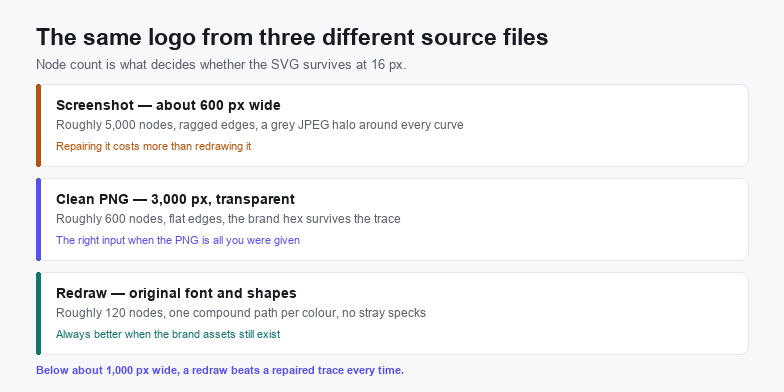
Geometric logos are faster to rebuild than to repair. If the mark is circles, rectangles and a typeface you can name, retyping the wordmark and drawing three shapes takes twenty minutes and produces something like 120 nodes with mathematically round curves. Tracing the same logo from a 600 px screenshot produces 5,000 nodes with visible flat spots, and every one of them has to be fixed by hand.
Trace instead when the mark is illustrated or hand-lettered: brush texture, uneven strokes, a mascot with real line variation. Those are exactly the qualities a redraw flattens out, and a trace preserves them. The convert logo to vector guide walks through the redraw route in detail, and the vectorize a logo page covers the settings that suit brand marks rather than photographs.
Frequently asked questions
Can I convert a PNG logo to SVG for free?
Yes. The browser converter runs on WebAssembly inside the tab, needs no account, and does not upload the file. Only the desktop app is paid, and it is only worth it for batch runs or for tracing without a browser.
Why does my traced logo look blurry at small sizes?
Because the source was small. A trace reproduces the softness it finds: two pixels of blur in a 600 px PNG become wavy contours that are still visible when the logo is scaled down. The fix is a larger original or a redraw, not a different converter setting.
Does the SVG keep my exact brand colours?
Not automatically. Tracing quantises the image to a limited palette, so each colour lands on the nearest cluster and can drift by a few units per channel. Set the fill attribute of each path to the brand hex after tracing and the file will match the style guide exactly.
Related SVG Workflows
A logo is one input to the same tracing engine. These pages cover the neighbouring jobs.
- Vectorize a logo — tracing settings tuned for brand marks instead of photos.
- Convert logo to vector — the full professional walkthrough, including the redraw route.
- Vectorize a logo for free — what free tools can and cannot deliver on a brand asset.
- Create an SVG logo from an image — rebuilding a mark when only a picture survives.
- PNG to SVG for Cricut — where the traced logo has to become a closed cut contour.
- PNG to SVG for Etsy — packaging a logo file for sale as a digital product.
- SVG editor — merge paths, set brand hex and tighten the viewBox.
Trace it in the browser
Free, no upload, no account. Batch conversion and offline tracing with the desktop app.
Try These Free Online Tools
No download required — convert, compress & optimize SVGs right in your browser
PNG to SVG Converter
The trace step on this page, with a colour limit you control.
Open PNG to SVGBackground Remover
Kill the white plate before it becomes a shape in the SVG.
Remove Background