
Create SVG with ChatGPT — Prompts That Produce Real Vector Paths
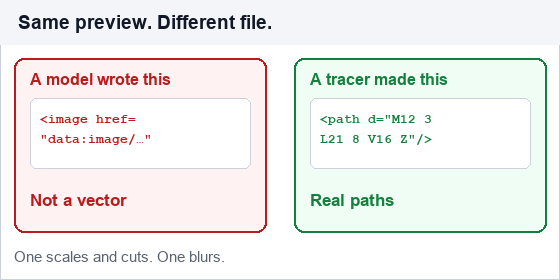
You can create an SVG with ChatGPT in about ninety seconds. The problem is what comes back: usually an <svg> tag wrapped around a base64 PNG. It previews perfectly, it opens in a browser, and it is not a vector at all. It cannot be cut on a Cricut, it cannot be recolored in Illustrator, and it will not scale past its original pixel size.
This guide is about the difference between asking for SVG and getting geometry. The prompts below are built around that distinction, and the validation checklist at the end catches the failure in under a minute.
Three ways ChatGPT output fails as a vector
| Failure | What you see | Why it happens |
|---|---|---|
| Wrapped bitmap | <image href="data:image/png;base64,…"> inside the SVG | The model "draws" by embedding pixels. Looks identical in a preview, useless downstream. |
| Missing namespace | The file renders in Chrome but fails in Illustrator or Inkscape | xmlns="http://www.w3.org/2000/svg" omitted. Browsers tolerate it; design software does not. |
| Text left as text | Letters are cut off or substituted when opened elsewhere | <text> depends on a font installed on the viewer's machine. For a logo, glyphs must become paths. |
There is a fourth, subtler one: geometry that is technically valid but hand-waved. If the model writes d="M10 10 L100 100" for a circle, you get a line. Models are good at writing code and bad at imagining shapes numerically.
The prompt structure that works
Four parts, in this order. Skip any one of them and you get a different failure.
- Declare the output contract. State the exact format you will accept, including the attributes that are usually dropped.
- Describe the geometry, not the idea. "A shield with a flat top and a V bottom, 2:3 ratio" beats "a security logo".
- Constrain the palette and stroke. Hex values, no gradients, single stroke width. This is what makes the result editable later.
- Forbid the shortcuts. Explicitly ban base64,
<image>, embedded fonts, and external references.
Write an SVG icon of a mountain with a sun, 24x24 viewBox.

Requirements:
- Root element must include xmlns="http://www.w3.org/2000/svg" and viewBox="0 0 24 24"
- All shapes must be <path>, <circle>, <rect>, or <polygon> with numeric coordinates
- 2 colors only: #1F2933 and #F5A623. No gradients, no filters, no opacity
- Stroke width 1.5, round line joins, no stroke on the sun
- Do NOT use <image>, base64 data, <text>, or external fonts
- Output only the SVG code, no explanation, no markdown fence

Then list every coordinate pair you used and confirm it falls inside the viewBox.
The last line matters more than it looks. Asking the model to re-read its own coordinates catches off-canvas geometry before you paste it into anything.
Six prompts that produce usable results
1. Icon set with consistent weight
Ask for the whole set in one response so the stroke width and corner radius stay identical across icons. Reusing a chat session matters here — a fresh session forgets the convention you established.
2. Logo mark, single color
Force one color and no strokes at all, so the mark is pure fill. Fill-only logos survive font substitution, scaling, and single-color cutting.
3. Convert a description into a cut-ready outline
Add "all shapes must be closed paths with no overlapping segments" — that is what a vinyl cutter needs. Without it you get open strokes and unclosed shapes that fail in Design Space.
4. Text as outlines
A model cannot export font glyphs as paths reliably. Instead, ask it to draw simple geometric letterforms (block letters built from rectangles and polygons) if the text is short, or set the type in a real design tool and outline it there. For anything longer than a word, use the second option.
5. Chart or diagram in SVG
The best use case for a text model, because the output is data-driven and verifiable: ask for the values in a comment above each element so you can check the geometry against the numbers.
6. Cleanup pass on existing code
Paste an existing SVG and ask for a version with merged paths, two-decimal precision, and unused <defs> removed. Models are genuinely good at this — it is text editing, not drawing.
Validate in sixty seconds
- Search the file for
base64. If it appears, you have a bitmap. Stop. - Check
xmlnsandviewBoxare both present on the root element. - Count
<pathelements. A simple icon should have between 2 and 30. Hundreds means the model traced something badly. - Open it in one non-browser tool — Inkscape, Illustrator, or Cricut Design Space. Browsers are too forgiving to be a test.
- Scale it to 400%. Any blur means a raster is hiding inside.
The fastest fix for a bad result: do not negotiate with the model. Drop the file into the SVG editor to see what is actually inside it — the layer list shows immediately whether you have paths or an embedded image.
When to stop prompting and trace instead
Prompting is the right tool when the shape does not exist yet. It is the wrong tool when the shape already exists as an image.
| Situation | Best approach | Why |
|---|---|---|
| You have a PNG or JPG of the logo | Trace it | The pixels already describe the shape. Tracing recovers it exactly; prompting guesses at it. |
| You need an icon that does not exist | Prompt, then clean up | No source image to trace. The model gives you a starting geometry. |
| You have a screenshot of a design | Trace, then simplify | Screenshots carry anti-aliasing; tracing plus path simplification removes it. |
| You need a photo turned into line art | Line art trace | Models cannot see the image's structure well enough to draw it. |
| You need 20 icons in a consistent style | Prompt one, then edit the rest by hand | Consistency across a set is where generation drifts most. |
The practical rule: generation for shapes that do not exist, tracing for shapes that do. Mixing them up is why people conclude "AI can't do SVG" — it can, just not the part that requires looking at pixels.
Frequently asked questions
Can ChatGPT create a real SVG file?
Yes, when the prompt forbids embedded images and requires explicit geometry. The default output frequently contains a base64 bitmap instead, which previews correctly but is not a vector.
Why does my ChatGPT SVG look fine but fail in Cricut Design Space?
Usually one of three things: an embedded bitmap, text elements with no font available on your machine, or open paths with no closed contours. Search the file for base64 and <text first.
Can ChatGPT convert a PNG to SVG?
Not by tracing. It cannot read pixel data and reconstruct contours. It will either describe the image in code — which is a redraw, not a conversion — or embed the bitmap. Use a tracer such as PNG to SVG for actual conversion.
Which is better for SVG, ChatGPT or Claude?
Claude tends to hold structure over longer files and is less likely to truncate a complex path set; ChatGPT is quicker for short icons. Neither traces images. See the Claude guide for the prompt differences.
Related SVG Workflows
What you do next depends on why you needed the file. These pages cover the cases that come up most often after a generated or traced SVG lands on your desk.
- Create SVG with Claude — the same task with an assistant that holds long path sets together.
- Create SVG with Google Gemini — why generated images are raster, and where Gemini does help.
- PNG to SVG High Quality in 2026 — what actually controls fidelity when you trace instead of prompt.
- Image Trace for PNG and PDF — format-by-format tracing workflow when the artwork already exists.
- AI Image to SVG Converter Guide — what happens when you run a generated image through a tracer.
- SVG Editor Online Free — fix the missing namespace or stray ids by hand.
- PNG to SVG Online — convert the original image instead of redrawing it.
- SVG MCP Server for AI Agents — how an assistant reaches a real converter through a tool call.
Have an image, not a prompt?
Trace it into real paths in the browser — no upload, no account. Batch conversion and offline work with the desktop app.
Related Articles

Try These Free Online Tools
No download required — convert, compress & optimize SVGs right in your browser
PNG to SVG Converter
Convert a PNG, JPG, BMP or WebP image into scalable SVG paths in your browser.
PNG to SVG OnlineSVG Editor
Open the generated file and check whether it holds real paths or an embedded bitmap.
Open SVG EditorSVG Compressor
Strip metadata and reduce path precision before you ship the file.
Compress SVG Online