
Create SVG with Google Gemini — What It Can and Cannot Do
Gemini is the most misunderstood of the three assistants in vector work, and the misunderstanding starts with a name collision. Gemini can generate images. Those images are raster. An SVG is not an image in that sense — it is markup describing geometry. So "Gemini makes images" and "Gemini makes SVG" are two different claims, and only the second one is what you need for a cut file.
That said, Gemini has one capability the others handle less well: it reads an uploaded image and can describe its structure accurately enough to be useful before you trace it. That is a genuinely practical workflow, and it is the part worth learning.
Clear up the confusion first
| What you asked for | What you get | Is it a vector? |
|---|---|---|
| "Generate an image of a fox logo" | A photo-like raster image, usually PNG or JPG | No. It is pixels at a fixed resolution. |
| "Write SVG code for a fox logo" | Markup with <path> elements | Yes, if the prompt forbids embedded images. |
| "Convert this PNG to SVG" | Either a description, a redraw, or a base64 wrapper | No. Models do not trace pixels. |
If your goal is a Cricut cut file, only the second row helps. The third is the one people keep trying, and it does not work in any assistant.
Three jobs Gemini does well
1. Turning a screenshot into an accurate brief
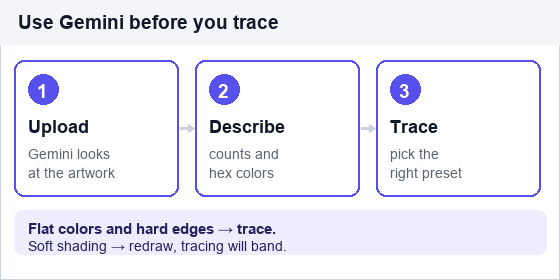
Upload the image and ask for a geometric description instead of code: shape count, dominant colors as hex, symmetry, aspect ratio, and which elements are solid versus outlined. That brief is then usable as the input for a code prompt — or as a decision aid for how to trace.
Look at this logo. Do not write code yet.

Tell me:
1. How many distinct shapes it contains
2. The exact hex colors, with approximate percentage of area for each
3. Whether any part uses a gradient or a soft edge
4. The bounding box aspect ratio
5. Whether the type is outline or solid, and how many words

Be specific about counts. I need this to choose vectorization settings.
That last line is the whole trick. The answer decides your approach: three flat colors and hard edges means a clean trace with a low color count; a gradient and soft edges means tracing will produce banding and you should redraw instead.
2. Generating simple, constraint-heavy SVG
Gemini follows explicit negative constraints reasonably well — better than it follows aesthetic direction. Give it a strict schema and it complies; ask it to "design something modern" and you get decoration.
3. Structured output at scale
If you need 20 icons described consistently, or an SVG per row of a dataset, Gemini's structured output handles the format discipline. Ask for one row per icon with fixed fields, then generate the markup in a second pass.
A working prompt
Write one SVG icon: a padlock, viewBox 0 0 24 24.

Rules:
- xmlns="http://www.w3.org/2000/svg" on the root element
- Exactly 2 shapes: a rect for the body, a path for the shackle
- fill="#1A1A1A", no stroke, no opacity
- No <image>, no base64, no <text>, no filters, no gradients, no ids
- Integer coordinates only, all inside 0–24
- Output only the SVG element, nothing else
Two shapes is not a limitation, it is a specification. Left unbounded, generated icons accrete extra paths — a highlight here, a shadow there — and each one is another thing to delete before cutting.
The workflow that actually saves time
This is the sequence worth adopting, because it uses each tool for what it is good at:
- Gemini describes the source image. Upload the logo, get shape count, hex colors, and whether gradients are present.
- You pick the method. Flat colors and hard edges → trace. Gradients and soft shading → redraw, because tracing will band.
- Trace with the right preset. Few colors and high simplification for the logo case: PNG to SVG. Photos and shading: Image to SVG. Sketches: Line Art to SVG.
- Validate in a non-browser tool. Inkscape, Illustrator, or Cricut Design Space. Browsers accept files that cutting software rejects.
Step 2 is where most time is lost. People trace an image that should have been redrawn, get a 4,000-path mess, and blame the tracer. The descriptor pass costs thirty seconds and prevents that.
What to check on any generated SVG
xmlnspresent? Missing means it will fail outside a browser.viewBoxpresent and matching the coordinates? A 24-unit viewBox with coordinates up to 200 renders as a cropped corner.- Any
base64? If yes, it is a raster in disguise. - Any
<text>? Convert to paths before cutting, or the font will differ on another machine. - Path count sane? A simple icon should be single or low double digits.
The honest summary: Gemini is a strong analyst of images and a serviceable writer of simple SVG. It is not a converter. When someone tells you Gemini turned their PNG into an SVG, check the file for base64 — the answer is usually there.
Frequently asked questions
Can Gemini convert a PNG to SVG?
Not by tracing. It can describe the image, write SVG that approximates it, or embed the bitmap in an SVG wrapper. None of those is a conversion. Use a tracer for real contours.
Is an image generated by Gemini a vector?
No. Generated images are raster with a fixed pixel resolution. To get a vector you either trace the result or ask for SVG code instead of an image.
Can Gemini read an SVG file I upload?
Usually, if it is text-based, which SVG always is. It can explain the structure and find problems such as missing namespaces or duplicate ids. It cannot reliably fix geometry it cannot see rendered.
Gemini or ChatGPT for SVG code?
Similar for short icons. Gemini is more useful when the task starts from an image you need described. Neither one traces. For long, structure-heavy files, Claude tends to hold together better.
Related SVG Workflows
What you do next depends on why you needed the file. These pages cover the cases that come up most often after a generated or traced SVG lands on your desk.
- Create SVG with ChatGPT — prompt structure that avoids a base64 wrapper.
- Create SVG with Claude — keeping 40-plus-path files consistent across one pass.
- AI Image to SVG Converter Guide — what a real conversion looks like versus a redraw.
- PNG to SVG High Quality in 2026 — resolution, color count, and path detail explained.
- Image Trace for PNG and PDF — tracing a screenshot or a PDF page into clean paths.
- Line Art to SVG — the right tracer when the source is a sketch.
- VTracer Online — full control over color precision and path simplification.
- SVG MCP Server for AI Agents — how agents call a converter directly.
Turn the image into real paths
Browser-based tracing with no upload and no account. Batch and offline conversion with the desktop app.
Related Articles

Try These Free Online Tools
No download required — convert, compress & optimize SVGs right in your browser
VTracer Online
Color tracing with control over palette size and path simplification.
Open VTracer OnlinePNG to SVG Converter
Trace flat logos and clipart with hard edges and few colors.
PNG to SVG Online