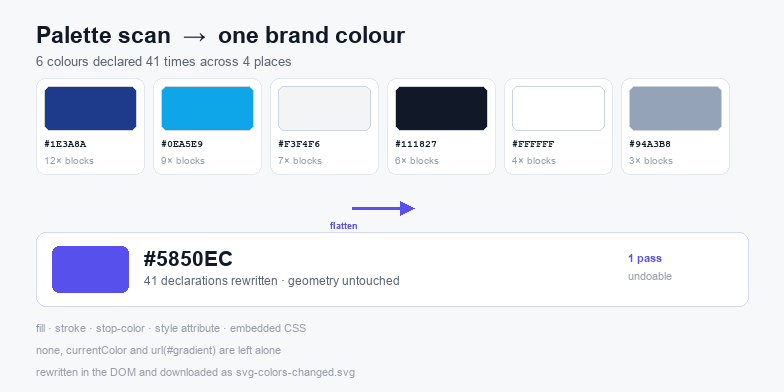
Search-and-replace misses half the colours in a real SVG. They hide in four different places: fill and stroke attributes, stop-color on gradient stops, inline style declarations, and rules inside an embedded <style> block. This tool reads all four, shows what it found as one palette, and rewrites them together.
How the palette scan works
On load, the file is parsed as XML and every element is walked once. Colours are collected from the presentation attributes fill, stroke, stop-color, color, flood-color and lighting-color, from the style attribute, and from any <style> element text. Each value is normalised: #f00, #FF0000, rgb(255,0,0) and red all collapse into one swatch with a combined count, so a palette of forty declarations usually turns out to be six colours.
Tokens that are not literal colours are excluded on purpose. none, transparent and currentColor stay out of the palette because replacing them changes behaviour rather than appearance, and url(#gradient) is a reference, not a value. If you flatten those into a solid colour you lose the gradient structure entirely.
Replacing one colour versus flattening the file
Replace selected takes the swatch you clicked and rewrites only that value. This is the safe path for a logo that has to keep its dark ink and swap its accent. Flatten all to this maps every swatch in the palette to the colour in the picker, which is how you turn a multi-colour icon set into a single-colour pictogram for a one-colour print run or a mask.
Both operations run on the parsed document, not on raw text, so the replacement cannot accidentally hit a number that looks like a colour. After each pass the palette is re-scanned, which is the fastest way to confirm that zero declarations of the old value remain.
Gradients, patterns and currentColor
Gradient stops are ordinary elements with a stop-color attribute, so they are rewritten like any other colour. That is usually what you want: a two-stop brand gradient keeps its shape and takes the new hues. A gradient that relied on #FFFFFF and #000000 for a fade will, after flattening, become a flat block — the tool does not preserve perceived luminance, because inventing a ramp is worse than letting you pick one.
currentColor is deliberately untouched. It inherits from CSS color, which is how icon systems theme themselves; rewriting it to a literal would break the inheritance you set up. The same applies to anything styled by an external stylesheet: the file simply does not contain those values, so change them where they live.
Brand palettes: keep one master, swap per client
A practical workflow for client work is to keep a single master SVG and a short list of palette pairs — primary, secondary, ink. Load the master, flatten or swap to the client's primary, download, then reset and repeat. Because geometry is never touched, the resulting file stays dimensionally identical to the master: same viewBox, same path data, same stroke widths, so nothing shifts on a cut line or in a print layout.
If the file needs more than a recolour, the SVG editor handles geometry and the SVG validator catches structural faults that a recolour cannot fix, such as duplicate ids or a missing namespace.
Undo, download and file safety
Every replacement stores a snapshot before it runs, so Undo steps back one pass at a time and Reset restores the file exactly as it was loaded. Download SVG writes svg-colors-changed.svg with the same XML declaration as the source, and Copy code puts the markup on the clipboard for a design tool or a code editor.
Nothing is uploaded. The file is read with FileReader, edited in the DOM and serialised locally, so the tool keeps working with the network off, and no copy of your artwork is kept between visits.