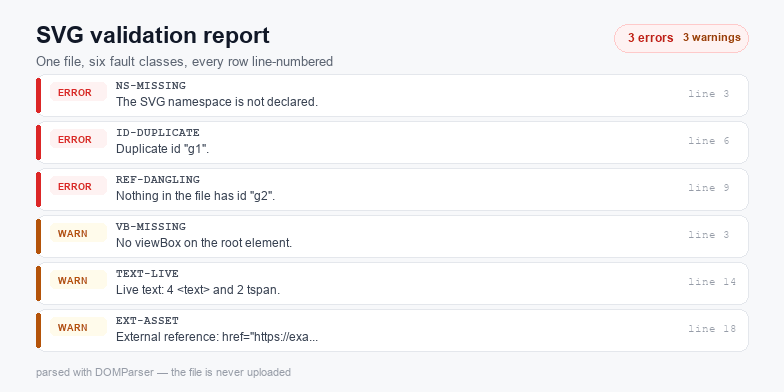
An SVG that opens in one app and fails in another almost always carries one of six XML-level faults: a missing xmlns, a viewBox that disagrees with width and height, duplicate id values, a reference to an id that no longer exists, an external image or font, or an inline script the next editor strips.
What the validator checks
Every rule below runs on the parsed DOM, not on a text search, so namespaces and inherited attributes are judged the way a rendering engine judges them. Findings are sorted by severity and the file is never modified.
The faults that actually break files
A missing namespace. An <svg> without xmlns="http://www.w3.org/2000/svg" still renders when it is inlined in HTML, because the HTML parser supplies the namespace. Save the same markup as a .svg file and it stops being an SVG document: the browser shows the text or an error, and every tool downstream, from Figma to Illustrator, treats it as an unknown XML dialect.
A viewBox that does not match width and height. The viewBox defines the internal coordinate system; width and height define the box. Give a 24×24 icon a viewBox="0 0 48 48" and it will look correct at its natural size but sit at half scale once a CSS rule takes over the sizing. Give it units inside the viewBox (0 0 24px 24px) and Safari drops the attribute entirely.
Duplicate ids. Copy-pasting a group inside an editor duplicates every id it contains. The document stays valid XML, so nothing complains, but a <use href="#arrow"> or a clip-path="url(#clip1)" now resolves to whichever element the parser met first. On a multi-layer cut file this surfaces as one shape silently borrowing another shape's clip.
Dangling references. The mirror image: the id was renamed or deleted but the reference stayed. Browsers ignore the missing paint server, so the shape renders black or vanishes, which reads as "the artwork is broken" rather than "one attribute is wrong".
External assets. Remote images, webfonts and @import rules make the file depend on a network and, in a browser context, leak a request to a third party. They also break the most common expectation of an SVG: that it is one self-contained file you can hand to a cutting machine.
Scripts and event handlers. A <script> element or an onload attribute turns a graphic into executable code. Browsers block script execution in <img> contexts but not when the file is opened directly or inlined, which is exactly how SVG uploads become an XSS vector.
Reading the report
Each row carries a rule code, a severity and the line where the fault was found. Error means the file will not render correctly or is unsafe to publish. Warning means it renders today but will fail in another application, a print workflow or a cutting machine. Notice is housekeeping: an oversized base64 block, a defs id nothing references, a missing accessible name.
The summary line counts elements, paths, ids and unique paint colours, so you can tell a 3 KB icon from a 300 KB trace before you open it. The Download JSON button writes the same findings as svg-validation-report.json, which is convenient when you are checking a batch of files from a build script.
Fixing the five most common errors
1. Restore the namespace
<svg xmlns="http://www.w3.org/2000/svg" viewBox="0 0 24 24">If the file also uses xlink:href, add xmlns:xlink="http://www.w3.org/1999/xlink" as well, or better, replace every xlink:href with plain href, which every current browser supports.
2. Rebuild the viewBox
Compute the bounding box of the artwork and write it as min-x min-y width height with no units. Keep width and height proportional or drop them and let CSS size the element. The SVG resize tool rewrites the box for you when you only need the numbers to change.
3. Rename the duplicate id
Give every duplicate a unique suffix, then update the references that pointed at the original. The validator reports the line of each duplicate, so the fix is mechanical: rename, re-run, repeat until the count reaches zero.
4. Delete or repoint dangling references
Either restore the id on the <defs> child or remove the url(#...) attribute so the element falls back to its own fill. Removing the attribute is safer than inventing a new gradient.
5. Drop inline scripts
Remove <script> blocks and every on* attribute before publishing. Animation belongs in CSS or SMIL (<animate>), which survive sanitizers; JavaScript does not.
Why validate before an upload or a cut
Cutting machines and print workflows are less forgiving than browsers: a missing viewBox becomes a wrong physical size, an external image becomes a blank rectangle, and a duplicate id becomes a misplaced cut line. Running the file through the validator first turns those into a one-minute fix instead of a wasted material run. After the markup is clean, the SVG compressor can strip the comments and metadata the report flags, and the colour changer handles the palette recolor that usually follows a validation pass.
Privacy
The file is read with FileReader and parsed with DOMParser. Both run inside the tab, so the source never leaves your device and the tool keeps working with the network switched off. There is no upload endpoint, no analytics on the pasted markup, and no copy of your artwork is stored between visits.