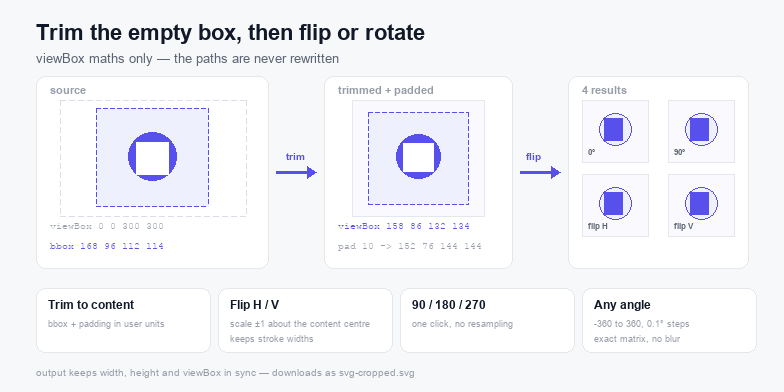
Cropping an SVG means rewriting the viewBox, not deleting geometry — set the box to the content bounding box and the empty margins stop taking up space while every path, gradient and id stays in the file.
What this tool does to the file
Three operations, all of them expressed as numbers in the root element. Nothing walks the path data, so a crop-and-flip of a 400 KB illustration returns exactly 400 KB of untouched paths and a different viewBox.
- Trim — measures the geometric bounding box of the whole drawing, adds the padding you choose, and writes that rectangle as the new
viewBox. Stroke width sits outside a geometric box, so keep a padding of at least half the heaviest stroke. - Flip — wraps the artwork in one group and applies
scale(-1,1)orscale(1,-1)about the centre of the content box, then re-measures. - Rotate — the same group gets a rotation matrix about the same centre, at 90, 180, 270 or any angle you type to a tenth of a degree.
Why the viewBox is the right place to crop
A design tool will happily delete the artboard margin for you, but it does so by rewriting every coordinate, which is how icons come back with transform="translate(...)" stacked three deep and strokes that no longer line up with their shapes. The viewBox is a window: change the window and the drawing is untouched. That matters when the file still has to open in Illustrator, Inkscape, a laser cutter and a CMS field that strips transforms it does not understand.
The same reasoning applies to rotation. Rotating the coordinates of a path is lossy for curves in a way that a matrix is not — a 90° rotation as a matrix is exact, and the arcs, dash offsets and gradient vectors follow it without rounding.
Running order: trim, then flip, then rotate
The order is fixed on this page because it produces the most predictable result: measure the content, apply the orientation change, then measure again for the final window. Two consequences are worth knowing.
First, padding is applied after the transform, so a padding of 8 stays 8 user units on screen whichever way the artwork faces. Second, a rotation of 45° grows the box: the axis-aligned bounding box of a rotated square is bigger than the square, exactly as it should be, and the reported size reflects that rather than clipping the corners. If the numbers look larger than you expected at odd angles, that is the corner geometry, not a bug.
When trimming is the actual fix
Empty margins are the most common reason a logo looks tiny inside its frame on a website, on a sticker proof, or in a cutting program that sizes by the bounding box. A wordmark exported from Figma often carries 40% empty canvas, so the same width="100%" rule renders the visible mark at 60% of the space you gave it. Trim the box and the artwork fills the frame with no CSS changes.
Trim also helps before tracing or before handing the file to a machine that centres by the page: a screenshot-derived SVG with slack on one side is the usual cause of “the cut is off”. Once the box hugs the content, the SVG resize tool can set a physical size, the SVG compressor can drop the metadata, and the SVG code editor is there if you would rather type the four numbers by hand.
Flip is not mirror-the-file
Flipping with a negative scale is what every renderer does, and it is why text inside a flipped group comes out mirrored while an icon does not change a pixel. If the artwork contains <text>, flip it back after the export or convert the text to paths first — the SVG validator reports live text as a warning for the same reason.
Privacy
The file is read with FileReader and transformed with the browser DOM. Both run inside the tab: no upload endpoint, no request per edit, no copy of the artwork kept between visits. The tool keeps working with the network switched off.