
Base64 exists so that binary-safe data can travel through channels that only carry text. An SVG is already text, which makes the conversion feel pointless — until the text has to sit inside a JSON string, a YAML config, a CSS custom property or an email body, where a stray newline, a quote or a non-ASCII character is a syntax error. Base64 removes all three problems at a fixed cost of one third.
What Base64 does to an SVG, and what it does not do
The encoder reads the file three bytes at a time and maps each group to four characters from a 64 symbol alphabet. Nothing is compressed, encrypted or validated: the string is a faithful transcript of the bytes, which is why decoding gives back the exact same file, indentation and comments included. The size rule is therefore arithmetic, not approximate:
| Source | Bytes | Base64 chars | Growth |
|---|---|---|---|
| A minified icon, 1 line | 4n | 4n × 4/3 | +33.3% |
| Same icon, wrapped at 76 | 4n | + 1 byte per line | +33.3% plus ~1.3% |
| Hand-formatted export with comments | often 3–5× larger | grows with it | +33.3% of the bloated size |
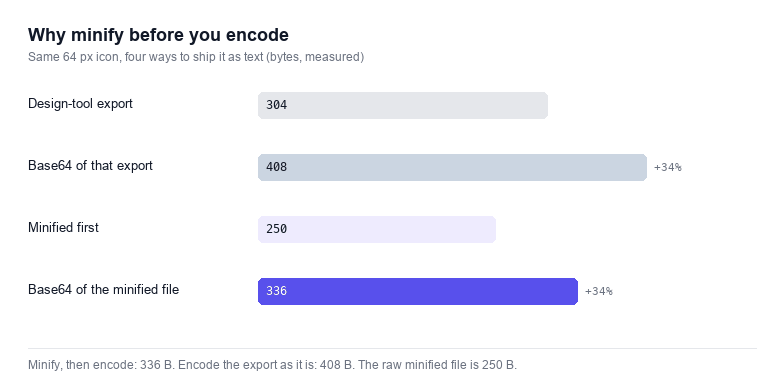
The practical consequence is that minifying before encoding matters far more than any encoder setting. Indentation is the single largest thing in a design-tool export: two spaces per level across a forty node illustration is several kilobytes, and Base64 then charges a third on top of the indentation you never needed.
Why minify before you encode
The checkbox at the top strips comments, collapses runs of whitespace between tags, removes empty class="" and id="" attributes, and trims the newlines that editors add after every element. It does not touch path data, coordinates, colours or structure — those are exactly the bytes the renderer needs. On the sample above the difference is large enough to see in the counters, and on real exports from Illustrator or Figma it is usually bigger, because those files carry <metadata>, <desc> and editor namespaces that nobody misses.
One thing minifying must not do is break a <text> element. Collapsing whitespace inside text content changes what is rendered, so the minifier only collapses between tags, never inside a text node. If your SVG uses xml:space="preserve", encode it as it is and skip the checkbox.
Line wrapping, and where it bites
Wrapping at 76 columns is a MIME convention from email and PEM certificates, where every line of payload had to fit a fixed-width transport. It survives in base64 -w 76 and in the output of openssl. In a browser the wrapped form is only correct inside something that tolerates whitespace: a .txt file, a MIME part, a text block you will unwrap in code.
It is wrong in three places you are likely to hit. Inside a CSS url() a newline terminates the token. Inside a JSON string a raw newline is illegal and must be escaped as \n, which costs more bytes than the wrap saved. Inside an HTML attribute the newline becomes part of the value. That is why the default here is one line, and why the wrapper is opt-in rather than automatic.
UTF-8: the bug that eats CJK titles
btoa() accepts a binary string, so anything above code point 255 throws InvalidCharacterError. The usual workaround, btoa(unescape(encodeURIComponent(svg))), works but is deprecated and slow; here the markup goes through TextEncoder and then a plain byte walk. The difference shows up the moment an SVG carries a <title> in Chinese, Japanese or Korean, or a typographic dash in a label: the naive version fails outright, a half-fixed version silently encodes UTF-16 code units and returns a string that decodes to mojibake.
The decoder on this page is the mirror image. It builds a byte array from the Base64 string, then runs TextDecoder over it, so the round trip is exact for the whole BMP and for characters outside it. The Test round trip button encodes the current markup, decodes it again and compares the two strings — the fastest way to prove an encoder is honest.
Base64 versus a plain file: when each wins
A Base64 SVG costs 33% more bytes for no caching benefit of its own and cannot be edited by opening it in a text editor. It wins in a narrow set of cases, and loses everywhere else:
- Wins inside a single-file deliverable: a demo page, an email template, a JSON fixture or a test snapshot that must not depend on a second request.
- Wins where the consumer refuses non-ASCII: a config file with an ASCII-only parser, a log line, a code field in a form.
- Loses for site assets, where a normal
.svgURL is cached, compressed by the server and served from a CDN. - Loses when a human has to read or tweak the markup later.
If the goal is a single self-contained file rather than a string, the data URI builder is the closer tool: it produces the data:image/svg+xml form with the escaping each context needs. And if the goal is a QR code with the same one-file property, the QR code generator now writes a single path.
Decoding back: what a valid round trip proves
Feed any Base64 string to the decoder and it will tell you three things: whether the alphabet and the padding are valid, how many bytes came out, and whether the result parses as XML. A string that starts with PHN2Zz is <svg in Base64 — a useful sanity check when you are looking at a value in a database and wondering what it is. The decoder also accepts the data:image/svg+xml;base64, prefix and ignores line breaks, so you can paste a value straight out of a stylesheet.
What it will not do is guess: if the bytes decode to something that is not XML, you get the raw text and the parser error rather than a silent success. That distinction is the whole point of a decoder you can trust.