
A data URI is the file itself, spelled into the URL. data:image/svg+xml,<svg…> is a complete SVG document that a browser will paint wherever a URL is accepted, with no second request. The encoding is the boring part and the escaping is the part that breaks builds, so this page does both and shows the byte cost of each.
A data URI is the file, not a link
Three pieces: the mediatype, an optional ;base64 marker, and the payload. Without the marker the payload is the document itself, percent-encoded where necessary; with it, the payload is Base64 of the same bytes. Both are legal, both render identically, and the browser does not care which you used.
| Form | Looks like | Readable | Cost |
|---|---|---|---|
| Percent-encoded | data:image/svg+xml,%3Csvg%20… | Yes, after decoding the escapes | Only reserved characters expand |
| Base64 | data:image/svg+xml;base64,PHN2Zy… | No | Always +33% |
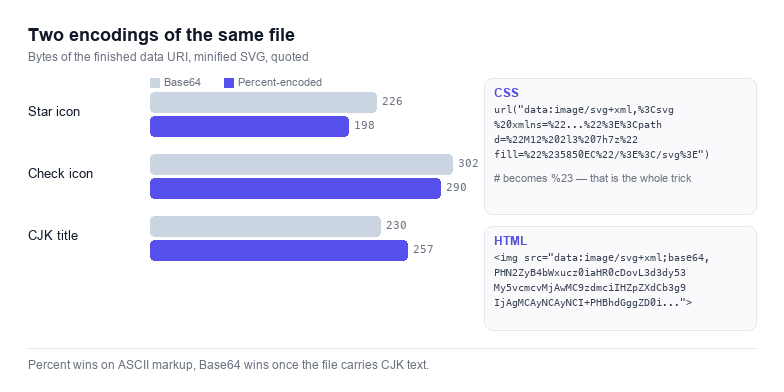
The size counter under the two outputs settles the argument for your specific file rather than in general: small markup with few reserved characters is usually shorter percent-encoded, while a file with dense path data and non-ASCII titles is shorter in Base64.
Base64 or percent-encoded: measuring the difference
Percent-encoding escapes only the characters that would otherwise confuse a parser — here < > # % " ' ( ) and whitespace, plus everything outside ASCII. A star icon that is 300 bytes of markup gains perhaps 60 escaped characters, which is far less than the 100 characters Base64 would add. The same icon with a d attribute of four thousand characters, however, contains almost nothing worth escaping, so percent-encoding barely grows it while Base64 adds a third.
Non-ASCII flips the comparison hard: one CJK character is three UTF-8 bytes, and percent-encoding writes all three as %E4%B8%AD. A title block in Chinese can triple the URI, at which point Base64 is the smaller of the two.
The escaping rules per context
This is where most broken inline SVG comes from, and none of it is about encoding:
| Context | What breaks | What to do |
|---|---|---|
CSS url() | A raw # starts a fragment, so fill="#5850EC" truncates the value and nothing renders | Escape # as %23, and quote the URI |
| CSS value | Parentheses and quotes end the token early | Escape them, or use Base64 |
| HTML attribute | Double quotes inside a double-quoted attribute close it | Single-quote the attribute or encode the quotes |
| JS string | Quotes, backslashes and line breaks | Wrap in the opposite quote, escape the rest |
| JSON value | Anything that is not a valid string body | JSON-escape the string, never paste raw markup |
The four boxes in the tool above apply exactly these rules to the URI you built, which is why they are not interchangeable: the CSS box has %23 where the HTML box has a plain #, because only CSS treats it as a fragment marker.
Where an inline SVG actually helps
- Critical icons above the fold, where one fewer request matters more than one more cache entry.
- Email templates, where external images are often blocked but inline data is not.
- Single-file deliverables: a demo page, a component test, a document you will email to a client.
- Print and PDF pipelines that need the artwork inside the document.
- Favicons and mask icons in a build step, where a data URI removes a file from the pipeline.
It stops helping when the same illustration is used on twenty pages: the bytes ship twenty times, and no CDN or cache can deduplicate them. For anything reused, a normal .svg file behind a cache header is smaller in total even though it costs a request.
Decoding a data URI you found
Paste any data URI into the decoder and it will tell you whether the payload is Base64 or plain, how many bytes came out, and whether the result parses as XML. This is the quickest way to answer "what is this value in our stylesheet" without opening a terminal. If you need the raw Base64 string rather than the URI wrapper, the SVG to Base64 page is the direct route, and if you want the same one-file property for a QR code, the QR code generator writes a single path SVG.
# first. Nine out of ten “my inline SVG does not show up” cases are an unescaped hash inside a CSS url().