
Figma SVG Clean Code: What to Delete After Export
Seven deletions take a Figma-style 24 × 24 icon export from 5,875 bytes to 1,921 bytes — 67.3 % smaller — while 99.76 % of the rendered pixels stay identical. Measured by rasterising both files at 240 × 240 in Chrome 157 and diffing the two images: 141 of 57,600 pixels move, at a mean error of 0.04/255.
The interesting part is which deletion pays. In this file the twelve paths hold 1,083 characters of path data — 18.4 % of the file — while the <defs> block holds fifteen definitions of which four are referenced at all. Cutting the eleven nobody asks for saves 2,275 bytes, seven times more than rounding every coordinate to two decimals (306 bytes).
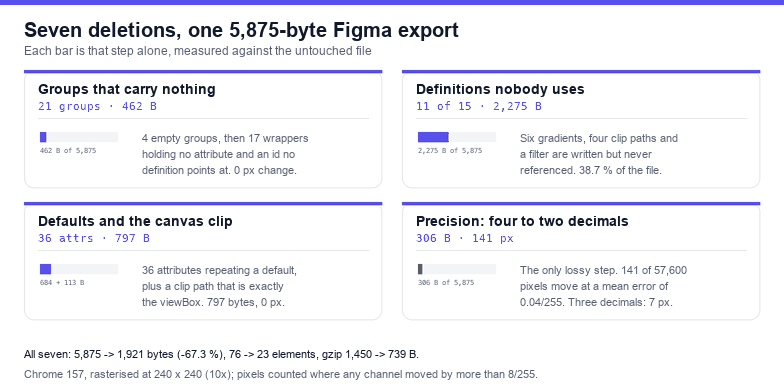
What the file actually spends its bytes on
Before deleting anything, count. The fixture is a realistic Figma export: a 24-unit canvas, twelve paths wrapped one group each, a root group carrying a full-canvas clip path, nine gradients, five clip paths and one drop-shadow filter. It comes out at 76 elements, 222 attribute uses over 31 unique attribute names (8 of them hyphenated), and 5,875 bytes.
| Where the bytes live | Count | Bytes | Share |
|---|---|---|---|
Path data (d) | 12 attributes | 1,083 | 18.4 % |
<defs> contents | 15 definitions | 2,660 | 45.3 % |
| Element tags + attributes | 76 elements | remaining 2,132 | 36.3 % |
That last row is why "minify the coordinates" advice disappoints people. Coordinates are a fifth of the file; the other four fifths are structure. Delete in the order below and each step is independent, so you can stop whenever the diff starts to move.
Step 1: delete the empty groups (4 groups, 95 bytes)
Figma keeps the wrapper of a frame or a boolean that ended up with nothing inside it, usually as <g id="empty-frame-1"/> or a group whose only child is another empty group. Removing them is a no-op for rendering — measured: 0 pixels changed, 95 bytes gone — but the count only converges if you loop. Delete the leaf and its parent becomes empty on the next pass, which is why a single forEach finds three of the four here and a while loop finds all four.
Byte-wise this step is noise. Do it anyway, because the next step is much easier to reason about when the tree has no dead branches.
Step 2: unwrap groups that carry nothing (17 groups, 367 bytes)
A group with no attributes, or with nothing but an unreferenced id, is pure nesting. Hoisting its children into the parent removes two tags per group and cannot change the render unless something references that group's id — a url(#id) in a gradient, clip, mask, filter or href="#id".
Seventeen groups disappear from this file for 367 bytes and 0 changed pixels. Collect the referenced ids first, then unwrap only groups whose id is not in that set. The order matters: if you unwrap before you know which ids are live, you will strip the wrapper a url(#clip0_412_88) points at, and the clip silently stops applying.
Step 3: drop the definitions nothing references (11 of 15, 2,275 bytes)
This is the step that pays. Figma writes a definition for every fill, effect and mask that ever existed on the layer, including the ones you turned off. Of fifteen entries in <defs>, four are reachable from the markup: three gradients painted by a path and one clip path applied to a group.
- 15 definitions, 2,660 bytes total
- 11 unreferenced (6 gradients, 4 clip paths, 1 filter)
- Removed: 2,275 bytes, 38.7 % of the file, 0 pixels changed
The safety rule is one pass over every attribute value looking for url(#…) plus href="#…", then keep anything whose id appears in that set. Do not go by element type: an unreferenced linearGradient and an unreferenced clipPath look identical in the markup and both are dead weight, but a <filter> can be referenced from a CSS rule in a <style> block rather than from an attribute, so parse <style> text for url(# too before deleting.
Step 4: remove the clip that is the canvas (113 bytes)
Figma wraps the whole drawing in a clip path that is exactly the frame, which is the single most common definition in the file and the one that does nothing: <clipPath id="clip0_412_88"><rect width="24" height="24" fill="white"/></clipPath> on a viewBox="0 0 24 24".
Detect it by comparing the rect against the viewBox — width ≥ viewBox width, height ≥ viewBox height, no offset — and only then remove both the clip-path attribute and the definition. Measured: 113 bytes, 0 pixels changed. If the rect is smaller than the viewBox, or offset, it is a real clip and removing it will change the picture; that is the case the clipping-mask article covers.
Step 5: strip the attributes that equal the default (36 attributes, 684 bytes)
Figma writes out values that the SVG specification already assumes. Thirty-six of them in this file, and every one is safe to remove because the default is the same value:
| Attribute | Value written | Default if absent |
|---|---|---|
fill-opacity, stroke-opacity, opacity | 1 | 1 |
fill-rule | nonzero | nonzero |
clip-rule | nonzero | nonzero |
stroke-linecap | butt | butt |
stroke-linejoin | miter | miter |
stroke-miterlimit | 4 | 4 |
684 bytes, 0 pixels changed. Note what is not on that list: fill-rule="evenodd" is a different rendering rule, not a default; stroke-width="1" is only removable when it really says 1; stop-opacity and fill-opacity with any value other than 1 are load-bearing. When in doubt, leave it.
Step 6: round the coordinates — the smallest lever, and the only lossy one
Every other step is pixel-exact. This one is not, and the numbers say so plainly. Rounding all numbers in the twelve d attributes of this file:
| Decimals kept | Bytes saved | Pixels changed (of 57,600) | Mean error |
|---|---|---|---|
| 3 | 164 | 7 | 0.00 / 255 |
| 2 | 306 | 141 | 0.04 / 255 |
| 1 | 472 | 858 | 0.31 / 255 |
| 0 | 714 | 3,431 | 3.13 / 255 |
Two decimals is the usual recommendation and the measurement supports it: 306 bytes for a quarter of one percent of pixels moving by more than 8/255 on any channel. One decimal starts to be visible on curves at small sizes, and zero decimals is a different drawing — 3,431 pixels changed at a mean error of 3.13/255.
Round inside the path data only. Rounding viewBox or width/height changes the coordinate system, and rounding a transform matrix moves whole groups by a fraction of a unit, which is much more visible than nudging one curve.
Step 7: shorten the ids you keep (231 bytes)
Figma names ids after layers and appends coordinates: paint0_linear_412_88, filter0_d_412_88, clip0_412_88. In this fixture the id text alone is 422 characters. Renaming the four live ids to single letters and rewriting every url(#…) to match saves 231 bytes with 0 pixels changed.
Two conditions. Rewrite references with a boundary-aware replacement — #paint0 must not match inside #paint0_linear, and a plain string replace will produce #a_linear and break the file. And only rename ids your own code does not select: if a stylesheet or a JS animation targets #Vector, this step is the one that breaks it.
The whole pass in one function
Steps 1 to 5 and 7 are non-destructive in this order. Step 6 is opt-in, because it is the only one that moves a pixel.
const svg = document.querySelector('svg');

function liveIds(root) {
  const set = new Set();
  root.querySelectorAll('*').forEach((el) => {
    for (const a of [...el.attributes]) {
      for (const m of a.value.matchAll(/url\(\s*#([^)\s]+)\s*\)/g)) set.add(m[1]);
      if (/href$/.test(a.name) && a.value.startsWith('#')) set.add(a.value.slice(1));
    }
  });
  const style = root.querySelector('style');
  if (style) for (const m of style.textContent.matchAll(/url\(\s*#([^)\s]+)\s*\)/g)) set.add(m[1]);
  return set;
}

const before = new XMLSerializer().serializeToString(svg).length;
const n0 = svg.querySelectorAll('*').length;

// 1. empty groups, to a fixed point
for (let moved = true; moved;) {
  moved = false;
  for (const g of [...svg.querySelectorAll('g')]) {
    if (!g.children.length && !g.textContent.trim()) { g.remove(); moved = true; }
  }
}

// 2. groups whose only attribute is an unreferenced id
const live = liveIds(svg);
for (const g of [...svg.querySelectorAll('g')]) {
  const names = [...g.attributes].map((a) => a.name);
  if (names.every((n) => n === 'id') && !live.has(g.id)) {
    while (g.firstChild) g.parentNode.insertBefore(g.firstChild, g);
    g.remove();
  }
}

// 3. definitions nothing references
for (const def of [...svg.querySelectorAll('defs > *')]) {
  if (def.id && !live.has(def.id)) def.remove();
}

// 4. the clip that is exactly the canvas
const vb = (svg.getAttribute('viewBox') || '').split(/[\s,]+/).map(Number);
for (const cp of [...svg.querySelectorAll('clipPath')]) {
  const r = cp.querySelector('rect');
  if (!r) continue;
  const covers = +r.getAttribute('width') >= vb[2] && +r.getAttribute('height') >= vb[3]
    && (+r.getAttribute('x') || 0) <= vb[0] && (+r.getAttribute('y') || 0) <= vb[1];
  if (!covers) continue;
  svg.querySelectorAll('[clip-path="url(#' + cp.id + ')"]').forEach((e) => e.removeAttribute('clip-path'));
  cp.remove();
}

// 5. attributes that repeat a default
const DEFAULTS = { 'fill-opacity': '1', 'stroke-opacity': '1', opacity: '1',
  'fill-rule': 'nonzero', 'clip-rule': 'nonzero', 'stroke-linecap': 'butt',
  'stroke-linejoin': 'miter', 'stroke-miterlimit': '4', 'stroke-dasharray': 'none' };
svg.querySelectorAll('*').forEach((el) => {
  for (const [name, value] of Object.entries(DEFAULTS)) {
    if (el.getAttribute(name) === value) el.removeAttribute(name);
  }
});

console.log('elements', n0, '->', svg.querySelectorAll('*').length);
console.log('bytes', before, '->', new XMLSerializer().serializeToString(svg).length);
On the fixture this prints elements 76 → 23 and bytes 5,875 → 2,436. Add the id rename from step 7 and it is 2,227; round the path data to two decimals as well and it is 1,921 — the 67.3 % figure from the top of this page. Gzipped, the original and that final file are 1,450 and 739 bytes: cleaning halves the compressed transfer too, because what was removed is mostly the kind of repetition gzip had already squeezed.
What not to delete, whatever the optimiser says
- Referenced masks, filters and clip paths. They look like dead weight until you check
url(#…)— and a mask that stops applying does not throw, it just stops hiding things. fill-rule="evenodd"andclip-rule="evenodd". Not defaults. Removing them fills donut shapes solid.preserveAspectRatio. Its absence is not neutral when the outerwidth/heightdisagree with the viewBox ratio.vector-effect="non-scaling-stroke". Two kilobytes of meaning in 32 characters; see the stroke article.<style>blocks with custom properties. A:rootblock may be the only place avar(--brand)is defined, and it is also wherecurrentColorbehaviour usually lives.- Ids your own CSS or JS selects. Shortening
#Vectorto#ais free weight, and a broken animation.
How to prove nothing changed
Do not eyeball it. Render both strings into a canvas at 10× and diff:
- Serialise the original and the cleaned file
- Load each as a data URI into an
Image,drawImageinto a 240 × 240 canvas - Compare per channel, count pixels where the largest channel delta exceeds 8
Measured for the pass above: 141 differing pixels out of 57,600, mean absolute error 0.04/255, largest single-channel delta 255. That last number is not a typo — a handful of edge pixels flip all the way from the fill colour to transparent where a curve moved by a fraction of a unit. If you need a strictly quiet diff, keep three decimals: 7 pixels move and the file is 2,063 bytes instead of 1,921. Keep all four decimals and the pass is byte-exact in pixels: 0 of 57,600 differ, at 2,227 bytes.
Where the byte budget matters more than the last pixel — an icon font, a sprite sheet, 200 icons in one bundle — two decimals is the right trade. For a logo shipped once, keep four and delete the eleven dead definitions instead; that is where the money is.
Frequently asked questions
Does deleting groups change how the file renders?
Not if the group carries no attribute and nothing references its id. Measured on this export: 4 empty groups and 17 attribute-less wrappers removed, 462 bytes saved, 0 of 57,600 pixels changed. A group that carries a clip-path, mask, filter, opacity or transform is a different story and must stay.
Why is precision the last step instead of the first?
Because it is the only lossy step and the smallest. In this file all twelve paths together hold 1,083 bytes of path data, 18.4 % of the file; dropping from four decimals to two recovers 306 of those bytes. Deleting eleven unreferenced definitions recovers 2,275 with no visual risk at all.
Can I just run an optimiser and skip this?
Yes, and it will do roughly the same five deletions. What it will also do, silently, is rename ids and merge paths — which is fine until your stylesheet targets #Vector or your animation targets a path index. Keep a copy of the original, diff the render at 2× or more, and check the ids you depend on survive. The SVG optimiser here reports byte counts before and after so you can see what a pass actually bought.
What if the export came from somewhere else?
The order still holds, but the reference scan is the part to trust least. Illustrator and Sketch write <metadata> and <switch> blocks, use xlink:href, and sometimes reference definitions from a <style> block instead of an attribute. Run the file through the SVG validator after cleaning: it reports dangling references, which is exactly the failure mode of a reference scan you got wrong.
Related Articles

Try These Free Online Tools
No download required — convert, compress & optimize SVGs right in your browser
SVG Optimiser
Run the same deletions with a byte count before and after, so you can see what a pass bought.
Open optimiserSVG Validator
Report dangling references and duplicate ids after a reference scan went wrong.
Open validatorSVG Crop / Flip / Rotate
Fix a viewBox that came from a bare selection instead of a frame.
Adjust the boxText to SVG
When text has to become paths, get real outlines with tracking and kerning.
Outline textSVG to Code
Inspect an export as React, Vue, HTML, Base64 or data URI without adding a dependency.
Convert to code