
Inline SVG vs img: What Changes When the File Leaves Your Page
A drawing pasted into the page and the same drawing loaded through <img> do
not render the same thing, and the difference is not fidelity. In a five-way test of one
518-byte file, <img> and a CSS background each lost 1,296 pixels — the exact
36 × 36 raster tile the SVG points at — while <object> and
<iframe> painted every pixel and still refused to let the page style, script,
click or name it. Only the inline copy answered yes to all four. The bytes are the least
interesting part: twenty inline copies compress smaller than twenty image tags plus their file.
This is a decision that gets made by habit — "images are cached, inline is faster" — and both halves of that habit are wrong at least half the time. What follows is one file, five containers and a list of things that either cross the boundary or do not, each one measured rather than assumed. The file draws a rounded badge, a circle, a line of text and a small four-colour tile.
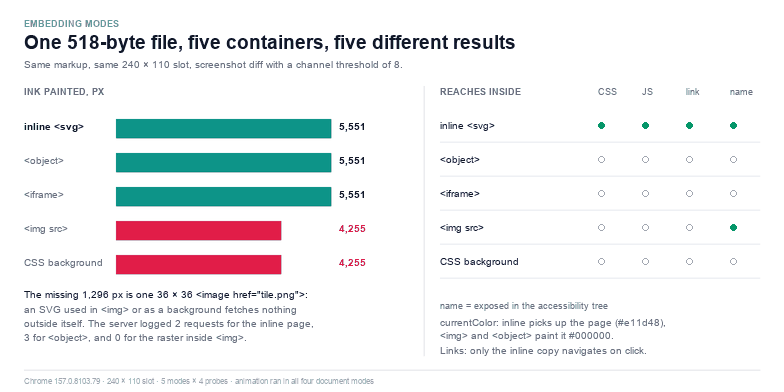
One file, five containers, one screenshot diff
The test file is 240 × 110 units, 518 bytes raw and 323 bytes gzipped. It is placed in
a 240 × 110 slot five ways: as inline markup, as <img src>, as a CSS
background-image, as <object data> and as
<iframe src>. Each slot is screenshotted at the same size and the PNGs are
compared channel by channel; a pixel counts when one channel moves by more than 8 of 255, which
ignores antialiasing noise and still catches a faint edge. The same harness applies a page
stylesheet, asks the page for an element id, clicks the centre of the drawing, reads the
accessibility tree and counts requests on the server, not in the browser.
The server log matters. Chrome fires request events for URLs it then refuses to fetch, so a page event that says "requested" can be a request that never left. Counting hits on the server is the only version of the answer that cannot be talked into agreeing with you.
Four containers paint the file; two of them drop what it points at
Inline, <object> and <iframe> produce
5,551 ink pixels, and the diff between them is zero at every channel. In
<img> and behind a CSS background the count is 4,255. The missing
1,296 pixels are one element: <image href="tile.png" width="36" height="36">,
which is 36 × 36 = 1,296. The worst channel difference in that block is 244 of 255, so this is
not a subtle rendering difference — the tile is simply not there.
The cause is not a bug. An SVG loaded as an image is a standalone document with no network
budget: it may not fetch a raster, a stylesheet or a font. <object> and
<iframe> load it as a document, so the tile is fetched — the server recorded two
requests for the inline page (HTML plus tile), three for <object> (plus the SVG
itself) and two for <img> (HTML plus SVG, no tile).
This is the same failure that makes Figma exports lose placed images in some viewers, except here it is deterministic: any reference that is not a fragment identifier is gone, every time. Two functions cover the check. The first lists every reference in the file and marks the ones that leave it:
function externalRefs(svg) {
  const found = [];
  const add = (kind, ref) => {
    const value = (ref || '').trim();
    if (!value) return;
    const external = !value.startsWith('#') && !/^data:/i.test(value);
    found.push({ kind, ref: value, external });
  };
  for (const m of svg.matchAll(/<([a-zA-Z:]+)\s[^>]*?(?:xlink:)?href\s*=\s*"([^"]*)"/g)) {
    add(m[1].toLowerCase(), m[2]);
  }
  for (const m of svg.matchAll(/url\(\s*['"]?([^'")]+?)['"]?\s*\)/g)) add('url()', m[1]);
  for (const m of svg.matchAll(/@import\s+(?:url\()?['"]?([^'");]+)/g)) add('@import', m[1]);
  for (const m of svg.matchAll(/@font-face\s*{[^}]*?src:\s*([^;]+);/g)) add('font-face', m[1]);
  return found;
}
The second turns that list into the question you actually have: will this file lose something if
I hand it to <img>? It also flags the three constructs that render but stop
working — a script, a foreignObject and a link.
function imgLoss(svg) {
  const reasons = externalRefs(svg)
    .filter((r) => r.external && r.kind !== 'a')
    .map((r) => r.kind + ' ' + r.ref);
  if (/<script[\s>]/i.test(svg)) reasons.push('a script element');
  if (/<foreignObject[\s/>]/i.test(svg)) reasons.push('a foreignObject');
  if (/\son[a-z]+\s*=\s*"/i.test(svg)) reasons.push('an event attribute');
  if (/<a\s[^>]*href\s*=/i.test(svg)) reasons.push('a link that cannot be clicked');
  return reasons;
}
The page stylesheet stops at the frame
Applying .slot .recolor { fill: rgb(225,29,72) } from the page changes the inline
drawing from 324 red pixels to 3,476: the 80 × 40 badge turns red and
the count rises by 3,152. Nothing else moves. <object> and
<iframe> stay at 324 (the red quadrant of the tile, 18 × 18 at
the rendered size) and the two raster modes stay at 0, because the tile is missing altogether.
That holds even though contentDocument is reachable for the frame modes: from the
page, document.querySelector('#media').contentDocument.getElementById('dot') returns
the element in both <object> and <iframe>. You can reach in
with JavaScript and change a fill one node at a time; you cannot write a rule that applies to a
hundred nodes, and you cannot do it before first paint. The inline copy is the only one where the
cascade and the drawing live in the same document.
currentColor shows the same boundary from the other side. With the page text colour
set to #e11d48, a rectangle filled with currentColor paints
rgb(225, 29, 72) inline; the identical file in <img> and in
<object> paints rgb(0, 0, 0), because there is no page context to
inherit from. If your icon system relies on currentColor for theming — which is the
normal reason to use it — an image tag silently defeats it.
Scripts, clicks and hover need the same document
Asking the page for document.getElementById('dot') succeeds only in the inline case;
in every other mode the page's document does not contain that node. Clicking the centre of a
drawing wrapped in <a href> navigates only when the SVG is inline: in
<img> and <object> the click is swallowed by the element and
the URL does not change. Hover works inside the file in all modes, because CSS inside the SVG file
is part of the file, but a hover rule written on the page reaches only the inline copy.
So "interactive SVG" is not one feature. Animation, hover and internal CSS are file features and survive the boundary. Anything that has to be driven by the page — a tooltip library, a click handler, a theme class, a data attribute read at runtime — is a page feature and requires inlining. If a designer hands you an SVG with a script in it, inlining also means executing third-party code in your origin; that trade-off has its own page in what a <use> reference can carry.
Animation is the exception that surprises people
Both animation systems in the test ran in every document mode. A SMIL
<animate attributeName="x" from="8" to="180" dur="1s"> moved 3,240 pixels
between two screenshots taken 1.25 seconds apart — the same 3,240 inline, in
<img>, in <object> and 3,200 in the iframe (the difference is
a timing edge on the last frame). A CSS @keyframes transform inside the file's own
<style> behaved identically: 3,240 pixels in all four.
This is why "SVG animation needs inline SVG" is wrong as a blanket rule. It needs inline SVG when
the animation is driven from outside — a class toggled by a button, a value from
getTotalLength(), a scroll listener. A self-running loop written inside the file is
fine in an image tag, and that is the cheapest way to ship an animated hero graphic without
shipping a script.
Accessibility: the image tag is the safer default
The accessibility tree tells a story that the marketing copy usually gets backwards. With
alt="Demo badge" on the image tag, Chrome exposes one node: role=image,
name "Demo badge". The inline copy, carrying role="img" and
aria-label="Demo badge", exposes the same thing. The CSS background exposes nothing —
it is decoration by definition. <object> and <iframe> also
expose no image node at all: the SVG inside them is a document, and its label is not promoted to
the parent tree.
So the two accessible options are the two simplest ones. Between them, the image tag is harder to
get wrong: alt is one attribute that linters check, while an inline SVG needs
role="img" plus a name, and a screen reader will otherwise walk into the paths. Inline
is the better answer when the drawing is genuinely part of the text — an annotated diagram whose
labels should be read in order — and the image tag is the better answer when it is one object with
one name.
The bytes do not settle it, and gzip makes that worse
Here is the measurement that breaks the usual argument. One copy: the inline page is 509 bytes gzipped, the image page is 314 plus the 323-byte file, so 637 — the inline version is 128 bytes smaller. Twenty copies: the inline page is 593 bytes gzipped, the image page is 314 plus the same 323-byte file, so 637. Inline still wins, by 44 bytes, because gzip's window finds the twentieth copy of the markup and charges almost nothing for it.
Raw bytes tell the opposite story, and both are true. Twenty inline copies are 10,738 bytes of HTML that the browser must parse into 20 separate DOM subtrees; twenty image tags are 1,515 bytes and one cached file, and three image tags on a page cost exactly one request. The gzip number is what a visitor downloads; the DOM number is what the main thread pays; the request count is what a CDN pays. Which one is "the bytes" depends on which one you are optimising, and for a drawing used once on one page, none of them is large enough to matter.
What does not show up in any byte count is the cost of coupling. An inline sprite cannot be cached apart from the page, cannot be cached across pages with different markup, and quietly puts every one of its ids into the page's global namespace — the failure mode described in unused defs and duplicate ids. A separate file can be cached once and referenced from everywhere, which is exactly what a sprite does, and that is the subject of the SVG sprite guide.
Sizing: a viewBox-only file reports 300 by 138
One more difference that bites during layout. A file with a viewBox and no
width/height reports an intrinsic size of 300 × 138 to JavaScript —
Chrome's fallback for an SVG with a ratio but no size — and then lays out differently in every
container: 99.98 × 45.83 in a 100-pixel-wide box, 600 × 275 in a 600-pixel box. The
ratio (240:110) is preserved; the size is whatever the container gives it. Inside an
<img> that behaviour is at least predictable, because a replaced element
respects width and height attributes. Inline, the same file obeys
whatever the CSS cascade says, including a rule aimed at a class you forgot it had.
Either way, do not trust naturalWidth as the design size, and do not ship a file
whose only size information is a viewBox if something downstream measures it. The
mechanics are in
viewBox versus width and
height.
The checklist, in code
Five containers, four questions, one answer. The function below encodes the measured matrix rather than an opinion: anything that has to reach from the page into the drawing forces inline; everything else can be an image, and with more than one copy the image is the better trade.
function pickEmbedding(need) {
  const inline = [];
  if (need.stylesWithPageCss) inline.push('the page stylesheet must reach the shapes');
  if (need.script) inline.push('a script inside the file must run with page access');
  if (need.clickable) inline.push('a link or button inside the drawing must respond');
  if (need.currentColor) inline.push('the drawing must follow the page text colour');
  if (need.name && !need.alt) inline.push('the name has to come from inside the file');
  if (inline.length) return { mode: 'inline', because: inline };
  return {
    mode: 'img',
    because: [
      need.copies > 1
        ? 'one file, one cache entry, for all ' + need.copies + ' copies'
        : 'nothing outside the frame has to reach in',
    ],
  };
}
Run it before the asset goes into a build, not after a designer reports that the icon changed
colour. If the answer is img and the file still references something external, either
inline the reference as a data URI or accept that the render will differ — the diff will be exactly
the area of the missing object, which is easy to spot once you know it is there.
Related SVG Workflows
The container decides what the drawing can do; the file decides how much of it survives the trip.
- SVG Sprite Guide — the other end of the trade: many drawings, one file, one request, measured.
- Figma SVG Image Missing After Export — the same missing-raster failure inside an export pipeline.
- SVG viewBox vs width and height — why a viewBox-only file reports 300 by 138.
- SVG <use> Element Security — what a reference can drag into your origin.
- Unused SVG defs Cleanup — the id collisions inlining creates, and how to find them.
- Why Is My SVG File So Large? — where the bytes actually sit before you argue about caching.
- SVG to Code — get the inline markup, the data URI and the CSS background from one file.
Related Articles

Try These Free Online Tools
No download required — convert, compress & optimize SVGs right in your browser
SVG to Code
Get the inline markup, the data URI and the CSS background for one file.
Open converter