
Why Is My SVG File So Large? Ten Files, Byte by Byte
A big SVG is almost never a big drawing. To find out where the weight actually sits I built ten files that draw the same 240×110 scene — a hexagon, a wavy line and a 60×40 rectangle — and let each one carry one of the patterns real exports carry: an embedded raster, a traced point cloud, editor metadata, six unused gradients, a transform per shape, forty outlined glyphs, and a hand-written file with none of it. Ten files, 211,553 bytes, one picture. In the file with an embedded PNG, 99.4% of the 92,048 bytes were the PNG, and every markup cleanup step combined changed the file by 0.1%. In the Illustrator-style export, 80.9% of the file was metadata no browser reads, and deleting it changed zero pixels.
Those two sentences are the whole diagnosis, and they point in opposite directions. A file that is large because of a picture is not fixed by an optimiser; a file that is large because of an exporter's private data is fixed in one step. The rest of this page is the byte accounting behind both, measured by removing one category at a time and re-rendering to see what the removal cost in pixels.
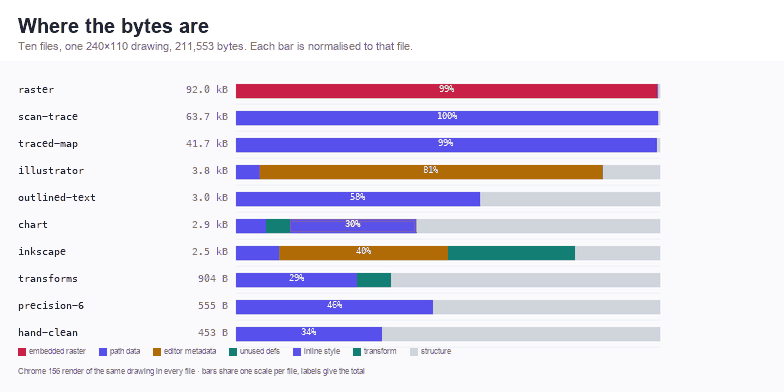
Ten files, one drawing
Every file draws the same thing at the same size, so any byte difference is the pattern, not the artwork. The gzip column is what the server would actually send with Content-Encoding: gzip at level 9 — it changes the ranking, as a later section shows.
| File | Size | gzip | Largest category |
|---|---|---|---|
raster-embedded — one embedded PNG under the vector work | 92,048 B | 69,708 B (75.7%) | raster 99.4% |
scan-trace — a potrace-style speckle field, 1,400 subpaths | 63,672 B | 16,179 B (25.4%) | path data 99.7% |
traced-map — a 1,900-point trace at six decimals | 41,726 B | 18,569 B (44.5%) | path data 99.3% |
illustrator — xmp metadata, a switch wrapper and an i:pgf block | 3,768 B | 2,631 B (69.8%) | metadata 80.9% |
outlined-text — forty glyph outlines | 2,974 B | 707 B (23.8%) | path data 57.7% |
chart — twenty <use> instances with inline style | 2,943 B | 659 B (22.4%) | style 29.9% |
inkscape — sodipodi namedview, RDF metadata, six unused defs | 2,510 B | 1,047 B (41.7%) | metadata 39.8% |
transforms — one <g transform> per shape, six decimals | 904 B | 463 B (51.2%) | path data 28.5% |
precision-6 — the clean drawing at six decimals | 555 B | 359 B (64.7%) | path data 46.5% |
hand-clean — the same drawing at two decimals, nothing else | 453 B | 306 B (67.5%) | path data 34.4% |
The whole corpus is 211,553 bytes and compresses to 110,628 — 52.3% of the original. These are the sizes files arrive at after an export or a trace, before anyone looks inside.
Two files are 99% one thing
The 92 kB file has a vector scene on top of a 320×150 PNG that is embedded as a data URI. The data URI is 91,518 bytes, 99.4% of the file; the two paths that draw the hexagon and the wave come to 174 bytes. Run every step in the optimisation ladder against it and it goes from 92,048 to 91,988 bytes: 0.1%, which is the whitespace.
The traced map is the same story with coordinates instead of pixels. 41,429 of its 41,726 bytes are the d attributes of two paths — 1,900 points, six decimals each. The scan trace pushes it further: one path with 1,400 subpaths, 99.7% of the file inside d.
This is why “which optimiser is best” often has no answer: on these two files the tool barely matters and the decision does. The raster either belongs in the SVG or it does not, and the trace either needs six decimals or it does not. The reduction walkthrough covers the options; this page is about which one applies.
Metadata is the cheapest 86%
The Illustrator-style file is 3,768 bytes and 3,049 of them are two blocks no renderer reads: an xmp packet with creator, timestamps and a document id, and an i:pgf blob holding the editor's private data as base64. Deleting both takes the file to 514 bytes — 86.4% — and 0 px of the 105,600 pixels in the render changed.
Inkscape's export is the same deal in smaller pieces: a sodipodi:namedview with window position, zoom and grid settings, an RDF metadata block, and six defs entries nothing references — three gradients, a blur, a clip path and a pattern. Metadata is 39.8%, defs 30.0%; removing the first leaves 1,327 bytes, the second 575, both at 0 px.
| Step | File after | Change | Pixels changed |
|---|---|---|---|
| illustrator, as exported | 3,768 B | — | 0 |
remove xmp and i:pgf | 514 B | -86.4% | 0 px |
| inkscape, as exported | 2,510 B | — | 0 |
| remove namedview and RDF | 1,327 B | -47.1% | 0 px |
| then remove the six unused defs | 575 B | -77.1% | 0 px |
Unused defs are invisible in every way that matters: a gradient no fill references still gets parsed, still travels to the client, and draws nothing, so nobody notices. The cheap check is a string search — for every id in defs, look for #that-id elsewhere in the file. Six of six were dead in the Inkscape file, and the two gradients kept alive by name only cost nothing either.
Six decimals for a pixel that isn't there
Coordinate precision is the one lever that is both mechanical and measurable. Taking the same 1,900-point trace and rounding progressively gives a clean curve — bytes on the left, pixels changed on the right, out of 105,600 pixels in a 480×220 render:
| Decimals | Size | Saved | gzip | Pixels changed | Max channel delta |
|---|---|---|---|---|---|
| six (as traced) | 41,726 B | — | 18,569 B | 0 px | 0 |
| 4 decimals | 34,127 B | -18.2% | 14,554 B | 0 px | 0 |
| 3 decimals | 30,299 B | -27.4% | 11,842 B | 0 px | 0 |
| 2 decimals | 26,420 B | -36.7% | 9,470 B | 7 px | 57 |
| 1 decimals | 22,295 B | -46.6% | 6,717 B | 403 px | 113 |
Four and three decimals are free on this drawing: nothing changed at all, and the file lost 18.2% and 27.4%. Two decimals — what most optimisers default to — saves 36.7% and flips 7 px. One decimal saves 46.6% and is visibly wrong: 403 px changed with a maximum channel delta of 113 out of 255, which is an edge that has moved, not an edge that has softened.
The scan trace behaves the same way and shows why the safe number is a property of the drawing, not of the tool: rounding it to two decimals saved 17.6% but changed 314 px. Same precision, ten times the damage, because its coordinates are denser: 1,400 marks in the same 240 units means 0.01 unit is a larger share of the gap between neighbours.
Summary: what each step bought
Applying the five steps in sequence to all ten files, with the pixel cost of the whole chain:
| File | Before | After | Change | Pixels changed |
|---|---|---|---|---|
raster-embedded | 92,048 B | 91,988 B | -0.1% | 24 px |
scan-trace | 63,672 B | 52,415 B | -17.7% | 314 px |
traced-map | 41,726 B | 26,378 B | -36.8% | 7 px |
illustrator | 3,768 B | 418 B | -88.9% | 19 px |
outlined-text | 2,974 B | 2,932 B | -1.4% | 0 px |
chart | 2,943 B | 2,846 B | -3.3% | 19 px |
inkscape | 2,510 B | 430 B | -82.9% | 19 px |
transforms | 904 B | 533 B | -41.0% | 72 px |
precision-6 | 555 B | 411 B | -25.9% | 19 px |
hand-clean | 453 B | 411 B | -9.3% | 0 px |
Read the last column first. Six of ten files change by less than 4%; the two that change by 80–89% are the ones whose weight was exporter data, and the two big files end up -0.1% and -17.7% — a rounding error wrapped around the actual weight.
The steps that are not free
Three removals cost pixels, and each is worth understanding before you run it in bulk.
Default presentation attributes. The transforms file carries stroke-linejoin, stroke-linecap, stroke-miterlimit, fill-rule and clip-rule on every path. Removing the ones that match the defaults saved 36.4% and changed 72 px with a maximum delta of 202. Not the attributes that were defaults, as it turns out: the hexagon's corners used the join that was removed, so a miter became a bevel at one vertex. An optimiser that strips “redundant” presentation attributes is guessing.
Halving the raster. Re-encoding the embedded PNG at 160×75 takes the file from 92,048 to 21,452 bytes — -76.7% — and changes 25,765 px at a mean channel error of 3.655. Visible at 480 px wide on a noisy illustration, invisible in a 120 px thumbnail. Decide with the largest size the file is ever shown at, not the size in the file.
Separating the raster. Pointing the <image> at an external file takes the SVG to 542 bytes, -99.4%. It also stops being one file: loaded on its own, the picture was absent and 88,454 pixels differed. A second request, a second cache entry and a broken image wherever the SVG travels without its sibling.
gzip changes which number matters
Everything above measured the file on disk. A server that gzips the response tells a different story, because text compresses and pictures do not:
| File | Raw | gzip | Sent as | What that means |
|---|---|---|---|---|
scan-trace | 63,672 B | 16,179 B | 25.4% | coordinate text collapses to a quarter |
chart | 2,943 B | 659 B | 22.4% | twenty repeated style strings, one dictionary |
traced-map | 41,726 B | 18,569 B | 44.5% | decimals buy less than the table above suggests |
illustrator | 3,768 B | 2,631 B | 69.8% | the i:pgf blob is base64 noise |
raster | 92,048 B | 69,708 B | 75.7% | 70 kB of PNG, 1.6% base64 tax |
That last row is the one worth carrying away. Base64 does expand a payload — four characters for every three bytes — but gzip takes almost all of it back: the file goes out at 69,708 bytes carrying a 68,621-byte PNG, an overhead of 1.6% rather than 33%. What gzip cannot fix is that the payload is a PNG of a photographic image rather than a photographic format.
Print the budget for your own file
The diagnostic behind the table is short enough to keep in a terminal. It reports the same categories the bars show, and it counts bytes, not characters, so a file with a BOM or a non-ASCII title is not under-counted.
function svgByteBudget(src) {
  const size = (s) => new TextEncoder().encode(s).length;
  const sum = (re) => (src.match(re) || []).reduce((n, m) => n + size(m), 0);
  const raster = (src.match(/data:[^;]+;base64,[A-Za-z0-9+/=]+/) || [''])[0];
  const metadata = sum(/<metadata[\s\S]*?<\/metadata>/g)
    + sum(/<sodipodi:namedview[\s\S]*?(?:\/>|<\/sodipodi:namedview>)/g)
    + sum(/<i:pgf[\s\S]*?<\/i:pgf>/g);
  const defs = sum(/<defs[\s\S]*?<\/defs>/g);
  const pathData = sum(/\sd="[^"]*"/g) - (src.match(/\sd="/g) || []).length * 5;
  const style = sum(/\sstyle="[^"]*"/g) - (src.match(/\sstyle="/g) || []).length * 8;
  const total = size(src);
  const rasterBytes = size(raster);
  return {
    total,
    raster: rasterBytes,
    metadata,
    defs,
    pathData,
    style,
    rest: total - rasterBytes - metadata - defs - pathData - style,
  };
}
Against the 92 kB file it prints total 92048, raster 91518, pathData 174. The categories are exclusive and in order, so they add up to the file size and the biggest line is the one to attack.
Strip what nothing reads
The removal step for the metadata case, with the namespace prefix handling that a real Inkscape file needs:
function stripEditorData(src) {
  return src
    .replace(/<metadata[\s\S]*?<\/metadata>/g, '')
    .replace(/<sodipodi:namedview[\s\S]*?(?:\/>|<\/sodipodi:namedview>)/g, '')
    .replace(/<i:pgf[\s\S]*?<\/i:pgf>/g, '')
    .replace(/<switch>([\s\S]*?)<\/switch>/g, '$1')
    .replace(/\s(?:inkscape|sodipodi|i):[\w-]+="[^"]*"/g, '')
    .replace(/\sxmlns:(?:inkscape|sodipodi|i)="[^"]*"/g, '')
    .replace(/>\s+</g, '><')
    .trim();
}
Two details matter. Editor attributes live in namespaces — inkscape:, sodipodi:, i: — so they leave as attributes and as declarations, while the elements that exist only for the editor go whole. And Illustrator's switch wrapper has to be unwrapped rather than deleted, or the drawing goes with it.
What to do, in order
Given the ten files: the order that costs nothing first, then the ones that cost a little.
- Print the budget first. One line tells you whether you are looking at a raster, a trace or metadata. Optimising a file whose weight is an embedded PNG is wasted work.
- Delete editor metadata and unreferenced defs. Free in this test on both files that had them: 86% and 83% off, zero pixels changed.
- Decide about the raster, not with the raster. Keep it embedded if the file travels alone; drop the resolution until the largest real display size stops improving; move it out only if you control both files.
- Round coordinates to the precision your largest render can show. Two decimals unless the file is a dense trace, where two was the point at which pixels started to move.
- Re-check the render, not the byte count. Six of the ten files came out of the full ladder with pixel differences, and only three of those were visible. The SVG to PNG tool renders at an exact size for exactly this comparison, and the optimiser shows the before and after side by side.
If it is still too big after that, it is usually a photograph — and SVG is the wrong format for one. The SVG versus PNG comparison puts numbers on where that line falls.
Related SVG Workflows
Size is one property of an export; these pages cover the ones that break it.
- SVG File Too Large: How to Reduce It — the reduction options, from settings to rewrites.
- Best Free SVG Optimizer Tools — what each one removes by default, and what that costs.
- Optimize SVG for Web Performance — the transfer side: cache headers, inline data and when gzip is not enough.
- Figma SVG Clean Code — the same byte accounting on a Figma export, step by step.
- SVG Compression Tool Guide — what a compressor can and cannot touch.
- Image Trace to SVG — where six-decimal point clouds come from in the first place.
- SVG to Code — read the markup as text before deciding what to delete.
Related Articles

Try These Free Online Tools
No download required — convert, compress & optimize SVGs right in your browser