
Remove Invisible Elements From SVG Without Deleting What Draws
Every cleanup guide says the same thing: delete the elements that do not show. The advice is
right and the rule people apply to it is wrong, because "does not show" is a measurement of one
render, and an SVG element can be invisible in five different ways that behave nothing alike.
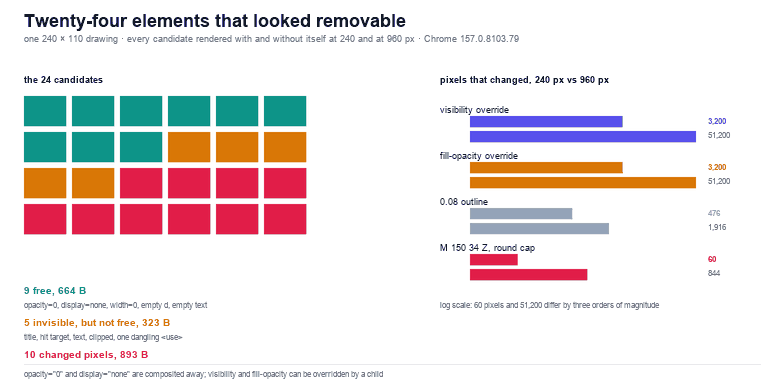
In 24 elements that looked removable, 14 changed zero pixels at 240 px and again at
960 px — and five of those 14 still could not be deleted safely. Nine were free, worth
664 bytes of markup. Four others changed exactly 3,200 pixels each, and one zero-length path
with round caps painted a dot while getBBox() reported a box of 0 × 0.
Each element below was added to the same 240 × 110 drawing and rendered twice, with and without itself, at two sizes. The pixel column counts channels that differ by more than 8, which ignores antialiasing noise without ignoring a real edge. Nothing here is a rule of thumb: every row is a render, and the interesting rows are the ones where the markup and the pixels disagree.
Zero ink is a measurement, not a property
Two definitions keep this from being opinion. Ink: a pixel scores 255 − min(r, g,
b), so white is 0 and an opaque red rectangle is 255 per pixel. Diff: two renders are compared
channel by channel and a pixel counts only when one channel moves by more than 8 of 255 — low enough
that a 3.5% darkening still counts.
Both sizes matter because a sub-pixel feature can pass at one scale and show at another. The drawing is 240 units wide, so one unit is one pixel at 240 px and four at 960. A 0.08-unit outline covers 8% of a pixel at the first size and 32% at the second, and it paints at both: 476 pixels changed at 240 px, 1,916 at 960 px.
Fourteen changed nothing; nine of them were free
Of the 24 candidates, 14 produced a byte-identical canvas at both sizes. That is 987 bytes of markup that does nothing, which sounds like a gift until you ask why it does nothing. Nine answers are safe and account for 664 of those bytes; five are not, and they are the other 323.
| Element as written | Bytes | Verdict | Why |
|---|---|---|---|
rect opacity="0" | 72 | free | compositing: a child cannot undo it |
group opacity="0", two children | 127 | free | same, two children |
child opacity="1" in an opacity="0" group | 91 | free | the child asks for opacity 1 and still gets 0 |
group display="none" | 82 | free | the subtree is never generated |
rect width="0" | 59 | free | box is 0 × 40, no area |
circle r="0" | 47 | free | box is 0 × 0 |
path d="" | 69 | free | no subpath at all |
rect fill="none" stroke="none" | 71 | free | box is 80 × 40, nothing to paint with |
text holding three spaces | 46 | free | box is 0 × 0, no glyphs |
rect at x="300" y="150", outside the viewBox | 61 | keep: clipped | 2,400 px once the viewBox is widened |
<use> of a display="none" rect | 84 | keep: referenced | the <use> above it would dangle |
<title> in the group | 33 | keep: name | it is what aria-labelledby resolves to |
rect fill="transparent" pointer-events="all" | 85 | keep: hit target | elementFromPoint returns this rect |
text fill="none" | 60 | keep: text | 47.5 × 22 of selectable text |
The nine free ones share a property: their invisibility is local. An opacity="0" is a
compositing instruction applied to what is already drawn, a display="none" subtree is
never generated, a width="0" rectangle has no area. Nothing inside them can bring the
paint back, and nothing outside them depends on them.
The five that follow each fail differently. The <title> is the accessible name
aria-labelledby resolves to: delete it and the name disappears from a screen reader and
from anything that reads the file to describe the image. The transparent rectangle with
pointer-events="all" is a real click target —
elementFromPoint at its centre returns that rect, while the same point on a
fill="none" rectangle returns the root <svg>. The text with
fill="none" occupies 47.5 × 22 units and can be selected and copied with no glyph
painted. The <use> of a display="none" rectangle draws nothing, so
deleting the rectangle looks free until you notice the reference it leaves behind — the file still
renders, and every reference audit now reports a dangling id.
The fifth is the interesting one, and it belongs to the next section.
Inheritance decides whether a container is deletable
A group marked invisible is not automatically a deletable group, because three of the properties people use for this are inherited and can be overridden by a descendant, and one cannot. The table below is that distinction, measured:
| Markup | px at 240 | px at 960 | Why |
|---|---|---|---|
| child sets visibility="visible" inside a hidden group | 3,200 | 51,200 | child sets visibility="visible" |
| child sets fill-opacity="1" inside a fill-opacity="0" group | 3,200 | 51,200 | child sets fill-opacity="1" |
| child sets opacity="1" inside an opacity="0" group | 0 | 0 | the control: 0.02% of the same markup, 0 pixels |
| path that is only "M 150 34 Z", round caps | 60 | 844 | no length, round cap, box 0 × 0 |
| stroke-width="0.08" outline | 476 | 1,916 | faint, and still 476 pixels |
| stroke-width="0.2" outline | 476 | 1,920 | two and a half times wider, same 476 pixels |
The five definitions in the same test behave the same way one level up — deleting the gradient,
clip path, mask, filter and <use> source changed 3,200, 2,630, 1,600, 2,836 and
3,200 pixels — and that is the subject of
unused defs cleanup.
Read the first three rows together. A group with visibility="hidden" whose child
sets visibility="visible" paints 3,200 pixels at 240 px and 51,200 at 960 — the whole
80 × 40 rectangle, exactly as if the attribute were not there, because
visibility is inherited and a descendant is allowed to say otherwise. The same is true
of fill-opacity="0", and of fill="none", and of
stroke.
Then the third row: a child asking for opacity="1" inside an opacity="0"
group gets nothing, and the canvas is byte-identical. Opacity is not inherited; it is applied to the
group after its children are composited, so zero multiplies whatever the child produced.
display="none" is the third behaviour — not inherited either, but it stops the subtree
from being generated, so nothing inside exists to override it. That makes
display="none" the safest of the four to delete and visibility="hidden"
the most dangerous, the reverse of how they are usually ranked.
A path with no length still draws a dot
d="M150 34 Z" describes a subpath that starts and ends at the same point. It has no
length, its bounding box is 0 × 0, and every geometry check in every optimiser will agree that
it draws nothing. With stroke-linecap="round" it paints a filled circle of the stroke
width: 60 pixels changed at 240 px, 844 at 960 px, and 46 units of ink at the smaller size. The
same path with the default butt cap paints nothing, and an empty d=""
paints nothing under either cap.
It defeats both cheap checks at once: a bounding-box comparison sees 0 × 0 and passes, and a diff at a small size reports 60 pixels that look like noise on a 26,400-pixel canvas. Only the combination separates a decorative dot from dead markup.
Clipping is not emptiness
The rectangle parked at x="300" y="150" in a 240 × 110 viewBox changed zero
pixels at both render sizes. Widen the viewBox to 480 × 220 and the same unedited element
paints 2,400 pixels with a worst channel delta of 226 — a solid red block that has been in the file
the whole time.
So "zero pixels at two sizes" is not evidence yet, because both sizes used the same viewBox. The render that matters is the one at the largest viewBox the file is used with, and that is rarely the viewBox in the file: a logo drawn in a 24-unit box lands in a 200-unit container, a symbol designed for its own aspect gets sliced into a wider one. Render at the widest box, or accept a guess.
Three checks a pixel diff cannot do
The render answers one question — did anything change — and three of the reasons to keep an element do not change pixels at all. These are the checks that cover them.
First, can a descendant bring the paint back?
// Can something inside this container still paint, in spite of the container?
// Each answer below was checked against a render: hidden group 3,200 px,
// fill-opacity group 3,200 px, opacity group 0 px, display:none group 0 px.
const OVERRIDABLE = {
  visibility: ['hidden'],        // inherited, a child may set visible
  fill: ['none'],                // inherited, a child may set a colour
  stroke: ['none'],
  'fill-opacity': ['0'],         // inherited, a child may set 1
  'stroke-opacity': ['0'],
};

function canDescendantPaint(attrs) {
  const a = {};
  for (const k of Object.keys(attrs || {})) a[k] = String(attrs[k]).trim();
  if (a.display === 'none') return false;   // subtree is never generated
  if (a.opacity === '0') return false;      // composited after drawing, so zero wins
  for (const k of Object.keys(OVERRIDABLE)) {
    if (OVERRIDABLE[k].includes(a[k])) return true;
  }
  return false;
}
Second, does a path that measures zero still draw? This walks the commands rather than the
numbers, because getBBox() is exactly the tool that cannot see the dot.
// A subpath with no length still paints when the cap is round or square, and
// getBBox() reports 0x0 for it, so a bounding-box check sees nothing.
function zeroLengthSubpaths(d) {
  const tok = d.match(/[A-Za-z]|-?\d*\.?\d+/g) || [];
  const out = [];
  let cmd = '', x = 0, y = 0, sx = 0, sy = 0, len = 0, linear = true, a = [];
  const close = () => {
    if (cmd) out.push({ length: Math.round(len * 100) / 100, linear, start: [sx, sy] });
    len = 0; linear = true;
  };
  const num = () => Number(a.shift());
  for (const t of tok) {
    if (/[A-Za-z]/.test(t)) {
      if (/[Mm]/.test(t)) { close(); cmd = t; a = []; sx = x; sy = y; }
      else { cmd = t; }
      continue;
    }
    a.push(t);
    const up = cmd.toUpperCase();
    if (up === 'M' || up === 'L') {
      if (a.length < 2) continue;
      const nx = cmd === 'm' || cmd === 'l' ? x + num() : num();
      const ny = cmd === 'm' || cmd === 'l' ? y + num() : num();
      if (cmd === 'M') { x = nx; y = ny; sx = nx; sy = ny; }
      else { len += Math.hypot(nx - x, ny - y); x = nx; y = ny; }
    } else if (up === 'H') {
      const nx = cmd === 'h' ? x + num() : num();
      len += Math.abs(nx - x); x = nx;
    } else if (up === 'V') {
      const ny = cmd === 'v' ? y + num() : num();
      len += Math.abs(ny - y); y = ny;
    } else if (up === 'Z') {
      len += Math.hypot(sx - x, sy - y); x = sx; y = sy; a = [];
    } else {
      linear = false; a = [];
    }
  }
  close();
  return out.filter((s) => s.linear && s.length === 0);
}

function paintsAsDot(d, cap) {
  if (cap !== 'round' && cap !== 'square') return false;
  return zeroLengthSubpaths(d).length > 0;
}
Third, the verdict that combines the render, the reference check and the geometry: an element that measured zero pixels is free only when all of the other answers are also "no".
// A box that sits entirely outside viewBox paints nothing inside that box.
function outsideViewBox(box, viewBox) {
  const [vx, vy, vw, vh] = viewBox;
  return box.x + box.width <= vx || box.y + box.height <= vy ||
         box.x >= vx + vw || box.y >= vy + vh;
}

// What to do with an element that measured zero pixels.
function removalVerdict(el, viewBox, referencedIds) {
  const a = el.attrs || {};
  if (a.id && referencedIds.has(a.id)) return 'keep: referenced';
  if (el.tag === 'title' || el.tag === 'desc') return 'keep: accessible name';
  if (el.tag === 'text' && (el.text || '').trim()) return 'keep: carries text';
  if (el.transparent && a['pointer-events'] === 'all') return 'keep: hit target';
  if (el.box && viewBox && outsideViewBox(el.box, viewBox)) return 'keep: only clipped';
  if (canDescendantPaint(a)) return 'keep: child may paint';
  if (el.tag === 'defs' || el.isDefinition) return 'keep: definition';
  return 'free';
}
Run in that order — render, references and names, geometry — an element that survives all three is safe to delete, and an element that fails any one of them is not. The three functions are the skeleton of a cleanup script rather than a checklist to do by hand, because a 300-element illustration has 300 chances to get the order wrong.
The order to delete in
- Render at the largest size and the widest viewBox. One size in one box proves nothing about any other box.
- Check what points at it. An
idthat anyurl(#…),href="#…", stylesheet oraria-labelledbyresolves to is not dead, whatever the pixels say. - Check what it says.
<title>,<desc>and text withfill="none"are content, not decoration. - Ask whether a child can override the container.
visibility,filland the two opacity properties can be overridden;opacityanddisplaycannot. - Delete, then re-render and re-check references. This is what catches a deletion that turned a definition into a dangling id.
For a whole file the ordering also pays: invisible markup is the cheapest thing to remove and the easiest to verify, and doing it first means the later diffs are against a smaller file. If the file also carries editor state — Inkscape's namedview, 68 unused ids, an RDF licence block — that is a separate pass, covered in removing SVG metadata without breaking the drawing. And if the invisible thing is a definition rather than a shape, the question changes from "does this paint" to "does anything reach this", which is the subject of unused SVG defs cleanup.
One number to keep in view: in a byte audit of ten files the same scene arrived in 453 bytes and in 92,048, and the spread was markup that does nothing. The 24 candidates here total 1,880 bytes of the same kind of markup, and only 664 of those bytes could actually go — about a third of "invisible" is free, and the rest would have broken something silently.
Related SVG Workflows
Deleting nothing that draws is one half of a cleanup; the other half is deciding what "nothing" means for a file you did not write.
- Unused SVG defs cleanup — the same question for gradients, masks and symbols, scored against five scanners.
- Remove SVG Metadata — the free half of a file-size cut, measured step by step on a real export.
- Why Is My SVG File So Large? — where the bytes sit in ten files that draw the same thing.
- SVG viewBox vs width and height — why the box you render in decides what is visible at all.
- Figma SVG Clean Code — what an export leaves behind, including the empty groups.
- SVG Stroke Width Scaling — why a 0.08-unit outline is not invisible.
- SVG Validator — list the empty groups, the zero-size shapes and the dangling references in a file.
Related Articles


Try These Free Online Tools
No download required — convert, compress & optimize SVGs right in your browser