
Content-Security-Policy for SVG: Seven Headers, Measured
A single response header can stop everything an SVG is able to do — and the shortest version of that header also repaints the drawing. I put six payloads against seven header variants in four embedding modes: 168 measured cells. script-src 'none' left 2 of the 6 payloads working, because two of them never needed a script. default-src 'none' stopped all six and turned a normal card black, changing 47,824 pixels. The header that does both jobs is three directives long, and it changed 0 pixels on the same card:
Content-Security-Policy: script-src 'none'; style-src 'unsafe-inline'; img-src data:If you only remember one line of this article, that is the line. The rest is why the obvious alternatives are worse, measured.
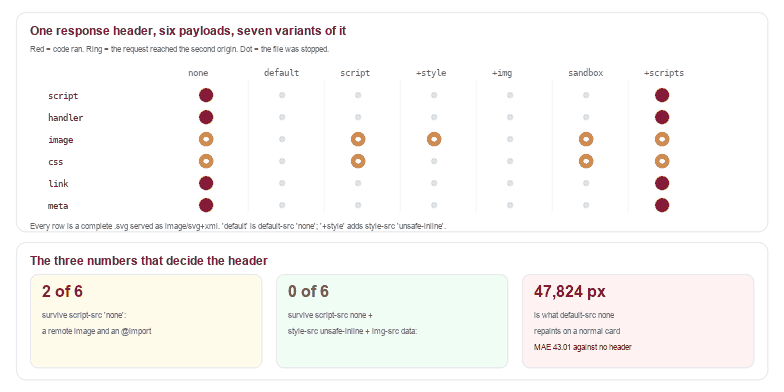
.svg file served as image/svg+xml with the header on its own response.Why the header is the only fix that lives outside the file
Every previous article in this series ends with the same advice: refusing the file is the only check that covers every case, and every sanitiser has an edge. A response header is not better than that advice — it is a different place to stand. It applies to the document after parsing, it does not care how the file was spelled, and it cannot be talked out of it by a clever attribute.
It also has one property that matters for a site like this one: it costs you nothing per file. There is no parser to run, no allowlist to maintain, and no new bypass class to learn. The only question is which directives to write, and that question has a measurable answer.
Six payloads, seven headers, four modes
Each payload does exactly one thing, so the matrix has one variable: csp-script has an inline <script>, csp-handler has an onload attribute, csp-image references a remote image and no script at all, csp-css imports a remote stylesheet, csp-link holds a javascript: link, and csp-meta is the script payload plus a <meta http-equiv> trying to police itself. A seventh file, csp-styled, is the control: a drawing whose colours come from its own <style> block.
The seven header variants are: no header, default-src 'none', script-src 'none', script-src 'none'; style-src 'unsafe-inline', the full recommended header, sandbox, and sandbox allow-scripts.
| Header | Payloads still working | Which ones |
|---|---|---|
| none | 6 of 6 | all of them |
default-src 'none' | 0 of 6 | — but see the drawing below |
script-src 'none' | 2 of 6 | the remote image and the @import |
script-src 'none'; style-src 'unsafe-inline' | 1 of 6 | the remote image |
| the recommended three directives | 0 of 6 | — |
sandbox | 2 of 6 | the remote image and the @import |
sandbox allow-scripts | 6 of 6 | all of them |
script-src 'none' leaves two of six working
This is the finding that changes practice. script-src 'none' is the directive everyone reaches for, and it does stop <script>, onload and javascript: — all three, measured, in all four modes. It says nothing about subresources, because subresources are not scripts.
csp-image has no script at all: one <image href> pointing at a host the author chose. Under script-src 'none' the request still left the browser and arrived at the second origin. csp-css is the same story one step further from code: a <style>@import url(...)</style> fetched a stylesheet, and the stylesheet won the argument — the rectangle's fill attribute says #111827 and was painted rgb(225,29,72), because the imported rule came later.
Neither of those executes code on the page. Both of them tell a stranger that a particular person opened a particular file at a particular second, which for an upload pipeline is the thing you were trying to prevent.
The one thing adding style-src buys you that nobody expects
Compare script-src 'none' with script-src 'none'; style-src 'unsafe-inline': the payload count goes from 2 to 1. Writing style-src at all — even with only 'unsafe-inline' in it — removes the ability to load a remote stylesheet, because a source list without a host does not allow a host. The @import stops dead, and the drawing keeps its colour, because 'unsafe-inline' is exactly what an SVG's own <style> block needs.
That is the whole trick of the recommended header. Each directive is doing one job: script-src 'none' removes code, style-src 'unsafe-inline' keeps the drawing and removes remote stylesheets, and img-src data: removes remote images while leaving data: URIs alone.
default-src 'none' stops everything and repaints the drawing
It is tempting to skip the reasoning and write default-src 'none'. Measured: 0 of 6 payloads do anything, which is perfect. And a normal card — gradient, rounded corner, one line of text, all styled by its own <style> block — comes out different from the same card with no header at all: 47,824 pixels changed, mean absolute error 43.01.
The mechanism is one line of the measurement: document.styleSheets.length is 1 with no header and 0 under default-src 'none'. The inline stylesheet was dropped, so fill: url(#g) never applied and the rectangle fell back to its default fill, which is black. Every SVG exported from a design tool that styles by class rather than by presentation attribute does this.
The same file under the recommended header: 0 pixels changed, MAE 0.01. Identical. Six variants in total scored 0 changed pixels; only default-src 'none' failed, and it failed by painting over the thing it was protecting.
sandbox is not a shortcut
A sandbox directive looks like the tidy answer: one word, no source lists. Measured, it blocks <script>, onload and javascript: — and leaves the remote image and the @import working, for the same reason script-src 'none' does: neither is a script. It is worth 2 of 6, exactly like the directive it resembles.
And sandbox allow-scripts, which is what people add when their own scripts stop working, restores all 6 of 6. A sandbox with that flag is a sandbox that has handed back the key. If the goal is "this drawing must not run anything", the source list is clearer and stricter than the sandbox, and it costs one line more.
What CSP does not cover
Four boundaries, all measured, all easy to get wrong.
A page CSP protects an inlined SVG and does not protect an embedded one. With script-src 'none' on the page, an SVG inserted with innerHTML never ran (0 beacon hits) — it is part of the page, so the page's policy applies. The same file in an <object> or an <iframe> ran and reached the beacon in both cases, because a separate document gets its own response headers and its own policy. If you embed user SVG, the header has to be on the .svg response, not on the page around it.
A meta tag inside the file is ignored. csp-meta declares <meta http-equiv="Content-Security-Policy" content="script-src 'none'"> and its script ran anyway, in all four modes. In an XML document there is no meta policy to apply; the file cannot police itself.
An <img> is already inert, and the header changes nothing there. All seven variants produced the same pixel from csp-styled in an <img> tag: rgb(88,80,236), its own colour, even under default-src 'none'. The image document enforces its policy for scripts but not for its own stylesheet, and it was never going to run anything anyway.
A data: URI inherits the page's policy. An SVG in a data: iframe fired the beacon twice on a page with no policy and 0 times on a page with script-src 'none'. That is the one place where the policy of the page does reach the drawing, and it is worth knowing because "it is only a data URI" is a common way to wave a file through.
One detail about counting, if you build this test yourself
Under default-src 'none' the remote-image payload still fires a request event in Chrome — and the second origin's log stays empty. The request object exists, the network call does not. A test that counts request events concludes the header failed; a test that reads the server's log concludes it worked. Every number in this article is from the server log, because that is the only side of the wire that can tell you a request did not happen.
The function behind the table
Because the question "what does this header stop" has a mechanical answer, it can be computed. This reads a CSP string and returns what it blocks, for the five behaviours measured above:
const SVG_THREATS = ['script', 'handler', 'image', 'css', 'link'];

function parseCSP(header) {
  const dir = {};
  String(header || '').split(';').forEach((part) => {
    const bits = part.trim().split(/\s+/).filter(Boolean);
    if (!bits.length) return;
    dir[bits[0].toLowerCase()] = bits.slice(1);
  });
  return dir;
}

function isRemoteSource(list) {
  return (list || []).some((s) => s === '*' || /^https?:/i.test(s) || /^[a-z0-9.-]+\.[a-z]{2,}$/i.test(s));
}

function predictBlocked(header) {
  const d = parseCSP(header);
  const sourceFor = (name) => d[name] || d['default-src'] || null;
  const allowsInline = (list) => !!list && (list.includes('unsafe-inline') || list.includes('*'));
  const sandboxed = Object.prototype.hasOwnProperty.call(d, 'sandbox') && !(d.sandbox || []).includes('allow-scripts');
  const scriptSrc = sourceFor('script-src');
  const scriptsOff = sandboxed || (!!scriptSrc && !allowsInline(scriptSrc));
  const imgSrc = sourceFor('img-src');
  const styleSrc = sourceFor('style-src');
  return {
    script: scriptsOff,
    handler: scriptsOff,
    link: scriptsOff,
    image: !!imgSrc && !isRemoteSource(imgSrc),
    css: !!styleSrc && !isRemoteSource(styleSrc),
  };
}
Run against the seven headers, its predictions agree with the measured matrix in 35 of 35 cells — five behaviours times seven headers, including the two sandbox cases. It is not a browser and it does not try to be; it is a way to review a header without re-running an experiment, and to catch the specific mistake of thinking script-src covers images.
Where to set it
The header belongs on the response that carries the SVG, and nowhere else is equivalent:
- Any framework with a route for stored files: set it in that route's handler, next to the
Content-Type. - nginx:
add_header Content-Security-Policy "script-src 'none'; style-src 'unsafe-inline'; img-src data:" always;inside the location that serves.svg. - Object storage: most of them let you attach response headers per object or per prefix; a bucket policy on the
*.svgprefix is the cheapest place to do it once. - If the file is inlined into a page instead: the page's policy applies, so a site-wide
script-srcalready covers it — that is the one case where you get this for free.
One caveat worth stating: img-src data: also blocks a legitimate SVG that references a sibling image by relative URL. If your drawings do that, use img-src 'self' data: and accept that same-origin references are allowed — the cross-origin beacon in this test is still stopped.
Frequently asked questions
Does Content-Security-Policy work on SVG files?
Yes, when the header is on the response that serves the .svg. Measured across seven variants and four embedding modes: the recommended header stopped all 6 payloads from running or fetching anything, in an <object>, an <iframe> and direct navigation.
Is script-src 'none' enough to make an SVG safe?
No. It stops <script>, onload and javascript:, and leaves a remote <image href> and a @import working — 2 of 6 payloads still reached the second origin. Adding style-src 'unsafe-inline' removes the @import, and img-src data: removes the image.
Why does default-src 'none' change how my SVG looks?
Because it also blocks the file's own <style> block. Measured: document.styleSheets.length goes from 1 to 0, fill: url(#g) stops applying, and a 414-byte card is repainted black — 47,824 pixels changed. Adding style-src 'unsafe-inline' fixes that and still blocks remote stylesheets.
Can an SVG set its own CSP with a meta tag?
No. A <meta http-equiv="Content-Security-Policy"> inside an SVG document was ignored in all four embedding modes and the file's script ran. The policy has to come from the response headers, which means from whoever serves the file.
Related SVG Workflows
The header is the last line of defence; these are the ones in front of it.
- SVG polyglot files — seven files that are several formats at once, and the byte check that tells them apart.
- Can SVG files contain malware — the 12-payload matrix and the first measurement of a CSP header on an SVG response.
- How to sanitize SVG — the allowlist that removes the payload before the header has to.
- foreignObject security — the HTML door that a
script-srcrule closes and a sanitiser has to notice. - XXE and entity attacks in SVG — the one attack in this series that CSP cannot see, because it happens before the document exists.
- SVG Validator — check the structure before you decide what to serve it as.
- SVG to PNG — flatten the drawing and the header stops being load-bearing.
Serve it with a policy, not a prayer
Check the file in the browser first, then send it back with the header that matches what you decided. No upload, no account.
Related Articles

Try These Free Online Tools
No download required — convert, compress & optimize SVGs right in your browser