
SVG foreignObject Security: HTML That Looks Like an Image
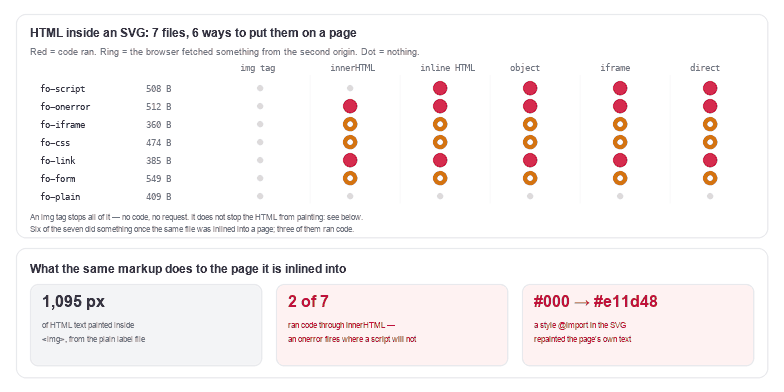
<foreignObject> lets an SVG contain a piece of XHTML, and that piece behaves like a piece of a web page: it is painted, it can carry <img> and <iframe> and <form>, and its text is real text. Measured on seven files, six embedding modes, Chrome 157: inside an <img> tag nothing ran and nothing was fetched — but 1,095 pixels of HTML text were still painted, from a file whose only content is a label. Once the same file is inlined into a page, 3 of 7 ran code and 3 more reached another origin, and one of them repainted a paragraph of the page itself.
That combination — inert as an image, live as markup, and visually identical either way — is what makes this tag different from every other way of smuggling script into an SVG.
What foreignObject is, and why "it's just an image" stops being true
SVG has no paragraphs. When you need one — a chart label with a line break, a badge with a two-word caption, a diagram whose boxes contain sentences — the standard answer is <foreignObject>, which switches the parser back into HTML for the contents of one element:
<svg xmlns="http://www.w3.org/2000/svg" width="220" height="90">
  <foreignObject x="8" y="8" width="204" height="74">
    <div xmlns="http://www.w3.org/1999/xhtml" style="font:14px sans-serif">
      <p>Build 42</p>
    </div>
  </foreignObject>
</svg>
Everything inside that div is HTML, not SVG. Which means it carries HTML's rules: a <script> is a script, an onerror is an event handler, an <iframe> loads a document, a <form> submits, a <style> applies to the document it lands in. For a designer this is convenient. For anything that accepts a file from a stranger it is the widest door in the format, because the door is disguised as a caption.
The img tag: nothing runs, and the HTML is painted anyway
Start with the good news, because it is real. In <img> mode none of the seven files ran code, and none of them produced a single request: no iframe load, no stylesheet fetch, no beacon. That matches the 12-payload result in the malware article: the image loader parses the file as an image document, where scripting is off and subresources are not fetched.
Now the part that is easy to miss. The HTML still renders. Take fo-plain, a 409-byte file whose entire content is two lines of text in a div, and count the pixels that are not the background: 1,751. Remove the <foreignObject> and count again: 656. The difference, 1,095 pixels, is the text — painted by an <img> tag, in a file that ran nothing.
Two consequences follow. First, a foreignObject file is not a picture of text, it is text: in an inlined document it is selectable ('Build 42' came back from a range over the inner paragraph) and indexable, and in an <img> it is pixels with no accessible fallback unless you wrote an alt. Second, whatever you use to check the file cannot rely on "it looks fine" — the malicious and the benign versions of a label look identical, because they are the same drawing.
innerHTML: the one hole in the previous finding
Yesterday's article reported that markup injected with innerHTML executed nothing: the HTML parser inserts a <script> element in a way that never runs it. That held for all twelve of those payloads. It does not hold here.
fo-onerror is a 512-byte file: a receipt with a broken image in it, <img src="/missing-4471.png" onerror="…"> inside the foreignObject. Inserted with innerHTML, the handler fires — the request for the missing file fails, and the error handler runs. fo-link holds a javascript: link and fires on click. Measured: 2 of the 7 ran code through innerHTML, and 3 more fetched something from the second origin without running code.
The mechanism is not subtle once you see it: innerHTML executes no script, but an onerror is not a script element. Any HTML that loads a subresource and reacts to its failure does the work for the attacker. A library that "sanitises" by stripping <script> and calling the result safe is one onerror away from being wrong, and foreignObject is the cheapest way to place an HTML img inside an SVG.
Inlined into the page: code, requests, and your own CSS
Server-rendered inline is the worst case, and it is the same in <object>, <iframe> and direct navigation: 3 of 7 ran code, 3 more fetched, and only the plain label did nothing. Three findings from that half are worth keeping.
1. An <iframe> inside a foreignObject loads a full HTML document. fo-iframe is 360 bytes and produced one request to the second origin, which logged it: 8936 /fo.html. The document renders inside your image's box, with its own scripts, on your page's origin if the URL is relative.
2. A form submits. fo-form is a fake "session expired" panel with a hidden input holding secret-token. Clicking the button sent the visitor to the second origin, which logged 8936 /form?token=secret-token. The token is arbitrary here; the point is that any value the page holds — a CSRF token, a session id, a cart total — can be posted from inside what the user was told was an image.
3. A <style> inside the file applies to the page, not to the image. This one has nothing to do with scripting. Inline an SVG whose foreignObject contains <style>@import url("…/imp.css");</style>, and the imported rule sheet lands in your document. Measured: a paragraph of the host page went from rgb(0, 0, 0) to rgb(225, 29, 72) because the file asked for it. The same mechanism runs in reverse with the page's own rules: in the inline test here, a p inside the foreignObject came back with color: rgb(225, 29, 72) and font-family: monospace — exactly what the page's p rule said, not what the file asked for.
That last pair is the honest version of "inline SVG is styleable": it is styleable in both directions, and the file gets a vote.
What it costs to remove, and when to keep it
The allowlist below is the one from yesterday's sanitiser with one deliberate omission: foreignObject is not on the list, so the element and everything inside it goes.
const SVGNS_L = "http://www.w3.org/2000/svg";
const ALLOWED = new Set(('svg g defs symbol use path rect circle ellipse line polyline polygon text tspan ' +
  'textPath title desc style linearGradient radialGradient stop clipPath mask pattern image ' +
  'marker filter feGaussianBlur feOffset feBlend feColorMatrix feMerge feMergeNode ' +
  'feComponentTransfer feFuncA feFuncR feFuncG feFuncB feFlood feComposite feDropShadow').split(' '));
const URL_ATTRS = new Set(['href', 'xlink:href', 'src', 'srcset']);

function safeParseSVG(src) {
  // A DOCTYPE is the only reason an SVG needs an entity, and no export tool emits one.
  if (/<!DOCTYPE/i.test(src) || /<!ENTITY/i.test(src)) {
    return { error: 'declares a DTD', elements: 0, attributes: 0, removed: [], svg: '' };
  }
  const doc = new DOMParser().parseFromString(String(src), 'image/svg+xml');
  if (doc.querySelector('parsererror')) return { error: 'not XML', elements: 0, attributes: 0, removed: [], svg: '' };
  const removed = [];
  let elements = 0;
  let attributes = 0;

  const walk = (node) => {
    for (const child of [...node.children]) {
      const name = child.localName;
      if (!ALLOWED.has(name)) {                 // foreignObject, script, iframe, a … land here
        removed.push(name);
        elements++;
        child.remove();
        continue;
      }
      for (const attr of [...child.attributes]) {
        const n = attr.name.toLowerCase();
        const v = attr.value.trim();
        const isUrl = URL_ATTRS.has(n) || n.endsWith(':href');
        if (n.startsWith('on') || (isUrl && !/^#|^data:image\/|^[a-z0-9._/-]+$/i.test(v))) {
          child.removeAttribute(attr.name);
          attributes++;
        }
      }
      walk(child);
    }
  };
  walk(doc.documentElement);

  return {
    error: null, elements, attributes, removed: [...new Set(removed)],
    svg: new XMLSerializer().serializeToString(doc.documentElement),
  };
}
Measured on all seven files: 1 element removed each, 0 attributes, because the removal takes the subtree with it. On the plain label file, 409 B becomes 140 B and 1,097 pixels change — those pixels are the label. On the form file, 2,648 pixels change. Nothing is repaired; the label is deleted.
That is why the rule has to be about authorship rather than about the tag. If you wrote the file, the tag is doing a job — a chart label with a line break, a diagram with a caption — and the right response is to keep it, keep the file out of user uploads, and make sure the text has an accessible equivalent. If someone else wrote it, the tag is unverifiable content and dropping it is the only thing that scales. A text scanner makes this concrete: run yesterday's scanner over the seven files and it flags all 7 — including the benign label file — with foreignObject (XHTML inside SVG). The rule cannot separate them by pattern, because the pattern is identical.
If your pipeline accepts SVG from users
- Decide about
foreignObjectby source. Your own exports: allowed. User uploads: removed with its subtree, or the file is refused. - Do not stop at stripping
<script>. 2 of 7 ran throughinnerHTMLwith no script element in play; anonerroron an<img>was enough. - Treat
<iframe>,<form>,<object>,<style>and<a>as HTML, not as drawing. Inside aforeignObjectthey are the page, and the allowlist has to decide about each one by name. - Cap the box.
foreignObjectcontent is clipped to the element'swidth/heightfor painting but not for layout cost; a form can be made to look like a button on top of a real one (see the sanitising article for the click-target problem in general). - Serve user SVG from a cookie-free origin, and prefer
text/plainorContent-Disposition: attachmentwhen the user asked to download. - Flatten when you can. If all you need is the picture, convert to PNG — the pixel result is identical and nothing left in the pipeline is a document.
For a file you are about to open by hand: a <foreignObject> in an icon is unusual, and a <form>, <iframe> or <style> inside one is a decision you should be able to explain. Open it in the SVG editor first — the tree shows the HTML nodes as nodes, which is more than the rendered image will ever tell you.
Frequently asked questions
Is foreignObject dangerous in an SVG?
Not by itself, and not inside an <img> tag: 0 of 7 files ran code or made a request there. It is dangerous when the file is inlined into a page, opened directly, or shown in an <object> or <iframe> — in those four modes 3 of 7 ran code and 3 more fetched a remote resource, because what is inside the tag is ordinary HTML.
Does foreignObject render inside an img tag?
Yes, and that surprises people. A label file whose only content is two lines of HTML painted 1,751 non-background pixels inside <img>, against 656 with the foreignObject removed — 1,095 pixels of text. It is painted as pixels, so it is invisible to search and to screen readers unless the file carries a title or the page carries an alt.
Can an SVG with foreignObject steal data?
From a page, yes. The measured case was a form with a hidden input submitted to a second origin, which logged /form?token=secret-token; an <iframe> inside the same tag loaded a whole HTML document from that origin. Neither needed a <script> element, and the file was under 600 bytes.
Should I remove foreignObject from my own exports?
No. If you authored the file, the tag is doing the job SVG has no other answer for: real paragraphs inside a drawing. Keep it, keep the file out of upload endpoints, and give the text an accessible fallback. The removal rule exists for files you did not author, where the content cannot be verified — and where a scanner flags the benign and the hostile file identically, all 7 of 7.
Related SVG Workflows
What to do next depends on whether the file is yours or someone else's.
- Sanitize SVG with an allowlist — the tree walk used above, its cost on a normal export, and why
<style>has to survive it. - Can SVG files contain malware — the 12-payload matrix, the header variants, and the
innerHTMLresult this article corrects. - XXE and entity attacks in SVG — the server-side half of the same story.
- SVG Editor — see the HTML nodes as nodes before anything renders them.
- SVG Validator — structural problems that make a hostile file look merely broken.
- SVG to PNG — flatten the drawing so nothing downstream parses it as a document.
- Figma SVG clean code — what an export from a real design tool contains, and what it never contains.
Look inside the drawing
Open the tree, find the HTML that should not be there, and decide with the source in front of you. Everything runs in the browser with no upload.
Related Articles

Try These Free Online Tools
No download required — convert, compress & optimize SVGs right in your browser
SVG Editor
HTML inside a foreignObject shows up as nodes here, which the rendered image never will.
Open editorSVG Validator
Run this first: a file that will not parse cannot be inspected at all.
Open validatorSVG to PNG
Keep the picture and drop the document — nothing left to run or fetch.
Convert to PNGSVG to Data URI
Inline an icon you authored without pasting its markup into the document.
Encode itSVG Optimiser
The size pass that runs after the security pass, not instead of it.
Open optimiser