
SVG Polyglot Files: One Set of Bytes, Five Verdicts
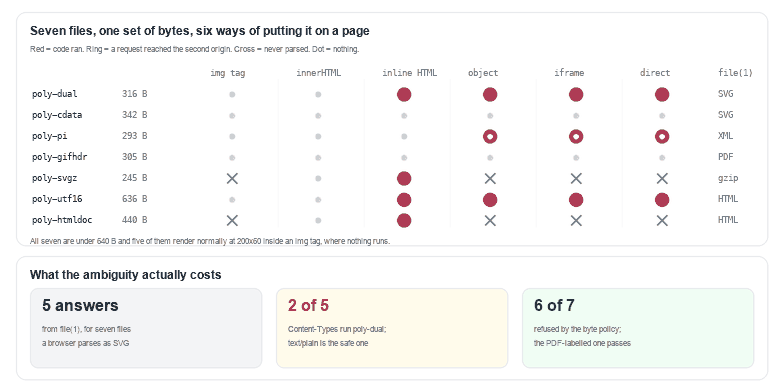
Yes, a single file can be a valid SVG, a valid HTML page, a gzip archive and — according to file(1) — a PDF, all from the same bytes. I built seven such files, between 245 and 636 bytes, and put each one through six ways of embedding an SVG on a page. Inside an <img> tag nothing ran and nothing was fetched, in all seven. Served as a document, 2 of the 7 ran code and one more pulled a stylesheet over the network without a single script tag. What format the file is, is decided by whoever opens it — not by what the file says about itself.
That is the useful way to think about polyglots. They are not a trick of malformed files. They are what happens when a format is text, when two parsers are willing to read it, and when the header that says which parser to use is set by your server rather than by the person who uploaded the file.
file -b on the same bytes.Why an SVG is the easiest file in the world to make ambiguous
Three properties do the work, and none of them is a bug.
It is text. XML is a text format with rules for what may come before the root element: a byte-order mark, whitespace, comments, processing instructions. That is a licence to put arbitrary other files' magic numbers in front of your drawing — legally, and invisibly to both parsers.
It has two parsers, in the same browser. An image/svg+xml response goes to the XML parser. A text/html response goes to the HTML parser, which has its own rules for foreign content and will happily build an SVG tree from the same markup. Two parsers means two answers to "what is this document".
It can be wrapped. gzip and UTF-16 are not exotic, they are the normal transport for text on the web. A file that is gzipped is still an SVG; it just has no < at offset zero any more.
Put together, those three mean a check that reads bytes can disagree with a check that reads the document, and both can be right.
The same 305 bytes: five answers from one tool
I ran file -b --mime-type over all seven. It gave five different answers, and the most interesting case is the smallest lie in the set:
| File | Size | file(1) says | Full verdict | As an <img> |
|---|---|---|---|---|
poly-dual | 316 B | SVG | SVG Scalable Vector Graphics image | 200x60 |
poly-cdata | 342 B | SVG | SVG Scalable Vector Graphics image | 200x60 |
poly-pi | 293 B | XML | XML document text | 200x60 |
poly-gifhdr | 305 B | PDF document | 200x60 | |
poly-svgz | 245 B | gzip | gzip compressed data | 0x0 |
poly-utf16 | 636 B | HTML | HTML document text | 200x60 |
poly-htmldoc | 440 B | HTML | HTML document text | 0x0 |
The poly-gifhdr row is the one to read twice. It is a perfectly ordinary drawing of a rectangle and a label, 305 bytes, with one comment above the root element. Inside the comment I put the magic numbers of four other formats: GIF89a, %PDF-1.7, PNG and JFIF. libmagic scans the file, finds %PDF-, and answers PDF document, version 1.7 — a 305-byte PDF with no cross-reference table and no pages. The file renders at 200x60 and does nothing else, because a comment is a comment.
So the only file in the set that libmagic gets wrong is the only one that is harmless. That is not a coincidence and it is not a criticism of libmagic, which is doing exactly what it promises: identifying a format from a handful of bytes. It is a demonstration that "what format is this" is not a question with one answer.
Seven files, six ways of embedding: only the img tag was quiet
The measurement is the same harness as the 12-payload matrix: each file served as image/svg+xml from one origin, a beacon counter on a second origin, six embedding modes, and a click on anything clickable. 7 files × 6 modes = 42 cells.
<img>: 0 of 7 ran code, 0 of 7 made a request. Five of them render at 200x60; the other two do not render at all.innerHTML: 0 of 7. Inserting the markup into a page changes nothing here, which is consistent with the earlier result and — see below — kills the CDATA trick.- Server-inline HTML: 4 of 7 ran code, because when the server writes the file into a page the script is simply part of the page.
<object>,<iframe>, direct: 2 ran code and 3 more made a request. These are the modes where the file gets its own document and its own parser.- Two of the seven never parse as an SVG document.
poly-svgzandpoly-htmldoccome back withnaturalWidth0 inside an<img>, and in the three document modes they produce no code and no request — they are not SVGs, and no amount of embedding makes them one.
The pattern is the one from every article in this series: the image loader is the safest seat in the building, and the only mode where the file's format stops mattering.
The four tricks that actually change what the file does
| Trick | What the file does | What it takes to work |
|---|---|---|
Processing instructionpoly-pi, 293 B | Loads a stylesheet from another origin and applies it: the rectangle's fill attribute says #111827 and comes out rgb(225,29,72) | XML mode only. In text/html the PI becomes a comment and the fill stays dark. |
gzippoly-svgz, 245 B | Runs the script inside | Content-Encoding: gzip plus the right type. Without the header the browser sees compressed bytes labelled as XML and paints nothing. |
UTF-16 with a BOMpoly-utf16, 636 B | Runs the script inside | Nothing. Both parsers honour the BOM: it ran as image/svg+xml and as text/html. |
A whole HTML page named .svgpoly-htmldoc, 440 B | Runs the script inside | text/html. As image/svg+xml it is not an SVG document and produces a broken image. |
Two of those four need something from your server: a gzip file and an HTML page only misbehave when the response says to treat them that way. One needs nothing at all. poly-utf16 starts ff fe 3c 00, and a search for the bytes of <svg returns nothing, which is why it is the one I would put first in a review.
That leaves the header as the deciding actor, and serving poly-dual with five different Content-Types makes it visible: image/svg+xml and text/html both ran its script, because the file is genuinely both things; text/plain showed the source and ran nothing; application/octet-stream downloaded it; image/gif produced an error placeholder. The extension is a suggestion, the type is the decision, and text/plain is the only type in that list that is both readable and safe — which is why the earlier article recommends it for stored uploads.
What the CDATA trick does not do
Folklore says <![CDATA[ ... ]]> hides a payload from the XML parser while the HTML parser closes the bogus comment at the first > and executes what follows. I built poly-cdata (342 bytes) in exactly that shape — a <desc> holding a CDATA section holding a <script> — and measured 0 code and 0 requests in all six modes. The reason sits in the HTML specification, not in Chrome: inside <svg> the tokenizer is in foreign content, where <![CDATA[ really is a CDATA section, so both parsers end up with the same text node. What CDATA does do is hide the string from a scanner that greps for <script, which is an argument for parsing rather than grepping.
The check that reads bytes instead of extensions
Before the drawing is parsed, something has to answer "is this the file it claims to be". This function looks at five things and returns them all, so the caller can decide rather than guess:
const MAGIC = {
  'GIF89a': [0x47, 0x49, 0x46, 0x38, 0x39, 0x61],
  '%PDF-': [0x25, 0x50, 0x44, 0x46, 0x2d],
  'PNG': [0x89, 0x50, 0x4e, 0x47],
  'JFIF': [0x4a, 0x46, 0x49, 0x46],
  'PK': [0x50, 0x4b, 0x03, 0x04],
};

function indexOfBytes(hay, needle, from = 0) {
  outer:
  for (let i = from; i <= hay.length - needle.length; i++) {
    for (let j = 0; j < needle.length; j++) if (hay[i + j] !== needle[j]) continue outer;
    return i;
  }
  return -1;
}

function inspectBytes(input) {
  const b = input instanceof Uint8Array ? input : new Uint8Array(input);
  const out = { bytes: b.length, encoding: 'utf-8', container: 'text',
                svgAt: -1, root: null, doctype: null, pi: [], foreign: [], lead: '' };

  // 1. 编码与容器:只看最前面的三个字节
  if (b[0] === 0xff && b[1] === 0xfe) out.encoding = 'utf-16le';
  else if (b[0] === 0xfe && b[1] === 0xff) out.encoding = 'utf-16be';
  else if (b[0] === 0xef && b[1] === 0xbb && b[2] === 0xbf) out.encoding = 'utf-8-bom';
  if (b[0] === 0x1f && b[1] === 0x8b) out.container = 'gzip';
  else if (b[0] === 0x50 && b[1] === 0x4b && b[2] === 0x03) out.container = 'zip';

  // 2. <svg 从第几个字节开始:UTF-16 的 '<' 后面跟着 0x00,子串扫描找不到
  const mark = out.encoding === 'utf-16le' ? [0x3c, 0x00, 0x73, 0x00, 0x76, 0x00, 0x67, 0x00]
    : out.encoding === 'utf-16be' ? [0x00, 0x3c, 0x00, 0x73, 0x00, 0x76, 0x00, 0x67]
      : [0x3c, 0x73, 0x76, 0x67];
  if (out.container === 'text') out.svgAt = indexOfBytes(b, mark);

  // 3. 别的格式的魔数出现在哪里 —— 注释里也算,这就是子串扫描被愚弄的原因
  for (const name of Object.keys(MAGIC)) {
    const at = indexOfBytes(b, MAGIC[name]);
    if (at >= 0) out.foreign.push({ name, at });
  }

  // 4. 文本视图:解码前 4 KB,再看根元素、DOCTYPE 和 <svg 之前有什么
  if (out.container === 'text') {
    let text = '';
    try {
      const enc = out.encoding === 'utf-16be' ? 'utf-16be' : out.encoding === 'utf-16le' ? 'utf-16le' : 'utf-8';
      text = new TextDecoder(enc).decode(b.subarray(0, 4096));
    } catch (e) { text = ''; }
    const dt = /<!DOCTYPE\s+([\w:.-]+)/i.exec(text);
    out.doctype = dt ? dt[1].toLowerCase() : null;
    out.pi = [...text.matchAll(/<\?([a-z][\w-]*)/gi)].map((m) => m[1].toLowerCase());
    const cut = text.indexOf('<svg');
    if (cut > 0) {
      out.lead = text.slice(0, cut)
        .replace(/<!--[\s\S]*?-->/g, '')
        .replace(/<\?[\s\S]*?\?>/g, '')
        .trim();
    }
    const bare = text.replace(/<!--[\s\S]*?-->/g, '').replace(/<\?[\s\S]*?\?>/g, '');
    const rt = /<([A-Za-z_][\w:.-]*)/.exec(bare);
    out.root = rt ? rt[1].toLowerCase() : null;
  }
  return out;
}
Run over the seven files it produces the table below. Two columns are doing the work: container (is there a wrapper) and svgAt (where does the document actually start, in bytes, encoding-aware).
| File | encoding | container | svgAt | root | magic found |
|---|---|---|---|---|---|
poly-dual | utf-8 | text | 0 | svg | 0 |
poly-cdata | utf-8 | text | 0 | svg | 0 |
poly-pi | utf-8 | text | 72 | svg | 0 |
poly-gifhdr | utf-8 | text | 77 | svg | 3 |
poly-svgz | utf-8 | gzip | -1 | None | 0 |
poly-utf16 | utf-16le | text | 2 | svg | 0 |
poly-htmldoc | utf-8 | text | 112 | html | 0 |
Two details are worth their own sentence. poly-utf16 reports svgAt: 2 — the document starts two bytes in, after the BOM, and the search pattern had to be the UTF-16 form of <svg (3c 00 73 00 76 00 67 00) rather than the ASCII one. And poly-gifhdr reports three foreign magic numbers, all inside a comment, which is exactly why they belong in a warning and not in a refusal.
The upload policy, priced on eight files
A policy that uses those fields is short, and it is testable. It refuses wrappers, non-UTF-8 encodings, doctypes, a root that is not svg, bytes before the document, and the four markup features that the rest of this series is about; it warns about magic numbers instead of refusing them.
function svgUploadPolicy(input) {
  const b = input instanceof Uint8Array ? input : new Uint8Array(input);
  const info = inspectBytes(b);
  const block = [];
  const warn = [];

  if (info.container !== 'text') block.push('container=' + info.container);
  if (!/^utf-8/.test(info.encoding)) block.push('encoding=' + info.encoding);
  if (info.svgAt < 0) block.push('no <svg in the bytes');
  else if (info.lead) block.push('bytes before <svg: ' + JSON.stringify(info.lead.slice(0, 24)));
  if (info.doctype && info.doctype !== 'svg') block.push('DOCTYPE ' + info.doctype);
  if (info.root && info.root !== 'svg') block.push('root <' + info.root + '>');
  if (info.pi.includes('xml-stylesheet')) block.push('xml-stylesheet PI');

  let text = '';
  try { text = new TextDecoder(/utf-16le/.test(info.encoding) ? 'utf-16le' : 'utf-8').decode(b); } catch (e) { text = ''; }
  if (/<script[\s>]/i.test(text)) block.push('script element');
  if (/\son[a-z]+\s*=/i.test(text)) block.push('event handler attribute');
  if (/<foreignObject[\s>]/i.test(text)) block.push('foreignObject');
  if (/<!DOCTYPE|<!ENTITY/i.test(text)) block.push('DTD');
  if (info.foreign.length) warn.push('magic in body: ' + info.foreign.map((f) => f.name + '@' + f.at).join(', '));

  return { ok: block.length === 0, block, warn, info };
}
Run over the seven polyglots plus a normal 425-byte icon: 6 of the 7 are refused, the icon passes with no blocks and no warnings, and the one polyglot that passes is poly-gifhdr — with three warnings attached, because its comment really does contain GIF, PDF, PNG and JFIF magic. That is the correct outcome. The file that libmagic called a PDF is a legitimate SVG, and the policy that reads the document knew it.
| File | Verdict | Why |
|---|---|---|
poly-dual | refuse | script element |
poly-cdata | refuse | script element |
poly-pi | refuse | xml-stylesheet PI |
poly-gifhdr | pass | — / warn: magic in body: GIF89a@4, %PDF-@43, JFIF@69 |
poly-svgz | refuse | container=gzip, no |
poly-utf16 | refuse | encoding=utf-16le, script element |
poly-htmldoc | refuse | bytes before |
legit-icon | pass | — |
If you accept SVG uploads, this is the list
- Decide the type from the bytes, once. Not from the extension, not from the
Content-Typethe client sent, and not from a magic number alone — all three can be made to disagree on purpose. - Refuse wrappers. gzip and zip are the two that cost nothing to check (two bytes) and everything to miss.
- Refuse anything that is not UTF-8. UTF-16 is legitimate XML and is invisible to a byte scan, which is precisely why a pipeline that only accepts one encoding can afford the rule.
- Serve stored files back as
text/plain, or withContent-Disposition: attachment, unless you are certain the type you send is the type the bytes are. - Do not let a comment decide anything. If your filter looks for strings, a comment is a place to hide them; if it looks for magic numbers, a comment is a place to plant them.
- Flatten when you can. A PNG cannot be a PDF, an HTML page, a gzip archive and an image at the same time.
For a file you are about to open by hand, the ten-second version is: look at the first line. A drawing that starts with a comment full of other formats' magic numbers, or with a processing instruction pointing at a host you do not recognise, is telling you what it is for.
Frequently asked questions
What is an SVG polyglot file?
A file that is valid in more than one format at once, so different parsers see different documents. Measured here: seven files between 245 and 636 bytes that a browser reads as SVG or HTML depending on the Content-Type, that file(1) identifies as SVG, XML, PDF, gzip or HTML, and that are inert inside an <img> tag.
Can a file be both an SVG and a PDF?
Not validly — a PDF needs %PDF- at offset zero and XML needs <. But a file can make a detector think it is a PDF: a 305-byte SVG with %PDF-1.7 in a comment is reported by libmagic as "PDF document, version 1.7", and renders as a normal drawing in a browser at the same time.
Does gzipping an SVG hide it from an upload filter?
From a filter that looks for <svg in the bytes, yes: the gzipped file has no such bytes. From a browser, no: served with Content-Encoding: gzip it renders and runs exactly like the original. Measured: without the header, naturalWidth 0; with it, the script ran and the beacon was fetched.
Is a CDATA section a way to hide a script from one parser?
Not inside <svg>. In foreign content the HTML tokenizer treats <![CDATA[ as a CDATA section, so both parsers produce a text node: 0 of 6 modes executed the payload. It does hide the string from a regex, which is a different problem with a different fix.
Related SVG Workflows
Polyglots are one way to make a file lie about what it is. These are the others, and what to do about them.
- Can SVG files contain malware — the 12-payload matrix, the embedding modes, and the Content-Type results this article extends.
- XXE and entity attacks in SVG — the doctype that turns a drawing into a file read on the server.
- foreignObject security — the one element that puts real HTML inside an SVG.
- A Content-Security-Policy for SVG — the response header that stops the script whichever parser reads the file.
- SVG Validator — fails loudly on files that were assembled to look merely broken.
- SVG Editor — open the tree and read the comment the drawing is hiding behind.
- SVG to PNG — flatten the drawing so nothing downstream can read it as a document.
Read the bytes, not the filename
Open the markup, find the declaration that should not be there, and re-export clean. Everything runs in the browser with no upload.
Related Articles

Try These Free Online Tools
No download required — convert, compress & optimize SVGs right in your browser
SVG Optimiser
Strip comments and dead definitions once the file is known to be clean.
Open optimiserSVG Crop / Flip / Rotate
Fix the viewBox on a file that came back from someone else.
Adjust the box