
SVG Decimal Precision: How Many Decimals Do You Need?
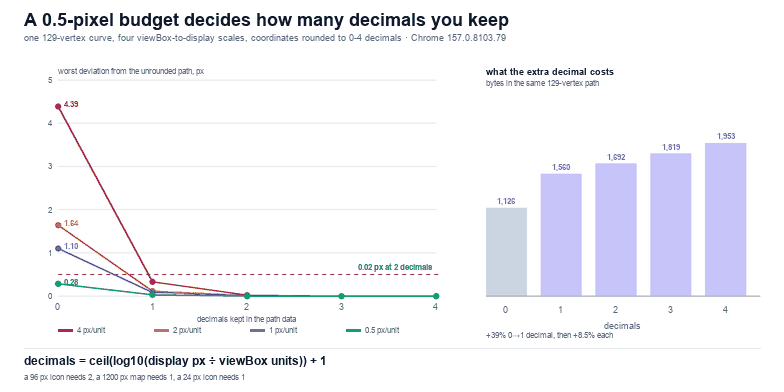
Rounding path data to two decimals is the default in most optimisers, and nobody defends it, because two decimals sounds harmless. It is harmless in some files and visibly wrong in others, and the thing that decides which is not the number of decimals: it is how many screen pixels one user unit covers. In sixty renders of one drawing, at 0.5 px per unit a single decimal left a worst-case drift of 0.03 px, while at 4 px per unit zero decimals moved a vertex 4.39 px and two decimals moved it 0.02 px. Same file, same rounding step, two different answers.
That is the whole rule, and it is arithmetic rather than taste. The rest of this page is the sixty renders behind it, the byte price of each decimal, and the two places where a rounder does real damage: the flags inside an arc, and relative path data.
The rule is a calculation, not a house style
Take the width of the viewBox in user units and the width the drawing is actually displayed at. Divide the
second by the first and you have px per unit. Rounding a coordinate to d decimals moves it by at
most half a step, so the error in device pixels is 0.5 × 10-d × pxPerUnit.
Set that below half a pixel and solve for d:
d = ceil(log10(pxPerUnit)) + 1
The +1 is the safety margin, and the measurements say it is not superstition. At the rule's value
the worst drift was 0.02 px; one decimal below it was 0.33 px at 4 px per unit and 4.39 px at zero decimals.
Multiply pxPerUnit by the device pixel ratio if the artwork is meant to look right on a 2x or 3x
screen, because a 0.4 px shift is one device pixel on a 3x display and that is the shift a designer notices.
| How the file is shown | px per unit | Rule says | Measured drift at that setting |
|---|---|---|---|
| a 24-unit icon at 24 px | 1 | 1 decimal | 0.08 px |
| a 24-unit icon at 96 px | 4 | 2 decimals | 0.02 px |
| a 240-unit illustration at 480 px | 2 | 2 decimals | 0.01 px |
| a 2,400-unit map at 1,200 px | 0.5 | 1 decimal | 0.03 px |
The awkward part is that one file is often shown at several sizes. A logo appears at 24 px in a nav bar and at 512 px in a press kit; the rule follows the largest, so the smaller view is over-precise and that is the correct direction to be wrong in. The number to avoid is the smallest: a 24 px render says one decimal is plenty, and that file at 512 px needs three.
What sixty renders measured
One 200×140 drawing, three elements: two chained cubic curves, a circle built from two 180-degree arcs,
and a wave with 129 vertices spaced 1.4 units apart. The drawing was scaled into viewBoxes of 24, 240 and 2,400
units and rendered at 24, 96, 480 and 1,200 px, giving four px-per-unit ratios. Every coordinate was then
rounded to 0, 1, 2, 3 and 4 decimals, the resulting path was sampled at 900 points with
getPointAtLength, and the sample was compared against the unrounded path. The pixel column is a
diff of the actual render, counted at a channel difference above 8.
| Scale | worst geometric deviation, px | pixels that differ | |||||||||
|---|---|---|---|---|---|---|---|---|---|---|---|
| 0 | 1 | 2 | 3 | 4 | 0 | 1 | 2 | 3 | 4 | ||
| a 24-unit icon shown at 96 px | 4.39 | 0.33 | 0.02 | 0.00 | 0.00 | 463 | 218 | 3 | 0 | 0 | |
| a 240-unit illustration at 480 px | 1.64 | 0.11 | 0.01 | 0.00 | 0.00 | 2,139 | 872 | 53 | 0 | 0 | |
| a 24-unit icon at its own size | 1.10 | 0.08 | 0.01 | 0.00 | 0.00 | 48 | 0 | 0 | 0 | 0 | |
| a 2,400-unit map at 1,200 px | 0.28 | 0.03 | 0.00 | 0.00 | 0.00 | 3,381 | 211 | 10 | 0 | 0 | |
Read the geometric column first, because the pixel column is noisy by construction: any sub-pixel shift repaints the antialiased edge of every stroke it touches. At 0.5 px per unit, zero decimals move the geometry by 0.28 px and still change 3,381 pixels of a 1200×840 render. Those pixels are not wrong, they are 8-bit edge values that landed differently. The geometry column is the one that predicts whether a reader can see the change.
The curve row is the useful counter-example. At 2 px per unit it shows 0.00 px even at zero decimals, because its coordinates are tens of units apart and its control points are far from the endpoints; rounding to whole units moves it less than the wave, which has vertices 1.4 units apart. Precision is a property of the drawing's density, not only of its scale.
The wave breaks first, and the reason is spacing
A rounded vertex does not fail on its own. It fails when it lands next to its neighbour: with 1.4 units between vertices, rounding to whole units can leave two points a fraction of a unit apart, and the segment between them turns into a spike that the stroke then thickens. That is why the wave at 4 px per unit needs two decimals while the curve at the same scale survives on one.
The practical test is the shortest segment in the path, not the number of decimals. If the smallest distance between consecutive vertices is 1.4 units, rounding to 0.1 units leaves 7% headroom in the worst case; rounding to 1 unit can collapse the pair entirely. A quick way to see it without a renderer:
const nums = d.match(/-?\d*\.?\d+/g).map(Number);
let min = Infinity;
for (let i = 3; i + 1 < nums.length; i += 2) {
  min = Math.min(min, Math.hypot(nums[i] - nums[i - 2], nums[i + 1] - nums[i - 1]));
}
// keep at least three significant steps between vertices:
// decimals = Math.floor(Math.log10(min / 3));
Each extra decimal costs 7 to 9 percent
On the same 129-vertex wave, with the source written at six decimals and rounded down from there:
| Decimals | Path data | Saved vs six |
|---|---|---|
| 0 | 1,126 B | −49.2% |
| 1 | 1,560 B | −29.6% |
| 2 | 1,692 B | −23.6% |
| 3 | 1,819 B | −17.9% |
| 4 | 1,953 B | −11.8% |
| 5 | 2,080 B | −6.1% |
| 6 | 2,215 B | — |
The step from six decimals to two saves 23.6% of the path data and costs 0.02 px at 4 px per unit. Going one step further, to a single decimal, saves another 7.8% and multiplies the error by roughly sixteen, from 0.02 px to 0.33 px. That is the trade this page is arguing about: the last decimal is cheap in bytes and expensive in error, so pick it from the scale and stop.
For a whole file the numbers are larger but the shape is the same. In the byte audit of ten SVG files, a 1,900-point trace went from 34,127 bytes at six decimals to 26,420 at two (−36.7%) with 7 pixels of 105,600 changed, and to 22,295 at one decimal (−46.6%) with 403 pixels changed and a 113 of 255 edge shift. Dense traces are exactly where the wave's spacing problem lives, at scale.
The flags in an arc are not numbers
An A command takes seven parameters: rx ry rotation large-arc-flag sweep-flag x y.
Two of those seven are bits, and any rounder that treats them as coordinates destroys the shape. This is not a
theoretical warning; the first version of the rounder behind this article did exactly that while scaling a
drawing into a 24-unit viewBox, and the icon it produced had a bounding box of 0 × 0.
Change to M 30 110 A 70 70 0 1 0 140 60 | Worst deviation | Bounding box |
|---|---|---|
| as written | — | 140 × 127 |
| large-arc-flag 1 → 0 | 70.71 units | 110 × 63 |
| sweep-flag 0 → 1 | 210.71 units | 140 × 127 (mirrored) |
| scale 0.12 applied to every token | 16.8 units | 0 × 0 |
Note the third row: the sweep flip keeps the same bounding box and still moves the curve by 210.71 units, so a bounding-box check will pass while the drawing is wrong. The rounder in the code section below walks the command arity and rewrites a flag to 0 or 1 instead of scaling it.
Relative coordinates accumulate what absolute ones do not
The same 129-vertex wave can be written as one M followed by 128 absolute L
commands, or as one m followed by 128 relative l commands. The relative form is
2,651 bytes against 2,930 (−9.5%), which is why exporters use it. But
each relative delta is rounded independently, and the errors add along the chain:
| Rounding | Absolute form | Relative form |
|---|---|---|
| one decimal | 0.04 px | 0.51 px |
| two decimals | 0 px | 0.03 px |
| drift at the last vertex, one decimal | 0.02 px | 0.08 px |
Twelve times the error for nine percent fewer bytes. If a path arrives in relative form and you intend to reduce precision, convert to absolute first, or give the relative version one more decimal than the rule asks for. The last-vertex row is the honest measure of accumulation: 0.08 px of drift at the end of the chain against 0.02 px.
Stroke width, opacity and transforms are outside the path
The path data is not the only place a decimal matters. Filling a 160×60 rectangle at 480 px, a stroke of 1.25 measured 2,055.1 units of ink coverage and the same shape at 1.0 measured 1,642.7, a 20.1% thinner line; 2.5 against 2.0 gave the same 20.1%. Stroke width is the one number where "round to a whole number" is a visible design change, so leave it at two decimals.
Opacity is worse per step because the scale is not linear in perception: 0.35 to 0.4 is a 14% change in blending. Matrix transforms are the opposite: a value of 0.0001 against 0.001 is a 0.1% shear, which over 1,000 units is a pixel. A working split is one decimal for opacity, two for stroke width, four for matrices, and the rule above for path data.
Round with a budget, then check the drift
Three functions: pick the decimals for a set of display sizes, round without touching arc flags, and check that a path really is inside its budget. They run in a build step, not by hand.
function decimalsFor(pxPerUnit) {
  // pxPerUnit = display pixels / viewBox units, measured at the largest size
  // the artwork is ever shown at (and multiplied by the device pixel ratio).
  if (!(pxPerUnit > 0)) throw new RangeError('pxPerUnit must be positive');
  return Math.max(0, Math.ceil(Math.log10(pxPerUnit))) + 1;
}

function budgetTable(sizes) {
  return sizes.map(function (s) {
    var ppu = s.displayPx / s.viewBoxUnits * (s.dpr || 1);
    return { name: s.name, pxPerUnit: Math.round(ppu * 1000) / 1000, decimals: decimalsFor(ppu) };
  });
}
function roundPath(d, decimals) {
var step = Math.pow(10, decimals);
var tokens = d.match(/[astvzqmhlc]|-?(?:\d+\.?\d*|\.\d+)(?:[eE][-+]?\d+)?/gi) || [];
var cmd = '';
var slot = 0;
var out = [];
for (var i = 0; i < tokens.length; i++) {
var t = tokens[i];
if (/[a-z]/i.test(t)) { cmd = t; slot = 0; out.push(t); continue; }
// A/a take rx ry rotation large-arc sweep x y: slots 3 and 4 are flags
var isArc = cmd === 'A' || cmd === 'a';
var pos = isArc ? slot % 7 : -1;
if (isArc && (pos === 3 || pos === 4)) {
out.push(t === '0' ? '0' : '1'); // a flag is a flag, not a number
} else {
var v = Math.round(parseFloat(t) * step) / step;
var s = v.toFixed(decimals);
if (s.indexOf('.') !== -1) s = s.replace(/0+$/, '').replace(/\.$/, '');
out.push(s === '-0' ? '0' : s);
}
slot++;
}
return out.join(' ');
}function checkPrecision(d, decimals) {
var problems = [];
var tokens = d.match(/[astvzqmhlc]|-?(?:\d+\.?\d*|\.\d+)(?:[eE][-+]?\d+)?/gi) || [];
var cmd = '';
var slot = 0;
var limit = decimals;
for (var i = 0; i < tokens.length; i++) {
var t = tokens[i];
if (/[a-z]/i.test(t)) { cmd = t; slot = 0; continue; }
var isArc = cmd === 'A' || cmd === 'a';
var pos = isArc ? slot % 7 : -1;
if (isArc && (pos === 3 || pos === 4)) {
if (t !== '0' && t !== '1') problems.push('flag "' + t + '" is not 0 or 1');
} else if (t.indexOf('.') !== -1) {
var frac = t.split('.')[1].replace(/[eE].*$/, '').length;
if (frac > limit) problems.push(t + ' has ' + frac + ' decimals, budget is ' + limit);
}
slot++;
}
if (!/^[\s]*[Mm]/.test(d)) problems.push('path data does not start with a moveto');
return problems;
}Used together, the three give a build-time assertion instead of a visual review:
const [{ decimals }] = budgetTable([
  { name: 'logo', viewBoxUnits: 24, displayPx: 24 },
  { name: 'logo@2x', viewBoxUnits: 24, displayPx: 96 },
]);
const rounded = roundPath(d, decimals);
const problems = checkPrecision(rounded, decimals);
if (problems.length) throw new Error(problems.join('; '));
What to do, in order
- Measure the biggest render. Width in pixels divided by viewBox width. Multiply by the device pixel ratio you support.
- Run the rule.
ceil(log10(pxPerUnit)) + 1. For most icons that is 1 or 2, for illustrations 2, for maps and CAD drawings 1. - Check the shortest segment. If consecutive vertices are closer than ten steps of the chosen precision, add a decimal or simplify the path first.
- Convert relative to absolute before reducing, or add one decimal to relative data.
- Leave stroke width at two decimals, and matrices at four.
- Diff a render at the largest size. A pixel diff above a channel delta of 8 on a PNG render of both versions is the only check that sees what a reader sees.
If the file still carries editor state after this — Inkscape's namedview, an Illustrator xmp block, eighty ids of which eleven are used — that is a separate job with a separate saving, and it is covered in how to remove SVG metadata without breaking the drawing. Do the metadata first: it is free, and it makes the path data easier to read before you decide about decimals.
Related SVG Workflows
Precision is one of four numbers that decide how a file looks at size. These pages cover the others.
- Why Is My SVG File So Large? — the byte audit of ten files, including the six-decimal trace measured here.
- Remove SVG Metadata — the other half of the savings, measured block by block on a real export.
- SVG Stroke Width Scaling — why the number in the file is not the number of pixels you see.
- SVG viewBox vs width and height — the box that sets px per unit in the first place.
- Best Free SVG Optimizer Tools — which ones round to two decimals and which let you choose.
- Image Trace to SVG — where dense point clouds with six decimals come from.
- SVG to Code — read the path data as text before you round it.
Related Articles
Try These Free Online Tools
No download required — convert, compress & optimize SVGs right in your browser