
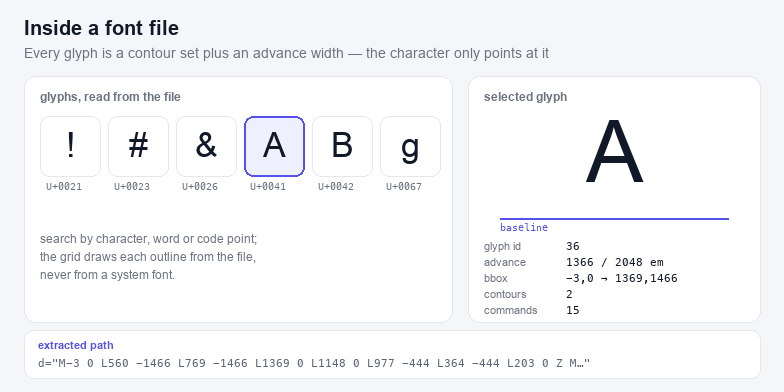
A font is a database of shapes, not a set of letters: each glyph is stored as one or more closed contours in font units, and the characters you type only point at those shapes through a lookup table. Extracting a glyph to SVG therefore means three reads — character to glyph id, glyph id to outline, outline to path — and nothing is redrawn, traced or approximated on the way out.
What is actually inside a glyph
Every glyph carries a bounding box and, for most glyphs, a list of contours. A contour is a sequence of points, each flagged as on-curve or off-curve; the sequence closes back on itself and becomes a filled region. Letterforms with counters — o, e, B, 8 — have two or three contours, and the inner ones are wound in the opposite direction so the hole appears when the shape is filled with the nonzero rule. Nothing in the file says "this is a hole"; the winding does the work, which is why a path that loses its direction suddenly fills solid.
Besides the outline, a glyph carries an advance width: the distance the pen moves before the next glyph starts. That number is not in the outline, and it is the one people forget when they copy a path into a drawing tool and wonder why the letters collide.
TrueType glyf versus CFF charstrings
Two outline formats dominate, and they differ in a way you can see in the exported path:
TrueType (glyf) | PostScript (CFF) | |
|---|---|---|
| File | .ttf, .ttc, Apple system faces | .otf, most design-tool exports, CFF-based CJK fonts |
| Curves | Quadratic, one control point → Q | Cubic, two control points → C |
| Composite glyphs | References to other glyphs plus a 2×2 transform (accents, ligatures) | Usually drawn outright; a few legacy fonts use seac |
| Precision | Integer font units | Fractional, so circles can be smoother at the same em size |
This tool decompresses composites before writing the path, so an é comes out as one flat outline rather than a reference the receiving application has to resolve. It also means the exported path has no dependency on the rest of the font.
One file, many faces
A .ttc or .otc is a collection: several complete fonts sharing one set of tables, which is how an operating system ships Regular, Bold and Light of a CJK family without tripling the disk cost. When you open one, the face picker lists what is inside — for example Songti SC Light, Songti SC Regular, Songti SC Black — and switching re-reads only the table directory, so it is instant even for a 60 MB file.
Two faces of the same family often share glyph outlines and differ only in metrics, so do not be surprised when two styles look identical at one size and diverge at another.
Per-glyph export or a whole string
Both are on this page because they solve different problems. The glyph panel gives you one character with its metrics and a viewBox computed from its own bounding box — the right shape for an icon set, a sprite sheet or a single letter in a logo where you will position it yourself. The string export lays out several characters with the font's own advance widths and kerning and writes one SVG at the size you ask for — the right shape for a wordmark or a label that has to read correctly.
If you need typographic controls — tracking, line height, alignment, colour — that is the other half of this pair: Text to SVG sets a paragraph rather than inspecting a file.
Metrics worth carrying with the outline
- Advance width positions the next glyph. In font units it is relative to
unitsPerEm, usually 1000 or 2048, so 600 units is 0.6 em. - Left side bearing is the gap between the origin and the leftmost point; ignoring it shifts every glyph a little to the left.
- Bounding box is what makes a tight viewBox possible. Without it a glyph sits in a full em square with air on all four sides.
- Contour count is the quickest way to spot a broken extraction: an o with one contour has lost its counter.
What you may do with an extracted outline
Outlines do not become licence-free when they leave the file. In most jurisdictions the glyph shapes are protected as software, and the font's own licence decides whether the outline may be embedded in a document, used in a logo, sold as part of a product, or redistributed at all. Desktop licences commonly allow embedding in a PDF or an image but not in an app or a template; open licences such as the SIL Open Font License allow far more, sometimes with a rename requirement. Extracting the path is a technical operation, not a legal one — read the licence before the artwork ships.
Checking the result
Paste the exported path into a drawing tool and compare the counter shapes against the original; if a letter looks solid, the winding order was lost on the way. The SVG Validator catches the structural faults (missing namespace, dangling references), and SVG Crop, Flip & Rotate trims the margin once the glyph sits where you want it. To embed the finished file in a page or a component, SVG to Code turns it into Base64, a data URI, JSX or a Vue template.