
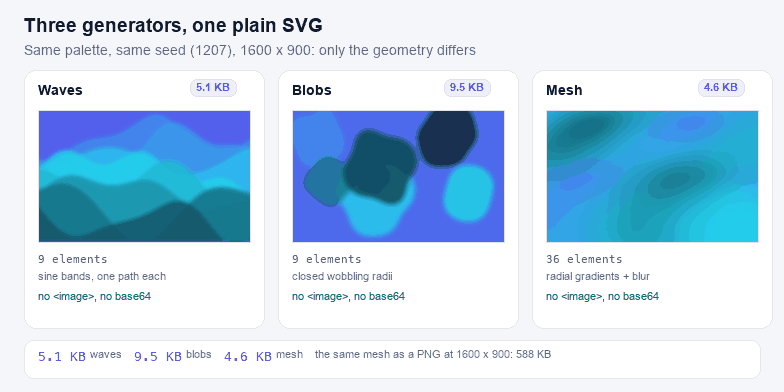
An SVG background is the one image on a page that never needs to be a bitmap: it is soft, it is behind everything, and it is the thing most likely to be asked to fill a screen it was not drawn for. The same design as stacked paths costs 5.1 KB; rasterised at 1600×900 it is 588 KB, and it goes soft the moment the viewport changes shape. The vector scales to any size because it is made of coordinates.
What each generator actually emits
| Type | Markup | Elements at default settings | Bytes | Best for |
|---|---|---|---|---|
| Waves | One closed <path> per band, sampled from two sine terms | 9 paths | 5.1 KB | Section dividers, hero bands, headers that need a horizon |
| Blobs | Closed curves built from a radius that wobbles as a function of angle | 9 shapes | 9.5 KB | Soft shapes behind a card, an avatar frame, a poster corner |
| Mesh | A grid of radial gradient circles over a base fill, under one blur filter | 36 gradients | 4.6 KB | The modern blurred-gradient look, without a PNG |
Every number in that table is read from the file this page produces at 1600×900, not estimated. The mesh is the heaviest of the three because each node needs its own <radialGradient>; it is still an order of magnitude lighter than a PNG of the same appearance at the same size.
Twelve presets, and what each one is for
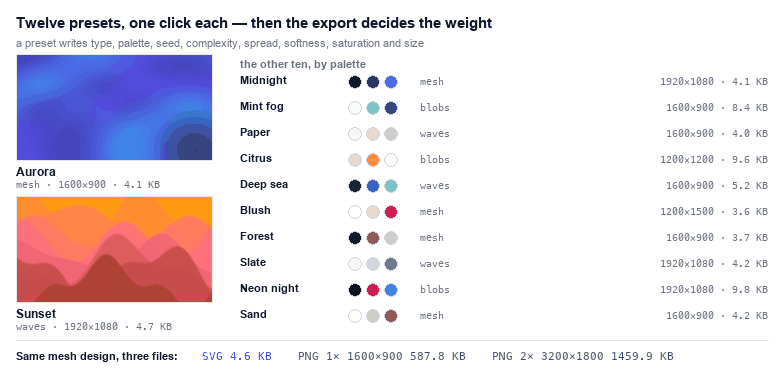
A preset is a complete set of the nine parameters this page keeps — type, palette, seed, complexity, spread, softness, saturation and the two size fields — not a theme layered on top of them. Click one and every control moves to that value, which is why the sliders keep working normally afterwards instead of fighting an override. The chips are rendered from the same constants the generator uses, so the swatch you click is the palette you get.
| Preset | Type | Palette | Built for |
|---|---|---|---|
| Aurora | Mesh | Indigo, cyan, near-black | Dark hero sections, product launches, the default look of this page |
| Midnight | Mesh | Deep navy, indigo, slate | Dashboards and docs where the background must stay quiet |
| Sunset | Waves | Amber, coral, plum | Warm landing pages, event pages, newsletter headers |
| Mint fog | Blobs | Mint, teal, off-white | Health, wellness and finance pages that need air |
| Paper | Waves | Warm greys, bone | Text-heavy pages — a horizon you can barely see |
| Citrus | Blobs | Lemon, orange, cream | Consumer apps and anything aimed at a young audience |
| Deep sea | Waves | Navy, teal, aqua | Technical and maritime products, section dividers |
| Blush | Mesh | Rose, peach, ivory | Weddings, beauty, editorial headers |
| Forest | Mesh | Moss, pine, sand | Sustainability and outdoor brands |
| Slate | Waves | Slate, steel, white | Corporate decks and print-adjacent layouts |
| Neon night | Blobs | Magenta, cyan, black | Gaming, music and developer tools with a dark UI |
| Sand | Mesh | Beige, tan, clay | Print-like pages, portfolios, anything with serif type |
Two of them — Paper and Slate — exist because a background that competes with body copy is a defect, not a style. Both keep saturation low enough that 15 px text stays legible on top without an overlay.
Waves: a sine curve, sampled, stacked
Each band is one path: the top edge is y = base + A·sin(2πf₁x/W + φ₁) + 0.45A·sin(2πf₂x/W + φ₂) sampled at 48 points, then closed along the bottom of the canvas. Two frequencies instead of one is what stops it looking like a graph: the second term bends the crests at a different rate, so no two waves in the stack are parallel.
Wave height scales the amplitude, Complexity sets how many bands are stacked, and Softness adds a blur which is the only reason the bands read as mist rather than as paper cut-outs. The bands are painted back to front with a slight opacity, so the palette reads as a gradient even though every layer is a flat fill.
Blobs: a radius that is a function of angle
A blob is a closed curve in polar coordinates: r(θ) = R·(1 + w·sin(k₁θ + φ₁) + 0.3w·sin(k₂θ + φ₂)), sampled 48 times around the circle and joined with quadratic segments through the midpoints. Two to four lobes on the first harmonic is the range where a shape reads as organic; go higher and it turns into a gear.
The trick that makes it usable rather than a novelty is that the path is small — a hundred bytes of curve data per blob — so you can stack five of them, blur the group, and still ship less than a single photographic JPEG thumbnail. Wobble (the Spread slider in this mode) is the amplitude of the radial distortion.
Mesh gradients, and the element SVG does not have
SVG 1.1 has linear and radial gradients. It has no mesh gradient, and the mesh proposal that was discussed for SVG 2 was never implemented in any browser, so every "mesh gradient SVG" you have seen is an imitation. The imitation that works: paint a base colour, then draw a circle at each node of a coarse grid, fill it with a radial gradient that goes from the node colour at the centre to the same colour at zero opacity at the rim, and put a single gaussian blur over the group. Overlap makes the colours mix; the blur hides the seams.
Two consequences worth knowing. First, the node colours come from a smooth field over the palette, not from independent random picks — random picks give confetti, and a field gives the drifting look a mesh is supposed to have. Second, the blur radius and the node spacing are coupled: raise the grid density without lowering the blur and the design flattens into a single colour. That is what Complexity and Softness do together, and why both exist.
Using the file
The download is a standalone SVG with a viewBox and matching width/height. Three ways to put it on a page, in order of preference:
- A file and a CSS background.
background-image:url(/bg/waves.svg);background-size:cover;— cached by the browser, keeps the HTML clean, andcoveris exactly the scaling behaviour a background wants. - Inline once, reference many. Put the markup in the document and reuse it, which saves a request but makes the HTML heavier and prevents caching the asset separately.
- A data URI. The Copy CSS button builds
background-image:url("data:image/svg+xml,...")from the current design. Convenient for a one-off, but it is not cacheable and it inflates the stylesheet — keep it to a few kilobytes, which is why the mesh is the one to avoid pasting.
A background should not compete with text, so keep the contrast low and check it: the same design that looks elegant behind a headline can make 15 px body copy unreadable. If you need to soften it further, an overlay linear-gradient in CSS is cheaper than regenerating the SVG.
Seeds, and why the link is short
Every random value — band positions, frequencies, phases, blob centres, node colours — comes from a seeded PRNG, so the seed plus the settings determine the artwork exactly. The share link carries those parameters in the URL fragment and nothing else: no storage, no server, no id to look up. Open the link and the page regenerates the identical file, byte for byte, which is also how you can hand a design to someone else and get the same result back.
When you find a composition worth keeping, write the seed down. Shuffling gives you a new one, and 1207 is not more special than 8412 — it is just the one you decided to keep.
Exporting a PNG at 1× and 2×
The PNG buttons rasterise the current design in the browser. 1× writes the canvas exactly as the size fields say — 1600×900 by default; 2× writes twice the width and twice the height, 3200×1800, which is the version to use on a retina screen or when the PNG will be cropped later. The number under the buttons is the byte size of the last PNG you actually exported, not an estimate.
At the default mesh that is 588 KB at 1× and 1460 KB at 2×, against 4.6 KB for the same design as SVG. The ratio is the point: a PNG stores every pixel, so the 1× file is about a hundred and thirty times heavier than the paths it was rendered from, and it stops scaling the moment it is written. Export a PNG for a slide, a screenshot, a social card or a platform that refuses SVG — not for a web page you control.
Two mechanics worth knowing. The rasteriser is the browser's own canvas, fed a blob URL of the SVG string, so the filter, the gradients and the opacities come out exactly as the preview draws them; and because the page never loads an external image, the canvas is never tainted, which is what makes toBlob possible at all. Very large canvases are capped by the browser — Chrome starts to struggle above roughly 16 million pixels — so 2× on a 2560×2560 canvas is the practical ceiling.
When a bitmap is the better answer
If the background is a photograph, or has grain, or needs to be animated frame by frame, a raster is the honest choice: use the PNG 2× button here, or the dedicated SVG to PNG converter if you want 3× or 4× and a transparent or tinted backdrop. The same tool is the answer when a platform refuses SVG uploads — some CMS media libraries still do.
Once the file exists, the usual neighbours apply: SVG Compressor to cut the decimals in the path data, SVG Color Changer to move the whole palette at once, and SVG Editor if you would rather nudge one node by hand than shuffle the seed.