
Turning SVG code into a PNG is a two-stage job: parse the markup into a DOM, then ask the canvas to draw that DOM at the pixel size you choose. Both stages are visible here — the editor shows what the parser sees, the preview shows what the rasteriser produced, and the size readout tells you how many pixels actually came out.
Paste, preview, export: the loop
- Paste or load. Drop in markup from Figma, Illustrator, a design system or a chat message, or start from one of the five templates.
- Watch the preview. Rendering happens as you type, 250 ms after the last keystroke, so a syntax error shows up immediately with the line number instead of silently producing a blank canvas.
- Pick a scale. 1x is the SVG's own size, 2x doubles both dimensions, 4x quadruples them. An exact width overrides the scale when you need a fixed asset size.
- Export. The PNG is named
svg-code-2x.png, orsvg-code-512px.pngwhen you set a width, so the file explains itself in a folder full of exports.
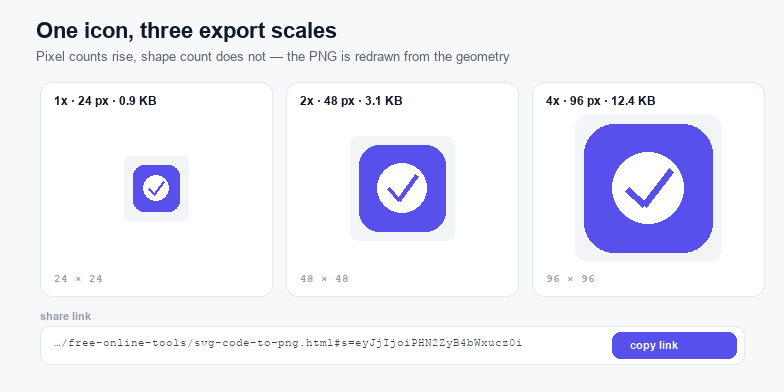
What 1x to 4x actually changes
The scale multiplies output pixels, not vector detail. At 4x, the browser rasterises the shapes at four times the coordinates, so curves and hairlines are computed at that resolution and look genuinely crisp; no new shapes appear. That is the difference between this and upscaling: enlarging a 1x PNG invents pixels by interpolation, while a 4x export re-draws from the geometry. A 24 × 24 icon at 4x becomes a 96 × 96 PNG, four times wider and roughly four times the file size on a flat mark. Anything above 8,192 px per side is refused, because canvas memory grows with the square of the dimension and the tab starts to stall.
Share links that reproduce the exact canvas
The share button packs the code, the scale and the background into the URL fragment: …/svg-code-to-png.html#s=eyJjIjoi…. Fragments are handled entirely by the browser, so the SVG never leaves the machine — not even as a request log entry. Open the link and the playground restores the code, re-renders, and lands on the same pixels. Two practical limits: a very large SVG makes a very long URL (some chat clients wrap or truncate past roughly 8,000 characters, and the counter turns amber when that is close), and the fragment is not a version control system — if you need history, keep the file.
Why pasted SVG code renders blank
Four faults cover almost every blank canvas. Missing namespace: an <svg> without xmlns="http://www.w3.org/2000/svg" parses as unknown elements and draws nothing. Zero or percentage size: width="100%" with no viewBox leaves the rasteriser with no intrinsic size. Paint that resolves to nothing: fill="none" on a shape with no stroke, or a url(#gradient) whose id was stripped during copy. External references: a linked raster image, a webfont, or a CSS import — the browser sandboxes SVG loaded as an image and refuses to fetch any of them.
The SVG Validator reports all four with line numbers; the SVG to Code tool goes the other way and converts a working file into embeddable markup.
Sizing rules that keep exports sharp
- Give the SVG a viewBox. A
viewBoxdefines the coordinate system, so the file scales without any width or height at all. - Export at 2x the CSS size. An icon placed at 32 CSS pixels wants 64 output pixels; 3x covers the densest phone screens and is rarely needed above that.
- Do not export a small SVG huge. A 16 px icon at 4x is 64 px of genuine geometry, but its 1-unit strokes stay 1 unit; if the design was drawn for 16 px, the hairlines stay hairlines. Redraw rather than overscale when you need 512 px.
- Flatten the background for print. Transparent PNG is right on screen and wrong in a document that assumes white; tick a background colour for anything headed to Word or a PDF.
When to ship the PNG and when to ship the SVG
A PNG is the safer default for anything that has to look identical everywhere: email signatures, chat avatars, app store screenshots, slide decks and print handoffs. It carries no code, no external references and no font assumptions, so it cannot be broken by a sanitizer or a CMS that strips SVG. The SVG is the better asset wherever the image has to scale or change colour: icons in a component library, logos on a responsive page, diagrams that must stay crisp at 4x.
In practice most teams keep both: the SVG as the source of truth, and a 2x PNG exported here as the fallback for the places that still refuse vector files. Export the PNG from the same markup you ship, not from a screenshot, so the two never drift apart.
Privacy and offline use
There is no upload endpoint on this page, no analytics call, and no external script. The code is parsed by DOMParser, drawn by the canvas API and encoded by the browser's own PNG writer. Disconnect the network and the playground still works — which is also the quickest way to verify that claim.