
SVG External References: Nine Ways Out of One Drawing
An SVG file can point at another file in at least nine different ways, and only some of them are called href. I built twelve files of 225 to 365 bytes, each aimed at a second origin that logs every request it receives, and placed each one in eight positions. Inside an <img> tag and inside a CSS background, nothing left the browser — 0 of 12 in both, while the drawings still rendered. In every other placement, 9 of the 12 reference types reached the server, including one hidden in a fill attribute and one in a font declaration.
That split is the whole subject. "SVG can phone home" is true, and "the image tag is safe" is also true, and the two statements are only compatible if you know which placements are images and which are documents. This article is the measurement of that boundary, plus the one thing a sanitizer gets wrong when it only looks for href.
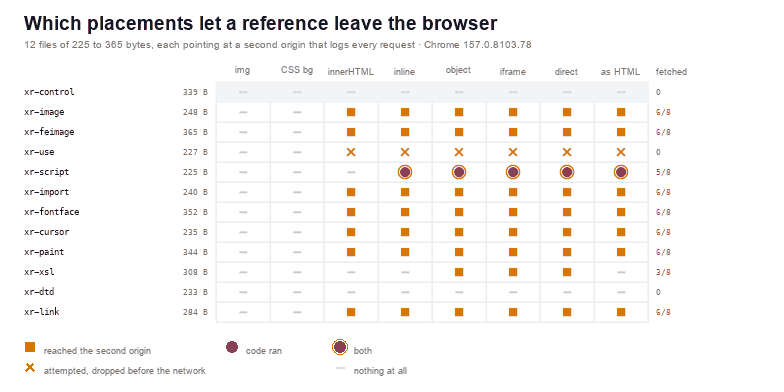
Nine reference types that leave the page
The files are small because each one contains a single reference and a rectangle. What varies is the syntax, and the syntax is what a filter has to recognise.
| File | Size | Reference | Placements that fetched |
|---|---|---|---|
xr-control | 339 B | data: PNG only, nothing to resolve | 0 / 8 |
xr-image | 248 B | <image href> | 6 / 8 |
xr-feimage | 365 B | <feImage href> inside a filter | 6 / 8 |
xr-use | 227 B | <use href> to another file | 0 / 8 |
xr-script | 225 B | <script href>, SVG 1.2 style | 5 / 8 |
xr-import | 240 B | @import url() in <style> | 6 / 8 |
xr-fontface | 352 B | @font-face src:url() | 6 / 8 |
xr-cursor | 235 B | cursor:url() in a style attribute | 6 / 8 |
xr-paint | 344 B | fill="url(other.svg#g)" | 6 / 8 |
xr-xsl | 308 B | <?xml-stylesheet href> | 3 / 8 |
xr-link | 284 B | <a href> to a landing page | 6 / 8 |
xr-dtd | 233 B | External DTD in the doctype | 0 / 8 |
The count column is a count of placements in which the second origin logged something. The reason it is not uniform is the subject of the next three sections.
The image tag and the CSS background are the only quiet placements
In an <img> tag, all twelve files decode at 240×110 and the second origin logs 0 requests. In a CSS background-image, the same: 0. This is not a filter, it is a different code path: the image loader parses the file into a picture and never gives it a document, so there is no base URL to resolve, no stylesheet to fetch, and no script to run.
Two of the twelve are worth looking at closely, because they show the difference between "does not fetch" and "does not work". xr-feimage paints 0 pixels as an image — the filter chain that only merges an feImage produces nothing when the referenced bytes are unavailable — and xr-paint also paints 0, because an external paint server is not supported at all. So the quiet placement is quiet because it refuses to resolve anything outside the file, not because it blocks a request after the fact.
That is why a thumbnail is a safe preview and a "preview in the browser" link is not. The thumbnail is an image; the link opens a document.
What innerHTML changes, and what it does not
Inserting the same file with innerHTML produced 7 fetches out of 12, which is the number most people get wrong in the optimistic direction. What is missing from that list is the interesting part: xr-script does not fetch and does not run there, because a script element created by the HTML fragment parser is not executed. xr-xsl does not fetch either, because a processing instruction written into a fragment is a comment. And xr-use raises a request event without reaching the server.
Everything that is an attribute, however, still resolves: <image href>, <feImage href>, the cursor:url() in a style attribute, the fill="url(...)", the @import and the @font-face inside <style>. Seven of twelve is not a safe number, and it is the number you get from the technique most often recommended for "safe" insertion.
The three that never fetch, and the one that waits for a click
Not every reference is a request. The external DTD is the clearest case: <!DOCTYPE svg SYSTEM "http://.../x.dtd"> is a real external reference by any XML definition, and Chrome logs 0 requests for it in all eight placements. Whatever your XML parser does with that doctype on the server is a different article — the XXE measurements cover the server side — but in the browser it is inert.
The <use> reference is the second case: Chrome raises the request event and drops it, logging Unsafe attempt to load URL, and the second origin receives nothing. The use article has the full grid; here it is one row of crosses.
The third is <a href>, which is not a fetch at all — it is a navigation, and it happens when someone clicks. Measured with a click at the centre of the drawing, the second origin logged 2 entries: the landing page and the favicon that page then asked for. Without the click, zero. If your threat model is "a tracking pixel that fires on upload", a link is not it; if your threat model is "a link that takes the reviewer somewhere", it is.
And then the odd one: xr-xsl, the <?xml-stylesheet href> processing instruction, fetched in 3 placements — the three XML document modes and none of the HTML ones, because the HTML parser drops a processing instruction outside the head. Same file, two parsers, one request.
Two references that fetch and paint nothing
xr-paint is the one I would not have predicted. A rectangle filled with url(http://origin/paint.svg#g) logs one request per document placement and then paints 0 pixels: the browser fetches the paint server and refuses to use a gradient from another document. The request is the whole attack — an exfiltration channel that does not need to be visible — and the empty rectangle is the reason nobody notices it in a screenshot.
xr-feimage behaves the other way round in the image placement: 0 pixels there, 3,600 pixels as a document. The filter works when the document is real and the external image is fetched, and produces nothing when the image loader tries it. Two placements, two outcomes, same bytes.
A checker that walks attributes misses the CSS
The obvious defence is to walk the tree and delete every attribute that points somewhere else. That is worth writing, and it is roughly forty lines.
// Every attribute that can pull a second origin. Walk the tree once and return
// the list, so an upload form can show the user what it is about to remove.
function makeMatchers() {
  return {
    attrs: ['href', 'src', 'data', 'poster'],
    funcs: /url\s*\(\s*['"]?([^'")]+)['"]?\s*\)/gi,
  };
}
const { attrs: URL_ATTRS, funcs: URL_FUNCS } = makeMatchers();

function isRemote(value) {
  const v = String(value).trim();
  if (!v) return false;
  if (v.startsWith('#')) return false;                 // same-document fragment
  if (/^data:/i.test(v)) return false;                 // inline bytes, no request
  if (/^[a-z][a-z0-9+.-]*:/i.test(v)) return true;      // http:, https:, file:, ftp:
  return !v.startsWith('data:');                       // relative path still leaves the page
}

function externalRefs(root) {
  const found = [];
  const walk = (el) => {
    for (const attr of [...el.attributes]) {
      const name = attr.name.toLowerCase();
      if (URL_ATTRS.includes(name) || name.endsWith(':href')) {
        if (isRemote(attr.value)) {
          found.push({ element: el.localName, attr: attr.name, url: attr.value.trim() });
        }
      }
      let m;
      URL_FUNCS.lastIndex = 0;
      while ((m = URL_FUNCS.exec(attr.value))) {
        if (isRemote(m[1])) {
          found.push({ element: el.localName, attr: attr.name, url: m[1].trim() });
        }
      }
    }
    for (const child of [...el.children]) walk(child);
  };
  walk(root);
  return found;
}
Run over the twelve files it finds 7 references in 7 of them, including the fill and the cursor ones that most filters miss. Removing them removes the requests: 2 of the 5 files that had no attribute reference still had a network hit, because the reference was inside <style> text and an attribute walk cannot see it.
// Remove the attribute, not the element: a logo that loses its remote bitmap
// still has its own paths, and a drawing that loses its filter still draws.
function stripExternalRefs(root) {
  let removed = 0;
  const walk = (el) => {
    for (const attr of [...el.attributes]) {
      let drop = false;
      if ((URL_ATTRS.includes(attr.name.toLowerCase()) || attr.name.toLowerCase().endsWith(':href'))
          && isRemote(attr.value)) drop = true;
      if (!drop && URL_FUNCS.test(attr.value)) {
        URL_FUNCS.lastIndex = 0;
        let m;
        while ((m = URL_FUNCS.exec(attr.value))) {
          if (isRemote(m[1])) { drop = true; break; }
        }
      }
      if (drop) { el.removeAttribute(attr.name); removed += 1; }
    }
    for (const child of [...el.children]) walk(child);
  };
  walk(root);
  // a processing instruction and a DOCTYPE never survive a rebuild, but strip
  // them explicitly when the caller passes raw text
  return removed;
}
Those two files are xr-import and xr-fontface. Both keep making one request per placement after the attribute pass — the CSS pass is not optional. With the <style> text rewritten as well (drop @import, rewrite remote url() to none), all twelve cleaned files make 0 requests across 36 placements, and the two that only had CSS references stop fetching.
One more measurement worth keeping: the first version of my own sanitizer checked only href. It left xr-paint making one request per placement after the rebuild, because the URL was in fill. Adding a url(...) check to every attribute brought it to zero. The bug is easy to make and invisible in a screenshot, since the rectangle stayed empty either way.
What to do before the file is stored
- Serve user SVG from a separate origin. Every request that a document makes inherits that document's origin; a separate hostname turns an exfiltration into a cross-origin request you can log and block.
- Fix the content type and add
nosniff.image/svg+xmlmeans the file is parsed as a document when navigated to, so this is not a complete answer — but it stops the file from being re-interpreted as HTML. - Strip references, not just
href. Walk every attribute forurl(), and rewrite<style>text. Afilland a font declaration are reference sites. - Preview as an image. The
<img>tag is the only placement where all twelve of these files stayed silent; make the preview path use it and make the "open in a new tab" path go through a download instead. - Log the request that the file tries to make. A CSP of
img-src data:on the SVG response is the cheapest way to see attempts without allowing them; the CSP article measured which directives actually stop what.
Why "put it in an image tag" is not the whole answer
Because the same file is an image or a document depending on how it is reached, and most applications reach it both ways. A download link, a "view original" button, a PDF export that embeds the file as a document, an email client that inlines it — each of those is a different placement, and the quiet one is only quiet while it stays an image. The data URI article shows the same asymmetry with a different wrapper.
So the rule is not "SVG is dangerous" or "the img tag is safe". It is: decide which placement each surface uses, and make the decision explicit in code. If a surface renders a document, it needs sanitizing and a separate origin; if it renders an image, it needs nothing from this article. The failure mode is a surface that does one and is described as the other.
To check a file before it gets anywhere near a server, the SVG Validator lists external references and dangling ids, and the SVG to PNG converter is the fastest way to see what a file actually draws when it is treated as an image and nothing else.
Related Articles
Try These Free Online Tools
No download required — convert, compress & optimize SVGs right in your browser