
SVG Data URI Security: Inert as a Picture, a Document as an Object
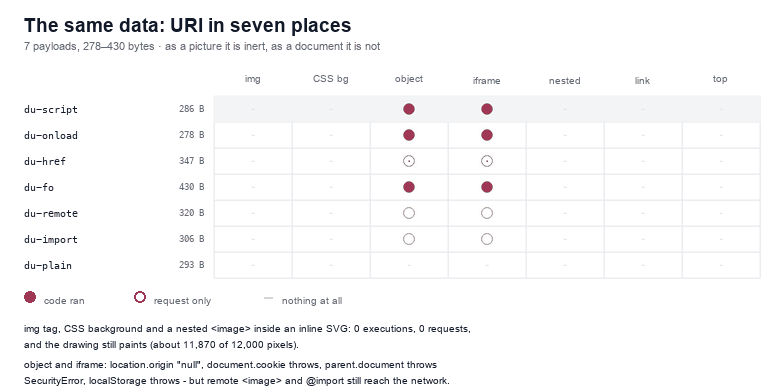
A data: URI is the safest-looking way to put an SVG on a page, and it is safe in exactly the three places people use it. I encoded seven SVG payloads — between 278 and 430 bytes — and placed each one in seven sinks: an <img> tag, a CSS background, an <object>, an <iframe>, a nested <image> inside an inline SVG, a link you can click, and a location.href assignment. In the first three sinks: 0 of 7 executed and 0 of 7 made a request, and the drawing still painted. In <object> and <iframe>: 4 of 7 executed and 3 of 7 reached the network. The encoding changes nothing. The sink decides everything.
That gap is wider than most write-ups admit, in both directions. A data: URI is not a sandbox — hand it to <object> and it runs code like any other SVG document. But it is also not a free pass for an attacker: the document it gets has an opaque origin, so it cannot read your cookies, your storage or your DOM, and modern Chrome refuses to navigate the top frame to it at all. Both halves are worth knowing before you decide where to put the next icon.
What a data: URI actually is
A data: URI carries its own bytes. data:image/svg+xml;base64,PHN2Zy... is not a request, not a file, and not a server — it is the document, written where the URL would normally go. That has three consequences that matter here.
- There is no response. No
Content-Typeheader to get wrong, noContent-Disposition, and no headers of your own. The media type is in the URI itself, and that is the only type the browser will use. - There is no origin. The document is assigned an opaque origin, which reports as the string
null. It is not your origin and it is not a subdomain of your origin; it is nobody's. - There is no CSP of its own. A document loaded from
data:inherits the policy of the page that embedded it — and when the same string is used as an image, the page'simg-srcis what decides whether it loads at all.
Those three are the whole model. What varies is which one the sink consults.
Seven sinks, seven contracts
The payloads are one feature each: a <script> element, an onload on the root, a javascript: link, a foreignObject holding an HTML <img> with onerror, a remote <image href>, a @import in a style block, and a plain drawing as a control. The seven sinks are the ways an SVG data URI realistically ends up in a page.
| Payload | Size | img | CSS bg | object | iframe | nested | link | top |
|---|---|---|---|---|---|---|---|---|
du-script | 286 B | — | — | ran | ran | — | — | — |
du-onload | 278 B | — | — | ran | ran | — | — | — |
du-href | 347 B | — | — | ran after a click | ran after a click | — | — | — |
du-fo | 430 B | — | — | ran | ran | — | — | — |
du-remote | 320 B | — | — | request only | request only | — | — | — |
du-import | 306 B | — | — | request only | request only | — | — | — |
du-plain | 293 B | — | — | — | — | — | — | — |
Read the columns rather than the rows and the structure is obvious: the three columns on the left are the image pipeline, the two in the middle are document loads, and the two on the right are navigations that Chrome declines to perform.
The image pipeline: nothing runs, nothing is fetched, the drawing appears
An <img> tag, a CSS background-image, and an <image href="data:...> inside an inline SVG are three different code paths in the browser and one behaviour in the measurement: 0 of 7 executed, 0 of 7 requested anything, and every payload painted.
The paint is worth a number, because it is the proof that the file was really parsed rather than rejected. All seven drawings are a 200×60 dark panel with a label, so a full render is 12,000 pixels of ink. Measured from screenshots: 11,758 to 11,915 pixels depending on the payload, in the CSS sink and the nested-image sink alike. The eleven missing pixels are the anti-aliased edges of the text. Nothing was dropped, nothing was blocked, and nothing executed.
The nested case is the one I expected to differ and did not. An <image href="data:image/svg+xml;base64,..."> inside an inline <svg> is a data URI inside an SVG inside an HTML page — three layers of parsing — and it lands in the same place as an <img>: inert, no requests, full paint. If you are generating a sprite sheet or an email template and nesting encoded SVGs, this is the measured answer, and it is the good one.
object and iframe: four of seven run, and the origin is nobody's
Change one attribute and the same string becomes a document. <object data="data:image/svg+xml;base64,..."> and <iframe src="data:...> both produced 4 executions out of 7: the script element, the onload attribute, the javascript: link after a click, and the foreignObject image error. Two of those four needed no interaction.
The marker in those four cells came from a document that reported location.origin as null, and that number is the reason this is a limited problem rather than a catastrophic one. Inside the frame, all four of these threw:
| Attempt | Result in a data: document |
|---|---|
document.cookie | throws a SecurityError |
parent.document | throws a SecurityError |
localStorage.setItem('a','1') | throws a SecurityError |
location.origin | returns the string "null" |
So the code runs, and it runs with no access to your session. It can compute, it can draw, it can navigate itself, and it can talk to the network — which is the next section, and the part that actually matters for privacy. What it cannot do is read the page that embedded it, which is the difference between "an SVG can run code here" and "an SVG can steal a login".
One more detail from the same cells: the javascript: link only worked with a void wrapper. Without it the link still executes — and then replaces the frame's document with the returned string, which is the same trap described in the JavaScript article. I am mentioning it twice because it caught me twice.
The network still works, which is the part to worry about
Three payloads reached the second origin in both document sinks, and none of them needed a script element:
du-remote—<image href="http://127.0.0.1:8956/b/remote.png">. One request per document sink, 0 in every image sink.du-import—@import url("http://127.0.0.1:8956/imp.css")inside a<style>block. One request per document sink.du-fo— an HTML<img>insideforeignObject, pointing at a URL that 404s. One request, and theonerrorthat follows it is one of the four executions above.
An opaque origin does not stop a subresource load. That means a data URI can be a tracking pixel with extra steps: zero code execution, one request, and a timestamp on someone's server every time the frame renders. If your threat model is "does this thing phone home", the image pipeline is the only answer that is actually quiet — not the document sinks, and not a CSP you forgot to set.
Navigations are refused, and the message is specific
The two right-hand columns are the ones where Chrome says no, and it says no in a way you can verify from the console.
Clicking <a href="data:image/svg+xml;base64,..."> left the page at about:blank — it did not navigate, and it did not render the SVG as a document. Assigning location.href to the same string left the URL exactly where it was. In both cases the console printed the same line: Not allowed to navigate top frame to data URL.
That is a deliberate browser policy, not an accident of this build, and it is the reason a data URI cannot be used as a phishing landing page — the classic "click here, the address bar shows a data URI" trick has been dead in Chrome for years. It also means the two rows in the table are not "0 executions because the payload failed" but "0 because there was no navigation to execute in". If you are writing a test for this, assert on page.url(), not on the absence of an error.
414 characters, and the one character that breaks the whole thing
Encoding is where most data URI bugs actually live, and they are cheap to avoid once you know the sizes. I took a normal 24×24 icon, 294 bytes of SVG, and encoded it four ways:
| Form | URI length | Renders? |
|---|---|---|
| base64 | 418 | yes, 24×24 |
| percent-encoded, everything escaped | 507 | yes, 24×24 |
raw markup, # left as is | 313 | no, 0×0 |
raw markup with %23 for the hash | 315 | yes, 24×24 |
Two facts fall out. First, a hash sign ends the data URI: everything after it is parsed as a fragment identifier, so fill="#e11d48" truncates the document mid-attribute and you get a broken image with no error message beyond a console warning. %23 fixes it, and that single substitution is what turns a 313-character almost-URI into a working 315-character one.
Second, base64 is not automatically bigger. For this icon base64 is 418 characters and a minimally escaped URI is 414 — base64 is four characters longer, because XML is mostly characters that need escaping. For a drawing full of quotes and angle brackets the percentages swing further. Measure the file you have rather than assuming.
The function below does the escaping in one pass, so the hash cannot be forgotten:
function encodeSvgDataUri(svg) {
  let out = '';
  for (const ch of svg) {
    out += /[A-Za-z0-9\-_.!~*'():\/;,=]/.test(ch) ? ch : encodeURIComponent(ch);
  }
  return 'data:image/svg+xml,' + out;
}
Run on the same 294-byte icon it produces a 453-character URI — longer than base64's 418, because this version is deliberately conservative and escapes spaces and every quote. It round-trips exactly: decoding the payload returns the original string byte for byte. If you are optimising for size, switch to base64 and skip the escaping question; if you are optimising for readability in a CSS file or an email template, keep the readable version and accept the extra 8 per cent.
Canvas: data: does not taint, http does
One more measurement, because it comes up whenever someone wants to rasterise an inline SVG. Drawing the same icon from a data URI into a canvas produced 3,271 pixels of ink and toDataURL() returned a 2498-character PNG. The canvas was not tainted: for image purposes a data: URI counts as same-origin.
Drawing an SVG served over http from another origin into the same canvas threw a SecurityError on getImageData. So the rule is the usual one, and it cuts in a direction that surprises people: if you need to read pixels back, encode the drawing — a data URI is the version you are allowed to inspect, and a cross-origin URL is the version you are not.
The one-line rule for each sink
I put the answer in a function as well, because a lookup table is easier to review than a paragraph:
function sinkIsInert(kind) {
  const map = {
    'img': 'inert', 'css-background': 'inert', 'svg-image': 'inert',
    'object': 'document', 'iframe': 'document', 'link': 'blocked', 'top-navigation': 'blocked',
  };
  return map[kind] || 'unknown';
}
Two things it deliberately does not encode: whether the page is allowed to load the URI at all (that is a CSP decision, and img-src data: is the directive that grants it), and whether the bytes inside are clean (that is the sanitizer's job). A sink being inert does not make the file harmless, and the reverse is also true — a clean file in an <object> is still a document with your origin on it.
The checklist
- Inline icons as
<img src="data:...>or a CSS background. Measured: 0 executions, 0 requests, full paint. It is the only sink where all three are true. - Do not put a data URI in
<object>or<iframe>unless you have read the bytes. 4 of 7 payloads ran there, with a real script engine and a real network stack. - Expect an opaque origin, not a sandbox. The document gets
origin: null, cannot read cookies or the parent, and can still fetch remote images and stylesheets. - Encode the hash.
#ends the URI;%23does not. It is a two-character fix for a silent broken image. - Set
img-src data:if you use them. Without it, a strictdefault-src 'self'blocks every encoded icon on the page. - Remember that a data URI cannot be a landing page. Chrome refuses top-level navigation to one, from a link or from
location.href, and logs why.
None of that makes a data URI a security boundary. It makes it a formatting decision with a predictable blast radius, which is a more useful thing to know.
Frequently asked questions
Is an SVG data URI safe?
As an image, yes: 0 of 7 payloads executed and 0 made a request inside an <img> tag, a CSS background or a nested <image>. As a document, no: 4 of 7 executed when the same string was used in <object> or <iframe>, though the document's origin is null and it cannot read your page.
Why does my data URI SVG show a broken image?
Almost always an unencoded #. Everything after the hash is read as a fragment, so fill="#e11d48" truncates the document. Measured: the same icon at 313 characters renders 0×0 with a raw hash and 24×24 at 315 characters with %23.
Does a data URI bypass Content-Security-Policy?
No. A data: image is subject to the page's img-src, and a data: document inherits the embedding page's policy. A policy of default-src 'self' blocks encoded icons; adding img-src data: is what allows them.
Can an SVG data URI steal cookies or read the page?
Not from these sinks. In <object> and <iframe> the document reports location.origin as "null", and document.cookie, localStorage and parent.document all throw SecurityError. It can still load remote images, which is the part to police.
Related SVG Workflows
Encoding is the easy half. These are the pages for the other half.
- Where SVG JavaScript actually runs — twelve files, six embedding modes, and the document-replacement trap this article runs into twice.
- How to sanitize SVG — the allowlist that removes the four payloads which execute in a document sink.
- A Content-Security-Policy for SVG — the header that decides whether a data URI loads at all.
- Can SVG files contain malware — the embedding matrix behind all of these numbers.
- SVG to Data URI — encode a file with the hash escaped, in the browser, with no upload.
- SVG Editor — read the markup before you decide which sink it goes into.
- SVG Validator — catch the document that will not parse before it becomes a broken icon.
Encode it once, correctly
Paste an SVG, get a data URI with the hash escaped and the quoting handled. Runs in your browser with no upload.
Try These Free Online Tools
No download required — convert, compress & optimize SVGs right in your browser
SVG Validator
Catch the document that will not parse before it becomes an icon.
Open validator