
Can an SVG File Run JavaScript? Where the Script Actually Runs
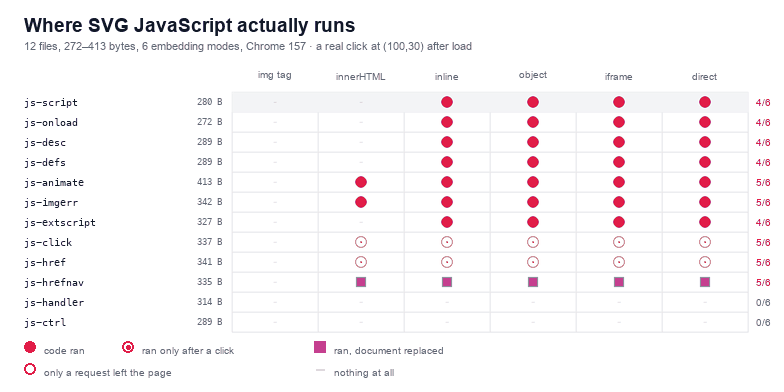
Yes — and the answer depends almost entirely on how the file got onto the page, not on what is inside it. I built twelve small SVG files, between 272 and 413 bytes, and put each one through six ways of embedding an SVG: an <img> tag, innerHTML, server-side inlining, <object>, <iframe>, and direct navigation. Inside an <img> tag, 0 of the 12 ran code and 0 of the 12 made a single network request. Served as a document, 10 of the 12 ran, seven of them with no click at all. The tag you use is the security boundary. The file is not.
That is the short version, and it is stable across everything I have measured on this site: the image loader treats an SVG as a picture, and a picture does not get to run code or fetch anything. Every surprise lives in the other five modes, and there are more surprises than the folklore suggests — including one payload that runs perfectly and still looks like it did nothing.
Why an SVG can carry JavaScript in the first place
This is not a bug and it is not a feature someone forgot to remove. SVG is a document format, and the specification says a conforming viewer has to support scripting for interactive graphics: charts with tooltips, maps that zoom, editors. A <script> element is part of the vocabulary, event attributes are part of the vocabulary, and an <a> element can hold a javascript: URL the same way an HTML anchor can.
So the useful question is never "can an SVG run JavaScript" — it always can. The question is which of the six embedding modes hands the file a document with a script engine attached. Three properties decide it:
- A document or a picture.
<img>and CSS backgrounds request an image. The browser decodes it to pixels and hands you a bitmap; there is no browsing context, no script engine, and in Chrome no subresource loading at all. - Whose document it is. Inlined markup becomes part of your page, so your origin, your cookies and your CSP apply to it — and your page's
innerHTMLrules apply too, which is a very specific set of rules. - Whether the file gets its own origin.
<object>,<iframe>and direct navigation give the file its own document. If it came from your server over http, that document is same-origin with you and can read your storage.
What I actually measured
The harness is the one from the 12-payload malware matrix, extended with a click: each file is served as image/svg+xml from one local origin, a second origin on another port logs every request that arrives, and every cell is measured twice — once after load, once after a real mouse click at (100,30), which lands on whatever the 200×60 drawing puts there.
The payloads are one feature each, so the matrix reads like a vocabulary list rather than a pile of exploits. A <script> element. An onload on the root. A script inside <desc>. A script inside <defs>. A SMIL <animate> with onbegin. An <image> pointing at a URL that 404s, with onerror. An SVG 1.2 external <script href>. An onclick on a rectangle. A <a> with a javascript: URL. The same link without a void wrapper. An SVG Tiny <handler>. And a plain drawing as a control.
| Payload | Size | img | innerHTML | inline HTML | object | iframe | direct |
|---|---|---|---|---|---|---|---|
js-script | 280 B | — | — | ran | ran | ran | ran |
js-onload | 272 B | — | — | ran | ran | ran | ran |
js-desc | 289 B | — | — | ran | ran | ran | ran |
js-defs | 289 B | — | — | ran | ran | ran | ran |
js-animate | 413 B | — | ran | ran | ran | ran | ran |
js-imgerr | 342 B | — | ran | ran | ran | ran | ran |
js-extscript | 327 B | — | — | ran | ran | ran | ran |
js-click | 337 B | — | ran after a click | ran after a click | ran after a click | ran after a click | ran after a click |
js-href | 341 B | — | ran after a click | ran after a click | ran after a click | ran after a click | ran after a click |
js-hrefnav | 335 B | — | ran, document replaced | ran, document replaced | ran, document replaced | ran, document replaced | ran, document replaced |
js-handler | 314 B | — | — | — | — | — | — |
js-ctrl | 289 B | — | — | — | — | — | — |
Twelve files × six modes = 72 cells, each run twice. Three numbers come out of that table and they are the whole article: 0 in the first column, 10 in the last four columns, 5 in the innerHTML column.
Inside an img tag: zero, and not only for scripts
All twelve files rendered at 200×60 inside an <img> tag, so the image loader parsed every one of them. None of them executed anything, and — this is the part that surprises people — none of them made a request, not even the two payloads whose whole purpose is to fetch something.
js-imgerr holds an <image href="http://127.0.0.1:8956/nope.png" onerror="...">. In an <img> tag the second origin logged 0 requests; in the other five modes it logged 1 each. The same is true of js-extscript, which carries an SVG 1.2 external script reference: 0 requests in the image tag, 1 in each document mode. Chrome's SVG image loader does not load subresources. That closes off the entire class of "the picture phones home" attacks without any configuration on your part, and it is why an <img> tag is the answer to almost every "how do I display untrusted SVG" question.
Two caveats worth keeping. First, this is Chrome 157 in November 2026; treat it as the behaviour of a modern browser rather than a law of nature, and re-check when you change browsers. Second, "no request" does not mean "no pixels": an SVG that draws a convincing login form still draws it, and a user can still type into the picture and believe they are typing into your site. That is a phishing problem, not a scripting problem, and it is solved by not accepting arbitrary SVGs, not by the tag you pick.
Served as a document: seven payloads ran with no click at all
In the four modes where the file becomes a document — server-inlined markup, <object>, <iframe>, direct navigation — the results are identical in every cell, which is itself informative: once the file has a browsing context with scripts enabled, how it got one stops mattering.
Seven of the twelve ran without any interaction:
js-script(280 B) — the obvious one. A<script>element directly under the root.js-onload(272 B) — no script element anywhere. Anonloadattribute on the root element, which fires when the document finishes loading.js-desc(289 B) — the script is inside<desc>, the accessibility description element. It is not rendered and it still runs.js-defs(289 B) — the script is inside<defs>, where definitions live that are never drawn. Same result.js-animate(413 B) — a SMIL<animate>element with anonbeginattribute. SMIL events are events, so the handler fires as soon as the animation starts, which is immediately.js-imgerr(342 B) — anonerroron an<image>that cannot load. No click; the failure itself is the trigger.js-extscript(327 B) —<script href="http://...">, the SVG 1.2 way of loading code from another file. Chrome honours it, fetches the URL and executes what comes back.
Read that list again with a scanner in mind. Only three of the seven contain a <script> element. Four contain no script tag at all, and two of those — <desc> and <defs> — are the two elements a text-based filter is most likely to skip, because they are "just metadata" and "just definitions".
The script element is the least interesting half of the problem
That is the finding I would put in front of anyone maintaining an upload filter. A rule that greps for <script catches 4 of the 12 files here. Of the other eight, six still execute somewhere — an event attribute, a SMIL event, a URL scheme — and two of those six need nothing from the user.
js-extscript is the one worth dwelling on, because it is the only payload that pulls code from a third party. In the four document modes the second origin logged exactly one request each time, and the marker in the page came from that remote file. So an SVG that looks completely inert in a text editor — one line, no script body, nothing to read — can still cause arbitrary JavaScript to run, provided whoever serves it allows the request. The only defence at that layer is a response header that names the hosts you trust, which is what the CSP article measures.
Two payloads need a click, and innerHTML does not save you
js-click puts an onclick on a rectangle that covers the whole drawing. js-href wraps the drawing in an <a href="javascript:...">. Neither runs on load. Both run the moment a real mouse click lands on them — in all five modes that have something to click, including innerHTML.
That last part matters because "innerHTML strips scripts" is true and misleading at the same time. Chrome will not execute a <script> element inserted through innerHTML — that is the HTML specification's "scripts that are already started" rule, and it holds here: js-script, js-desc and js-defs are all inert in that column. But an event handler attribute is not a script element. Inserting markup with onclick, onerror or onbegin and then letting the user click, or letting an image fail, is enough:
js-animateran ininnerHTMLwith no interaction at all, because the animation begins by itself.js-imgerrran ininnerHTMLwith no interaction, because the image failed by itself.js-clickandjs-hrefran ininnerHTMLafter one click.
So the column that is supposed to be the "safe" one is 5 of 12, and two of those four needed nothing but time. If your application does el.innerHTML = svgFromUser, you have not blocked scripting; you have blocked one syntax of it.
The payload that runs perfectly and looks like nothing happened
js-hrefnav is js-href with the void removed: <a href="javascript:window.__pwned='href'">. In the matrix its row looks almost empty — the marker variable is never set, in any mode, before or after the click. It would be easy to write "the link does nothing" and move on.
It does not do nothing. When a javascript: URL is navigated to, the browser takes the completion value of the script and, if it is not undefined, replaces the document with that value as a string. The assignment ran; then the document that held the marker was thrown away and replaced with the text href. I checked the document, not the variable, and there it is: the page content is the 4-character string href after the click, in the direct, inline and innerHTML modes alike.
Two lessons, and the second one is about testing rather than about SVG. Writing javascript:void(...) is what keeps a bookmarklet from wiping your page — that is the whole reason the void idiom exists. And any test that concludes "no execution" from a missing global variable will miss this entire class of payload. If you are auditing SVG handling, assert on effects that survive a document replacement: a network request, a storage write, or the document itself.
What Chrome quietly ignores
Two payloads in the set do nothing anywhere, and both are worth knowing about because they show up in older security guidance.
js-handler (314 B) uses the SVG Tiny 1.1 <handler type="application/ecmascript"> element, which was designed exactly for this job — attaching a script to an event without an on* attribute. Chrome does not implement it: 0 of 6 modes, no requests, no errors. js-ctrl (289 B) is the control: a normal drawing, 0 of 6, which is what you want to see, because a control that fires would mean the harness is broken.
There is a third thing that belongs in this section even though it is not in the table: a <set attributeName="onload" to="..."> animation does not write an event attribute at runtime. I checked in the earlier matrix: the target element keeps three attributes, and the onload it was supposed to acquire never appears. SMIL can animate presentation attributes; it does not get to install handlers on your behalf.
Scanning and stripping: 11 of 12 found, 36 cells clean
Two functions, and they are the ones that produced the numbers in this section rather than a cleaned-up version of them. The scanner walks the parsed document — root element included, which is the detail a first version of this code got wrong and which is exactly how js-onload survives a naive strip — and reports four kinds of finding: script and handler elements, on* attributes, javascript:/vbscript: URLs, and data:image/svg+xml references.
function scanScriptSurface(root) {
  const found = [];
  const mark = (kind, name, where) => found.push(kind + '@' + where + (name ? ':' + name : ''));
  const els = [];
  if (root.nodeType === 1) els.push(root);
  if (root.querySelectorAll) els.push(...root.querySelectorAll('*'));
  for (const el of els) {
    const tag = el.localName;
    if (tag === 'script') { mark('script', el.getAttribute('href') || '', tag); continue; }
    if (tag === 'handler') { mark('handler', el.getAttribute('type') || '', tag); continue; }
    for (const attr of Array.from(el.attributes)) {
      const name = attr.name;
      const value = attr.value;
      if (/^on/i.test(name)) { mark('event', name, tag); continue; }
      if (/^(xlink:)?href$/i.test(name) || name === 'src') {
        const flat = value.replace(/[\u0000-\u0020]/g, '').toLowerCase();
        if (flat.startsWith('javascript:') || flat.startsWith('vbscript:')) { mark('jsurl', name, tag); continue; }
        if (flat.startsWith('data:image/svg+xml')) { mark('data', name, tag); continue; }
      }
      if (/url\(\s*['"]?\s*javascript:/i.test(value)) { mark('cssurl', name, tag); }
    }
  }
  return found;
}
Run over the twelve files it reports 11 findings across 11 of them, and returns an empty array for the control. Every payload in the set is caught by exactly one rule, and no payload needs two — which is the sign of a rule set that matches the vocabulary rather than a blacklist of strings.
The stripper removes what the scanner found, and reports its own counts so you can log them:
function stripScriptSurface(root) {
  const log = { elements: 0, attributes: 0, urls: 0 };
  const all = root.nodeType === 1 ? [root, ...root.querySelectorAll('*')] : [...root.querySelectorAll('*')];
  for (const el of all.filter((n) => n.localName === 'script' || n.localName === 'handler')) {
    el.remove();
    log.elements += 1;
  }
  for (const el of all) {
    for (const attr of Array.from(el.attributes)) {
      if (/^on/i.test(attr.name)) { el.removeAttribute(attr.name); log.attributes += 1; continue; }
      if (/^(xlink:)?href$/i.test(attr.name) || attr.name === 'src') {
        const flat = attr.value.replace(/[\u0000-\u0020]/g, '').toLowerCase();
        if (flat.startsWith('javascript:') || flat.startsWith('vbscript:')) {
          el.removeAttribute(attr.name);
          log.urls += 1;
        }
      }
    }
  }
  return log;
}
Across the eleven payloads it removed 5 elements, 4 event attributes and 2 javascript: URLs, and re-scanning the result returns nothing for all twelve. Then I ran the stripped files back through three document modes:
| After stripping | Cells | Executions | Requests |
|---|---|---|---|
inline HTML, <object>, direct × 12 files | 36 | 0 | 3 (see below) |
Zero executions in all 36 cells. But three requests survive, and the reason is worth its own paragraph, because it is the difference between removing a handler and removing a reference. js-imgerr after stripping is a clean file with an <image href="http://127.0.0.1:8956/nope.png"> and no onerror. Nothing runs — and the browser still fetches the URL, once per document mode, because deleting the event attribute did not delete the element that points at a remote host.
That is not a flaw in the stripper; it is a scope decision you have to make explicitly. Removing execution is one job. Removing outbound references is another, and it needs its own allowlist: href and xlink:href that start with http, @import, <use> pointing at another file. A file that runs nothing but still pings a host every time it is opened is a tracking pixel, not a clean asset.
If you accept SVG, this is the list
- Display untrusted SVG in an
<img>tag or as a CSS background. Measured here: 0 of 12 executed, 0 of 12 fetched anything. It costs nothing and closes the largest door. - Do not
innerHTMLa file you did not write. It stops script elements and nothing else;onerrorand SMIL events still fire without a click. - Treat
<object>,<iframe>and "open in a new tab" as same-origin code execution. If the file came from your domain, its script can read your storage; the only difference between the three modes in this measurement was zero cells. - Strip by parsing, not by grepping, and include the root element. A scanner that starts at
querySelectorAll('*')never sees theonloadon<svg>and reports a clean file while it still runs on load. - Assert on effects, not on variables. A
javascript:URL that returns a value replaces the document; a test that reads a global will call it a pass. - Add the response header anyway.
script-src 'none'stops the script element, theonloadand thejavascript:link even when the file is inlined and your stripper was bypassed — with the caveats measured in the CSP article.
None of this requires refusing SVG. It requires knowing that the tag is the policy: the same bytes are a picture in one place and a program in another, and the difference is a line of your markup.
Frequently asked questions
Can an SVG file contain JavaScript?
Yes. Scripting is part of the SVG specification, and a file can carry it in a <script> element, an event attribute such as onload or onerror, a SMIL event handler like onbegin, or an external <script href>. Measured here, 10 of 12 small payloads executed when the file was served as a document.
Does an SVG in an img tag run JavaScript?
No. All 12 payloads were inert inside an <img> tag — no execution, and no network request either, including two payloads whose entire purpose was to fetch a URL. The image loader decodes the file to pixels and never gives it a document.
Is innerHTML safe for SVG?
No. It blocks <script> elements, which is what most people mean by "safe", and lets everything else through: in this measurement 4 of the 12 payloads ran after innerHTML insertion, two of them with no user interaction at all (a SMIL onbegin and an onerror on a failed image).
Why did my test say the SVG did nothing when it actually ran?
Because a javascript: URL that returns a value replaces the whole document with that value. The payload js-hrefnav sets a marker and returns the string href; the marker disappears with the old document, so any test that reads a global variable afterwards sees null and concludes nothing happened.
Related SVG Workflows
Script is one execution surface. These are the others, measured the same way.
- Can SVG files contain malware — the 12-payload matrix and the six embedding modes this article extends with clicks.
- How to sanitize SVG — the allowlist that survives the payloads in this table, and the regex that does not.
- A Content-Security-Policy for SVG — the response header that stops the script wherever it is embedded.
- foreignObject security — the element that puts real HTML, and real event handlers, inside a drawing.
- SVG Validator — fails loudly on files assembled to look merely broken.
- SVG Editor — open the tree and find the attribute nobody meant to ship.
- SVG to PNG — flatten the drawing so nothing downstream reads it as a document.
Look at the file before you ship it
Open the markup, find the attribute that should not be there, and re-export clean. Everything runs in the browser with no upload.
Try These Free Online Tools
No download required — convert, compress & optimize SVGs right in your browser