
A BMP is the most transparent image format there is: a 14 byte file header, a device independent header, an optional colour table, then the pixels. Because that table is in the file, a BMP to SVG conversion can be exact about colour — the tracer does not have to guess a palette, it can read the one the image was authored with, which is what a screen printer, an embroiderer or a vinyl shop means by "the same red".
What is actually inside a BMP
Five parts, and each one explains a quirk you may have hit elsewhere:
| Part | Size | What it holds |
|---|---|---|
| File header | 14 bytes | The letters BM, the file size and the offset where pixel data starts |
| Info header | 40 to 124 bytes | Width, height, bit depth, compression, palette count. Version 4 and 5 add colour space and alpha masks |
| Colour table | 0 to 1024 bytes | Up to 256 entries of B, G, R, reserved. Present only at 1, 4, 8 bpp and sometimes 16 and 24 |
| Pixel array | row padded | Index values or colour triples, every row padded to a 4 byte boundary |
| Row order | — | Bottom-up when the height is positive, top-down when it is negative. Reading it the other way up is the classic "my BMP is mirrored" bug |
The 4 byte row padding is worth knowing about because it is not in the pixel count: a 100 pixel wide 24 bit BMP uses 300 bytes of colour and 300 is already a multiple of four, but a 101 pixel wide one uses 303 bytes plus one byte of padding per row. Every reader that gets this wrong produces a diagonal smear, and every file that gets it wrong is 1 byte per row larger than expected.
Bit depth decides how good the trace can be
| Depth | Colours in the file | What tracing gives you |
|---|---|---|
| 1 bpp | 2 | Perfect for line art and faxes: two colours, clean edges, the smallest SVG this page can produce |
| 4 bpp | Up to 16 | Exactly 16 fills, no approximation at all — this is the ideal input for screen printing separations |
| 8 bpp | Up to 256 | Exact up to 64 entries, then reduced; the usual input for indexed GIF era artwork and old clip art |
| 16 bpp | 32K or bitfields | The 5-5-5 default and custom BI_BITFIELDS masks are both read; expect banding on gradients |
| 24 bpp | 16.7M | True colour with no palette, so quantisation is needed: choose 8 to 16 colours for flat art |
| 32 bpp | 16.7M + alpha | Alpha is kept when the file actually uses it, so transparent areas stay transparent in the SVG |
Exact palette, reduce, or black and white
Three modes, and the choice matters more than any slider on the page:
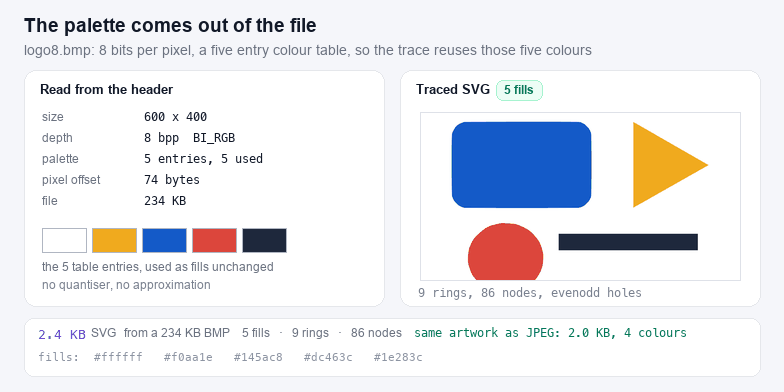
- Exact palette copies every fill from the BMP's colour table. No quantiser runs at all, so the output colours are the input colours, which is the whole point when the file is a spot colour job. A 600×400 eight bit file with five used entries traces to 2.4 KB, 9 rings and 86 nodes.
- Reduce ignores the table and re-quantises to 4, 8, 16 or 24 colours. Use it on 24 or 32 bit files, or on an eight bit file whose table has 200 near-identical greys.
- Black and white thresholds on luminance. The same file at two colours comes to 2.2 KB and 7 rings — roughly half the path data, because every anti-aliased edge stops being a separate band.
Black and white mode, and why half the file disappears
An 8 bit scan of a pen drawing usually carries a table of 256 greys, most of them one or two pixels wide along each stroke. Trace that as-is and every stroke becomes three concentric shapes: dark core, mid grey halo, light fringe. Thresholding collapses all three into one shape, which is both what a cutter can use and what the drawing actually was before the scanner antialiased it. Set the threshold by watching the preview: the right value is the one where the strokes stop thinning out but the paper texture has already gone.
The same reasoning applies to screens and stamps. If you then want the artwork in a single colour, SVG Color Changer replaces every fill in one step, and SVG Validator will tell you whether the export kept its viewBox and namespace.
Edge cases this decoder handles
- Top-down rows. A negative height in the info header means the first row in the file is the top row. Half the BMPs written on Windows are bottom-up, most written by image libraries on macOS are top-down.
- BI_BITFIELDS. 16 bit BMPs may use 5-6-5 or arbitrary masks stored after the header; the masks are read and normalised, instead of assuming the default 5-5-5.
- RLE8 and RLE4. Run length encoded 4 and 8 bit BMPs are decoded including the absolute and delta escape codes, so old Windows wallpaper files open instead of throwing.
- 32 bit alpha. Some writers leave the fourth byte at zero; if no pixel sets it the image is treated as opaque, otherwise the alpha channel is honoured and transparent pixels are skipped by the tracer.
- Truncated and mismatched files. If the header promises more pixel bytes than the file holds, the reader says so instead of drawing half an image.
- Not supported on purpose. BI_JPEG and BI_PNG compressed BMPs, and files whose header is smaller than 12 bytes. The first two are a JPEG or a PNG wearing a BMP header.
Where the traced BMP goes next
Palette BMPs are the classic input for screen printing and for cutting: one file per colour, each a single path, which is exactly what a vinyl cutter and a screen exposure want. Trim the empty margin with SVG Crop, Flip & Rotate, then check the machine limits in SVG for Silhouette Cameo or PNG to SVG for Cricut. For a JPEG source the noise profile is different enough that a dedicated page is better: JPG to SVG runs a heavier denoise and a majority filter before tracing. And if the artwork is already a clean transparent bitmap, PNG to SVG is the shortest path.