
Windows icons are a container format pretending to be an image. The file starts with a directory: one 16 byte record per embedded image, each with its own size, bit depth and byte range. Then come the images themselves, and they need not use the same encoding — a modern .ico usually mixes PNG entries for the large sizes with DIB entries for the small ones. A converter that hands the file to the browser gets whichever entry the browser prefers and no way to tell you which one that was.
The directory, and why the size you pick decides the result
Every entry is an independent raster. The 16 pixel one holds 256 pixels of information in total; tracing it produces a shape that is right at 16 pixels and wrong everywhere else, which is the source of most "your converter made a blurry blob" complaints. The table below is the entry list from a typical four-size icon:
| Entry | Pixels | What a trace can recover |
|---|---|---|
| 16 × 16 | 256 | Almost nothing. Letters close up, curves become steps. Fine for checking the file parses |
| 32 × 32 | 1,024 | A silhouette and the main shapes, no interior detail |
| 48 × 48 | 2,304 | Usable for a simple mark: two or three fills, a handful of nodes |
| 128 × 128 | 16,384 | The smallest size where corners survive as corners |
| 256 × 256 | 65,536 | The only entry worth vectorising for real use, and usually a PNG stream |
The tool preselects the largest entry because that is almost always the right answer, and it reports the others so you can see what you are giving up. When a container's biggest entry is 48 pixels, the honest move is to find the original artwork rather than to trace harder: no amount of detail setting invents pixels that were never saved.
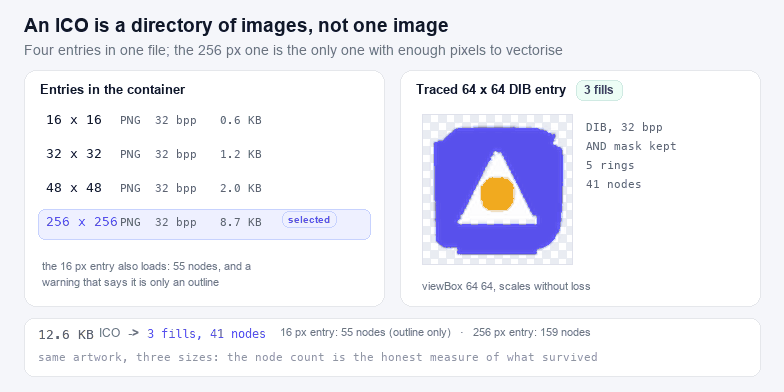
PNG entries and DIB entries in the same file
Two encodings, both common, and they fail differently:
- PNG entries appeared with Windows Vista for 256 pixel icons. The entry is a complete PNG stream, so it may carry a real alpha channel with soft edges. Decoded here by handing the byte range to the browser as an image, then painting it to a canvas.
- DIB entries are headerless BMPs: a bitmap header whose height is twice the real height (XOR bitmap plus AND mask), an optional palette, pixels stored bottom-up with each row padded to four bytes, then a one bit mask where a set bit means transparent. Decoded here in JavaScript, palette and mask included.
The height-doubling is the detail most readers get wrong: take the header height at face value and every DIB icon decodes as two stacked half-images. The AND mask is the second: 8 and 24 bit icons express transparency only through it, so a reader that ignores the mask paints a black rectangle where the transparency should be.
What a traced favicon is for
An ICO exists because browsers once needed a fixed set of raster sizes. An SVG favicon removes the set: declare it once with <link rel="icon" type="image/svg+xml" href="/icon.svg"> and it is drawn at 16 pixels in a tab, 32 in a bookmark bar and 180 on a phone home screen from a single file. Keep the .ico as a fallback for older browsers and for the icon slots the operating system fills itself.
Two practical notes. First, a favicon SVG should be a single flat shape with a generous safe area — at 16 pixels, a detailed mark collapses into mud no matter how the file is encoded. Second, a traced icon inherits the pixel grid of its source: if the 256 entry was drawn on a grid with anti-aliased edges, the trace will show a slight wobble at large sizes. That is honest to the source, and it is why tracing a 256 entry beats tracing a 48 one every time.
Cursor files, and the hotspot
A .cur is the same container with type 2, and the hot spot coordinates live in the directory record — the two bytes that hold the colour count in an .ico. The tool reads and reports them, and they are lost on export, because an SVG has no concept of a click point. If the cursor matters, note the hot spot before you convert.
After the trace
An SVG favicon is small by nature, but the path data can still be tightened with SVG Compressor, and the file is worth validating with SVG Validator before it goes in a <head> — a missing xmlns is the classic reason an SVG favicon renders in one browser and not another. For the raster direction, SVG to PNG exports the 32 pixel fallback from the vector you just made.
Related containers: GIF to SVG if the icon was exported as a GIF with a palette, and WebP to SVG for the alpha plane in a WebP mark.