
A GIF has no transparency in the alpha sense and no compression artefacts in the JPEG sense, but it does have something most converters ignore: a colour table written into the file. That table is the cheapest possible answer to the hardest part of tracing, which is deciding what the palette should be. Read it and the quantiser has nothing to do; ignore it and a sixteen-colour logo comes back as sixteen approximations of itself.
What is inside a GIF, block by block
The format is a header followed by a flat list of blocks, and each block is the reason for a quirk you may have met elsewhere:
| Block | Where it sits | What it decides |
|---|---|---|
| Signature | Bytes 0–5 | GIF87a or GIF89a. Anything else is not a GIF, which is how a JPEG renamed to .gif gets caught |
| Logical screen | Bytes 6–12 | Canvas width and height, plus the packed byte that says whether a global colour table follows and how big it is (“size code N” means 2N+1 entries) |
| Global colour table | After the screen descriptor | Up to 256 RGB triples. This is the palette the trace uses in exact mode |
| Graphic control extension | Before each frame | Delay, disposal method, and the one-bit transparent index — the closest a GIF gets to an alpha channel |
| Image descriptor | One per frame | Frame rectangle, optional local colour table, interlace flag, then LZW data in sub-blocks |
| Trailer | Last byte 0x3B | End of file. Everything before it is frames, which is how the frame count is obtained without decoding any of them |
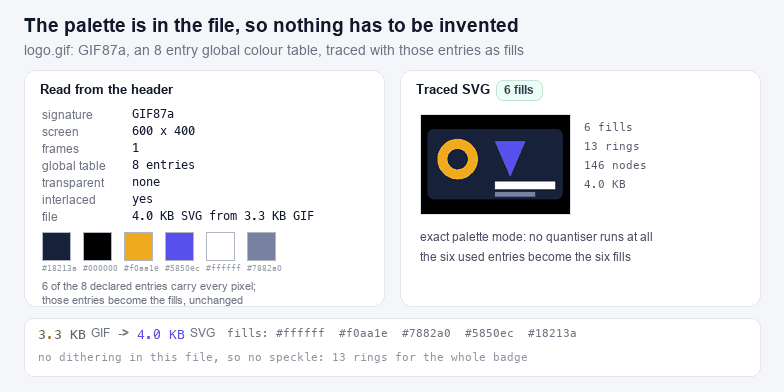
Because the block list is self-describing, the frame count costs one pass over the file and no pixels at all. That is what the frames field above reports: it is the real count, read from the container, not a guess from the first extension block.
The palette is already the answer
Exact palette mode maps every pixel back to the table entry it came from and emits one <path> per entry actually used. On the sample below, a sixteen-entry table where five entries carry all the area, that produces five fills and no approximation at all. The swatches in the left panel are the table, largest area first, with pixel counts — useful because a GIF normally declares 256 entries and uses nine.
Reduction and threshold modes exist for the other two cases. Reduce re-quantises to 4, 8, 16 or 24 colours, which is what you want when the table holds two hundred near-identical greys from a scan. Black and white thresholds on luminance, and it is the mode that halves the path data on line art, because every anti-aliased edge stops being a separate band.
Dithering is what ruins a GIF trace
GIF has at most 256 colours, so anything with a gradient gets dithered: the encoder alternates two entries in a pattern so the eye averages them. To a contour tracer that pattern is real structure. Every dot becomes a closed ring of four pixels, the ring count explodes into the tens of thousands, and the SVG ends up several times larger than the GIF it came from while looking exactly as speckled as the original.
Two honest ways out. Trace the artwork before it was dithered — the PNG or the vector original. Or collapse the pattern here: switch to Reduce with four colours and let the 3×3 majority filter vote the checkerboard back into one flat fill. The second is a repair, not a recovery; the fine gradients are gone either way.
Transparency in a GIF is one bit
One index in the table is declared transparent, so a pixel is either fully visible or fully absent. There are no half values, which means edges in a GIF are hard or matted against whatever colour the file's author flattened them onto. This page keeps that index transparent, so a traced GIF of a logo on a transparent field produces an SVG with empty space around the mark — the same shape a cutter wants, with no white rectangle behind it.
If the file was flattened onto white instead, the transparent index is unused and you have an opaque white background. In that case trace normally and knock the white out afterwards with SVG Color Changer, or start from a cleaner source: a PNG to SVG conversion has a real alpha channel to work with.
Where a traced GIF is worth having
- Old logos and clip art that only exist as GIF. Exact palette keeps the colours the designer chose, which is often the whole point of the job.
- Screen printing and vinyl: one path per palette entry is exactly a colour separation, and PNG to SVG for Cricut covers the machine-side limits.
- Pixel art and low-resolution sprites, where the hard edges survive a trace better than they survive a resample. Detail 9 and smoothing 2 keep the stair steps honest.
- Diagrams and screenshots saved as GIF because the tool only offered GIF. Those trace well; the text inside them does not, so retype it.
What it is not worth having: photographs, dithered gradients, and anything with soft shading. Those are pixel data pretending to be shapes, and a trace will faithfully reproduce the pretence.
Next steps
The export is a plain SVG with no embedded bitmap: shrink it with SVG Compressor, trim it with SVG Crop, Flip & Rotate, or check the namespace and viewBox with SVG Validator. Neighbouring formats have their own pages because their containers differ: WebP to SVG for the alpha plane and lossy prediction noise, and ICO to SVG for icon containers with several sizes inside.