
A WebP is three formats wearing one extension: a lossy bitstream (VP8), a lossless one (VP8L), and an extended container (VP8X) that carries an alpha plane, an animation or both. That matters before a single pixel is traced, because transparency changes what a trace should do and lossy prediction noise changes how much clean-up it needs. This page parses the RIFF chunks, reports which of the three you have, and only then quantises and traces.
What the container says before the pixels are read
The first twelve bytes are RIFF, a length and WEBP; the next four name the first chunk, and that name is the codec. Reading it takes microseconds and tells the tracer more than any pixel statistic can:
| Chunk | What it means | What the tracer does about it |
|---|---|---|
VP8 | Lossy, one frame, no alpha plane | Denoise 1 px before quantising; edges carry prediction smear |
VP8L | Lossless, so the pixels are exactly what was encoded | No denoise needed: every flat area really is flat |
VP8X | Extended container: flags declare alpha (bit 4) and animation (bit 1), then the canvas size | Keep alpha when declared; report the frame count when animated |
Canvas size is worth checking against the decoded size. A VP8X file may declare a canvas larger than the frame it contains, which is how animations place frames; the tool traces the decoded pixels and reports the canvas separately, so a file that looks cropped in another converter explains itself here.
Alpha is usually the reason to convert a WebP, not the colour
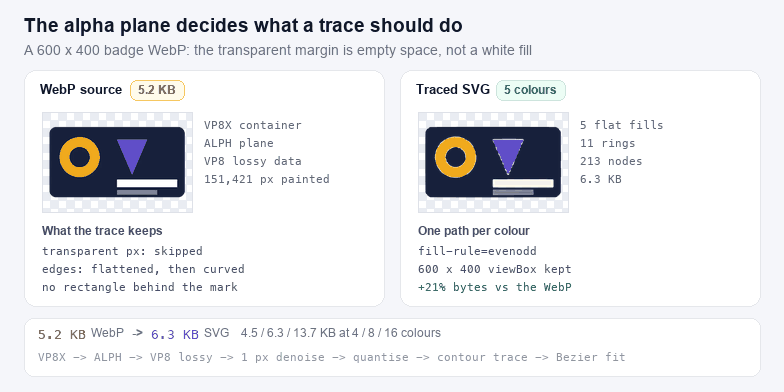
Most WebP artwork on the web is a PNG that was re-encoded for weight, and the alpha plane survived. Tracing that file is straightforward if the transparency survives the trace — a tracer that ignores alpha will happily trace the RGB values sitting under the transparent pixels, which are usually black, and you get a black rectangle behind your mark. Here the alpha plane reaches the tracer as a mask, thresholded at half opacity: a pixel is either painted or it is not, because an SVG fill has no partial coverage. That threshold is also what removes the fringe a lossy WebP leaves along an alpha edge — semi-transparent RGB values that a naive trace turns into a pale outline hugging the mark on every side.
Three modes, and the choice is not cosmetic:
- Keep is right for logos, icons and any artwork that already has a hole in it. The output has no background element at all.
- Flatten on white composites the image onto white before quantising. Use it when the destination is a document or a slide, where a transparent background renders as black.
- Knock out border ignores alpha and floods the border colour instead. Use it on a flattened export from a screenshot tool, where the "transparent" area is really opaque white.
Lossy WebP noise does not look like JPEG noise
JPEG compresses 8×8 blocks with a DCT, and its signature artefact is a ripple around every hard edge. VP8 predicts each block from its neighbours and codes the residual, so the artefacts are different in kind: edges smear along their direction, small text loses its counters, and flat panels drift by a few levels across the frame instead of showing a halo. For tracing, the practical difference is that a lossy WebP usually needs a lighter denoise than a JPEG of the same visual quality, but it needs the majority filter just as much.
That is what the three presets encode. Icon assumes flat colour and few regions: 4 colours, detail 7, smoothing 8. Flat art is the default middle: 8 colours, detail 5, smoothing 6. Photo goes to 16 colours with detail 4 and smoothing 4, which keeps more gradient bands and accepts the file size that follows. The sliders stay live after a preset, so the preset is a starting point rather than a mode.
Choosing a colour count
Colour count is the lever with the largest effect on both file size and fidelity, and it is not linear. Measured on the 600×400 badge above (a 5.2 KB lossy WebP at quality 88) at the default detail and smoothing:
| Colours | SVG size | Rings | Nodes | Where it fits |
|---|---|---|---|---|
| 4 | 4.5 KB | 11 | 156 | Two-tone marks, stencils, single-colour cutting |
| 8 | 6.3 KB | 11 | 213 | Flat illustration, UI icons, badges |
| 16 | 13.7 KB | 29 | 536 | Artwork with gradients worth keeping as bands |
On the badge above, the four-colour trace comes to 4.5 KB against 5.2 KB of WebP and the eight-colour one to 6.3 KB — the same order of magnitude, which is the honest way to read it. The gain is not bytes, it is behaviour: the SVG stays sharp at any size and the WebP does not. For anything photographic the SVG lands several times larger, and the advice is that a photograph does not want to be a vector at all: past sixteen colours you are storing a mosaic, not a drawing.
Animated WebP: frame one, and why
If the VP8X flags declare animation, the tool says so and traces the first frame. A frame picker was left out deliberately: an animation is a sequence of near-identical images, and what people actually want from an animated WebP is one still — a logo, a badge, a favicon. If you need a later frame, export it as a still WebP from your editor and drop that in; you get an exact trace of the frame you meant instead of a guess.
After the trace
The output is a plain SVG with no embedded bitmap, so the usual next steps apply: flatten the palette to the single colour a cutter wants with SVG Color Changer, trim the margin with SVG Crop, Flip & Rotate, shrink the path data with SVG Compressor, and confirm the export kept its viewBox with SVG Validator. If the source is a GIF with its own colour table, GIF to SVG keeps those exact colours instead of guessing a palette; if it is an icon container, ICO to SVG lets you choose which embedded size to trace.