
SVG Event Handler Security: What Fires Without a Click
Every SVG event handler is an attribute, which makes handlers look like something a regular expression can delete. I built fifteen files between 195 and 337 bytes, each carrying one handler, placed them in eight positions and stepped through five interactions — nothing, hover, click, wheel, resize — to see which ones fire on their own. 5 of the 15 ran with zero interaction, 4 more needed one gesture — a click, a hover, a wheel or a resize — and the <img> and CSS background placements ran none of them. innerHTML stopped onload and <script> and let the other 9 through.
Two results in this set are worth the article on their own. A javascript: link does not set a variable — it replaces the document with the value the URL returns, so the file looks like it did nothing and has actually deleted the page it ran in. And the two SMIL tricks that circulate as filter bypasses — <set attributeName="onclick"> and <set attributeName="href" to="javascript:…"> — did not write the attribute at all in Chrome 157.0.8103.78, which is a negative result worth knowing before you spend a week defending against them.
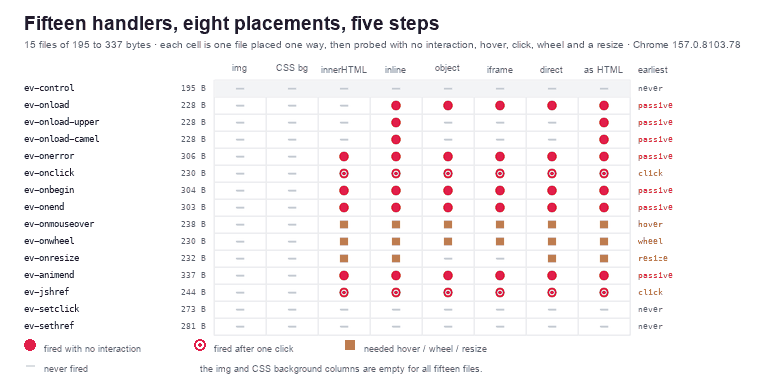
The fifteen files
| File | Size | Handler | Earliest step | Placements that fired |
|---|---|---|---|---|
ev-control | 195 B | nothing | never | 0 of 8 |
ev-onload | 228 B | onload on <svg> | passive | 5 of 8 |
ev-onload-upper | 228 B | ONLOAD on <svg> | passive | 2 of 8 |
ev-onload-camel | 228 B | onLoad on <svg> | passive | 2 of 8 |
ev-onerror | 306 B | onerror on <image> with a 404 href | passive | 6 of 8 |
ev-onclick | 230 B | onclick on <rect> | click | 6 of 8 |
ev-onbegin | 304 B | onbegin on <animate> | passive | 6 of 8 |
ev-onend | 303 B | onend on <animate> | passive | 6 of 8 |
ev-onmouseover | 238 B | onmouseover on <rect> | hover | 6 of 8 |
ev-onwheel | 230 B | onwheel on <rect> | wheel | 6 of 8 |
ev-onresize | 232 B | onresize on <svg> | resize | 4 of 8 |
ev-animend | 337 B | onanimationend on <rect> with a CSS animation | passive | 6 of 8 |
ev-jshref | 244 B | <a href="javascript:…"> around a rectangle | never | 0 of 8 |
ev-setclick | 273 B | <set attributeName="onclick"> | never | 0 of 8 |
ev-sethref | 281 B | <set attributeName="href" to="javascript:…"> | never | 0 of 8 |
"Never" is a result, not a gap in the data: it separates handlers the browser implements from handlers that only look dangerous.
Five handlers fire on their own
onload on the root, onerror on an image with a broken reference, onbegin and onend on a SMIL animation, and onanimationend on a CSS animation. Five files, five different mechanisms, one property: the browser dispatches these itself, on a schedule, without asking anyone.
onerror is the cheapest to trigger, because the reference does not have to be hostile. A deleted asset, a renamed file, a 404 from a CDN is enough — the handler waits for someone else's broken link and then runs. onend and onanimationend are the quietest: they fire after the page has settled, which is after most automated review has already taken its screenshot.
Any review that gates on "the user did something" is not a gate for these five. That is the whole reason to measure them instead of listing them.
Three that need one gesture
onclick and the javascript: link fire on the click at (60, 30); onmouseover fires as soon as the pointer arrives; onwheel needs a wheel event over the canvas; onresize needs the container to change size. In a review flow, all of these are one gesture away: clicking a thumbnail to zoom, scrolling a preview pane, rotating a phone.
onresize is the one worth calling out, because it does not need the user at all in the usual sense. It needs a layout. An iframe that sizes itself to its content, a responsive grid that reflows, a device rotation — all of them dispatch a resize, and the file fires. It ran in 4 of 8 placements.
The image tag is inert, innerHTML is not
0 of 15 files fired in <img> or a CSS background. The image loader never creates a document, so there is nothing to attach a handler to, and every file still rendered at 240×110. That is now the seventh article in this series to measure the same thing, and it remains the single most useful fact about previews.
innerHTML is the opposite: 9 of 15 fired there, including all five that need no interaction. What it stops is onload on the root and <script>; what it does not stop is onerror, onbegin, onend, onanimationend or the javascript: link. If your preview inserts markup with innerHTML, you have removed two mechanisms and kept the rest.
The uppercase spelling only works in HTML
The same handler written three ways behaves in three different ways, and not in the direction most people expect:
| Spelling | Fired in | Never fired in |
|---|---|---|
onload |
srvinline, object, iframe, top, ashtml | img, cssbg, innerhtml |
ONLOAD |
srvinline, ashtml | img, cssbg, innerhtml, object, iframe, top |
onLoad |
srvinline, ashtml | img, cssbg, innerhtml, object, iframe, top |
Lowercase fires in all five XML document placements. ONLOAD and onLoad fire only in the two placements where an HTML parser sees the bytes — server-side inlining and the same file served as text/html — because the HTML parser lowercases attribute names before it matches handlers, while the XML parser keeps ONLOAD as a different attribute name that no handler is bound to. The practical rule is not "case does not matter" or "case matters"; it is that you have to compare lowercase local names, because one of the two parsers will hand you an uppercase handler that works.
The SMIL trick that does not work
Two files were built around <set>, the SMIL element that writes an attribute after parsing. One writes attributeName="onclick" onto a rectangle; the other writes attributeName="href" to="javascript:…" onto an <a>. Neither fired anywhere, and a DOM inspection after 900 ms explains why: the attribute was never written. The rectangle's attribute list is still x, y, width, height and fill.
That is worth stating plainly, because both tricks are widely repeated as ways past an attribute filter. In Chrome 157.0.8103.78 they are not a filter bypass; they are a no-op. A sanitizer should still remove them — a browser that starts honouring them would turn a harmless file into a live one, and the cost of removing them is zero — but nobody should build a threat model on them firing today.
A javascript: link deletes the page
The fifteenth file is the one that taught me to distrust my own instrument. It is a plain <a href="javascript:window.__pwned='jshref'"> around the rectangle. The marker variable stayed null in all six document placements, which reads as "did not fire".
It fired in all six. What happens is that the URL evaluates to the string jshref, and a javascript: URL that returns a string replaces the document with that string — the script, the marker and the page all disappear together. Measured on document length instead of a variable: innerhtml 470 → 32, srvinline 475 → 32, object 143 → 32, iframe 143 → 32, top 143 → 32, ashtml 276 → 32 characters, in every placement, including innerHTML.
So the marker technique under-reports by exactly the payloads that are most destructive, and the fix is to measure something other than the marker: document length, body text, or the fact that the page went blank. The JavaScript article hit the same trap with a different payload; it is not a quirk of this file.
The rewrite
The pass below walks the tree, lowercases the local name, removes every attribute that starts with on, removes <script>, removes javascript: URLs, and removes the SMIL elements that can write either of those after parsing.
  function stripHandlers(text) {
    const doc = new DOMParser().parseFromString(text, 'image/svg+xml');
    if (doc.querySelector('parsererror')) return { error: 'parse', svg: text };
    let attrs = 0, elements = 0, sets = 0;
    for (const el of [...doc.getElementsByTagName('*')]) {
      for (const name of [...el.getAttributeNames()]) {
        const local = name.replace(/^xlink:/, '').toLowerCase();
        if (local.startsWith('on')) { el.removeAttribute(name); attrs += 1; }
        if (local === 'href' || local === 'src') {
          if (/^\s*javascript:/i.test(el.getAttribute(name) || '')) {
            el.removeAttribute(name); attrs += 1;
          }
        }
      }
      if (el.localName === 'script' && el.parentNode) {
        el.parentNode.removeChild(el); elements += 1;
      }
      if (el.localName === 'set' || el.localName === 'animate'
          || el.localName === 'animateTransform') {
        const target = (el.getAttribute('attributeName') || '').toLowerCase();
        const to = (el.getAttribute('to') || '').trim();
        const kill = target.startsWith('on')
          || (target === 'href' && /^javascript:/i.test(to));
        if (kill && el.parentNode) { el.parentNode.removeChild(el); sets += 1; }
      }
    }
    return { svg: new XMLSerializer().serializeToString(doc), attrs, elements, sets };
  }
Applied to the fifteen files it removes 12 attributes, 0 script elements and 2 SMIL elements. Re-running the rewritten files in innerHTML, <object> and as a document — three placements, five steps each — gives 0 executions across 45 cells, and every file still paints its 2,400-pixel rectangle.
The version most codebases start with is shorter:
  // 反例:只用正则删属性,看起来干净,实际漏两种写法
  function stripHandlersRegex(text) {
    const before = text;
    const out = text
      .replace(/\son[a-z]+="[^"]*"/g, '')
      .replace(/<script[\s\S]*?<\/script>/gi, '');
    return { svg: out, changed: out !== before };
  }
It leaves 6 of the 15 files unchanged. On this corpus the extra coverage is exactly what you would expect — the javascript: link survives the regex, because its href is not an on attribute, and the regex has no opinion about SMIL. That link is the one payload that deletes a document, so the difference between the two passes is not cosmetic: it is the difference between a file that can wipe the page it is previewed in and one that cannot.
The checklist
- Lowercase the local name before comparing.
ONLOADandonLoadare live handlers in the placements where an HTML parser sees the file. - Strip
on*from every element, including inside<defs>,<symbol>and<filter>. - Remove
javascript:from every URL-bearing attribute, and re-check after the rewrite. - Remove
<set>and<animate>whoseattributeNamestarts withonor ishref. They are inert today and cost nothing to drop. - Preview in an
<img>tag. It is the only placement where none of the fifteen fired. - Do not treat
innerHTMLas a sanitizer. It stopsonloadand<script>and passes everything else on this list. - Test with a
javascript:link and measure document length, not a marker variable, or your test will report "clean" for the payload that deletes the page.
What this does not cover
It does not cover CSS. A stylesheet can animate an element and change what a preview looks like without any handler, and the one CSS-driven handler here (onanimationend) is caught only because the attribute is still on the element; a sanitizer that rewrites <style> text but forgets element attributes will miss the next version of it.
It does not cover the same-origin problem either. Every placement that fired was a document on the reviewer's origin, which is why the CSP article recommends a separate origin for user content rather than a longer attribute list. A handler that runs on a sandboxed origin still runs; it just cannot reach the session cookie, and that difference is structural rather than lexical.
The SVG Validator shows the attribute tree before you commit to a file, the SVG Editor is the quickest way to see what a handler is attached to, and the upload checklist is where these rules belong in a pipeline. One sentence: remove the mechanisms that can attach code — attributes, scripts, javascript: URLs and animation that writes attributes — and stop trusting a marker variable to tell you whether they fired.
Related SVG Workflows
Handlers are one mechanism among several. These pages cover the others, and the two tools that show you what a file contains before a preview does.
- Can SVG files run JavaScript — twelve payloads in six placements, including the ones that need no click.
- Sanitizing SVG for XSS — what an allowlist keeps, and what it deletes by accident.
- SVG foreignObject Security — HTML inside a drawing, and which placement runs it.
- SVG use Element Security — code that lives in a definition and runs when referenced.
- SVG Content Security Policy — why a separate origin beats a longer attribute list.
- SVG Filter Security — the other half of this week: cost, references, and a filter that erases its own artwork.
- SVG Validator — the attribute tree, before you commit to storing the file.
Related Articles

Try These Free Online Tools
No download required — convert, compress & optimize SVGs right in your browser