
SVG Filter Security: What a Filter Can Cost and Fetch
An SVG filter is the part of the format that is pure computation: a chain of pixel operations with no document, no script and no navigation attached. That reputation is why filters usually get a pass. I built twelve filter files between 243 and 3530 bytes, put each one in eight placements, and timed how long Chrome needs to draw one 60×40 rectangle through it. In an <img> tag or a CSS background, none of the twelve made a single request. In a document placement the feImage payload did — and the same file that fetched painted 600 pixels instead of 2,400, because a filter that cannot load its input erases the artwork instead of showing it.
The cost half is more surprising than the network half. A 40×40 convolution kernel — 1,600 taps per output pixel — costs 1.4 ms, the same as a two-pixel blur (1.8 ms), because Chrome clamps what it will compute. What does scale is the number of primitives: the same rectangle pushed through 1 blur, then 10, 30, 60, 120, 240, 400 blurs went 1.6 → 70.3 ms, a straight line at about 0.17 ms per primitive. The expensive file is not the one with the scary kernel; it is the 14682-byte one with 400 boring ones.
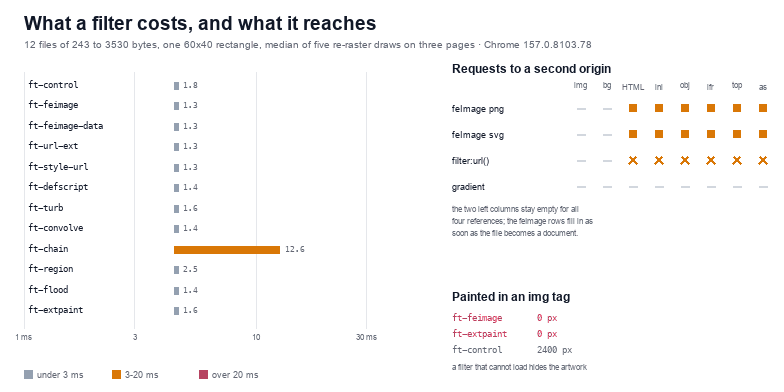
The twelve files
Every file is a 240×110 canvas with one 60×40 rectangle, which paints 2,400 pixels when the filter behaves. The variables are the primitive, the region and the reference.
| File | Size | Filter | Re-raster | Painted in img |
|---|---|---|---|---|
ft-control | 316 B | One feGaussianBlur, radius 2 | 1.8 ms | 2400 px |
ft-feimage | 364 B | feImage at a second origin | 1.3 ms | 0 px |
ft-feimage-data | 512 B | Same, with a data: URI | 1.3 ms | 2400 px |
ft-url-ext | 243 B | filter="url(other#f)" | 1.3 ms | 2400 px |
ft-style-url | 263 B | The same reference in a <style> rule | 1.3 ms | 2400 px |
ft-defscript | 324 B | <script> inside <defs> | 1.4 ms | 3456 px |
ft-turb | 478 B | feTurbulence, five octaves, displaced | 1.6 ms | 2302 px |
ft-convolve | 3530 B | feConvolveMatrix, order 40×40 | 1.4 ms | 2400 px |
ft-chain | 2442 B | 60 chained feGaussianBlur | 12.6 ms | 2396 px |
ft-region | 335 B | Region 40,000×40,000, blur 80 | 2.5 ms | 14812 px |
ft-flood | 382 B | feFlood plus feComposite | 1.4 ms | 2400 px |
ft-extpaint | 387 B | Gradient inherited from another file | 1.6 ms | 0 px |
Re-raster time is what a container pays when it changes size: two warm-up draws at the intrinsic size, then one draw at each of five widths between 600 and 840 pixels, median of the five, median of three fresh pages. It is not a decode time — decode() returns in 2 to 6 ms for every one of these files, including the slow ones, because the filter is not evaluated until something asks for pixels.
In an image tag, nothing leaves
Across the fifteen files (twelve payloads and three controls) and 120 cells, the <img> and CSS background columns logged 0 requests. That includes the two files built specifically to fetch.
The reason is the same one every article in this series has measured: the image loader decodes the file into a picture and never gives it a document, so there is no base URL for a filter reference to resolve against. What is different here is the consequence. In a document placement, ft-feimage makes 6 requests — one per placement — and the rect it was supposed to blur disappears: 600 pixels painted instead of 2,400. The element that fetched is the element that replaced the artwork.
| Placement | Requests from ft-feimage | Painted |
|---|---|---|
img | 0 | 0 px |
cssbg | 0 | 0 px |
innerhtml | 1 | 600 px |
srvinline | 1 | 600 px |
object | 1 | 600 px |
iframe | 1 | 1296 px |
top | 1 | 600 px |
ashtml | 1 | 600 px |
So the sentence "filters cannot exfiltrate" is only true for the placement most people use for previews. Once the same bytes are inlined into a page — which is what a "paste the SVG into the template" feature does — a filter reference is an ordinary cross-origin image request, and the second origin logs it.
Two references that try and fail, one that never tries
Three other files separate the mechanisms. ft-url-ext and ft-style-url both point a filter:url() at another file. In the six document placements each raises one request event and the server logs 0 hits: the browser decides it will not use a filter from another document and drops it, after the request has been counted. The rectangle still paints its 2,400 pixels, because an unresolvable filter is skipped rather than applied.
ft-extpaint points a gradient at another file with xlink:href. It produces 0 request events in every placement, and paints 0 pixels, because a paint server from another document is never resolved. That is a good outcome for the network and a bad one for the reviewer: the file looks empty and contains nothing that any scanner will call dangerous.
The control files make the boundary explicit. ft-feimage-same uses the same feImage served from the page's own origin: it also fetches only in document placements, and it also paints nothing. ft-feimage-svg points at another origin's SVG rather than a PNG: same result, one request per document placement. Whatever the target type, a filter loads it only when the file is a document, and the loaded image becomes the filter's output, replacing the shape.
What a filter actually costs
Two thousand and four hundred pixels are cheap. The question is what the filter asks the renderer to do per pixel, and how many times.
The three primitives that look expensive are not, in Chrome 157.0.8103.78:
- 1,600-tap convolution — 1.4 ms, against 1.8 ms for a two-pixel blur. Whatever the specification allows, this implementation is not paying 1,600 multiplies per pixel.
- Five-octave turbulence plus displacement — 1.6 ms. Noise is generated once per raster and cached.
- Twenty turbulence primitives chained — 1.5 ms, no more than one. The per-primitive cost is not uniform across primitive types.
The one that costs is the gaussian blur, and only when it is repeated. The same rectangle, same filter, N primitives of the same radius:
| Primitives | File size | Re-raster | ms per primitive |
|---|---|---|---|
| 1 | 318 B | 1.6 ms | — |
| 10 | 642 B | 4.6 ms | 0.33 |
| 30 | 1362 B | 7.3 ms | 0.20 |
| 60 | 2442 B | 12.8 ms | 0.19 |
| 120 | 4602 B | 21.6 ms | 0.17 |
| 240 | 8922 B | 42 ms | 0.17 |
| 400 | 14682 B | 70.3 ms | 0.17 |
A straight line at 0.17 ms per primitive on a 700×320 raster. Four hundred blurs cost 70.3 ms and 14682 bytes, and the file contains no script, no URL, no entity and no exotic attribute. Extrapolating to a 4K thumbnail is arithmetic, not measurement — the area is about 25 times larger — but the arithmetic is the point: a queue that renders 200 uploads per hour does not need a pathological file, only a file with 400 primitives.
The oversized region is the other half of the story, and it is about output rather than time. ft-region declares x="-20000" width="40000" with a blur radius of 80. It costs 2.5 ms, which is nothing, and it paints 14812 pixels in a 240×110 frame: the blur expands the shape across the whole frame, so the file that was a small rectangle becomes a wash of grey. In a grid of thumbnails, that is a file that looks broken rather than dangerous — and it is also a file whose filter surface is 1.6 billion pixels wide if the renderer decides to be literal about it.
A budget you can compute before you render
Timing a filter means rendering it, which is the attack. Counting does not. The function below reads four numbers off the parsed tree: primitive count, declared region area, convolution taps and noise octaves.
  const SVGNS = 'http://www.w3.org/2000/svg';
  function filterBudget(text) {
    const doc = new DOMParser().parseFromString(text, 'image/svg+xml');
    const bad = doc.querySelector('parsererror');
    if (bad) return { error: 'parse' };
    const filters = [...doc.getElementsByTagNameNS(SVGNS, 'filter')];
    let prims = 0, area = 0, kernel = 0, octaves = 0, region = null;
    for (const f of filters) {
      const kids = [...f.children];
      prims += kids.length;
      const w = parseFloat(f.getAttribute('width') || '1.2');
      const h = parseFloat(f.getAttribute('height') || '1.2');
      const pct = String(f.getAttribute('width') || '').includes('%');
      const a = pct ? (w / 100) * 240 * (h / 100) * 110 : w * h;
      if (a > area) { area = a; region = [w, h]; }
      for (const p of kids) {
        if (p.localName === 'feConvolveMatrix') {
          const o = (p.getAttribute('order') || '3').trim().split(/\s+/).map(Number);
          kernel = Math.max(kernel, (o[0] || 3) * (o[1] || o[0] || 3));
        }
        if (p.localName === 'feTurbulence') {
          octaves = Math.max(octaves, Number(p.getAttribute('numOctaves') || 1));
        }
      }
    }
    // 一次经验阈值:> 8 个原始图元 / 区域 > 4 倍画布 / 卷积核 > 100 项 / 噪声 > 3 倍频
    const flags = [];
    if (prims > 8) flags.push('primitives');
    if (area > 4 * 240 * 110) flags.push('region');
    if (kernel > 100) flags.push('kernel');
    if (octaves > 3) flags.push('octaves');
    return { filters: filters.length, primitives: prims, region, area: Math.round(area),
             kernel, octaves, flags };
  }
Run over the twelve payloads it flags 4 of them:
| File | Primitives | Region | Taps | Octaves | Flags | Cost |
|---|---|---|---|---|---|---|
ft-control | 1 | 1×1 | 0 | 0 | — | 1.8 ms |
ft-feimage | 1 | 1×1 | 0 | 0 | — | 1.3 ms |
ft-feimage-data | 1 | 1×1 | 0 | 0 | — | 1.3 ms |
ft-url-ext | 0 | — | 0 | 0 | — | 1.3 ms |
ft-style-url | 0 | — | 0 | 0 | — | 1.3 ms |
ft-defscript | 1 | 1.2×1.2 | 0 | 0 | — | 1.4 ms |
ft-turb | 2 | 1×1 | 0 | 5 | octaves | 1.6 ms |
ft-convolve | 1 | 1×1 | 1600 | 0 | kernel | 1.4 ms |
ft-chain | 60 | 1×1 | 0 | 0 | primitives | 12.6 ms |
ft-region | 1 | 40000×40000 | 0 | 0 | region | 2.5 ms |
ft-flood | 2 | 1×1 | 0 | 0 | — | 1.4 ms |
ft-extpaint | 1 | 1×1 | 0 | 0 | — | 1.6 ms |
Four files carry a flag, and the four are worth reading one by one. Two are the expensive ones, at 12.8 ms and 12.6 ms. One is the convolution kernel, flagged for its 1,600 taps even though this Chrome renders it in 1.4 ms — the flag is a statement about what the file asks for, not about what this browser pays. And one is the region, cheap in time and six times the painted area. A static budget over-flags by design: it has to, because the same kernel is 1.4 ms here and 1,600 taps per output pixel in a renderer that follows the specification literally.
Scripts hide in definitions, not in filters
ft-defscript is a filter next to a <script> inside <defs>. It runs in 5 of the eight placements — srvinline, object, iframe, top, ashtml — and in none of img, cssbg, innerhtml. Same split as every other article here: no document in an image tag, and no script execution through innerHTML. A definition block hides code from a reviewer looking at the picture, not from the parser.
That is the argument for an element allowlist over the whole tree rather than an attribute filter over primitives: filter, feGaussianBlur and the rest of the primitives are safe to permit, script is not, and its parent element does not change that.
What a rewrite can fix
Removing references is a tree walk. Keep #fragment and data:, delete everything else, and do it inside <style> text and url() values as well as on attributes — the external reference article measured what an attribute-only pass misses.
  const LOCAL = /^(data:|#)/i;
  function stripExternal(text) {
    const doc = new DOMParser().parseFromString(text, 'image/svg+xml');
    if (doc.querySelector('parsererror')) return { error: 'parse', svg: text };
    let refs = 0, css = 0;
    const REF_ATTRS = ['href', 'src'];
    for (const el of [...doc.getElementsByTagName('*')]) {
      for (const name of [...el.getAttributeNames()]) {
        const local = name.replace(/^xlink:/, '');
        const v = el.getAttribute(name) || '';
        if (REF_ATTRS.includes(local)) {
          if (!LOCAL.test(v.trim())) { el.removeAttribute(name); refs += 1; }
        }
        if (local === 'filter' && /url\(/i.test(v) && !/url\(["']?#/.test(v)) {
          el.removeAttribute(name); refs += 1;
        }
        if (local === 'fill' || local === 'stroke') {
          const m = v.match(/url\(["']?([^"')]+)/i);
          if (m && !LOCAL.test(m[1]) && !m[1].startsWith('#')) {
            el.setAttribute(name, v.replace(/url\([^)]*\)/i, '#none')); refs += 1;
          }
        }
        if (local === 'style' && /url\(|@import/.test(v)) {
          const cleaned = v.replace(/@import[^;]*;?/gi, '')
            .replace(/url\(["']?(?!data:|#)[^)]*\)/gi, () => { css += 1; return 'none'; });
          el.setAttribute(name, cleaned);
        }
      }
      if (el.localName === 'style' && el.textContent) {
        const cleaned = el.textContent.replace(/@import[^;]*;?/gi, '')
          .replace(/@font-face\s*{[^}]*}/gi, '')
          .replace(/url\(["']?(?!data:|#)[^)]*\)/gi, () => { css += 1; return 'none'; });
        if (cleaned !== el.textContent) el.textContent = cleaned;
      }
      if (el.localName === 'script' && el.parentNode) { el.parentNode.removeChild(el); refs += 1; }
    }
    return { svg: new XMLSerializer().serializeToString(doc), refs, css };
  }
Over the twelve files it removes 4 references and 1 CSS URLs. Re-running the rewritten files in <img>, <object> and as a top-level document gives 0 requests across 36 cells, while the benign files keep their pixels (2400 px). What it does not do is make the file cheap: stripping an feImage leaves the 400 blurs exactly where they were, and the region is an attribute, not a reference.
So two controls, two jobs. Reference stripping protects the network. A budget protects the renderer. Neither protects the reviewer from a file that simply renders empty, which is why the thumbnail should be treated as evidence about whether the file is intact, not just whether it is dangerous.
The checklist for untrusted filters
- Count primitives, region area, taps and octaves before rendering. Reject on a threshold you can explain, and log the four numbers so a designer can argue with them.
- Clamp the region to the canvas (
x="-10%" width="120%") instead of trusting the author's numbers. - Cap primitives per filter and filters per file. 400 blurs is not a design, it is a workload.
- Rewrite references, including inside
<style>andurl(). Keep#idanddata:. - Strip
scriptfrom the whole tree,<defs>included. - Preview in an
<img>tag, and treat an empty render as suspicious: a filter that cannot load its input paints nothing. - Put the same budget in the thumbnail worker, not just in the browser. The pipeline pays the same milliseconds, with less patience.
What this does not cover
It does not cover the server-side renderer. Chrome clamping a 40×40 kernel says nothing about the C library behind librsvg or a cloud thumbnail service, several of which implement the specification literally and will pay for all 1,600 taps, on a region the author chose. It does not cover GPU differences either: the same chain measured here can be faster on one device and slower on another, which is why the budget counts primitives rather than milliseconds.
And it does not cover composition: a filter is one of several things that can be expensive at once, and the file that stalls a queue usually has a mask, a clip and a filter agreeing to be costly together. The upload checklist is where the size and parse gates belong, the SVG Validator shows the primitive tree before you render it, and the external reference article covers the references that are not filters.
One sentence: a filter in an image tag is inert, a filter in a document can fetch and can erase its own artwork, and the only thing that reliably costs money is the number of primitives — not the size of the kernel everyone worries about.
Related SVG Workflows
Filters are one of several ways a file can act on the machine that opens it. These pages cover the rest of the surface, and the tools that let you look at a file before you render it.
- SVG External References — twelve files that point at a second origin, in eight placements.
- SVG Upload Security Checklist — six checks and fourteen files, with the one that passes all of them.
- SVG Content Security Policy — which header actually stops a fetch, measured over 168 cells.
- Can SVG files run JavaScript — twelve payloads, six placements, two runs per cell.
- SVG use Element Security — what a reference can reach, and the one Chrome drops.
- SVG Validator — parse, structure and references in one report, before anything renders.
- SVG to PNG — bake a filter into pixels once, instead of on every view.
Related Articles
Try These Free Online Tools
No download required — convert, compress & optimize SVGs right in your browser
SVG Validator
Lists filter primitives, regions and external references per file.
Open validator