
SVG Namespace Security: One File, Two Parsers, Two Answers
An SVG file is XML, except when it is not. The same bytes can be read by an XML parser that cares about namespaces and by the HTML parser that does not, and the two disagree about what the document even contains. I wrote twelve files between 159 and 390 bytes that move elements between namespaces — a script declared as XHTML, a prefixed root, a foreignObject image, an undeclared xlink prefix — and served each one twice: once as image/svg+xml and once as text/html. Nothing ran in an <img> tag: 0 of 12, 0 requests. In a document, 5 of 12 ran — and which five depends on the parser.
The sharpest pair in the set is a script whose namespace is declared as XHTML: <html:script xmlns:html="http://www.w3.org/1999/xhtml">. Served as image/svg+xml it ran in four document placements. Served as text/html, the identical bytes did not run at all, because the HTML parser treats html:script as an unknown element with a colon in its name. If you scan for <script you catch it. If you trust the HTML parse, you miss it.
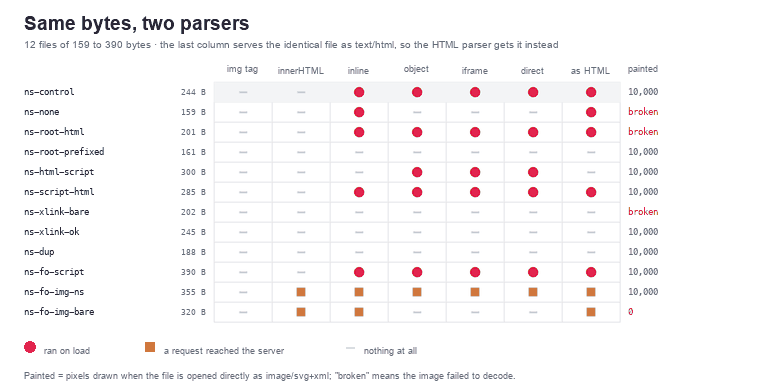
image/svg+xml; "broken" means the image never decoded. The last column is the same file with Content-Type: text/html.The namespace is not decoration
Browsers do not render an <svg> because the tag is called svg. They render it because the element is in the SVG namespace, and the namespace comes from the xmlns attribute. Take it away and you still have a well-formed document — my ns-none file parses without a single error — but the root element lands in no namespace at all, and the image loader refuses it: 0×0 pixels, nothing to draw.
Serve those same bytes as text/html and the HTML parser repairs the file for you: it puts svg in the SVG namespace by definition, the rectangle appears, and the script runs. The failure mode is asymmetric in a way that hides itself: in one placement the file is broken, in the other it is fine, and neither placement tells you about the other.
Declaring the root as XHTML goes the other way. <svg xmlns="http://www.w3.org/1999/xhtml"> is a document with no SVG in it. As an image it fails to decode; opened directly it runs its script and paints 0 pixels; as text/html it paints 10,000, because the HTML parser ignores the xmlns attribute on an svg tag entirely. The attribute that decides everything in one parser means nothing in the other.
Prefixes: valid XML, invisible HTML
The prefix form makes the same point without any error at all. A root written as <s:svg xmlns:s="http://www.w3.org/2000/svg"> is perfectly good XML, and the image loader handles it: 10,000 pixels. Served as text/html, the HTML parser creates an element literally named s:svg, which is not an SVG element, so 0 pixels — a blank page, no console error, no warning.
This is the case that breaks naive validation. A file like this passes every XML check you can run, renders correctly in every tool you are likely to open it with, and disappears when a browser receives it over HTTP with the wrong content type. If your pipeline validates with DOMParser and then serves from a static host that labels .svg as text/html, you have shipped a blank image and nothing in your logs will say so.
Scripts, and which namespace they need
The matrix of script placements is small enough to state in four lines, and it is the most useful table in this article:
| Markup | As image/svg+xml | As text/html |
|---|---|---|
<script> in the default SVG namespace | runs | runs |
<html:script xmlns:html="...xhtml"> | runs | does not run |
<script xmlns="...xhtml"> | runs | runs |
<script> inside foreignObject, XHTML namespace | runs | runs |
The pattern is that the XML side executes a script in either namespace, while the HTML side only executes the ones it recognises as script elements after parsing — which includes a plain <script> and a <script> that declares XHTML for itself, but not a prefixed one. This is the mirror image of an earlier measurement on this site, where an OnLoad attribute with a capital O survived the XML parser and was lowercased into an executing onload by the HTML parser. In both cases the correct conclusion is the same: a scanner that models one parser has a blind spot the size of the other parser.
xlink, and the quietest failure in the format
xlink:href needs a namespace declaration, and this is the one place in the set where the XML parser actually refuses the file. Without xmlns:xlink="http://www.w3.org/1999/xlink", DOMParser returns a parser error, the image decodes to 0×0, and opening the file directly shows the browser's error page — 20,304 pixels of red text. Served as text/html, the same bytes render 10,000 pixels, because the HTML parser never looks at prefixes when it builds attributes.
Binding the prefix to the wrong URI is worse, because nothing fails. With xmlns:xlink="http://www.w3.org/1999/xlink-wrong" the file parses, the image decodes at 240×110, and 0 pixels are painted, against 10000 for the same file with a bare href. The attribute is there, in a namespace nobody reads. No error, no warning, just an icon that is missing one shape.
foreignObject: the namespace you have to add yourself
A foreignObject full of HTML is the one place where the file genuinely needs two namespaces, and the difference is measurable. An <img xmlns="http://www.w3.org/1999/xhtml"> inside it made one request to the second origin in every document placement. The same element without that attribute made zero requests and painted nothing when the file was parsed as XML: it stayed in the SVG namespace, where an img is not an image, so it neither loads nor fails.
Serve that file as text/html and it makes the request again, because the HTML parser switches into HTML content inside foreignObject and assigns the XHTML namespace on its own. And in an <img> tag, the version with the namespace made no request at all — the image loader gives the file pixels, not a document, so nothing inside it can fetch.
The same namespace rule applies to scripts: an XHTML <script> inside a foreignObject ran in all six document placements and made no request in the image tag. If your sanitiser removes foreignObject wholesale — mine does by default — you also remove the whole class of problem, at the cost of files that legitimately embed HTML.
Two xmlns attributes, and a rule that is not enforced
A detail that surprises people who trust the XML specification: Chrome accepted a root element with two xmlns attributes, both when the values were identical and when they differed. No parser error, the image decoded, the drawing appeared. So "duplicate namespace declaration" is not a check you can rely on to reject a file; if you care, count the attributes yourself.
The check I run, and what it catches
The function below parses the file as XML, rejects it if the parser complains or the root is not an svg element in the SVG namespace, then walks every element and every attribute. It reports scripts in any namespace, XHTML elements outside a foreignObject, embedded frames inside one, unknown namespaces, event attributes, and the foreignObject child that stayed in the SVG namespace. Run against the twelve files here it flags 9 of them; the three it passes are the prefixed root, the correct xlink file and the duplicate-xmlns file, none of which are dangerous.
function checkNamespaces(text) {
  const SVG = 'http://www.w3.org/2000/svg';
  const XHTML = 'http://www.w3.org/1999/xhtml';
  const doc = new DOMParser().parseFromString(text, 'image/svg+xml');
  const bad = doc.getElementsByTagName('parsererror')[0];
  if (bad) {
    return { ok: false, issues: [{ kind: 'xml', detail: bad.textContent.trim().replace(/\s+/g, ' ').slice(0, 90) }] };
  }
  const issues = [];
  const root = doc.documentElement;
  if (root.namespaceURI !== SVG || root.localName !== 'svg') {
    issues.push({ kind: 'root', detail: (root.namespaceURI || 'no namespace') + ' <' + root.localName + '>' });
  }
  const all = [...doc.getElementsByTagName('*')];
  for (const el of all) {
    const ns = el.namespaceURI;
    const inForeign = el.parentElement && el.parentElement.closest
      ? el.parentElement.closest('foreignObject') !== null : false;
    if (ns === SVG) {
      if (el.localName === 'script' || el.localName === 'handler') {
        issues.push({ kind: 'script', detail: 'SVG <' + el.localName + '> at #' + (el.id || '?') });
      }
    } else if (ns === XHTML) {
      if (!inForeign) issues.push({ kind: 'xhtml-outside', detail: '<' + el.localName + '> in the XHTML namespace, outside foreignObject' });
      if (el.localName === 'script') issues.push({ kind: 'script', detail: 'XHTML <script> inside foreignObject' });
      if (el.localName === 'iframe' || el.localName === 'object' || el.localName === 'embed') {
        issues.push({ kind: 'embed', detail: '<' + el.localName + '> inside foreignObject' });
      }
    } else {
      issues.push({ kind: 'foreign-ns', detail: (ns || 'no namespace') + ' <' + el.localName + '>' });
    }
    for (const attr of el.attributes) {
      if (/^on/i.test(attr.name)) issues.push({ kind: 'handler', detail: el.localName + '@' + attr.name });
    }
  }
  for (const fo of doc.getElementsByTagName('foreignObject')) {
    for (const child of fo.children) {
      if (child.namespaceURI !== XHTML && child.namespaceURI !== SVG) {
        issues.push({ kind: 'fo-child', detail: '<' + child.localName + '> stayed in ' + (child.namespaceURI || 'no namespace') });
      }
      if (child.namespaceURI === SVG && child.localName !== 'svg') {
        issues.push({ kind: 'fo-child', detail: '<' + child.localName + '> is still SVG here, so it will not load or fire onerror' });
      }
    }
  }
  return { ok: issues.length === 0, issues };
}
Cleaning is blunt on purpose. The cleaner removes scripts and handlers in every namespace, drops elements from unknown namespaces, and by default drops foreignObject entirely — a document inside a document is not something an icon needs. Pass {keepForeignObjects: true} if you must keep them, and accept that you then have to police the HTML separately with the rules in the foreignObject article.
function cleanNamespaces(text, options) {
  const SVG = 'http://www.w3.org/2000/svg';
  const XHTML = 'http://www.w3.org/1999/xhtml';
  const opts = Object.assign({ keepForeignObjects: false }, options || {});
  const doc = new DOMParser().parseFromString(text, 'image/svg+xml');
  if (doc.getElementsByTagName('parsererror').length) return { ok: false, removed: ['unparsable'], text: null };
  const root = doc.documentElement;
  const removed = [];
  if (root.namespaceURI !== SVG || root.localName !== 'svg') return { ok: false, removed: ['root is not svg'], text: null };

  for (const el of [...doc.getElementsByTagName('*')]) {
    if (!el.isConnected) continue;
    const ns = el.namespaceURI;
    const insideForeign = el.parentElement && el.parentElement.closest('foreignObject');
    const drop = (el.localName === 'script' || el.localName === 'handler')
      || ns === null || ns === ''
      || (ns !== SVG && (opts.keepForeignObjects ? !(ns === XHTML && insideForeign) : true))
      || (!opts.keepForeignObjects && el.localName === 'foreignObject');
    if (drop) { removed.push('<' + el.localName + '>'); el.remove(); }
  }
  for (const el of [root, ...root.querySelectorAll('*')]) {
    if (!el.attributes) continue;
    for (const attr of [...el.attributes]) {
      if (/^on/i.test(attr.name)) { removed.push(el.localName + '@' + attr.name); el.removeAttribute(attr.name); }
    }
  }
  return { ok: removed.length === 0, removed, text: new XMLSerializer().serializeToString(root) };
}
After cleaning, the 9 files that produced output were served again in three document placements: 0 executions, and the two foreignObject files stopped making their requests. The correct xlink file kept its 10,000 pixels, so the cleaner is not erasing drawings it does not understand.
A checklist for namespace handling
- Check the root, not the tag name.
root.namespaceURI === "http://www.w3.org/2000/svg", or you are looking at a different language with the same word in it. - Serve
.svgasimage/svg+xml. The prefixed-root file is valid XML and a blank page overtext/html; the no-xmlns file is the reverse. - Reject prefixed roots. No exporter produces
s:svg, and the HTML parser cannot render it. - Require
xmlns:xlinkwhenxlink:hrefappears, and fail on a parser error rather than continuing — a file that does not parse is a file your scanner has not read. - Give
foreignObjectchildren the XHTML namespace or drop them. Without it they neither load nor raise an error, which makes the omission invisible in testing. - Validate with the same parser that will serve the file. The SVG Validator reports the tree that
DOMParserbuilt, and the SVG Editor shows you the namespaces when you click an element.
Namespace handling is not the most dramatic part of SVG security — nothing in this set executed where an <img> tag was involved — but it is the part most likely to make a working file stop working, and the part where a scanner built on the wrong parser will quietly pass something it should have caught. If you want the broader context, the JavaScript matrix and the polyglot article cover the other ways a file can be two things at once. Once the file is clean, the SVG optimiser is the last step before it ships.
Related Articles
Try These Free Online Tools
No download required — convert, compress & optimize SVGs right in your browser
SVG Optimiser
Rewrites the file with a plain SVG namespace, which fixes prefixes.
Open optimiser