
SVG Sandbox Preview: Containing an Untrusted File
An SVG preview is a decision about where somebody else's file gets to run, and most tools make that decision without ever naming it. I built twelve files of 185 to 355 bytes — each a 240×110 drawing with one 60×40 rectangle and one mechanism — and placed every one of them twelve ways: as an image, as a CSS background, inlined into the page, in an object, an embed and an iframe, and in six iframe flavours with the sandbox attribute set or not. 144 cells, 60 of which did something. The image tag and the CSS background ran nothing and fetched nothing. The four unsandboxed document placements ran all nine mechanisms, including one script that read the session cookie and posted it to a second origin and one that replaced the whole page. With sandbox and no flags, none of the nine ran and none could read the cookie — but two of them still fetched.
Those last four words are the reason this article exists. The sandbox attribute is usually described as if it contained the file, and it does contain the code: no script, no parent document, no cookie, no storage, no navigation. It does not contain the network. A cross-origin <image> and a CSS @import reached the second origin from all ten document placements, including the ones where scripts were forbidden. And sandbox="allow-scripts allow-same-origin" gives almost everything back — 8 of the nine mechanisms ran there, including the cookie read — which is why the specification says that combination is no sandbox at all.
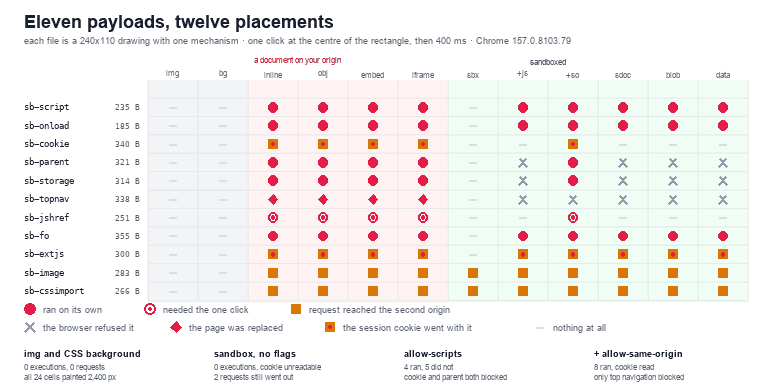
The twelve files
Every file is the same drawing with a different thing attached, so the only variable is the mechanism. They are small on purpose: 185 bytes is short enough to paste in a comment, and a reviewer who is looking at the picture will not see any of it.
| File | Size | What is attached | Cells that reached something |
|---|---|---|---|
sb-control | 195 B | nothing at all (control) | 0 of 12 |
sb-script | 235 B | <script> |
9 of 12 |
sb-onload | 185 B | onload on the root element |
9 of 12 |
sb-image | 283 B | <image href> at a second origin |
0 of 12 |
sb-cookie | 340 B | script reads document.cookie, beacons it out |
5 of 12 |
sb-parent | 321 B | script writes into parent.document |
5 of 12 |
sb-storage | 314 B | script writes to localStorage |
5 of 12 |
sb-topnav | 338 B | script navigates top.location |
4 of 12 |
sb-jshref | 251 B | <a href="javascript:…">, needs a click |
5 of 12 |
sb-fo | 355 B | foreignObject with an XHTML img onerror |
9 of 12 |
sb-extjs | 300 B | external <script href> |
9 of 12 |
sb-cssimport | 266 B | @import inside a <style> |
0 of 12 |
The preview page and the files are served from the same origin, which is what an upload folder usually is: a directory on the same host as the viewer. That matters for the cookie column and nothing else — a file on a separate origin would fail to read the cookie for the boring reason that it is on a separate origin, and the sandbox comparison would not change.
Two placements run nothing
Across the twelve files and two placements — <img> and a CSS background — there were zero executions and zero requests. Not one payload, including the two built specifically to fetch, produced a single log line on the second origin. All 24 cells still painted their rectangle, 2400 pixels each, so this is containment rather than failure.
That is the same result every article in this series has measured, and it is worth restating why: the image loader decodes the file into a picture and never gives it a document. No document means no base URL for the <image href>, no origin to read a cookie from, no parent to write into, and no script engine attached. The cost is that the preview is a photograph: you cannot inspect the tree, select the text or click anything inside it.
Four placements are the page
Inline the markup, or point an <object>, an <embed> or an <iframe> at the file, and the file becomes a document on your origin. All four behave identically here: 8 mechanisms ran, and the ninth replaced the page.
| Payload | What the preview did |
|---|---|
sb-cookie | Read document.cookie, got sid=secret123, and requested /c.png?d=sid%3Dsecret123 from the second origin — one hit per placement, five placements. |
sb-parent | Wrote data-pwned onto the parent <body>. After the load the top page carried the attribute. |
sb-storage | Wrote to localStorage on your origin. It survives the preview being closed. |
sb-topnav | Navigated the top frame to another URL. In four cells the harness came back holding a different page than the one it opened. |
sb-jshref | Ran on one click in the middle of the rectangle — the payload the previous article's marker variable kept reporting as clean. |
sb-extjs | Fetched a script from the second origin and executed it: /e.js, 1 hit per placement. |
sb-fo | An XHTML <img onerror> inside foreignObject fired, and drew a broken-image glyph — the 2605 pixels instead of 2,400 that show up in every document placement. |
In these four placements Chrome says nothing at all about it, because nothing is being blocked: the console shows only the harmless 404 from the foreignObject image. A preview that runs a file this way is not misconfigured; it is doing exactly what an iframe is for.
What the sandbox attribute changes
Same twelve files, same origin, three configurations. This is the whole article in one table.
| Mechanism | sandbox | + allow-scripts | + allow-scripts allow-same-origin |
|---|---|---|---|
<script>, onload | blocked | runs | runs |
read document.cookie | blocked | opaque origin, cookie is the empty string | reads sid=secret123 |
write into parent.document | blocked | blocked, SecurityError | works |
localStorage | blocked | blocked, SecurityError | works |
navigate top.location | blocked | blocked | blocked |
javascript: link on click | blocked | blocked, silently | runs |
external <script href> | not even fetched | fetched and executed | fetched and executed |
cross-origin <image> | fetched | fetched | fetched |
CSS @import | fetched | fetched | fetched |
| the drawing itself | 2400 px | 2400 px | 2400 px |
Two rows deserve their own paragraph. The cookie row is the difference between contained and contained-looking: with allow-scripts alone the script runs, and every attempt to read the cookie throws — not because the attribute is a filter but because the document is in an opaque origin, so there is no cookie jar to read. Add allow-same-origin and the script is back on your origin, with your cookie, your storage and your parent document.
The top-navigation row is the one thing the attribute keeps even in the permissive case, because allow-top-navigation is a separate flag. Chrome says so directly: Unsafe attempt to initiate navigation for frame with URL … The frame attempting navigation of the top-level window is sandboxed, but the flag of 'allow-top-navigation' or 'allow-top-navigation-by-user-activation' is not set. If your preview needs a link inside the file to work, think about whether you want it to work.
srcdoc, blob and data: bytes you already have in JS
Three of the twelve placements never send the file back to the server. srcdoc puts the markup in an attribute, blob: wraps it in a Blob and hands the frame a URL, and data: encodes it into the URL itself. All three are common in editor previews, because they avoid a round trip and let you preview unsaved changes.
With sandbox="allow-scripts" all three land on the same numbers as the plain sandboxed iframe: 4 mechanisms run, 3 blocked, the cookie unreadable. The origin of the URL does not decide the origin of the frame — the sandbox does. A blob: URL inherits the creator's origin, and it is still opaque inside a sandboxed frame, which is exactly the property you want if the editor has the bytes in memory and no server route to preview them.
The one measurable difference in the whole set is cosmetic and comes from the missing base URL. The foreignObject payload points a relative src="/missing.png" at a file that does not exist; in seven placements the browser draws a broken-image glyph (2605 painted pixels instead of 2,400), and in the blob: and data: cells the same payload paints 2400 — the glyph never appears, because a relative reference has nothing to resolve against. Same code, same origin rules, different pixels. If your preview pipeline compares renders, that is a difference to expect, not a bug to chase.
A sandbox does not stop the network
This is the part that gets left out of most advice. Four payloads can reach out, and the sandbox stops only the one that needs script permission to start.
| Payload | Reached the second origin in | Cells |
|---|---|---|
sb-image — <image href> | every document placement, sandboxed or not | 10 |
sb-cssimport — @import | every document placement, sandboxed or not | 10 |
sb-extjs — external script | every placement except the one where scripts are forbidden | 9 |
sb-cookie — beacon after reading the cookie | only where the cookie was readable | 5 |
The @import row is the interesting one. It produces a request in the no-flags sandbox, where the console is busy reporting blocked script execution and every visible sign says the file is inert. CSS is not script: the sandbox does not gate stylesheet loading, so a file can still announce that it was opened, from which address, and when. That is one bit of exfiltration without a single line of JavaScript, and it is the same finding the CSP article ran into from the other direction.
If the network matters — and for user content it usually does — the control that works is a Content-Security-Policy on the preview response that forbids every origin but your own, or serving previews from a host that has nothing else on it. The external reference article lists the nine ways a file can leave; the sandbox is orthogonal to all of them.
The four states, and a function that assigns them
After the table the useful abstraction is small: every cell is inert, escaped, contained, or contained-with-scripts. Written out, it is the thing to put in a review tool rather than in a document nobody reads.
const INERT = new Set(['img', 'cssbg']);
const SANDBOXED = new Set(['sbnone', 'sbscripts', 'sbboth', 'sbsrcdoc', 'sbblob', 'sbdata']);

// The attribute is a list of permissions, so build it from what the preview
// actually needs instead of copying a string from a blog post.
function sandboxFor({ scripts = false, sameOrigin = false } = {}) {
  const flags = [];
  if (scripts) flags.push('allow-scripts');
  if (sameOrigin) flags.push('allow-same-origin');   // cancels the containment
  return flags.length ? `sandbox="${flags.join(' ')}"` : 'sandbox';
}

// One measured cell in, one of four states out. "escaped" means the file
// reached something that belongs to the page, not that it looks dangerous.
function classify({ mode, executed, cookie, navigated }) {
  if (INERT.has(mode)) return 'inert';
  if (navigated || cookie === 'secret') return 'escaped';
  if (!SANDBOXED.has(mode)) return 'escaped';
  return executed ? 'contained-with-scripts' : 'contained';
}
Run over the 144 measured cells it returns inert for the 24 image and background cells, escaped for the 36 unsandboxed document cells and for the one cookie cell under allow-same-origin, contained for the twelve no-flags sandbox cells, and contained-with-scripts for the 16 cells where an opaque origin still ran code.
The two states that matter for a decision are the last two. If a preview only needs to show the drawing, contained is available: no script runs, and the picture is identical to the unsandboxed one. If the preview needs interaction — hover states, an animated icon, a clickable prototype — then contained-with-scripts is the honest ceiling, and the network is still open.
The checklist
- Never inline, never
object, neverembed. Those four placements ran all nine mechanisms on the viewer's origin. - Use
<img>for thumbnails. It is the only placement with zero executions and zero requests, and it paints the file correctly. - If you need a document, use an iframe with
sandboxand no flags. The drawing survives; nothing else does. - Add
allow-scriptsonly when the feature needs it, and never addallow-same-originalongside. Together they undo the containment, and every guide that recommends the pair is describing a way to make the attribute decorative. - Do not rely on the sandbox for the network. Add a CSP that allows only your own origin, or serve the preview from a host with nothing else on it.
- Keep the file off the origin that holds the session. The sandbox is a second line; a separate origin is the first.
- Re-test after changing the preview. The difference between a thumbnail and a detail view is one attribute, and the table above changes with it.
What this does not cover
It does not cover cost. A sandboxed iframe still renders the file, and a file with 400 filters costs the same milliseconds whether or not its scripts are allowed to run — the filter article is the one that measured that. It does not cover the download path either: a file served with Content-Type: image/svg+xml and opened directly is a document on your origin, and no preview attribute applies. And it does not cover allow-popups, allow-forms or allow-modals, each of which adds a way out that this harness did not test.
It also does not cover the browser you are not using. Everything here is Chrome 157.0.8103.79 on macOS. The sandbox specification is older and more uniform than most of the SVG surface, so I would expect the containment rows to hold and the network rows to be identical, but "would expect" is not a measurement.
For the pipeline around the preview: the upload checklist covers what to check before you store a file, the SVG Validator shows the tree before anything renders, and the SVG Editor opens a file you have already decided to trust. One sentence: preview in an image tag when you only need a picture, in a no-flags sandbox when you need a document, and treat the network as a separate problem because the sandbox does not touch it.
Related SVG Workflows
Containment is one layer of a pipeline that has several. These pages cover the layers on either side of it.
- SVG Upload Security Checklist — six checks and fourteen files, and the one that passes all six.
- SVG Content Security Policy — which header actually stops a fetch, over 168 cells.
- SVG External References — the nine ways a file reaches a second origin.
- Can SVG files run JavaScript — twelve payloads, six placements, two runs per cell.
- SVG Event Handler Security — what fires with no click, and why a marker variable lies.
- SVG Filter Security — the other cost of rendering a file you did not write.
- SVG Validator — parse, structure and references in one report, before anything renders.
Related Articles
Try These Free Online Tools
No download required — convert, compress & optimize SVGs right in your browser