
SVG Duplicate IDs: When the Second Figma Export Breaks the First
Figma names its definitions after the node that produced them, so two separate exports usually contain the same handful of ids: paint0_linear_1_2, clip0_1_2, mask0_1_2, filter0_d. Paste both into one page — a component library, a hero with three icons, a template that merges partials — and every reference to those names resolves to the first definition in document order. Nothing errors. The second graphic simply borrows the first one's paint, clip, mask or shadow.
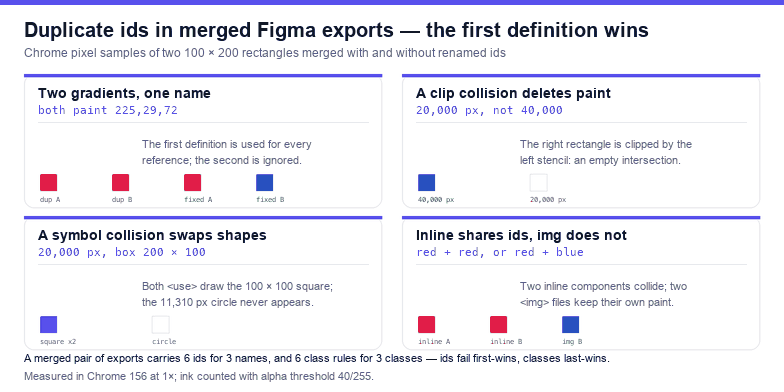
Everything below was measured in Chrome by rasterising merged fixtures and sampling pixels: two 100 × 200 rectangles side by side, the left one meant to be #e11d48 and the right one meant to be #1d4ed8. With two gradients sharing an id, both rectangles paint 225,29,72. Rename the second definition and the right one paints 29,78,216. That is the whole bug in one line, and the rest of this article is the list of places it hides.
Why ids collide in the first place
An id is document-global, and an SVG element is not a scope. Two <svg> elements on one page share the same id space, so <linearGradient id="paint0"> in the second file is not a second gradient — it is a duplicate declaration that the parser accepts and the style system ignores. Figma's names make this near-certain in practice, because the suffix carries the node coordinates rather than anything unique to the export run: the same symbol exported twice, from the same place in the file, produces byte-identical ids.
Measured on a realistic merge of two exports — each with one gradient, one clip path, one mask and three colour classes — the merged result contains 6 elements with an id, of which only 3 are distinct; all three names collide. The same merge produces 6 class rules for 3 class names, which fails differently, as the last section shows.
The rule: url(#id) binds to the first match
When the browser resolves fill="url(#paint0_linear_1_2)", it looks up the first element with that id in document order and uses it. Later definitions with the same id are not merged, not averaged, and not reported. The consequence for a merged file is that the first export wins every shared name — including names used by exports that were pasted after it.
That asymmetry matters when you are debugging. If the top of the page looks right and the bottom looks wrong, the file is not corrupt: the bottom is a victim of the top. Reading the visual result in page order is misleading, because the damage always falls on whatever comes later.
Cause 1: two gradients, one name — the second turns first-colour
The most common symptom is a logo that arrives in the wrong brand colour, usually the colour of a different logo on the same page. Measured on the two-rectangle fixture:
| Markup | Left rect | Right rect |
|---|---|---|
Both reference #paint0 (red defined first, blue second) | 225,29,72 | 225,29,72 |
Second definition renamed #paint1 | 225,29,72 | 29,78,216 |
There is a second-order version of this that costs more time: if the two gradients differ in geometry rather than colour — one horizontal, one vertical — the victim does not change colour, it changes direction. A gradient that runs the wrong way after a merge is the same bug, and searching for "gradient direction changed" will not find it. The gradient fix article covers the other four ways gradients go wrong once the reference is intact.
Cause 2: duplicate clipPath — one shape disappears
A clip path is geometry, so a collision does not tint the wrong pixels; it deletes them. Take a left rectangle clipped to the left half and a right rectangle clipped to the right half, then merge them without renaming: both reference the first clip, so the left rectangle paints its 20,000 pixels and the right rectangle, whose own paint area does not overlap the left clip, paints nothing at all. Total ink 20,000 instead of 40,000, and the ink box measures 100 × 200 instead of 200 × 200.
What makes this one expensive to diagnose is that the vanished shape is still in the file, still in the layer panel of your editor, and still selected when you click where it should be. Careful readers of the clipping mask article will recognise the arithmetic: clipping is an intersection, and intersecting a right-hand rectangle with a left-hand stencil gives nothing.
Cause 3: duplicate mask — half the artwork goes missing
The same accident with a mask costs exactly half the art. Two rectangles of 100 × 200, one masked by a 100-pixel-wide region and one by a full 200-pixel region: merged with the same mask0 id, both are masked by the 100-pixel region, so the painted area is 20,000 pixels and alpha at x = 150 reads 0. Renaming the second mask restores 40,000.
Because a mask is luminance, the visual result is subtler than a clip: a narrow mask crops, a grey mask fades. A collision between two grey masks makes a graphic slightly washed out in a way that is easy to attribute to anti-aliasing, a colour profile, or the export itself. If one part of a page looks uniformly 60% opaque and everything else is fine, count the mask ids before touching anything else.
Cause 4: duplicate symbol or group — two icons, one shape
<use href="#sym"> is a reference like any other. Merge two sprite sheets and the second sheet's symbols become unreachable: measured on a fixture where the first #sym is a 100 × 100 square (10,000 px) and the second is a circle of radius 60 (11,310 px), both <use> elements paint the square — total ink 20,000, ink box 200 × 100, and the circle never appears.
Icon sprites are the classic victim because they are assembled by concatenation tools that are careful about icons and careless about ids. The tell is a set of icons where several look identical, or where one icon repeats at a position it does not belong — the geometry is being borrowed, so the wrong glyph appears at the right size.
Cause 5: duplicate filter — the shadow of another element
Filters are the least visible instance and the easiest to misread as a styling bug. Two drop shadows with opposite offsets, merged under one id: measured, both rectangles take the first definition, and the combined ink box runs from (30,30) to (189,189) — 160 × 160 — because the +20 offset was applied to both. The rightmost pixel at 189 is the giveaway: the second rectangle ends at 170, so anything beyond that is the other filter's offset.
Practical consequence: a card that suddenly casts its shadow up-left in one component and down-right in another. Both are "correct" for their own definition; only one definition is read.
The opposite rule for classes: the last one wins
Colour styles export as .cls-1, .cls-2, .cls-3 rules rather than attributes, and those collide by cascade instead of by lookup. Two rules with the same selector and different colours resolve the second one, so both shapes take the last colour in the file: measured 29,78,216 for both rectangles, where the first rule said 225,29,72.
So a merged file has two opposite failure modes, and the symptom tells you which one you have. One shape wrong in a way that matches another shape → id collision, first wins. Several shapes wrong in the same way, all matching the last stylesheet → class collision, last wins. A file with both problems at once will look random until you separate the two checks.
Two components on one page: inline versus img
Whether the collision happens at all depends on how the SVG is delivered. Measured on two inline components in one document, both painted 225,29,72 — the second one lost its gradient. The same two files loaded through <img> painted 225,29,72 and 29,78,216, because each image is its own document with its own id space.
That single fact decides the architecture in many design systems. Inlining an SVG gives you currentColor, CSS targeting and no extra request — at the cost of a shared id namespace. Referencing it through <img> isolates the ids, at the cost of not being able to theme it. Mixing the two on one page is fine; mixing inline SVGs from different origins is where the collisions live.
Catching it before it ships
Two counters, both cheap. The first finds duplicate ids; the second reports how many references depend on a name that appears more than once. Running the SVG validator on the merged file gives the same answer with line numbers, which is easier than counting in a console.
const ids = [...document.querySelectorAll('[id]')].map((n) => n.id);
const dup = [...new Set(ids.filter((v, i) => ids.indexOf(v) !== i))];
console.log(ids.length, 'ids,', new Set(ids).size, 'unique, duplicates:', dup);

// which referenced names are being resolved by more than one element?
const refs = [...document.querySelectorAll('*')].flatMap((el) =>
  [...el.attributes].map((a) => a.value).filter((v) => /^url\(#|^#/.test(v)));
console.log(refs.filter((v) => dup.some((d) => v.includes(d))));
One caution about counting in JavaScript: document.getElementById() returns a single element even when several share the id, while querySelectorAll('#name') returns all of them. Measured on the merged fixture, getElementById reported 1 element and querySelectorAll reported 2 for the same name. A "no duplicates found" report built on getElementById is not a report at all.
Fixing it: namespace each export
Renaming ids in place is ambiguous — after the fact there is no way to tell which reference was meant for which definition. The reliable fix runs before the merge, per export: prefix every id inside one export and rewrite the references inside that same export. Measured on the merged two-component fixture, that renamed 2 ids in the second group and took the right half from 225,29,72 to 29,78,216 without touching the left.
function namespaceIds(root, prefix) {
  const map = new Map();
  root.querySelectorAll('[id]').forEach((el) => {
    const next = prefix + el.id;
    map.set(el.id, next);
    el.id = next;
  });
  if (!map.size) return 0;
  const fix = (v) => v
    .replace(/url\(#([^)]+)\)/g, (m, id) => (map.has(id) ? 'url(#' + map.get(id) + ')' : m))
    .replace(/^#(.+)$/, (m, id) => (map.has(id) ? '#' + map.get(id) : m));
  root.querySelectorAll('*').forEach((el) => {
    for (const a of [...el.attributes]) {
      if (a.name !== 'id' && /url\(#|^#/.test(a.value)) el.setAttribute(a.name, fix(a.value));
    }
  });
  return map.size;
}
// usage: one call per export group, before inserting it into the page
namespaceIds(document.querySelector('#exp-2'), 'e2-');
Three details make the difference between a fix and a new bug. It has to include href="#…" as well as url(#…), or <use> keeps pointing at the old symbol. It has to skip the id attribute in the rewrite loop, or the freshly renamed ids get overwritten. And it has to run per group rather than once over the whole document: running it after the merge would prefix the collisions in document order, including the ones that were legitimately unique.
For class collisions, prefix the selectors as well — .cls-1 becomes .e2-cls-1 in both the rule and the class attribute — or, more simply, resolve the classes back into presentation attributes before merging, which removes the cascade from the equation entirely. The SVG editor is a quick way to do one file by hand before you automate the rest.
A thirty-second check
- Does every
url(#…)andhref="#…"point at an id that exists exactly once? - Do the second and later graphics on the page borrow the first one's colour?
- Did a whole shape vanish after a merge? That is a clip collision, not a missing element.
- Did several shapes all take the same (last) colour? That is a class collision.
- Are the SVGs inline or behind
<img>? Only the inline ones share an id space.
The one-line rule: SVG ids are page-global, and a url(#name) reference always resolves to the first element with that name — so when two Figma exports are merged, the second one silently inherits the first one's gradients, clips, masks, symbols and filters, and the fix is to prefix the ids per export before merging.
Frequently asked questions
Why is my second SVG the wrong colour after pasting two Figma exports?
Because both files define a gradient with the same id, and a url(#…) reference resolves to the first one in document order: measured, two rectangles meant to be 225,29,72 and 29,78,216 both painted 225,29,72. Rename the ids in the second export and the second shape gets its own paint.
Why did a shape disappear when I combined two SVG files?
A shared clip path or mask. Both elements reference one definition, and clipping is an intersection: measured, a right-hand rectangle clipped by a left-hand stencil painted nothing, leaving 20,000 pixels of ink where 40,000 were expected and a 100 × 200 ink box instead of 200 × 200.
Do duplicate ids break SVG in every browser?
They do not throw, which is the problem: the duplicate definition is accepted and then ignored. Measured in Chrome, the consequence is always "first definition wins" for ids and "last rule wins" for classes — two opposite failure modes in one merged file. Validation tools flag the duplicate; visual inspection often does not.
Should I inline SVG or use img to avoid collisions?
If ids are the risk, <img> isolates them: measured, two inline components both painted 225,29,72, while the same two files as <img> painted 225,29,72 and 29,78,216. Inline only when you need currentColor or CSS targeting, and namespace the ids when you do.
Related SVG Workflows
Duplicate ids are the sixth thing to break in a Figma export, after the canvas, the borders, the gradients, the masks and the colour. These pages cover the rest.
- Figma SVG gradient fix — gradients that go flat, move or disappear once the reference is intact.
- Figma SVG currentColor — why a themed icon still paints black, and the four rules that beat the keyword.
- Figma SVG clipping mask fix — the intersection arithmetic behind a vanished shape.
- Figma SVG export not working — blank files, greyed-out buttons and empty exports.
- SVG validator — reports duplicate ids and dangling
url(#…)references with line numbers. - SVG editor — rename ids and fix references in the browser, no upload.
- SVG optimiser — minify a merged file without collapsing the names you just separated.
Related Articles


Try These Free Online Tools
No download required — convert, compress & optimize SVGs right in your browser
SVG Validator
List every duplicate id and the dangling url(#…) references they cause.
Open validatorSVG to Data URI
Isolate the ids by loading the file as an image instead of inlining it.
Build data URI