
Figma SVG Export Settings: What Each Option Writes
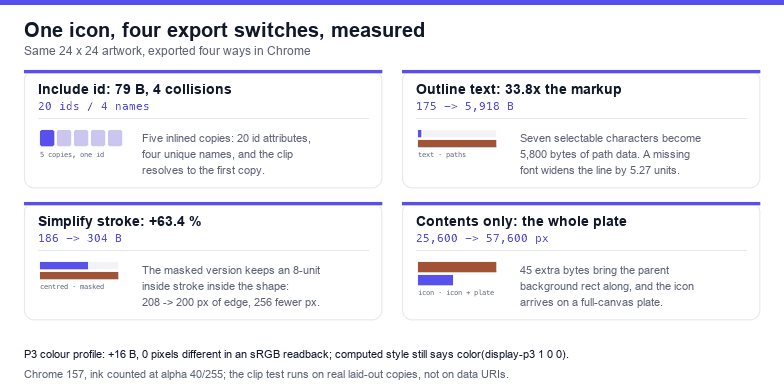
Figma's SVG export panel is three checkboxes and a colour profile, and each one changes the file in a way you can count. Measured on one 24 × 24 icon: include id costs 79 bytes and 13.7 % of the file, and five inlined copies end up with four duplicated ids that clip each other; outline text multiplies the text markup 33.8× (175 bytes to 5,918); simplify stroke adds 63.4 % markup to keep an inside-aligned edge inside. Figma's REST exporters document the same switches, with defaults worth knowing: svg_include_id false, svg_outline_text true, svg_simplify_stroke true, contents_only true.
Everything below is measured in Chrome 157 by rasterising the exported markup and reading the pixels back, so the numbers describe what the setting does to the file, not what the tooltip promises.
The switches, and the defaults Figma itself documents
The export panel exposes four things per layer, and Figma remembers them per layer rather than globally — which is why one icon in a set can export differently from the other eleven without anyone noticing.
| Switch | What it writes | Documented default |
|---|---|---|
| Include “id” attribute | each layer name as an id | svg_include_id = false |
| Outline text | glyph outlines instead of <text> | svg_outline_text = true |
| Simplify stroke | keeps stroke attributes where SVG can express the alignment | svg_simplify_stroke = true |
| Colour profile | #rrggbb or color(display-p3 …) | sRGB |
There is a fifth lever outside the checkbox list, in the same menu: whether overlapping content outside the exported node is included. The next four sections measure each one on the same icon.
Include id: 79 bytes, and the icon that clips its neighbour
Turning ids on adds 79 bytes to this 577-byte icon, 13.7 %. That is the harmless half of the story. The harmful half appears when two exports live in the same document: Figma names the clip path clip0_412_88 in every export, and the layer-based names collide just as reliably.
Five copies of the icon, inlined on one page: 20 id attributes, 4 unique names. Every name appears five times. document.querySelectorAll('#clip0_412_88') returns 5 elements; document.getElementById('clip0_412_88') returns the first one, and that is what url(#…) resolves to.
So build the test that matters: two copies of the same icon, one clipped to the left half and one to the right half, both carrying id="clip0_412_88".
| How it is placed | Ink | Where it lands |
|---|---|---|
| Right-clipped copy alone | 7,200 px | right half (x 60–119 of a 120 px box) |
| Left-clipped copy first, right-clipped copy second | 7,200 px | left half (x 0–59) |
Same pixel count, wrong half. That is the most confusing class of bug in this whole area, because nothing is missing and nothing errors: the icon is simply mirrored, or half of it is, and only the second copy on the page is affected. Rename ids per instance — suffix them — and rewrite every url(#…) to match. The rewrites have to be boundary-aware: replacing #paint0 as a plain string also hits #paint0_linear, and the second pass then renames what the first pass created. The duplicate-id article has the reproducible case in more detail.
Outline text: 33.8× the markup, and the font that swaps
The phrase “Figma 24” at 26 px is 175 bytes as a <text> element and 5,918 bytes as a single path — 33.8 times larger, 5,800 of those bytes being the d attribute alone. Seven selectable characters become zero.
What you buy for that is independence from fonts, and the measurement shows why it matters. The same <text> rendered with font-family="Arial" measures 108.39 units wide, which matches the glyph advance sum of 108.38 — the text engine and the outline agree. Swap the family to Inter, which is not installed on this machine, and the line measures 113.66 units, 5.27 wider (+4.9 %), drawn in whatever the fallback chain reaches. The file did not change. The machine did.
Two honest caveats about the outline version. The path is 5,918 bytes for seven characters, so outlining a headline is expensive; outline a logo wordmark, not body copy. And the outline is not bit-identical to the text rendering even in the same browser: measured pixel diff between the two is 1,440 pixels with a mean error of 1.44/255, all of it antialiasing along the edges.
If you need to know which fonts in an export are actually present on a machine before you decide, measure the width against a deliberately non-existent family instead of trusting document.fonts.check():
function widthOf(family) {
  const probe = document.createElement('span');
  probe.style.cssText = 'position:absolute;visibility:hidden;font-size:100px;white-space:pre;font-family:' + family;
  probe.textContent = 'ABCDEFGHIJ abcdefghij 0123';
  document.body.appendChild(probe);
  const w = probe.getBoundingClientRect().width;
  probe.remove();
  return Math.round(w * 100) / 100;
}

const missing = widthOf('__no_such_font__');
const families = [...new Set([...document.querySelectorAll('text')]
  .map((t) => getComputedStyle(t).fontFamily.split(',')[0].replace(/["']/g, '').trim()))];

families.forEach((f) => {
  const w = widthOf('"' + f + '", __no_such_font__');
  console.log(f, w === missing ? 'NOT INSTALLED' : 'present', w);
});
console.log('text elements:', document.querySelectorAll('text').length);
The reason to compare widths rather than ask the font API: document.fonts.check('12px "Inter"') answers “is a font with this description available”, and for a family that is simply absent it can still say yes because a fallback matched the description. A width that equals the bogus family's width is much harder to fake.
Simplify stroke: 63.4 % more markup for four pixels
SVG can only centre a stroke on a path. Figma can align a stroke inside or outside, so when the alignment matters the exporter has to fake it: double the stroke width, then mask away the half that should not be there. The two encodings of the same 200 × 200 square with an 8-unit inside stroke:
| Encoding | Markup | Ink box | Ink |
|---|---|---|---|
| Stroke attribute, centred (wrong alignment) | 186 B | 208 × 208 | 6,400 px |
| Double width + mask (inside, faked) | 304 B | 200 × 200 | 6,144 px |
| Double width, no mask | 187 B | 216 × 216 | 12,800 px |
The faked version costs 118 bytes more, 63.4 %, and buys 4 px of edge: the centred stroke paints 4 units outside the shape on every side, the masked one stops at the boundary. The third row is what happens if you take the doubling but drop the mask — the stroke grows on both sides and the shape visibly inflates.
The practical consequence is the opposite of what the label suggests. Leaving simplify stroke on keeps the alignment you drew, at the cost of a <mask> in the file. Turning it off is better when you want to restyle strokes in code, because then the file keeps stroke-width as a number you can change — but the shape you drew may not be the shape you get. Aligning strokes to centre before export sidesteps the whole trade.
Contents only: the 24 × 24 icon that arrives as a full plate
Exporting a node normally renders only what belongs to it. With overlapping content included, anything drawn behind the node in the parent comes along, and the result is an icon with a surprise background:
| What was included | File | Ink at 10× |
|---|---|---|
| The icon alone | 131 B | 25,600 px |
| Icon + the parent's 24 × 24 background rect | 176 B | 57,600 px |
| Icon + a 104 × 104 rect hanging past the frame | 194 B | 57,600 px |
45 bytes of markup turns 25,600 inked pixels into 57,600 — the whole canvas. The overhanging rect is the nastier version: it is clipped by the viewBox, so the file looks like a 24 × 24 solid square with an icon somewhere inside it, and the markup gives no hint that the rectangle was never part of the icon. If an export arrives with a rectangular plate behind the artwork, this is the switch that put it there. The transparent background article covers the other route to the same symptom.
Colour profile: 16 bytes with no visible gain in sRGB
Exporting with Display P3 writes fill="color(display-p3 1 0 0)" instead of fill="#ff0000", 16 bytes more on this fixture. Chrome keeps the declaration — the computed value reads back as color(display-p3 1 0 0) — but when the file is rasterised into an sRGB canvas, the sampled pixel is 255,0,0,255, exactly the same as the hex version: a measured difference of 0 pixels, mean error 0.
So the case for sRGB is compatibility, not colour. Anything that parses the file with an older renderer, a server-side rasteriser, or a design tool that does not understand color() has a chance of dropping the declaration and painting nothing. Unless the asset is going straight to a wide-gamut pipeline you control, keep sRGB.
Which setting for which asset
| Asset | id | Outline text | Simplify stroke | Contents only |
|---|---|---|---|---|
| UI icon inlined in code | off | n/a | off if you restyle strokes | on |
| Logo or wordmark deliverable | off | on | on | on |
| Illustration for the web | off | on, or keep text with webfonts | on | on |
| Animated SVG (CSS or JS targets ids) | on, with renamed layers | depends on the animation | off | on |
| Cut file for a vinyl or laser cutter | off | on | on | on |
The one row that needs discipline is the animated one: ids are only useful if they are names you chose. id="Vector 7" is not an API, it is a layer name with a copy number in it, and it will change the next time somebody renames a layer.
A 60-second audit for an export you did not make
Most of these arrive as somebody else's file. One pass over the DOM tells you which settings were used and which are about to hurt:
const svg = document.querySelector('svg');
const all = [...svg.querySelectorAll('[id]')].map((el) => el.id);
const dupes = [...new Set(all.filter((id, i) => all.indexOf(id) !== i))];
const acrossPage = [...new Set(all.filter((id) => document.querySelectorAll('[id="' + id + '"]').length > 1))];
const decimals = Math.max(0, ...[...svg.querySelectorAll('[d]')]
  .flatMap((el) => (el.getAttribute('d').match(/\.(\d+)/g) || []).map((s) => s.length - 1)));

console.log('elements', svg.querySelectorAll('*').length);
console.log('ids', all.length, 'unique', new Set(all).size, 'duplicates', dupes);
console.log('duplicates across the page', acrossPage);
console.log('text nodes', svg.querySelectorAll('text').length,
  'masks', svg.querySelectorAll('mask').length,
  'definitions', svg.querySelectorAll('defs > *').length);
console.log('max decimals in path data', decimals);
console.log('bytes', new XMLSerializer().serializeToString(svg).length);
Read it in this order. Duplicate ids across the page mean the export used “include id” and is about to collide. A non-zero text count means outlining was off, so the file depends on fonts. Masks above zero with a stroke-heavy drawing mean simplify stroke faked an alignment. More definitions than references means you are carrying the “nothing” that the cleanup pass deletes.
What no setting fixes
Three problems survive every combination above. The viewBox comes from whatever you selected, so exporting a bare shape crops to the artwork instead of the frame — export the frame. Precision is not a switch at all; the exporter writes its own number of decimals and the only lever is afterwards, which is a viewBox edit or a precision pass. And raster effects — shadows, blurs — are pixels in the SVG no matter what the checkboxes say, which is why a “vector” export can look soft when scaled.
One more: none of these settings changes whether the file is valid. Paste the export into the SVG validator before it goes into a codebase; it reports the dangling references and duplicate ids that the export panel happily produces.
Frequently asked questions
Should “include id attribute” be on or off?
Off by default. It adds 79 bytes to this icon, 13.7 %, and the ids it writes are layer names that collide between exports: five copies inlined on one page produced 20 id attributes with 4 unique names. Turn it on only when your CSS or JavaScript needs to target those elements, and rename the layers first.
Is outline text still necessary if I embed the font?
An SVG that is loaded through an <img> tag cannot fetch an external stylesheet or font file, so an embedded webfont does not reach it. For a logo shipped to other people — print, cut files, client deliverables — outline it. For your own site with the webfont loaded and inlined text, keeping <text> keeps 7 selectable characters instead of 5,918 bytes of paths.
Why did my icon gain a white background after export?
Almost always overlapping content from the parent being included. Measured: the icon alone inks 25,600 pixels; the same export with a 24 × 24 background rect from the parent inks 57,600 — the entire canvas — for 45 extra bytes. Export only the frame's contents, or delete the rectangle afterwards.
Does the colour profile setting change anything I can see?
Not in an sRGB readback. color(display-p3 1 0 0) and #ff0000 both sample as 255,0,0 once rasterised, a measured difference of 0 pixels, while the P3 version is 16 bytes larger and needs a renderer that understands color(). Choose sRGB unless the destination is a wide-gamut pipeline.
Related Articles
Try These Free Online Tools
No download required — convert, compress & optimize SVGs right in your browser
SVG Validator
Catch duplicate ids, unbound prefixes and references that point nowhere.
Open validatorSVG Optimiser
Delete the definitions nobody references before the file enters a codebase.
Open optimiserText to SVG
Outline a wordmark in the browser when the export has to survive without fonts.
Outline textSVG to Code
Paste the export and get the same artwork as React, Vue or HTML markup.
Convert to code