
When people search for PNG to SVG code, they usually want the actual SVG markup — the XML text made of <path> elements, a viewBox, and fill attributes — rather than a file saved to disk. The fastest way to get it is to run a command-line tracer such as Potrace, call it from Python with pypotrace, or use a JavaScript port in Node.js. Online APIs can also return raw SVG strings. For complex, full-color artwork, a desktop AI vectorizer like Super Vectorizer Pro exports standard SVG files that are themselves editable code, and it gives you visual controls that command-line tools lack.
Need clean SVG code without writing scripts? Try Super Vectorizer Pro free trial to preview vectorization results on Mac or Windows.
Compatible with macOS 10.10+ (M1/M2/M3) & Windows 7/8/10/11
What "PNG to SVG Code" Actually Means
A PNG is a grid of pixels. It stores color values for each dot, but it stores no geometry — no lines, curves, or shapes. An SVG is the opposite: it is a text document that describes shapes mathematically. When you convert PNG to SVG code, you are asking software to look at the pixels, guess where the edges are, and write those edges as vector path data.
The resulting SVG code can be:
- Embedded in HTML — paste it directly into a webpage.
- Styled with CSS — change colors, strokes, and hover states.
- Animated — manipulate paths with CSS or JavaScript.
- Edited in a design tool — open in Inkscape, Illustrator, or Cricut Design Space.
- Optimized — run through an SVG optimizer to remove redundant points.
That last point is important: not all "SVG" files contain real vector paths. Some converters simply wrap the original PNG inside an <image> tag. The file extension says .svg, but the content is still a bitmap. A true PNG-to-SVG-code conversion produces <path> elements you can inspect and edit.

Convert PNG to SVG Code with Potrace (Command Line)
Potrace is the open-source tracer behind many free converters. It takes a bitmap and outputs monochrome SVG paths. It does not handle color directly — you feed it a black-and-white image and it traces the silhouette.
Installation
On macOS, install via Homebrew:
brew install potraceOn Windows, download the binary from the official Potrace site or use a package manager such as Chocolatey. On Linux, it is usually available through your distribution's package manager.
Basic usage
Potrace expects a BMP, PBM, PGM, or PPM file. Convert your PNG first, then trace:
convert input.png -colorspace Gray -threshold 50% input.pnm
potrace -s -o output.svg input.pnm
The -s flag tells Potrace to produce SVG. The -o flag sets the output file. If your source is already pure black and white, you can skip the ImageMagick conversion.
Useful options
-t 5— remove specks smaller than 5 pixels.-k 0.45— set the black/white threshold.-a 1.5— adjust curve smoothing; higher values produce smoother paths.-O 0.5— optimize the SVG by simplifying paths.
For simple logos and silhouettes, Potrace is fast and free. For photographs or multi-color illustrations, you will need to separate colors into separate channels and trace each one, which is where code-based workflows become tedious.
Convert PNG to SVG Code with Python
If you want to build PNG-to-SVG conversion into a Python pipeline, use pypotrace together with Pillow and NumPy. This gives you an SVG string you can save, modify, or serve from a web app.
from PIL import Image
import numpy as np
import potrace

# Load the PNG and convert to black-and-white
img = Image.open('input.png').convert('L')
bitmap = potrace.Bitmap(np.array(img) > 128)

# Trace and get SVG path data
path = bitmap.trace()

# Build a minimal SVG around the path
svg = f'<svg xmlns="http://www.w3.org/2000/svg" viewBox="0 0 {img.width} {img.height}">\n'
svg += '  <path d="' + path.to_xml() + '" fill="black"/>\n'
svg += '</svg>'

with open('output.svg', 'w') as f:
    f.write(svg)
This script produces a single-color SVG. For color tracing in Python, you would quantize the image to a palette, split it into separate masks, trace each mask, and combine the resulting paths into one SVG with different fill colors. Libraries such as scikit-image or opencv-python can help with the preprocessing, but the workflow is significantly more involved than a one-line Potrace call.

Convert PNG to SVG Code with JavaScript / Node.js
For web developers, a JavaScript port of Potrace lets you vectorize images in Node.js or even inside the browser. The potrace package on npm is the most common choice.
const potrace = require('potrace');
const fs = require('fs');

potrace.trace('input.png', function(err, svg) {
  if (err) throw err;
  fs.writeFileSync('output.svg', svg);
});
The callback receives a complete SVG string, including the <svg> tag. You can pass options to control threshold, turn policy, and curve smoothing:
const options = {
  threshold: 128,
  turdSize: 5,
  optCurve: true,
  color: '#1a1a1a'
};

potrace.trace('input.png', options, function(err, svg) {
  fs.writeFileSync('output.svg', svg);
});
Browser-side tracing is also possible by drawing the image to a <canvas>, reading the pixel data, and passing it to a JavaScript tracer. This avoids a server round-trip, but it can be slow for large images and it still produces single-color output unless you add your own color-separation logic.
Online APIs That Return SVG Code
Several cloud services accept a PNG and return SVG markup. These are useful when you do not want to install software or maintain your own tracing pipeline. The response is usually a JSON object containing a base64-encoded SVG string or the raw XML.
Typical workflow:
- Send the PNG as a multipart upload or base64 payload.
- Receive the SVG string in the response body.
- Decode if necessary and save or embed the markup.
Cloud APIs can produce good results for clean logos and icons, but they require an internet connection, may impose rate limits, and usually charge per image. They also upload your file to a remote server, which is worth considering for sensitive artwork. For a private, offline alternative, a desktop app keeps every pixel on your machine.
When Code Tracing Falls Short (and Desktop AI Wins)
Command-line and code-based tracers are unbeatable for automation and simple shapes. They fall short when the source image has:
- Gradients or photographs — monochrome tracers cannot represent smooth tone changes.
- Many colors — manual color separation becomes a project in itself.
- Fine detail — threshold tuning either loses hairline features or adds noise.
- Anti-aliased edges — blended edge pixels become stair-steps or ghost paths.
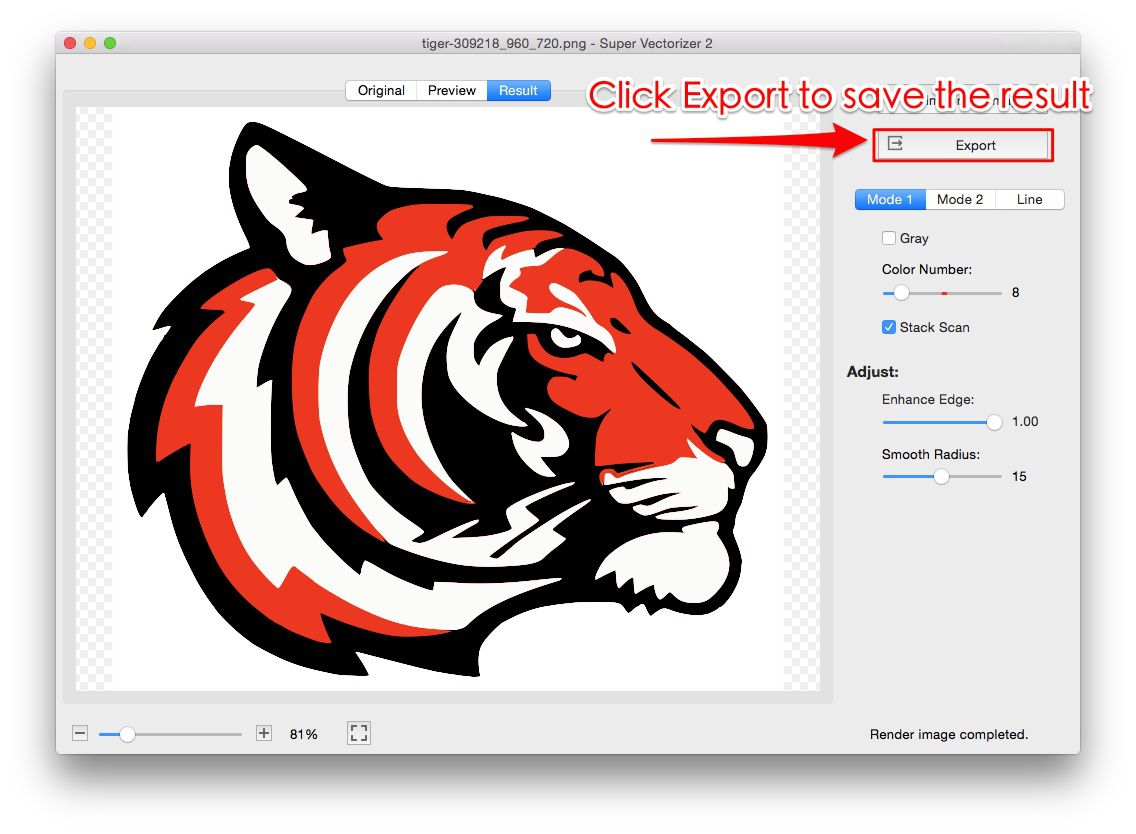
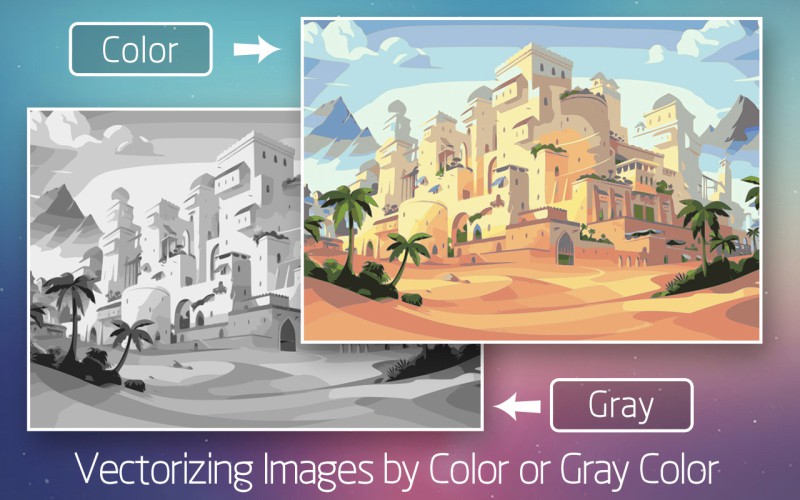
That is where Super Vectorizer Pro fits in. It is a desktop AI vectorizer that runs on macOS and Windows, processes one image at a time, and exposes controls for color count, smoothing, corner threshold, and noise removal. The exported file is standard SVG code, so you still get all the benefits of editable markup, but you get there through a visual interface rather than scripts.

PNG to SVG Code Tools Compared (2026)
| Tool | Price | Platform | Skill Level | Output | Batch Support | Best For |
|---|---|---|---|---|---|---|
| Super Vectorizer Pro | $29.99 one-time (free trial to preview) | Mac & Windows | Beginner | Editable SVG file/code Best UI | No (one at a time) | Full-color artwork, photos, offline use |
| Potrace (CLI) | Free (open source) | Mac, Windows, Linux | Intermediate | Monochrome SVG code | No (one command per image) | Simple silhouettes and logos |
| pypotrace | Free (open source) | Python | Advanced | SVG string via code | Scriptable loop | Python pipelines and automation |
| potrace (npm) | Free (open source) | Node.js / Browser | Advanced | SVG string via code | Scriptable loop | Web apps and Node scripts |
| Cloud vectorizer APIs | Paid per image / credits | REST API | Advanced | SVG code in response | No (one call per image) | Quick conversions without local setup |
The right choice depends on whether you value automation or control. Code is perfect for repeating the same operation on hundreds of similar icons. A desktop AI vectorizer is better when each image needs individual tuning and the output must be color-accurate.
Cleaning and Validating Your SVG Code
Once you have SVG markup, a few cleanup steps make it smaller and more reliable:
- Run an optimizer. Tools like our SVG Compressor Online remove redundant decimals, combine paths, and strip unused metadata.
- Check the viewBox. Make sure the coordinate system matches the original PNG dimensions so the SVG scales predictably.
- Inspect paths in a browser. Open the file directly in Chrome, Firefox, or Safari. If it renders correctly there, it will usually render everywhere.
- Remove embedded bitmaps. If the file size is close to the original PNG, the SVG may contain a base64-encoded image instead of real paths.
For production web use, an optimized SVG often loads faster and scales more crisply than the PNG it replaced. For design or crafting use, the same code imports into Cricut Design Space, Illustrator, or Inkscape.
The Bottom Line
PNG to SVG code is easy to generate for simple shapes and logos, and command-line or code-based tracers are the most efficient route for automation. For color artwork, photographs, or anything that needs visual tuning, a desktop AI vectorizer gives you cleaner SVG markup with far less scripting.
Code-Based Tracing
- Free and scriptable
- Great for icons and silhouettes
- Integrates into build pipelines
- Returns raw SVG strings
- Single-color output by default
Desktop AI Vectorizer
- Full-color tracing with one click
- Visual sliders for smoothing and detail
- Runs offline — no uploads
- Exports standard SVG code
- One-at-a-time tuning per image
Frequently Asked Questions
What does PNG to SVG code mean?
PNG to SVG code means converting a PNG bitmap into the actual SVG markup — the XML text containing path data, viewBox coordinates, and fill attributes. The result is a text file you can embed in HTML, edit in a vector editor, or manipulate with code.
Can you convert PNG to SVG with Python for free?
Yes. The most common free approach is to install Potrace and use a Python wrapper such as pypotrace together with Pillow and NumPy. You load the PNG, threshold it to black and white, and call the tracer to produce an SVG string. Color tracing requires extra steps or a different library.
Is Potrace good for PNG to SVG conversion?
Potrace is excellent for simple black-and-white silhouettes, logos, and line art. It is fast, free, and runs on the command line. It is less suited to photographs, gradients, or full-color illustrations unless you first split the image into separate color channels.
Does Super Vectorizer Pro export SVG code?
Yes — Super Vectorizer Pro exports standard SVG files, which are plain text SVG markup. You can open the exported file in any code editor, embed it in a webpage, or import it into Illustrator, Inkscape, or Cricut Design Space. The trial lets you preview results; exporting the final file requires a licence.
Which is better for PNG to SVG: code or a desktop vectorizer?
Use code when you need automation, versioning, or integration into a pipeline, and when the artwork is simple. Use a desktop AI vectorizer like Super Vectorizer Pro for complex, full-color, or detailed images where visual tuning matters more than scripting.
Does Super Vectorizer Pro support batch processing?
No — Super Vectorizer Pro processes one image at a time. It does not have a batch mode. This one-at-a-time workflow lets you adjust tracing settings per image, which usually produces cleaner SVG code than bulk processing.
Get Clean SVG Code Without Writing Scripts
Download Super Vectorizer Pro and preview full-color PNG-to-SVG conversion on your own Mac or Windows machine. Export standard SVG files you can edit, embed, or optimize.
Compatible with macOS 10.10+ (M1/M2/M3) & Windows 7/8/10/11
Related SVG Workflows
- JPG to Vector AI Free Guide
- PNG to SVG With Color Guide
- Image to Vector AI Free Without Login
- PNG to SVG AI Converter
- Online Image Vectorizer
- Best Free AI Vectorizer Tools 2026
- PNG to SVG AI Reddit Community Guide
- Convert Pixel Art to SVG: Keep the Crisp, Scalable Grid
- SVG Animation Tutorial: How to Animate SVG Graphics Like a Pro
- Super Vectorizer Pro vs Adobe Illustrator 2026
- PNG to SVG Online