
Reddit's design and crafting communities keep returning to one question: what is the best way to convert a PNG to SVG with AI? The PNG to SVG AI reddit consensus in 2026 is surprisingly consistent. Most free online "converters" do not trace vector paths at all; they embed the original raster image inside an SVG wrapper, which looks fine on screen but is useless for cutting, engraving, or scaling. Redditors who need real vector output recommend desktop AI vectorizers that trace on-device, and Super Vectorizer Pro is one of the most frequently mentioned offline alternatives for Mac and Windows. It uses AI-powered tracing to turn PNG, JPG, and BMP files into editable SVG paths, processes one image at a time, and offers a free trial to preview the result before you commit.
Ready to convert your images? Try Super Vectorizer Pro free trial to preview vectorization results.
Compatible with macOS 10.10+ (M1/M2/M3) & Windows 7/8/10/11
What Reddit Says About PNG to SVG AI Conversion
The PNG to SVG AI reddit conversation spans several subreddits, each with its own angle. In r/vector and r/design, users debate image quality, node count, and whether AI tracing has finally caught up with manual Bezier work. In r/cricut and the Cricut-focused communities, the focus is relentlessly practical: will the SVG actually cut cleanly on a machine, or will jagged paths shred a sheet of vinyl? In r/Inkscape, the discussion centers on how the free open-source editor's Trace Bitmap feature compares to dedicated AI vectorizers. And in r/webdev, developers want SVGs that are small, clean, and web-optimized, not bloated files full of redundant nodes.
Across all of these communities, three themes repeat throughout 2026:
- AI tracing has improved dramatically. Modern AI models produce smoother curves and fewer nodes than the old Potrace-based auto-tracers that powered earlier generations of free tools.
- The raster-in-SVG trick is the most common complaint. Many browser-based converters finish in under a second because they simply wrap the PNG in an image tag inside an SVG container. No tracing happens at all.
- Offline desktop tools win for serious work. Privacy, no file-size limits, no credit systems, and no login walls make desktop vectorizers the go-to recommendation for anyone doing production work.
The #1 Reddit Warning: Fake SVG Converters
If there is one piece of advice that echoes across every PNG to SVG AI reddit thread, it is this: not every tool that calls itself an "SVG converter" actually traces vectors. The giveaway is speed. A real AI vectorizer takes a few seconds to analyze color regions, trace boundaries, and generate paths. A fake converter finishes instantly because it simply embeds your PNG inside an SVG file using a base64-encoded image tag.
<image or base64. If you find either, the tool embedded a raster, not a vector. In Cricut Design Space, a fake SVG appears as a Print layer rather than a Cut layer, which is a dead giveaway that no paths were ever traced.This matters most for crafters. A Cricut or laser cutter reads vector paths to drive its blade or beam. An SVG that contains an embedded raster image has no paths to follow, so the machine either refuses to cut or produces a single rectangular outline. Reddit users who lost premium vinyl or specialty cardstock to this trick are the loudest voices warning others away from instant online converters.
Tools Reddit Recommends for PNG to SVG AI (2026)
The tools below come up most often in PNG to SVG AI reddit recommendations. Each genuinely traces vector paths rather than embedding rasters, though they differ sharply in price, platform, and ease of use.
| Tool | Price | Platform | Offline | Batch | Best For |
|---|---|---|---|---|---|
| Super Vectorizer Pro | $29.99 one-time | Mac & Windows | Yes | No (one at a time) | Offline AI tracing with color control |
| Inkscape | Free (open source) | Mac, Windows, Linux | Yes | No | Zero-budget manual tracing |
| Adobe Illustrator | $22.99/mo | Mac & Windows | Yes | Possible, awkward | Pro Image Trace with path editing |
| Vectorizer.AI | Free credits, then paid | Web | No | No | Quick online AI traces |
| Vector Magic | $9.95/mo | Web & Desktop | Desktop only | No | Precise color separation |
Reddit users who want a one-time purchase without subscriptions or credit systems consistently point to Super Vectorizer Pro. It traces on-device, so there is no upload wait, no file-size limit, and no privacy concern about sending images to a cloud server. The trade-off is that it processes one image at a time, which most Redditors consider an acceptable limitation given that color-count and smoothing settings differ from image to image.
Reddit's Top PNG to SVG AI Tips
Beyond tool recommendations, the PNG to SVG AI reddit community shares a set of workflow tips that apply regardless of which converter you choose.
- Start with a high-resolution source. A PNG of at least 500 pixels on the longest side gives the tracer enough data to produce smooth curves. Tiny or heavily compressed sources guarantee jagged output.
- Start with a low color count. A four-color trace of a six-color illustration usually still reads correctly and saves two sheets of vinyl plus two alignment steps. Raise the count by one only if a specific detail collapses.
- Clean up stray nodes. After tracing, zoom to 300% and inspect for stray anchor points, broken paths, and tiny disconnected shapes. These cause slow cutting and vibration on a machine.
- Verify before you cut. Before sending to a Cricut or laser, confirm the linetype says Cut, not Print. Those 30 seconds can save a sheet of premium material.
- Avoid converting photographs. SVG is ideal for logos, icons, and line art. Tracing a photograph creates thousands of paths, massive file sizes, and unpredictable rendering. Stick to graphics with solid colors.
How to Vectorize a PNG to SVG Offline (Reddit-Approved Workflow)
For users who want to follow the most recommended PNG to SVG AI reddit workflow without uploading images to a cloud server, here is the step-by-step process using Super Vectorizer Pro.
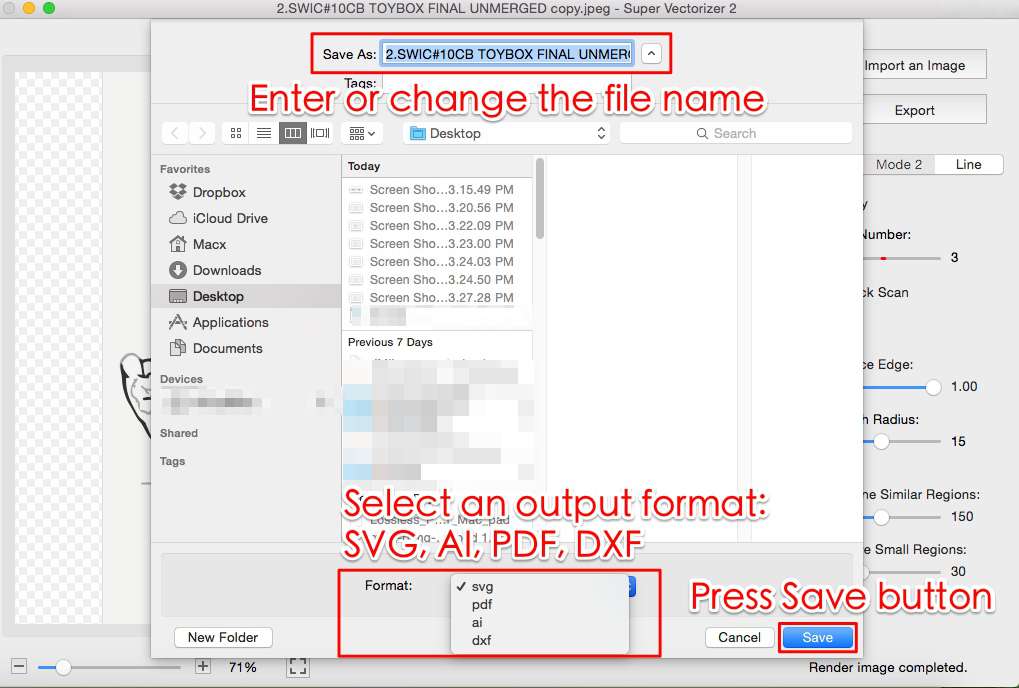
- Load your PNG image. Open Super Vectorizer Pro and drag your high-resolution PNG onto the canvas. The application accepts PNG, JPG, and BMP files and processes one image at a time.
- Choose a tracing mode. Select Line Art for single-color logos and line drawings, or Color for multi-color illustrations and designs with distinct color regions. The mode determines how the AI model analyzes the image.
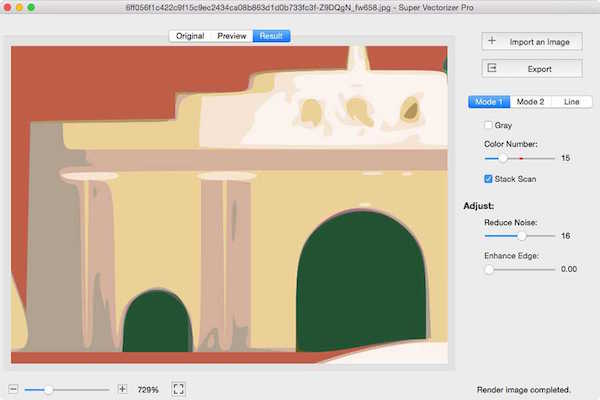
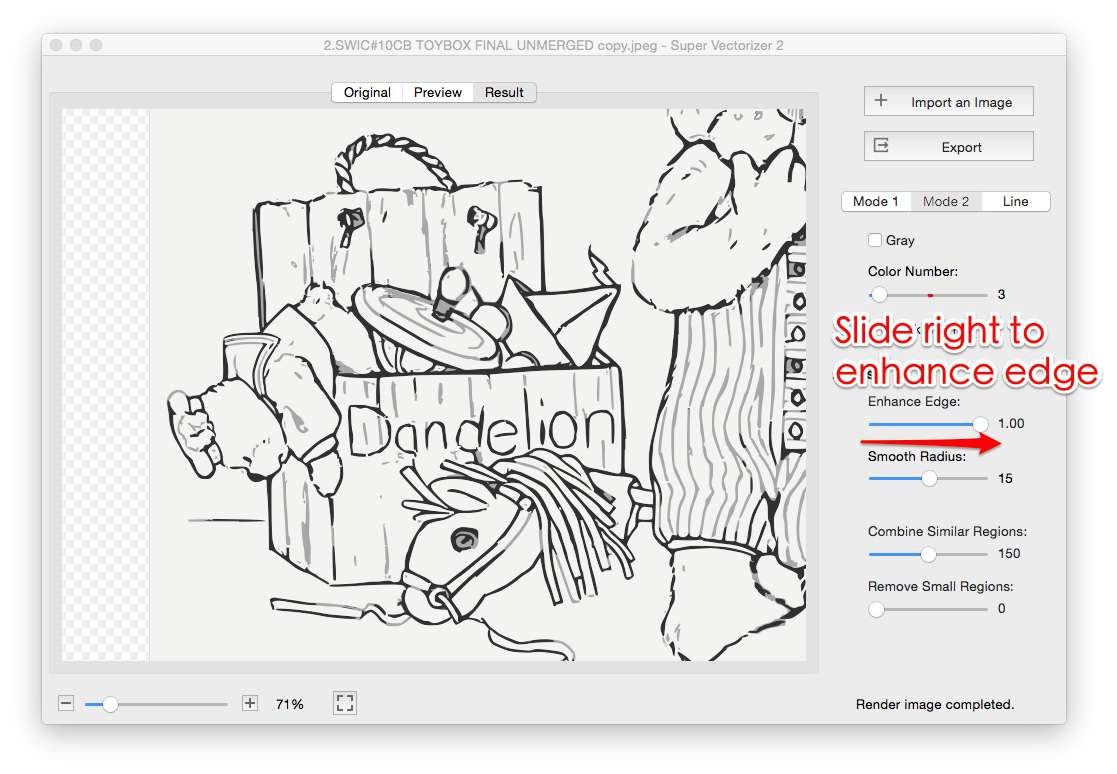
- Adjust color count and smoothing. Start with a low color count and increase only if the design loses detail. Raise the smoothing slider to replace pixel stair-steps with curves, and lower the corner threshold for geometric logos that need sharp angles preserved.
- Preview the traced result. Use the free trial to preview the vector output on screen before exporting. Check for stray nodes, broken paths, and jagged edges that need further adjustment. The trial is preview-only, so you can experiment with settings before committing.
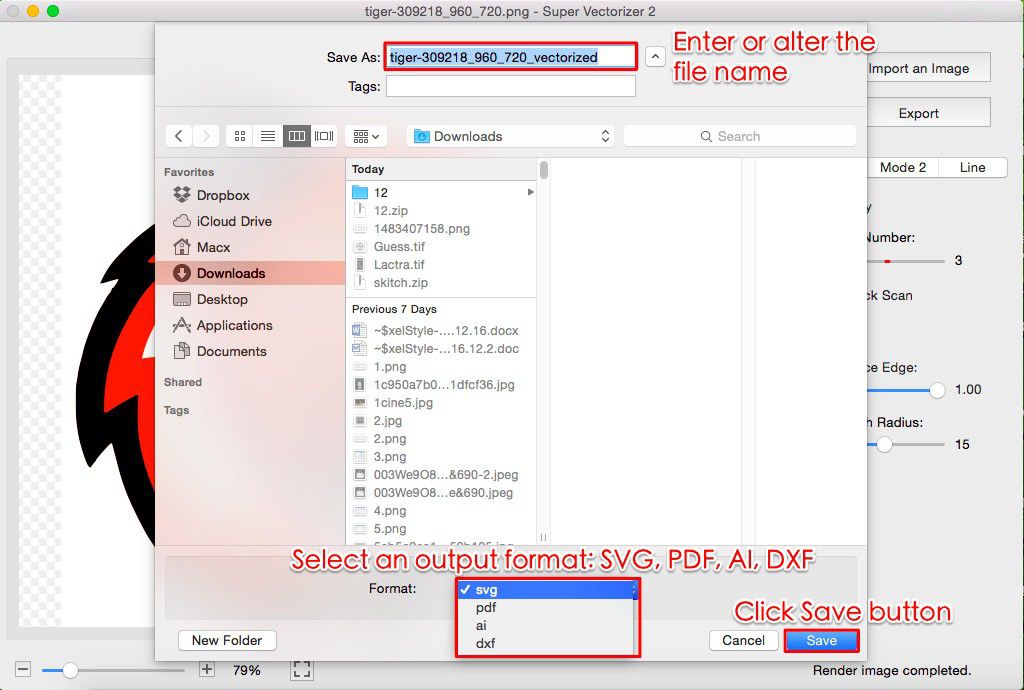
- Export the SVG file. Once the preview looks clean, export the SVG. The file contains real vector paths, not an embedded raster, so it will scale, cut, and edit correctly in any vector application.
Common Reddit Complaints About Free Online Converters
The PNG to SVG AI reddit community has compiled a familiar list of grievances about free browser-based converters. If you have spent time in these threads, you will recognize them instantly.
- Raster embedding instead of tracing. The single most common complaint. The converter finishes instantly and produces an SVG that is just a wrapped PNG.
- Watermarks on output. Some free tools stamp a logo or brand mark onto the exported SVG, rendering it useless for professional work or client deliverables.
- Login and email walls. Many converters require an account before you can download, which means handing over an email address for a single conversion.
- File-size and credit limits. Cloud-based tools cap upload size and restrict the number of conversions per day. Desktop tools have no such limits.
- Bloated file sizes. Even when real tracing occurs, poorly optimized tracers produce SVGs with excessive nodes, making files 10 to 50 times larger than necessary and slowing down web pages and cutting machines.
- Privacy concerns. Uploading client logos or proprietary artwork to a third-party server is a non-starter for many professionals. Reddit's privacy-conscious users strongly prefer offline tracing.
Which Subreddits Discuss PNG to SVG AI?
If you want to follow the PNG to SVG AI reddit conversation directly, these are the most active and relevant communities.
- r/vector — General vector graphics discussion. Users debate tracing quality, node optimization, and AI versus manual Bezier work.
- r/cricut — Cutting-machine crafters. The focus is on whether SVGs will cut cleanly, with practical advice on color layers and node cleanup.
- r/Inkscape — Open-source vector editor community. Threads compare Inkscape's free Trace Bitmap feature to paid AI vectorizers.
- r/webdev — Web developers who want small, clean, web-optimized SVGs for icons, logos, and UI graphics.
- r/AdobeIllustrator — Professional designers discussing Image Trace presets and post-trace path editing.
- r/design — Broader design community where logo vectorization and format conversion come up regularly.
The Bottom Line for 2026
The PNG to SVG AI reddit community has reached a clear verdict by 2026. If you need real vector output for cutting, engraving, printing, or scaling, avoid instant online converters that embed rasters inside SVG wrappers. Use a tool that genuinely traces paths. For Redditors who want a one-time purchase, offline privacy, and AI-powered tracing on Mac or Windows, Super Vectorizer Pro is the most recommended desktop alternative. It processes one image at a time, lets you preview the result with a free trial, and exports clean SVGs with real vector paths that scale and cut without compromise.
Start Tracing PNG to SVG Offline Today
Download Super Vectorizer Pro and use the free trial to preview your vectorization results before buying.
Compatible with macOS 10.10+ (M1/M2/M3) & Windows 7/8/10/11
Frequently Asked Questions
What does Reddit recommend for PNG to SVG AI conversion?
Reddit communities such as r/vector, r/cricut, and r/Inkscape most often recommend desktop AI vectorizers over free online converters, because many browser-based tools embed the raster image inside an SVG wrapper instead of tracing real vector paths. Super Vectorizer Pro, Inkscape, and Adobe Illustrator are the tools Redditors mention most frequently for genuine path-based output.
Why do Redditors warn against free online PNG to SVG converters?
Many free online converters finish in under a second because they simply wrap the original PNG inside an SVG file using an image tag or base64 encoding. The result looks fine on screen but cannot be cut, engraved, or scaled. Redditors call this the raster-in-SVG trick and recommend testing output by opening the SVG in a text editor and searching for the word image or base64.
Does Super Vectorizer Pro support batch PNG to SVG conversion?
No. Super Vectorizer Pro processes one image at a time. Each conversion benefits from individual color-count, smoothing, and corner-threshold adjustments, so a one-at-a-time workflow generally produces cleaner vectors than bulk processing followed by manual cleanup.
Is the Super Vectorizer Pro trial free?
Yes. Super Vectorizer Pro offers a free trial to preview vectorization results on screen. The trial lets you load a PNG, adjust tracing settings, and see the vector output before purchasing a license.
Which subreddits discuss PNG to SVG AI conversion?
The most active subreddits for PNG to SVG AI discussions are r/vector, r/cricut, r/Inkscape, r/webdev, r/AdobeIllustrator, and r/design. Each community brings a different perspective, from cutting-machine practicality to web optimization and professional design workflows.
What is the best free alternative to paid PNG to SVG AI tools according to Reddit?
Inkscape is the most recommended free option on Reddit. Its Trace Bitmap feature can produce real vector paths, though it requires manual threshold tuning and node cleanup. For users who want AI-powered automatic tracing with less manual effort, Super Vectorizer Pro offers a free trial to preview results before buying.