
The Recraft AI image vectorizer is a cloud tool that converts an uploaded raster image into an editable SVG, and each vector output is metered at two credits on a subscription plan. It is the right choice if you already generate assets inside Recraft and want vectorization in the same browser tab. If your actual job is turning existing PNG, JPG or BMP files into clean SVG, PDF, EPS, DXF or AI output — offline, without a monthly credit budget — Super Vectorizer Pro is the stronger alternative, at a one-time $39.99 for a lifetime single-platform license that runs locally on macOS and Windows.
This page explains what the Recraft AI image vectorizer does well, where its cloud-and-credits model gets expensive or awkward, and how it compares against the other tools people shortlist in 2026: Vectorizer.AI, Adobe Illustrator, Inkscape and Super Vectorizer Pro. If you want the wider free-tool landscape first, our roundup of the best free AI vectorizer tools in 2026 covers eight options side by side.

Want to test offline vectorization on your own artwork? Try the Super Vectorizer Pro free trial to preview results before you buy.
Compatible with macOS 10.10+ (M1/M2/M3) & Windows 7/8/10/11
The Short Verdict
Both tools produce SVG files, but they solve different halves of the problem. Recraft is a generative design platform that can also vectorize. Super Vectorizer Pro is a dedicated converter for artwork that already exists.
Super Vectorizer Pro Advantages
- One-time license from $39.99 — no monthly credits
- Runs offline on macOS 10.10+ (M1/M2/M3) and Windows 7–11
- Five modes: color, grayscale, black and white, line, skeletonization
- Live sliders for color count, smoothing, noise and corners
- Exports SVG, PDF, EPS, DXF and AI
- Files never leave your computer
Recraft AI Advantages
- Generates brand-new vector artwork from a text prompt
- Reusable custom styles keep an asset set visually consistent
- Strong in-image text rendering compared with most generators
- Nothing to install — works from any browser
- Developer API with batch jobs for engineering teams
- Free tier available for evaluating output quality
What Is the Recraft AI Image Vectorizer?
Recraft is best known as a generative design tool: you describe an icon, logo or illustration, and it returns editable vector output rather than a flat bitmap. That native SVG generation is its genuine differentiator against prompt-to-picture tools that only produce raster images. Alongside generation, Recraft offers a vectorize step that takes a file you already own and traces it into vector paths in the browser.
So the phrase "Recraft AI image vectorizer" actually covers two different jobs:
- Generating vectors from a prompt. No source image involved — the model draws the artwork and emits SVG geometry. This is what Recraft is genuinely best at.
- Vectorizing an uploaded bitmap. You supply a PNG, JPG or similar file, and the service converts it into vector paths. This is the same category of task handled by Vectorizer.AI, Illustrator's Image Trace, Inkscape's Trace Bitmap and desktop tools like Super Vectorizer Pro.
The distinction matters because the two workflows have very different quality expectations. Generation is judged on aesthetics; vectorization is judged on fidelity — did the traced curves follow the original edges, did small text stay legible, did flat color regions stay flat instead of fragmenting into hundreds of near-identical shapes?

Recraft AI Image Vectorizer Pricing in 2026
Recraft moved to credit-based subscriptions, and the conversion rate is published clearly: one credit buys one raster image, and two credits buy one vector or SVG output. Vectorization therefore costs double what raster generation costs. Here is how the plans looked when this page was written in August 2026.
| Plan | Price (billed annually) | Monthly credits | Approx. vector outputs | Notes |
|---|---|---|---|---|
| Free | $0 | Small daily allowance | Handful per day | Outputs are public and not licensed for commercial use |
| Basic | ~$10/mo (~$12 monthly billing) | 1,000 | ~500 | Commercial rights, private generations |
| Pro | From ~$16/mo | 2,000–16,000 (tiered) | ~1,000–8,000 | Adds video generation and higher parallelism |
| Teams | From ~$18/seat/mo | 2,000+ per seat | ~1,000+ per seat | Shared styles, SSO, centralized billing |
Compare that against a one-time purchase. A lifetime Super Vectorizer Pro license for a single platform is $39.99, and the universal license covering one Mac plus one Windows PC is $49.99. Even the cheapest Recraft paid tier passes $39.99 in roughly four months of annual billing, and keeps charging after that. Full pricing is on the Super Vectorizer Pro pricing page.
Where the Recraft AI Image Vectorizer Falls Short
None of this makes Recraft a bad product — it makes it a product built for a different primary use case. Four limitations show up repeatedly when people use it purely as an image vectorizer.
1. Every file is uploaded before it is processed
Cloud vectorization means your artwork leaves your machine. For a personal doodle that is irrelevant. For an unreleased client logo, a signed NDA, a medical diagram or internal engineering artwork, it is a real consideration — and often the deciding one. A local desktop app removes the question entirely because the raster-to-vector conversion happens on your own CPU.
2. Credits make per-image cost unpredictable
Tracing is iterative. You rarely get the right result on attempt one; you nudge the settings, re-run, compare. In a credit system each re-run costs money, which quietly pushes you toward accepting the first passable output instead of the best one. With a licensed desktop app, iteration is free — you can drag a slider fifty times without thinking about the meter.
3. Limited low-level tracing control
Recraft's vectorize step is intentionally simple. Dedicated vectorizers expose the knobs that determine output quality: how many colors to quantize to, how aggressively to smooth curves, what counts as noise, where a corner becomes a corner. Those controls are what let you take a scanned logo from "roughly right" to "production ready". Our guide to high-quality PNG to SVG conversion walks through which setting fixes which artifact.
4. It needs an internet connection
Recraft is browser-based, so no connection means no vectorization. If you work on a train, on site, on a locked-down network or simply through an outage, an offline tool keeps working.

Recraft AI Image Vectorizer vs Super Vectorizer Pro and the Wider Market (2026)
Here is how the main raster-to-vector options compare on the criteria that actually decide the purchase. Note that Super Vectorizer Pro processes one image at a time — it has no batch mode, and that is worth knowing up front if unattended bulk conversion is your requirement.
| Tool | Price (2026) | Platform | Offline / Online | Batch support | Output control | Best for |
|---|---|---|---|---|---|---|
| Super Vectorizer ProBest offline | $39.99 one-time (single platform); $49.99 universal | macOS 10.10+ (M1/M2/M3), Windows 7–11 | Fully offline | No (one at a time) | 5 modes + live sliders for color, smoothing, noise, corners | Converting existing raster art into production SVG, PDF, EPS, DXF, AI |
| Recraft AI | Free tier (public, non-commercial); Basic ~$10/mo; Pro from ~$16/mo | Browser | Online only | API batch jobs; one at a time in the web UI | Prompt-driven, limited manual trace settings | Generating new vector icons and illustrations in a consistent style |
| Vectorizer.AI | Subscription / credit packs | Browser | Online only | Yes, on paid tiers | Automatic with some post-trace tuning | Fast one-off cloud tracing of clean logos |
| Adobe Illustrator | ~$22.99/mo single app | macOS, Windows | Desktop (account check) | Yes, via actions and scripting | Image Trace panel presets plus full path editing | Designers already inside Creative Cloud |
| Inkscape | Free (open source) | macOS, Windows, Linux | Fully offline | Command-line only | Trace Bitmap dialog, multi-scan modes | Zero-budget vectorization with a steeper learning curve |
If you want deeper head-to-head detail on any of those, we have dedicated comparisons: vs Vectorizer.AI, vs Adobe Illustrator, vs Inkscape and vs Canva.
The Best Offline Recraft Alternative for Mac and Windows
Super Vectorizer Pro is a desktop application for macOS and Windows that converts raster images such as PNG, JPG and BMP into editable SVG vector files using AI-powered tracing. It processes one image at a time and offers a free trial to preview results. It supports 70+ formats on the import and export side, which covers most of what a design or fabrication workflow throws at it.
Five vectorization modes cover the realistic range of source material:
- Color — flat logos, badges, stickers and illustrations where you want distinct color regions preserved as separate paths.
- Grayscale — photographs and shaded artwork where tonal steps matter more than hue.
- Black and white — scanned signatures, stamps and stencils that need to become a single clean silhouette.
- Line — inked drawings and technical diagrams where strokes should stay strokes, not become filled blobs.
- Skeletonization — single-stroke centerline output for plotters, engravers and CNC toolpaths.
The sliders are where the quality actually comes from. Color count controls how many distinct fills the tracer is allowed to produce, which directly determines SVG file size. Curve smoothing removes the stair-stepping that raster edges leave behind. Noise removal discards specks below a size threshold, which is essential for scans and JPEG-compressed sources. Corner threshold decides whether a sharp junction is preserved as a corner or rounded into a curve.
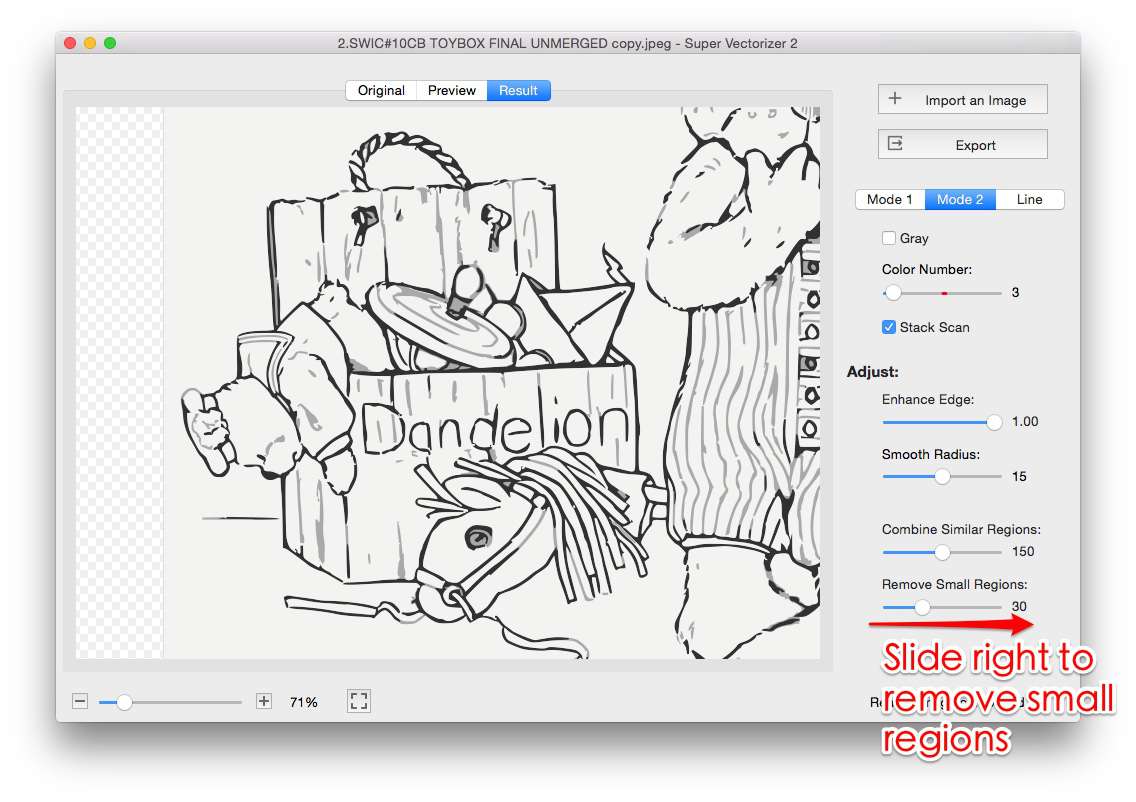
Because everything runs locally, the loop is fast: change a value, watch the preview update, change it again. There is no upload wait, no queue and no credit deducted for the attempt. The trade-off, stated plainly, is that the app has no batch queue — it is a one-at-a-time workflow. If you need to convert a folder of 400 files overnight, look at Inkscape's command line or a cloud service with a batch API instead.
How to Vectorize an Image Offline in 2026
The offline equivalent of the Recraft AI image vectorizer workflow takes about four minutes per image once you know the controls.
- Open the raster image. Drag a PNG, JPG, BMP, GIF or TIFF into the window. Start with the file that matters most, since the app works on one image at a time.
- Pick a vectorization mode. Color for logos and flat illustrations, line for inked drawings, skeletonization for single-stroke plotter and cutter output.
- Tune the tracing controls. Adjust color count, curve smoothing, noise removal and corner threshold while watching the live preview. Fewer colors mean a smaller SVG; more smoothing removes stair-stepped curves.
- Compare against the bitmap. Toggle between the original raster and the traced result. Check small text, thin strokes and tight corners — these fail first.
- Export the vector. Save as SVG, PDF, EPS, DXF or AI. Exporting requires a license; the free trial is limited to previewing the vectorization result on screen.
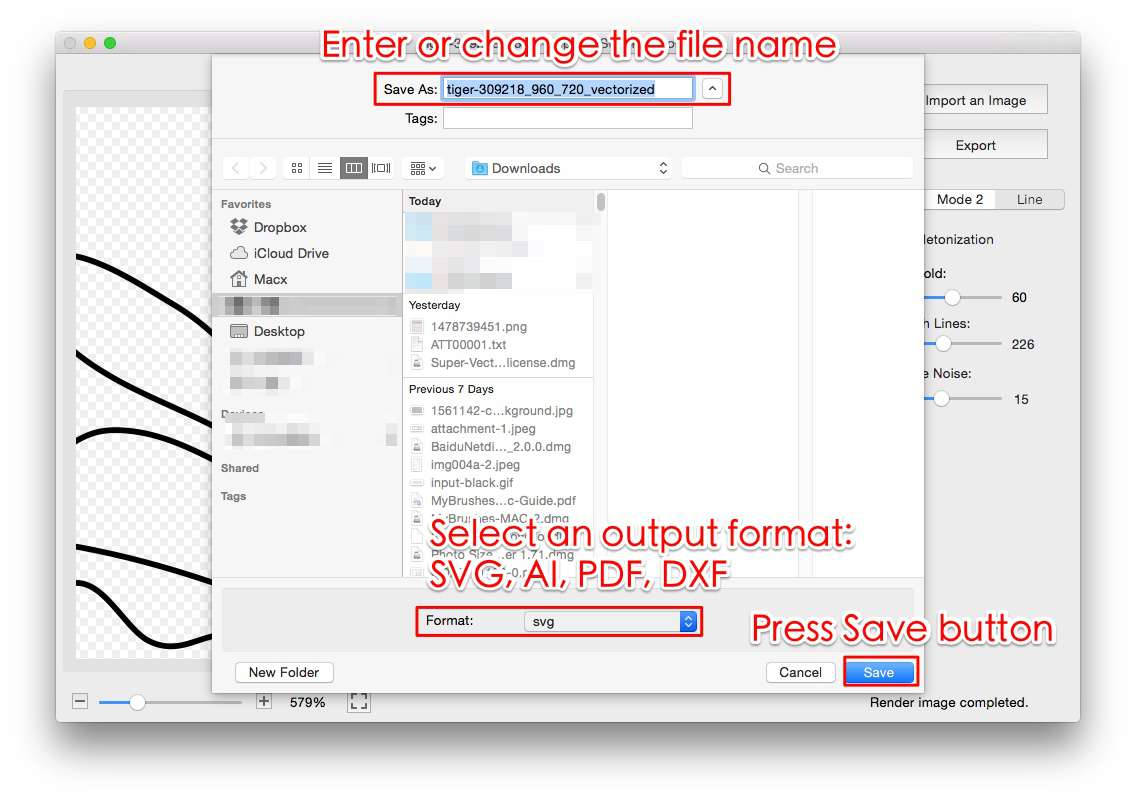
If you would rather test the idea in a browser before installing anything, our online image vectorizer and PNG to SVG AI converter pages let you trial the concept, and the PNG to SVG code guide explains what the resulting path markup actually contains.
When Recraft Is Still the Right Choice
Be honest about which problem you have. Recraft wins clearly in three situations:
- You need artwork that does not exist yet. No tracer can invent an icon set from nothing. A generative vector model can, and Recraft's output is genuinely editable rather than a bitmap pretending to be vector.
- You need a consistent style across many assets. Saved custom styles and brand palettes are a first-class feature, which matters when you are producing a coherent icon family rather than one graphic.
- You are building a pipeline. The developer API with batch jobs, background removal and inpainting is a real production interface, not an afterthought. A desktop app cannot serve requests from your backend.
Where Recraft is the weaker fit is the plain, common task: I have this PNG, I need a clean SVG, I do not want to upload it, and I do not want a subscription. For a broader look at prompt-based vector generation, see our guide to free AI SVG generators.
Which Should You Choose in 2026?
- Converting existing logos, scans or illustrations, privately, with a one-time cost → Super Vectorizer Pro.
- Generating new vector icons and illustrations from prompts → Recraft AI.
- Occasional single conversions, nothing to install → a browser tracer such as Vectorizer.AI, or our free online tools.
- Already paying for Creative Cloud → Illustrator's Image Trace is already on your machine.
- Zero budget and patience for a learning curve → Inkscape.
- Unattended bulk conversion → a cloud batch API or Inkscape's command line, not a one-at-a-time desktop app.
Most people asking about the Recraft AI image vectorizer arrive with a file already in hand. If that describes you, the offline route is cheaper over any reasonable timeframe, faster to iterate with, and keeps your artwork on your own machine. You can also read our take on the closest cloud competitor on the Vectorizer.AI alternative page.
Frequently Asked Questions
What is the Recraft AI image vectorizer?
The Recraft AI image vectorizer is a cloud feature inside Recraft that turns an uploaded raster image, such as a PNG or JPG, into an editable SVG. It sits alongside Recraft's generative tools, so the same workspace can both create new vector artwork from a text prompt and convert existing bitmaps into vector paths. Because it runs on Recraft's servers, your image is uploaded before it is processed, and the output is metered in credits rather than being tied to a one-time purchase.
Is the Recraft AI image vectorizer free?
There is a free tier with a daily credit allowance, but at the time of writing (August 2026) free-plan outputs are public and are not licensed for commercial use. That makes the free tier suitable for testing whether the vector quality clears your bar, not for client or product work. Commercial rights and private generations start on the Basic plan, listed at about $10 per month when billed annually. Always confirm the current terms on Recraft's own pricing page before you rely on them.
How many credits does a vector image cost in Recraft?
Recraft's published conversion is one credit for a raster image and two credits for a vector or SVG output, with larger operations such as creative upscaling costing considerably more. On a 1,000-credit Basic plan that works out to roughly 500 vector outputs per month if you spend nothing else. Subscription credits do not roll over at the end of a billing cycle, although separately purchased top-up credits do not expire.
Can the Recraft AI image vectorizer batch process images?
In the browser interface you work through images individually. Recraft does expose batch jobs through its developer API, so teams with engineering resources can queue conversions programmatically and pay per credit. If you are looking for a desktop app that queues folders of files, neither Recraft's web UI nor Super Vectorizer Pro is that tool — Super Vectorizer Pro processes one image at a time.
What is the best offline alternative to the Recraft AI image vectorizer?
For converting existing raster files into vectors without uploading anything, Super Vectorizer Pro is the closest desktop equivalent. It runs entirely on your own Mac or Windows PC, costs a one-time $39.99 for a single-platform lifetime license, and gives you five tracing modes plus live sliders for color count, curve smoothing, noise removal and corner threshold. Inkscape is the free open-source option if budget matters more than tracing controls.
Does Super Vectorizer Pro support batch conversion?
No. Super Vectorizer Pro processes one image at a time. You open a file, tune the tracing settings against the live preview, export the vector, then move on to the next image. That one-at-a-time workflow is deliberate — it keeps the settings tied to the artwork in front of you — but it does mean the app is not the right choice if your job is converting hundreds of files unattended.
Does the Recraft AI image vectorizer work offline?
No. Recraft is a browser-based platform, so both generation and vectorization require an internet connection and an active account with available credits. Super Vectorizer Pro works the other way around: after installation it runs locally on macOS 10.10 or later, including Apple Silicon Macs, and on Windows 7 through 11, with no upload step and no per-image metering.
The Bottom Line for 2026
The Recraft AI image vectorizer is a capable feature attached to an excellent generative vector platform. If prompt-to-SVG is the reason you are there, it earns its subscription. But judged purely as an image vectorizer — the thing you reach for when a client sends a low-resolution logo and asks for a scalable file — it carries three costs a desktop tool does not: your artwork is uploaded, every iteration is metered, and the deep tracing controls that fix real artifacts are not exposed. For that specific job, a one-time offline license is the more economical and more private answer, and it keeps working when the network does not.
Vectorize images offline on Mac and Windows
Five tracing modes, live previews and export to SVG, PDF, EPS, DXF and AI. Try the free trial to preview vectorization results on your own files.
Compatible with macOS 10.10+ (M1/M2/M3) & Windows 7/8/10/11
Try These Free Online Tools
No download required — convert, compress & optimize SVGs right in your browser
PNG to SVG Converter
Convert PNG, JPG, BMP images to scalable vector graphics instantly
PNG to SVG ConverterSVG Compressor (Mini)
Reduce SVG file size by up to 80% without losing quality
SVG Compressor OnlineOnline Image Vectorizer
Auto-trace bitmaps into vector paths straight from your browser
Online Image VectorizerJPG to SVG Converter
Turn JPEG photos into crisp vector artwork in seconds
JPG to SVG ConverterEPS to SVG Converter
Convert EPS vector files to web-friendly SVG format
EPS to SVG ConverterAll Free Tools
Browse our complete collection of free online conversion tools
Browse All Free Tools