
Figma SVG Outline Text: What Changes When Type Becomes Paths
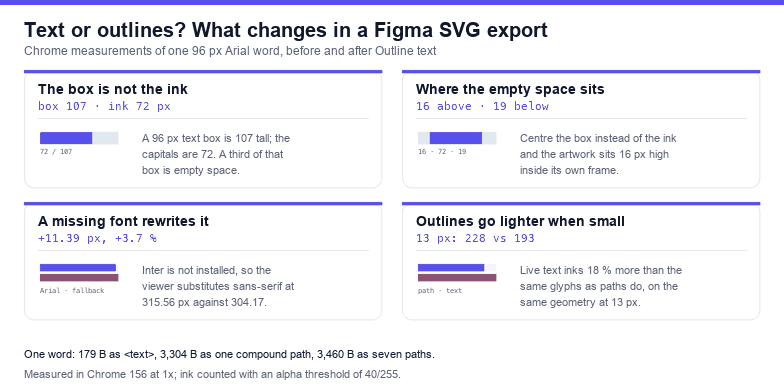
Figma's Outline text command replaces a live <text> element with path data per glyph. It solves the font problem outright and creates four new ones: the artwork changes size, the weight changes at small sizes, the file grows by an order of magnitude, and the word stops being a word. Measured on one 96 px Arial word, the layer box shrinks from 304.17 × 10⁷ to 295.55 × 71.11, the markup grows from 179 bytes to 3,304, and at 13 px the outline inks 18 % fewer pixels than the text it replaced.
Every figure below comes from rasterising the same fixture in Chrome 156 at 1× — a real Arial outline extracted with fontTools, positioned so it overlays a <text x="20" y="120" font-size="96"> exactly — then reading the pixels back with getImageData. Nothing here is estimated from a font's published metrics.
What the command actually does
Select a text layer, right-click, Outline text. Figma keeps the frame, drops every typographic attribute, and writes the glyph contours as paths. For the word "Outline" that is seven glyphs and, in this outline, ten subpaths — the letters with counters and stems carry more than one contour each — which is roughly 3,183 characters of path data in one d attribute.
The practical consequence is that the file no longer contains a string. It contains a drawing of a string. Text nodes measured in the exported file: zero. Selectable characters: zero. Everything that made it type — family, weight, tracking, alignment, language, the ability to fix a typo — is gone, and in exchange you get geometry that renders identically on every machine on earth.
That trade is worth making about half the time. The rest of this article is the measured account of what you are trading, so you can tell which half you are in.
The text box is not the ink box
This is the one that breaks layouts. A <text> element reports a bounding box built from the font's ascent and descent, not from the letters you typed, so a 96 px box is 107 units tall no matter what it says. The ink inside it is whatever the glyphs happen to cover:
| Word at 96 px | Box (w × h) | Ink (w × h) | Empty above | Empty below |
|---|---|---|---|---|
Outline | 304.17 × 10⁷ | 297 × 72 | 16 px | 19 px |
OUTLINE | 416.06 × 10⁷ | 407 × 72 | 16 px | 19 px |
AV | 121.08 × 10⁷ | 122 × 70 | 17 px | 20 px |
gy | 101.39 × 107.2 | 99 × 73 | 35 px | −0.8 px |
Typography | 501.66 × 107.2 | 499 × 91 | 17 px | −0.8 px |
Two numbers matter. First, capitals fill only 67 % of the box height (72 of 107), so a third of the space a designer sees around the word is not artwork. Second, the empty band is not symmetric and not constant: a word with no descenders leaves 19 px below the baseline, a word with a descender overflows the box by 0.8 px, and a word made of descenders and x-height letters — gy — starts 35 px down.
That is why replacing a text layer with an outlined version moves things. If you take the text frame, outline it, and then centre the new path group in the frame, the ink is not centred: for Outline it sits 16 px above the visual middle, because the box reserved 19 px of descent that the letters never use. Measured on a 340 × 140 frame the ink covers 44 % of the frame area — a logo that looked comfortably sized on the canvas reads small in the export.
A missing font rewrites the line for every viewer
A live <text> does not carry its font. It carries a name, and the viewer resolves that name against whatever is installed. When the name is not there, the browser substitutes, and the substitution is not neutral:
font-family | Measured width | Box height | What happened |
|---|---|---|---|
Arial | 304.17 | 107 | installed, used |
Inter | 315.56 | 135 | not installed, substituted |
Figma Sans | 315.56 | 135 | not installed, same substitute |
Roboto | 315.56 | 135 | not installed, same substitute |
Inter, Arial | 304.17 | 107 | fallback list works |
Three different missing names produced one result — 315.56 wide, 135 tall, which matches the generic sans-serif default — so you cannot reason about the substitute, only about the fallback list you wrote. Inter is Figma's default UI font on most platforms and is not installed on most machines, which means the file you exported from Figma looks 11.39 px wider (3.7 %) on your site than it did on the canvas, and 28 units taller. In a 300 px button that is the difference between one line and two.
Outlining removes this entirely: a path has no font to look up. It also removes the ability to fall back gracefully, which is why the same property is a bug in one context and the whole point in another.
Outlines render lighter, and lighter still when small
Draw the same glyphs twice — once as live text, once as paths on the same baseline — and the text version is heavier at every size. Chrome's text engine applies hinting and stem darkening to the rasterised run; a path is simply filled.
| Size | Ink as <text> | Ink as <path> | Difference |
|---|---|---|---|
| 96 px | 7,769 px | 7,358 px | +5.6 % |
| 48 px | 2,223 px | 1,957 px | +13.6 % |
| 13 px | 228 px | 193 px | +18.1 % |
The gap grows as the type gets smaller, which is the opposite of what most people expect: at 96 px the two are visually identical (1,993 pixels of the 80,000 in the frame differ, all on antialiased edges), while at 13 px all 193 of the outline's pixels differ from the text version. A 13 px label that looked correct in Figma looks thin and slightly grey in the product, and no amount of checking the path data explains it.
Two fixes, both cheap: give the outlined label a hairline stroke in the same colour (stroke-width="0.4" paint-order="stroke" puts the weight back without thickening edges visibly), or move up one weight before outlining and measure the result at the size it will actually ship. Do not eyeball it on a retina canvas at 200 % zoom.
The file gets eighteen times bigger
Measured on the same word, with everything else identical:
<text>element: 179 bytes- outline as one compound path: 3,304 bytes
- outline as seven separate paths: 3,460 bytes
For a logo that is irrelevant. For a UI kit with forty labels it is a real number — roughly 130 KB of path data replacing 7 KB of text, before compression — and it is the reason outline-happy icon sets feel slow on first paint.
What you lose, precisely
- Search and selection. Measured: zero text nodes, zero selectable characters. A user cannot copy the word, a crawler cannot read it, a screen reader announces nothing unless you add
role="img"and a<title>. - Edits. Changing the copy in live text moved the same fixture from 304.17 to 357.56 units wide — 53.39 units of reflow for one extra letter. In an outline, the same edit means re-exporting from Figma, which means the person who owns the CMS cannot do it.
- Translation. "Save" becomes "Enregistrer" and needs 40 % more width. An outline cannot reflow, so every locale becomes its own export.
- Partial targeting. You cannot colour one word of an outlined sentence with CSS, or animate a single letter, because there are no letters left.
When outlining is the right answer
It is the right answer when the artwork is final and the geometry is the deliverable: logos and lockups, wordmarks that ship inside a PDF or an email signature, type that sits on a path or inside a mask, and any file whose licence does not allow shipping the font. It is also the only reliable fix when a client insists on a font that half their audience has never installed.
It is the wrong answer for UI labels, anything behind a CMS, anything translated, and anything that needs to be searchable — which is most of the text on a website. For those, keep <text> and fix the two things that actually break: write a real fallback stack (font-family="Inter, Arial, sans-serif", measured to resolve to 304.17 here) and accept that the viewer's metrics win.
Doing it in Figma without breaking the layout
- Duplicate the text layer. Outline the duplicate; keep the original hidden in the file so the copy stays editable.
- Check the frame before and after. The outline is shorter than the box by the descent — 19 px on this fixture — so a frame that was tight to the box now has visible space below the word.
- If the artwork must sit optically centred, centre on ink, not on the frame. The script below does that inside the SVG.
- Zoom to 100 % and look at the smallest size the artwork will ship at. This is where the weight difference shows.
- Add
role="img"and a<title>with the original words, so the meaning survives the conversion.
Re-centring an outlined group on its ink
getBBox() on the group returns the ink, so centring is arithmetic. This runs on the built file, not in Figma:
const svg = document.querySelector('svg');
const g = svg.querySelector('#art') || svg;
const bb = g.getBBox();
const vb = svg.viewBox.baseVal;
const dx = vb.x + (vb.width - bb.width) / 2 - bb.x;
const dy = vb.y + (vb.height - bb.height) / 2 - bb.y;
g.setAttribute('transform', `translate(${dx.toFixed(2)} ${dy.toFixed(2)})`);
console.log('moved', dx.toFixed(2), dy.toFixed(2), 'ink', bb.width.toFixed(2), bb.height.toFixed(2));
Measured on the 96 px fixture in a 400 × 200 canvas: the group starts at x 24.64 with a 295.55-wide ink box and a 71.11-tall one, and the script moves it by 27.59 and 14.38 to centre both axes. Run it twice and it reports the same two numbers, not double: getBBox() measures the geometry before the group's own transform, so the script recomputes the offset instead of stacking it — which is exactly the behaviour you want in a build step that may run more than once.
Checking an export you did not make
Most outline-text problems arrive as somebody else's file. Two questions decide everything: is there still live text, and does any of it name a font that is not there. The second one is answerable by measuring against a deliberately bogus family:
const svg = document.querySelector('svg');
const texts = [...svg.querySelectorAll('text')];
console.log(texts.length, 'text nodes');
texts.forEach((t) => {
  const probe = t.cloneNode(true);
  probe.setAttribute('font-family', '__missing__');
  t.parentNode.appendChild(probe);
  const real = t.getBBox().width;
  const bogus = probe.getBBox().width;
  probe.remove();
  console.log(t.textContent, '|', t.getAttribute('font-family'), '|',
    real === bogus ? 'USING A FALLBACK' : 'ok', real.toFixed(2));
});
On a fixture holding one Arial line and one line that names an uninstalled font, this prints one ok and one USING A FALLBACK, which is exactly the split you need before deciding whether to outline, embed, or rewrite the family. Note that the probe has to be inserted into the document to be measured — a detached node returns a zero-width box, and every line then looks broken.
The one-line rule: outlining replaces a resolved font with fixed geometry — the box shrinks by the descent it no longer reserves, the ink loses 6 to 18 % of its weight depending on size, the markup grows about eighteen times, and the word stops being text; decide which of those four you can afford before you press the command.
Frequently asked questions
Does Figma outline text automatically when exporting SVG?
No. An SVG export keeps <text> with a font-family attribute unless the layer was outlined first, so the file depends on the viewer's fonts. Measured, a name that is not installed renders 11.39 px wider at 96 px (315.56 against 304.17) and 28 units taller.
Does outlining fix missing fonts?
Yes, and that is its main virtue: a path has no font lookup, so the artwork renders identically everywhere. The cost is that it also cannot fall back gracefully, so a file that ships to a machine without the font will look identical rather than merely different.
Why does outlined text look thinner than the original?
Because live text is rasterised by the text engine with hinting and stem darkening, while a path is filled geometrically. Measured on identical geometry: 7,769 px of ink against 7,358 at 96 px, 2,223 against 1,957 at 48 px, and 228 against 193 at 13 px — an 18 % shortfall at the size where labels live. A 0.4-unit stroke in the same colour restores most of it.
Can I turn outlined text back into text?
In Figma, undo works until you close the file. In an exported SVG there is nothing to turn back: the characters are gone, so keep the original layer in the design file, and keep the copy in a CMS rather than in the artwork.
Related SVG Workflows
Outline text is one of six things that go wrong between a Figma canvas and a working SVG. These pages cover the rest.
- Figma SVG export not working — blank files, greyed-out buttons and exports that contain one rectangle.
- Figma SVG viewBox fix — the canvas that is bigger than the artwork, measured with
getBBox(). - Figma SVG stroke fix — borders that scale with the icon instead of staying put.
- Figma SVG currentColor — why an icon with a hardcoded fill ignores your theme colour.
- Text to SVG — convert a line of type to paths in the browser, with tracking and kerning applied.
- SVG editor — inspect an outlined file, check the subpath count and re-centre it without uploading anything.
- SVG optimiser — minify 3 KB of glyph data without rounding the curves into visible facets.
Related Articles
Try These Free Online Tools
No download required — convert, compress & optimize SVGs right in your browser
Text to SVG
Turn a line of type into paths in the browser, with tracking and kerning applied.
Convert textSVG Validator
Report leftover text nodes, missing viewBox and dangling references.
Open validatorBackground Remover
Drop the white plate a text layer carried with it before you ship it.
Remove background