
Figma SVG to React Component: What Breaks on the Way
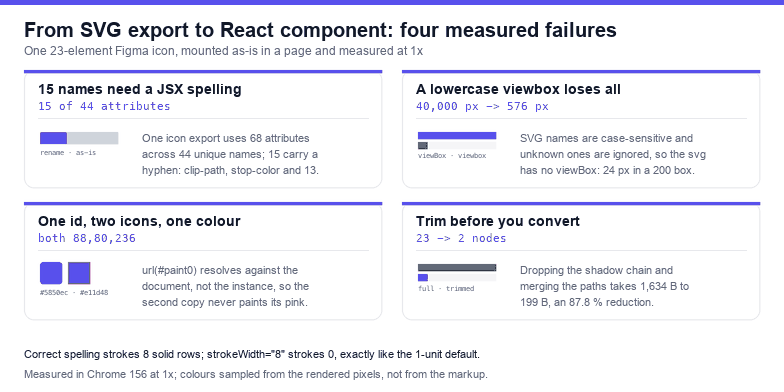
Pasting an exported SVG into a React component looks like a copy-and-paste job and behaves like a migration, because an SVG file and a React element tree disagree about four things that never raise an error. Measured on one 23-node Figma-style export: 68 attribute uses across 44 unique names, 15 of them hyphenated, and three ids — three ids that collide the instant the component renders twice, at which point the second copy paints 88,80,236 instead of the pink it was designed with.
Everything below was measured in Chrome 156 by mounting the same markup in a page and reading computed style, pixels and the accessibility tree. Where React itself would be the thing under test, the claim is about the browser — which is the part that decides whether your component looks right, and the part that does not care which framework produced the attributes.
What the export actually contains
A representative Figma export of a single gradient-and-shadow icon is 1,634 bytes and 23 elements. Inside it:
| Item | Count | Why it matters in JSX |
|---|---|---|
| Elements | 23 | one component render costs 23 nodes |
| Attribute uses | 68 | every one is a prop or a literal in the tree |
| Unique attribute names | 44 | the surface you have to translate |
| Hyphenated names | 15 | these are the ones with a JSX spelling |
id attributes | 3 | collide across instances unless made unique |
The fifteen hyphenated names in this file are clip-path, fill-rule, clip-rule, fill-opacity, stroke-width, stroke-linecap, stroke-linejoin, font-family, font-size, font-weight, letter-spacing, color-interpolation-filters, flood-opacity, stop-color and stop-opacity. That is the real conversion table — not the ten names everyone remembers, and not the two hundred in a cheat sheet you will never open.
The rename table
SVG attribute names are hyphenated; JSX wants camelCase for the ones React knows about. The mapping is mechanical, which is why a script should do it rather than a person:
const MAP = {
  'clip-path': 'clipPath', 'clip-rule': 'clipRule', 'fill-rule': 'fillRule',
  'fill-opacity': 'fillOpacity', 'stroke-width': 'strokeWidth',
  'stroke-linecap': 'strokeLinecap', 'stroke-linejoin': 'strokeLinejoin',
  'stroke-miterlimit': 'strokeMiterlimit', 'stroke-opacity': 'strokeOpacity',
  'stroke-dasharray': 'strokeDasharray', 'stroke-dashoffset': 'strokeDashoffset',
  'font-family': 'fontFamily', 'font-size': 'fontSize', 'font-weight': 'fontWeight',
  'letter-spacing': 'letterSpacing', 'text-anchor': 'textAnchor',
  'stop-color': 'stopColor', 'stop-opacity': 'stopOpacity',
  'flood-color': 'floodColor', 'flood-opacity': 'floodOpacity',
  'paint-order': 'paintOrder', 'color-interpolation-filters': 'colorInterpolationFilters',
};
const svg = document.querySelector('svg');
const seen = new Set();
svg.querySelectorAll('*').forEach((el) => {
  for (const a of [...el.attributes]) if (MAP[a.name]) seen.add(a.name);
});
console.log(seen.size, 'hyphenated names to rename:', [...seen].join(' '));
Run against the export above, this prints 15 and the same list, which is how the count in the table was produced. Keep the script: exports change, and the next one will use eleven of these names and four you have not met.
What happens when a name is wrong
An SVG document is case-sensitive, and a name it does not recognise is not an error — it is ignored. So a component that has been "cleaned up" by lowercasing its attributes renders, logs nothing, and is wrong in two ways at once:
| Attribute as written | Measured result |
|---|---|
viewBox="0 0 24 24" in a 200 × 200 svg | 200 × 200 of ink (40,000 px), correctly scaled |
viewbox="0 0 24 24" | 24 × 24 px of ink (576 px) — no scaling at all |
stroke-width="8" | 8 rows of solid stroke |
strokeWidth="8" | 0 rows — identical to the 1-unit default |
The viewbox case is the one that ruins layouts: the artwork is drawn at one eighth of its size in the corner of the box, and because it is still valid SVG nobody investigates the spelling. The strokeWidth case is subtler — the hairline that appears where a 8-unit stroke should be looks like a design decision, and the fix is invisible once you find it.
This cuts both ways. camelCase is correct inside JSX and meaningless outside it, so a component that gets exported back to a .svg file — for a favicon, for an email, for a design handoff — silently loses every renamed attribute. Keep the original export as the source of truth and treat the component as a build artefact.
Ids collide the moment the component renders twice
Figma names its definitions after the layer and a hash: paint0_linear_412_88, filter0_d_412_88, clip0_412_88. Unique within one export, and unique within forty exports too — except that url(#paint0_linear_412_88) resolves against the whole document, not against the SVG that contains it. Render the same component twice and both copies point at the first definition.
Measured with two copies of one icon, the first filled #5850ec and the second #e11d48: both paint 88,80,236. The pink never appears, and there is no warning, because from the browser's point of view there is one id and one gradient. A brand-colour icon and a white icon of the same shape cannot coexist on one page until the ids differ.
The fix belongs in the component, not in the export: rewrite every id with an instance-specific suffix and update every reference. Two details make it work — url(#x) inside any attribute value, and bare #x inside href — and it has to run before the markup is inserted, not after:
function uniquify(root, suffix) {
  const map = new Map();
  root.querySelectorAll('[id]').forEach((el) => {
    const next = el.id + '-' + suffix;
    map.set(el.id, next);
    el.id = next;
  });
  root.querySelectorAll('*').forEach((el) => {
    for (const a of [...el.attributes]) {
      if (a.name === 'id' || !map.size) continue;
      let v = a.value;
      map.forEach((to, from) => {
        // the lookahead is what stops a second run from turning
        // #paint0-suffix into #paint0-suffix-suffix
        v = v.replace(new RegExp('#' + from + '(?![\\w-])', 'g'), '#' + to);
      });
      if (v !== a.value) a.value = v;
    }
  });
  return map.size;
}
const svg = document.querySelector('svg');
console.log(uniquify(svg, Math.random().toString(36).slice(2, 7)), 'ids rewritten');
Measured on the two-icon fixture: before the call both rectangles read 88,80,236; after it the first reads 88,80,236 and the second reads 225,29,72. The map size is 1 for that fixture and 3 for a full Figma icon, which is the number worth logging in a test.
Inline SVG styles leak into the whole document
Some Figma exports — and almost every "copy as SVG" from other tools — carry a <style> block with class selectors like .cls-1. A <style> element inside inline SVG is not scoped to that SVG: its rules join the document's stylesheet list and match anything on the page with the same class.
Measured: an SVG carrying .cls-a{fill:#e11d48} followed by a second SVG whose rectangle has class="cls-a" and fill="#5850ec". The second rectangle computes to rgb(225, 29, 72) — the first icon's colour, painted onto an element that declared a different one, because a CSS class rule outranks a presentation attribute.
Two consequences. First, if you convert an export with classes into a component, either delete the <style> block and inline the fills, or scope every selector with the component's own class and hope no other copy exists. Second, this is the same mechanism that makes class names like .cls-1 dangerous: the next export will also use .cls-1.
Attribute, CSS and inline style: who wins
Figma writes some fills as attributes and some as style="fill:…", and the two lose to different things. Measured with a page rule setting fill: #e11d48 on three rectangles:
| Markup | Computed fill | Rule |
|---|---|---|
fill="#5850ec" | rgb(225, 29, 72) | CSS beats presentation attributes |
style="fill:#5850ec" | rgb(88, 80, 236) | inline style beats CSS |
fill="#5850ec" style="fill:#16a34a" | rgb(22, 163, 74) | inline style beats its own attribute |
So a component that sets its colour with style cannot be themed by CSS, and a component that sets it with an attribute can be themed but cannot be protected. The React-idiomatic answer is neither: put fill="currentColor" in the markup and let the parent's color decide, which keeps the override in the cascade where a consumer expects it.
Accessibility is not automatic
An inline <svg> with no role and no title does not appear in the accessibility tree at all. Measured with the browser's own snapshot: the bare icon contributes no node; adding role="img" and a <title> contributes one node with role image and the name Download icon; aria-hidden="true" removes it again.
That gives the two correct shapes, and only two: a meaningful icon is role="img" plus a title (or aria-label), a decorative one beside visible text is aria-hidden="true". What ships from Figma is neither, which means every converted icon is currently invisible to a screen reader — silently, because the page looks fine.
Trim before you convert
Conversion is a good moment to delete what the export does not need. The same icon, with the shadow chain removed and the two paths merged into one fill-rule="evenodd" compound path:
- Full export: 23 elements, 1,634 bytes
- Trimmed: 2 elements, 199 bytes — an 87.8 % reduction
Nothing about that is React-specific; it is just easier to do while you are already editing the markup. The shadow filter is 12 of the 21 removed nodes, and on a 24 px icon it is invisible anyway.
A checklist before you commit the component
- Every hyphenated attribute renamed, and no
viewboxorstrokeWidthleft in a file that will be saved as.svg. - Ids rewritten per instance, with
url(#…)andhref="#…"both updated. - No
<style>block left in the markup, or every selector scoped. - Colour expressed as
currentColorwhere theming is expected. role="img"+<title>for meaningful icons,aria-hidden="true"for decorative ones.width/heightremoved andviewBoxkept, so CSS decides the size.
The one-line rule: an exported SVG is a document with document-wide names — ids, classes and CSS — so converting it to a component means renaming the 15 hyphenated attributes, uniquifying its 3 ids, deleting its style block, and deciding its role in the accessibility tree, or the second copy will paint with the first copy's gradient.
Frequently asked questions
Do I need to rename every SVG attribute for React?
Only the hyphenated ones, and only for the JSX spelling. Measured on one Figma export, that is 15 names out of 44 unique attributes — clip-path, fill-rule, stroke-width, stop-color and eleven more. The other 29 (including d, fill, viewBox and gradientUnits) are already correct.
Why do two copies of my icon show the wrong colour?
Because both copies carry the same gradient id, and url(#id) resolves against the document rather than the SVG. Measured with two instances filled #5850ec and #e11d48: both painted 88,80,236. Suffix every id per instance and rewrite the references before inserting the markup.
Why does my icon render tiny in the corner of the box?
Almost always a lowercase viewbox. SVG attribute names are case-sensitive and unknown names are ignored, so the svg has no viewBox at all. Measured on a 24-unit drawing in a 200 × 200 box: viewBox inks 40,000 pixels, viewbox inks 576 — a 24 × 24 picture in the top-left corner.
Is it better to inline the SVG or use an img tag?
Inline when the icon must inherit currentColor, be animated, or carry a title for assistive technology; use an <img> when the artwork is static and its internal ids do not matter. Note that an <img> cannot load external references at all, so a Figma export with a linked image has to be inlined or embedded.
Related SVG Workflows
Converting an export is one of seven things that go wrong between a Figma canvas and a working SVG. These pages cover the rest.
- Figma SVG images missing after export — the base64 payload, the request that never happens, and the namespace that voids the file.
- Figma SVG duplicate id collision — the same collision, measured across two exports rather than two instances.
- Figma SVG currentColor — how to make a converted icon follow the theme instead of a hardcoded fill.
- Figma SVG stroke fix — what to delete from an export, starting with the strokes that scale with it.
- Figma SVG viewBox fix — the canvas that is bigger than the artwork.
- SVG to code — paste an export and get Base64, data URI, HTML, React or Vue output in the browser.
- SVG optimiser — minify the export before conversion without rounding its curves into facets.
Related Articles

Try These Free Online Tools
No download required — convert, compress & optimize SVGs right in your browser
SVG to Code
Paste an export and get React, Vue, HTML, Base64 or data URI output in the browser.
Convert to codeSVG Optimiser
Trim the shadow chain and merge paths before the markup becomes a component.
Open optimiserSVG Editor
Rename ids, delete a style block and check the subpath count without uploading.
Open editorSVG Validator
Catch duplicate ids, unbound prefixes and references that point nowhere.
Open validator