
Super Vectorizer Pro vs Vectornator comes down to one question in 2026: do you need to convert an existing raster image into a vector, or do you need to design new vector artwork from scratch? Super Vectorizer Pro is the better choice if you want to turn an existing PNG, JPG or BMP into an editable SVG, PDF, EPS, DXF or AI file on your own Mac or Windows PC, privately and for a one-time $29.99 licence with no subscription. Vectornator — the app that was rebranded to Linea — is the better choice if you are drawing illustrations, lettering or UI on a canvas and exporting clean SVG from shapes you build yourself, because that free design app is built for exactly that. If your daily task is "I have this logo, make it a vector," the offline desktop vectorizer wins on cost and privacy; if your daily task is "design me new artwork," the free app wins. Below we compare both across the factors that actually decide the purchase.
Both tools emit the SVG format, but they start from opposite ends. Vectornator / Linea is a design canvas that outputs SVG from vector shapes you create; Super Vectorizer Pro is a converter that turns bitmap artwork you already own into those vector shapes. If you want a broader look at dedicated tracers first, our roundup of the best free AI vectorizer tools in 2026 covers eight options side by side, and our free image vectorizer guide walks through the workflow options for every budget.
Want to test offline vectorization on your own artwork? Try Super Vectorizer Pro free trial to preview vectorization results.
Compatible with macOS 10.10+ (M1/M2/M3) & Windows 7/8/10/11
The Short Verdict
Both tools produce SVG files, but they solve different problems. Vectornator / Linea is a free vector design app that exports SVG from artwork you build on its canvas. Super Vectorizer Pro is a dedicated converter for artwork that already exists as a raster file. The honest split is: design new vectors versus convert existing bitmaps.
Super Vectorizer Pro Advantages
- One-time licence from $29.99 — no subscription, no per-seat fee
- Runs offline on macOS 10.10+ (M1/M2/M3) and Windows 7–11
- Five modes: color, grayscale, black and white, line, skeletonization
- Live sliders for colour count, smoothing, noise and corners
- Exports SVG, PDF, EPS, DXF and AI
- Files never leave your computer
Vectornator / Linea Advantages
- Free to download and use on Mac, iPad and iPhone
- Full vector design suite: pen, shapes, type, auto-trace-free drawing
- Touch and Apple Pencil support for natural drawing on iPad
- Clean SVG export from vector shapes you draw
- Nothing to install for the web companion — runs from your device
- Strong community and template ecosystem
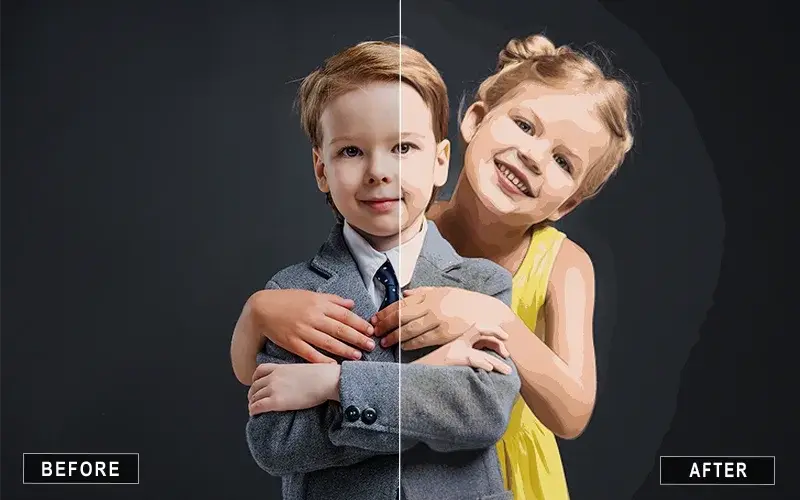
Super Vectorizer Pro vs Vectornator: Head-to-Head Comparison
Here is the direct comparison across the factors that decide most purchases. Vectornator / Linea pricing below reflects the free app model as of September 2026.
| Factor | Super Vectorizer Pro | Vectornator / Linea | Better for most users |
|---|---|---|---|
| Price model | One-time: $29.99 Mac or Win permanent, $49.99 Universal | Free to use on Apple platforms (no subscription) | Vectornator / Linea Free |
| 5-year cost (single user) | $29.99 total | $0 | Vectornator / Linea Free |
| Core job | Dedicated raster-to-vector converter | Free vector design app for illustration and UI | Depends on your task |
| Platform | Native macOS 10.10+ (M1/M2/M3) and Windows 7/8/10/11 | macOS, iPadOS, iOS (Apple-centric) | Super Vectorizer Pro Cross-OS |
| Offline / online | Fully offline after install | Local app; account sync assumes periodic online access | Super Vectorizer Pro Local |
| Batch support | No (one at a time) | No batch tracing; one object or frame at a time | Tie |
| Output quality — existing logos & scans | Excellent; five tunable modes plus manual sliders | Not applicable — no bitmap tracing engine | Super Vectorizer Pro Fidelity |
| Output quality — new artwork | Not applicable (it traces existing files) | Excellent SVG from vector shapes you design | Vectornator / Linea Design |
| Editing after trace | Manual parameter tuning (colour, smoothing, noise, corner) | Full vector editing on canvas, but only of shapes you create | Depends on source |
| Export formats | SVG, PDF, EPS, DXF, AI | SVG and common raster exports | Super Vectorizer Pro Formats |
| Privacy | Local processing, nothing uploaded | Local files; optional cloud sync needs an account | Super Vectorizer Pro Local |
| Try before you buy | Free trial to preview results; saving needs a licence | Free app; no purchase required | Vectornator / Linea Free |
| Best for | Converting existing raster art into production SVG, PDF, EPS, DXF, AI | Designing illustrations, lettering and UI and exporting clean SVG from them | — |
Pricing in 2026: $29.99 Once vs a Free Design App
Vectornator was rebranded to Linea and remains free to download and use on Apple platforms. There is no subscription for the core app, which makes it the cheapest way to produce SVG if your work is designing new artwork from scratch.
| Option | Cost | Best for |
|---|---|---|
| Vectornator / Linea | $0 (free app on Mac, iPad, iPhone) | Drawing illustrations, lettering and UI and exporting clean SVG |
| Super Vectorizer Pro — single platform | $29.99 one-time permanent licence (Mac or Windows) | Converting existing raster art into editable vectors on one machine |
| Super Vectorizer Pro — Universal | $49.99 one-time Universal licence (one Mac + one Windows PC) | Designers who work across both operating systems |
Compare that against a one-time purchase. A permanent Super Vectorizer Pro licence for a single platform is $29.99, and the universal licence covering one Mac plus one Windows PC is $49.99. For the specific job of converting existing bitmaps to vectors, that $29.99 is the entire lifetime cost — no recurring fees, no seats, no upsell.
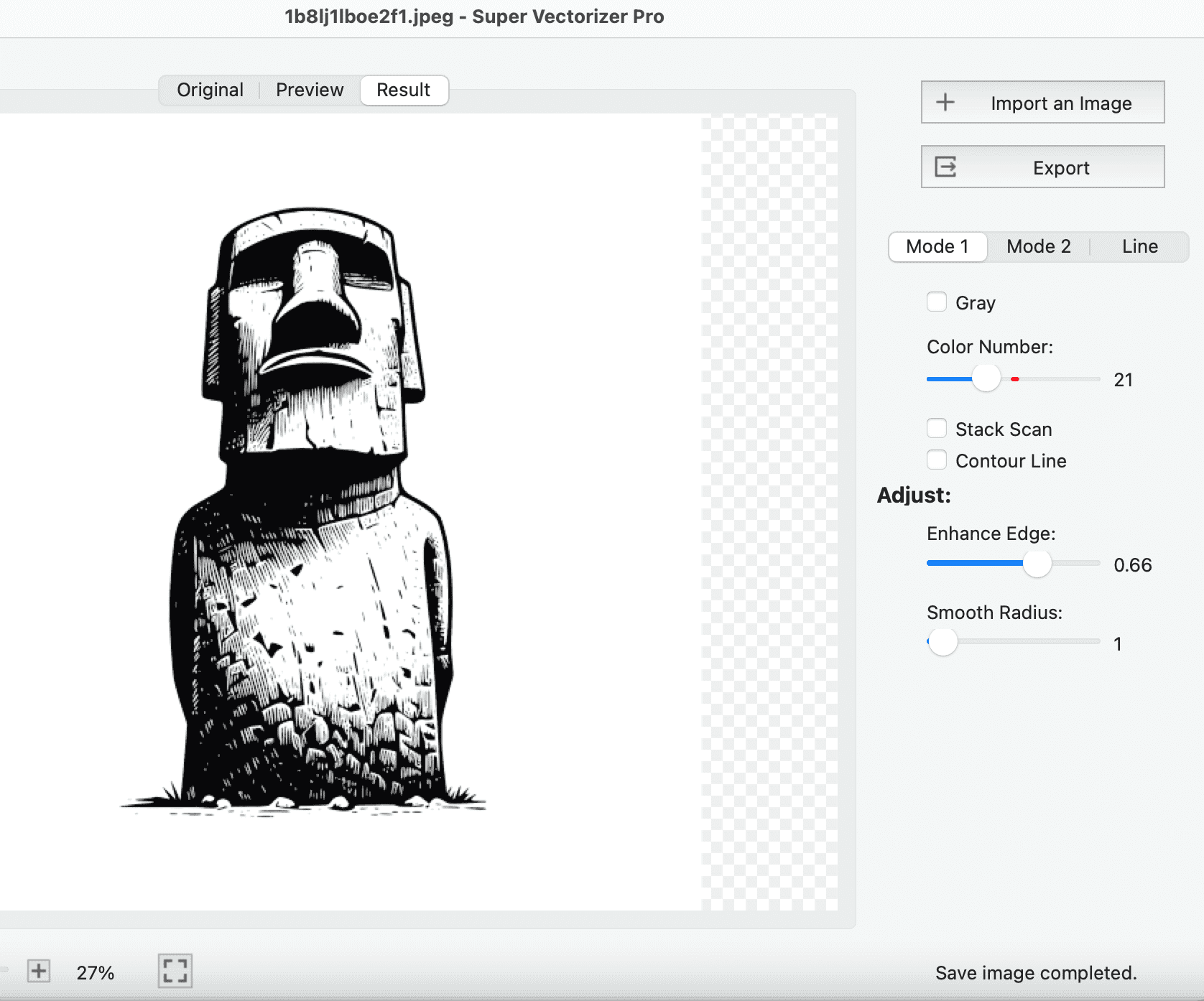
Platform and Mac Compatibility
This is a clear win for the desktop app if you live on Apple hardware and value local control, and it also covers Windows users that Vectornator / Linea does not. Super Vectorizer Pro is built for modern macOS: it runs natively on macOS 10.10 and later, including Apple Silicon M1, M2 and M3 chips, and it works fully offline. That means no "will it run on my Mac?" question and no upload step. Vectornator / Linea is Apple-only (macOS, iPadOS, iOS), so Windows users simply cannot use it at all.
If you are on a current Mac and want a vectorizer you can actually install, trust and use without the internet, Super Vectorizer Pro is the safer default. If you are already inside the Apple ecosystem and want a free drawing canvas, Vectornator / Linea fits naturally — especially with Apple Pencil on iPad.
Batch Processing and Automation
Let us be precise here, because the two tools handle volume differently and neither is a bulk converter.
Super Vectorizer Pro processes one image at a time. You open a file, tune the trace, check the preview, save the result, then move to the next file. That is a deliberate, inspection-first workflow and it suits the way most designers actually work — but it is not automation, and it will not convert a folder of 400 product photos while you make coffee.
Vectornator / Linea is not a tracer at all. It has no feature that ingests a folder of PNGs and emits editable vectors, so there is no batch tracing to compare. Its strength is designing one illustration at a time and exporting the SVG you built by hand. So the honest split is: manual, quality-controlled conversion of existing art → a desktop vectorizer with manual control. Designing new vector artwork → a free design app. Anyone telling you a single tool wins both categories is selling something.
Output Quality and the Editing Experience
Both products emit SVG, but they optimize for opposite goals. Vectornator / Linea's strength is design: draw a path, set type, build a layout, and export crisp SVG from geometry you control precisely. Its export is excellent for clean, intentional vector artwork.
Where Vectornator / Linea is strong
Vectornator / Linea is genuinely better at producing SVG from design intent. Pen tools, shape builders, typography and a clean iPad interface mean the SVG you export stays consistent and intentional. If you need a illustrated mascot, a custom font treatment or a UI mockup, no tracer can draw it for you — a design app can. This is the use case the free app was built for.
Where Super Vectorizer Pro is strong
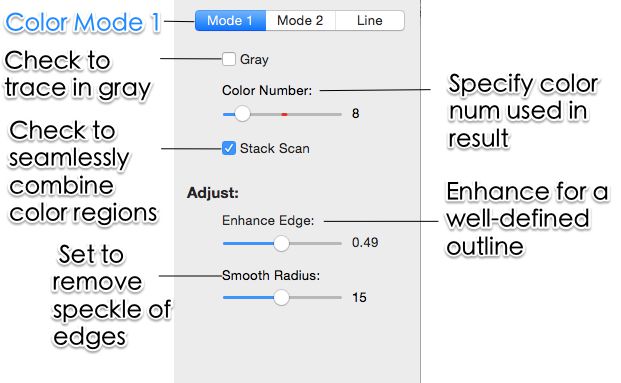
Super Vectorizer Pro gives you five distinct modes — colour, grayscale, black and white, line, and skeletonization — plus sliders for colour count, curve smoothing, noise suppression and corner threshold. On messy source material such as a scanned sketch, a photographed sign or a low-resolution PNG pulled off a website, that manual control is decisive. You can push noise removal up until speckles disappear, drop the colour count until the SVG is light enough for a website, or switch to skeletonization to reduce line art to single-stroke centerlines for a cutter or plotter.
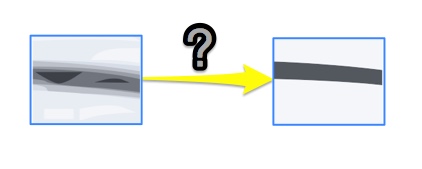
For a typical flat logo, honestly, a designer rebuilding it in a free app exports a cleaner file — but rebuilding takes time and skill. Super Vectorizer Pro gets you a usable traced vector from the source in minutes, which is usually the faster path when the source already exists. Our guide to high-quality PNG to SVG conversion walks through the specific settings that matter.
How Both Compare to Vectorizer.AI, Illustrator, Inkscape and Canva in 2026
Neither tool exists in a vacuum. Here is where they sit against the other four options most people evaluate.
| Tool | Price | Platform | Offline / Online | Batch support | Output control | Best for |
|---|---|---|---|---|---|---|
| Super Vectorizer Pro | $29.99 one-time (permanent) | macOS 10.10+, Windows 7–11 | Offline | No (one at a time) | 5 modes + live sliders for color, smoothing, noise, corners | Converting existing raster art into production SVG, PDF, EPS, DXF, AI |
| Vectornator / Linea | Free | macOS, iPadOS, iOS | Local app (cloud sync optional) | No batch tracing | Full canvas design; per-shape SVG export | Illustration, lettering and UI design with clean SVG output |
| Vectorizer.AI | Subscription / credit packs | Browser | Online only | Yes, on paid tiers | Automatic with some post-trace tuning | Fast one-off cloud tracing of clean logos |
| Adobe Illustrator | $22.99/month | macOS, Windows | Offline (with online licence check) | Yes, via Actions scripting | Image Trace panel presets plus full path editing | Studios already inside Creative Cloud |
| Inkscape | Free, open source | macOS, Windows, Linux | Offline | Command-line only | Trace Bitmap dialog, multi-scan modes | Budget-conscious users comfortable with a learning curve |
| Canva | Free tier; Pro $15/month | Browser, iOS, Android | Online only | No | Basic tracing; SVG export is Pro-only | Social and marketing graphics, not production vectors |
Which Should You Choose? Four Common Scenarios
1. You have a client logo or scan that needs to become an SVG
Choose Super Vectorizer Pro. A $29.99 one-time licence pays for itself against any subscription, and you keep the tool permanently with native Apple Silicon support. The one-at-a-time workflow is a non-issue at this volume because you would inspect each result anyway. It also keeps the artwork on your own machine.
2. You are illustrating or designing custom artwork from scratch
Choose Vectornator / Linea. It is free, touch-friendly on iPad, and its SVG export from your own shapes is the right tool for that job. No tracer can draw an illustration for you.
3. You handle client artwork under confidentiality terms
Choose Super Vectorizer Pro. Local processing removes the upload question entirely — nothing is transmitted, nothing is stored on a third-party server, and you can document that in a compliance review. A cloud design suite inevitably syncs files online.
4. You occasionally need an SVG and want zero cost
Choose a free tool. Vectornator / Linea works well for designing simple shapes, and several free tracers are covered in our guide to image to vector AI free without login if you would rather not install or subscribe at all.
How to Vectorize an Image Offline with Super Vectorizer Pro
If you land on the desktop side of this comparison, the workflow takes about three minutes:
- Open your raster image. Drag a PNG, JPG, BMP, GIF or TIFF into the window. The app handles one image at a time.
- Choose a vectorization mode. Colour for logos and illustrations, grayscale for photos, black and white for stamps and stencils, line or skeletonization for sketches and cutter-ready line art.
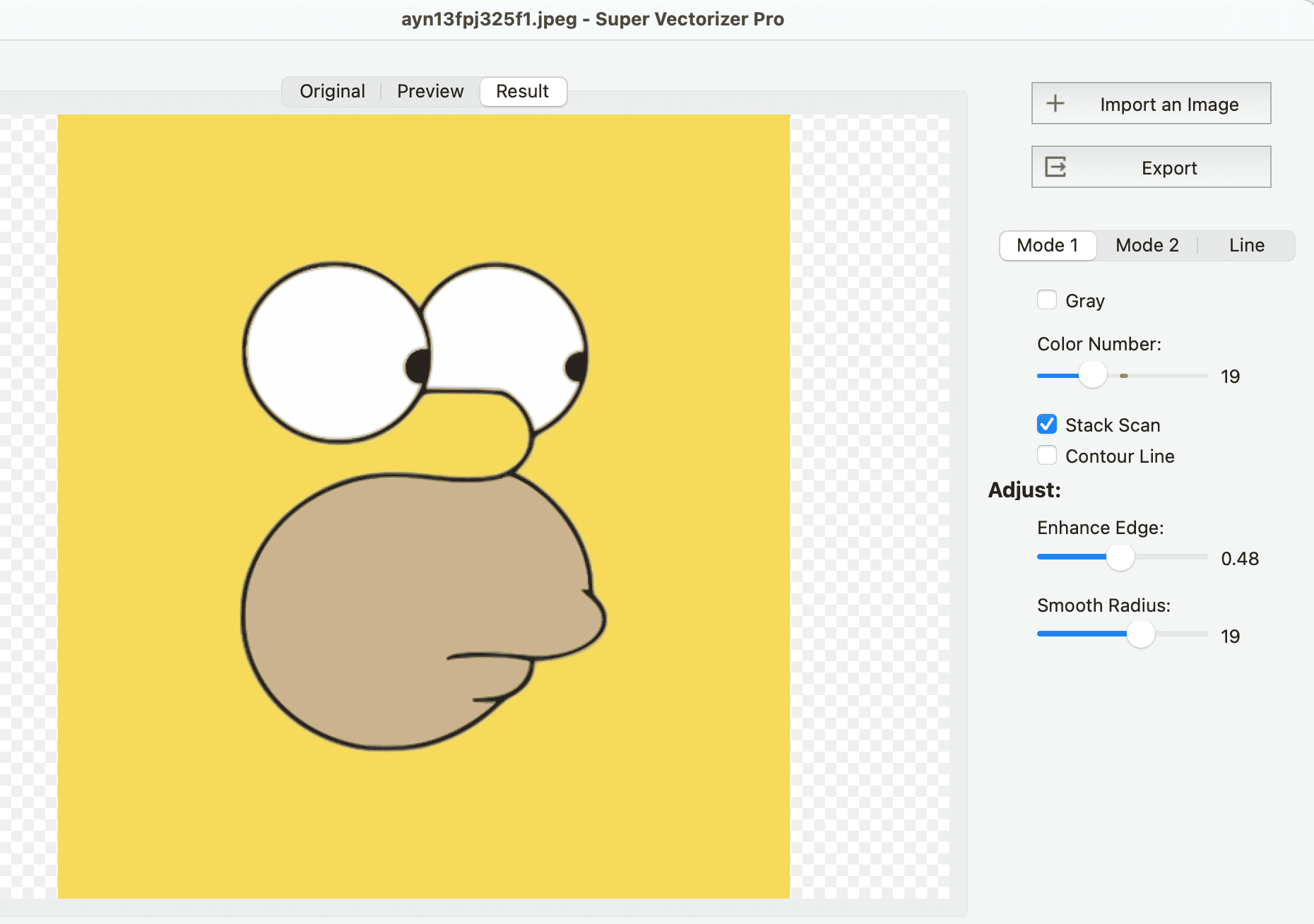
- Tune the tracing parameters. Adjust colour count, curve smoothing, noise removal and corner threshold. The preview updates locally as you drag.
- Compare against the original. Toggle between the bitmap and the traced result to confirm that edges, gradients and small text survived vectorization.
- Save the vector file. Export as SVG, PDF, EPS, DXF or AI. Saving requires a licence — the trial is limited to previewing results.
Frequently Asked Questions
Is Super Vectorizer Pro better than Vectornator for vectorizing images?
For turning an existing PNG, JPG or BMP into a clean SVG, Super Vectorizer Pro is the better tool. It is purpose-built to convert raster artwork into editable vector files with tunable tracing modes, runs offline, and costs a one-time $29.99 licence. Vectornator (now Linea) is a free vector design app for Mac, iPad and iPhone; its SVG output is excellent for shapes you draw on the canvas, but it has no automatic bitmap tracing engine, so it cannot turn an uploaded photo or logo into editable paths for you. If your daily task is "I have this logo, make it a vector," the desktop vectorizer wins; if your task is "design new artwork from scratch," a free design app is the right call.
How much does Vectornator / Linea cost compared to Super Vectorizer Pro?
Vectornator was rebranded to Linea and remains free to download and use on Apple platforms — there is no subscription for the core app. Super Vectorizer Pro is a one-time purchase: $29.99 for a permanent Mac or Windows licence, or $49.99 for a Universal lifetime licence covering one Mac plus one Windows PC. So Vectornator / Linea wins on upfront cost (zero), but it does not solve the raster-to-vector job. The honest comparison is not price alone but whether you need to design new vectors (free app) or convert existing bitmaps (paid converter). Spending $29.99 once is still far cheaper than most design subscriptions over a few years.
Does Super Vectorizer Pro support batch conversion like Vectornator?
No. Super Vectorizer Pro processes one image at a time — there is no batch mode, no folder queue and no bulk export. Vectornator / Linea also has no automatic batch tracing, because converting raster files into editable paths is simply not what a design app does. If you need unattended bulk conversion of many raster files, neither tool is the right fit; a cloud batch API or a scriptable editor such as Illustrator is the honest recommendation. For typical logo, icon and cut-file work the one-at-a-time workflow is rarely a bottleneck.
Which is better for exporting SVG?
It depends on the source. Vectornator / Linea exports beautiful, hand-built SVG from vector shapes, illustrations and typography you create on its canvas — ideal for artwork you design from scratch on a Mac or iPad. Super Vectorizer Pro exports SVG, PDF, EPS, DXF and AI from raster images you already have, with five tracing modes plus sliders for colour count, smoothing, noise and corners. Vectornator / Linea cannot turn a photographed logo into a vector for you; Super Vectorizer Pro cannot design a new illustration for you. They export SVG from opposite starting points.
Does Vectornator / Linea work offline, and when should I choose it over Super Vectorizer Pro?
Vectornator / Linea is a local app, so once it is installed on your Mac, iPad or iPhone you can design without a constant internet connection — though account sync and some asset libraries assume periodic online access. Choose Vectornator / Linea when you are creating illustrations, lettering, UI mockups or icons from scratch and want a free, touch-friendly design canvas. Choose Super Vectorizer Pro when you already have a raster file, want it traced privately on your own Mac or Windows PC, and prefer a one-time cost with no subscription and no upload step.
Can I use Vectornator / Linea as a free image vectorizer alternative?
Only partially, and not automatically. Vectornator / Linea lets you draw and export vector shapes for free, but it has no built-in feature that converts an uploaded PNG or JPG into editable vector paths — you would have to trace the bitmap by hand with the pen tool, which is slow and inexact for photos or detailed logos. A dedicated vectorizer such as Super Vectorizer Pro (free trial to preview results, one-time licence to export) or an online tracer is the practical alternative when the source is a raster image rather than artwork you build yourself.
The Bottom Line for 2026
Super Vectorizer Pro vs Vectornator / Linea is not really a quality contest — it is a question of which job you have. If you already own a PNG, JPG or BMP and need a clean, scalable file, the offline desktop vectorizer is cheaper over any reasonable timeframe, faster to iterate with, and keeps your artwork on your own hardware. At $29.99 once, it is the economical and private answer for conversion. If you need new vector illustrations, lettering or UI designed from scratch, a free design app's canvas and clean SVG export are the more capable tool — and the price is unbeatable.
Buy Super Vectorizer Pro if you want to own a vectorizer outright, work offline, keep client artwork on your own machine, and steer the trace by hand on a modern Mac or Windows computer. Use Vectornator / Linea for free if you are drawing new artwork yourself and want a polished Apple-native design app. Most people who type "Super Vectorizer Pro vs Vectornator" into a search box arrive with a file already in hand — and for that specific job, the one-time offline licence is the stronger buy.
If you are leaning desktop, download the trial and run three of your own hardest images through it — a scanned sketch, a photographed logo, and a low-resolution PNG. Preview quality on your real source files tells you more than any comparison table, including this one.
Test the Desktop Side of This Comparison
Run your own images through Super Vectorizer Pro and preview the trace before you decide. One-time licence from $29.99 — Mac and Windows, including Apple Silicon.
Compatible with macOS 10.10+ (M1/M2/M3) & Windows 7/8/10/11
Try These Free Online Tools
No download required — convert, compress & optimize SVGs right in your browser
PNG to SVG Converter
Convert PNG, JPG, BMP images to scalable vector graphics instantly
PNG to SVG ConverterSVG Compressor (Mini)
Reduce SVG file size by up to 80% without losing quality
SVG Compressor OnlineSVG Optimizer
Clean up SVG code, remove redundant data and optimize for web
SVG Optimizer OnlineJPG to SVG Converter
Turn JPEG photos into crisp vector artwork in seconds
JPG to SVG ConverterEPS to SVG Converter
Convert EPS vector files to web-friendly SVG format
EPS to SVG ConverterAll Free Tools
Browse our complete collection of free online conversion tools
Browse All Free Tools